The arm is here and the thing it has to touch is there. This area is about the gap between those two sentences.
It is the least glamorous part of a robot project and it is where most of the time goes. Perception gives you a number. Gripping gives you a grasp. In between sits the question of whether the arm can actually get to that number, whether the route it takes is one anybody would sign off, and what happens in the last twenty millimetres when the number turns out to have been slightly wrong.
This document is the map. It sets out the five kinds of move an arm makes, what real tasks actually use, and which of the other five documents answers which question.
Who this is for, and what it is for#
This is written for someone who can already picture a robot arm and a camera, has read the arm area or knows the equivalent, and now has to make a real arm go somewhere. You do not need to have used a motion planner. Every term is explained where it first appears.
Three areas of this repository already touch this subject, and this one deliberately does not repeat them.
Position, frames and transforms builds the maths underneath everything here: what a frame is, what a transform is, and how joint angles become a position. Read it first if those words are new.
Tools and libraries introduces MoveIt 2, ros2_control, the kinematics libraries and behaviour trees, each with pseudo code and working code. It answers "what is this piece of software and how do I call it". This area answers "which one, when, and what goes wrong".
Programmed methods for one arm maps the landscape: the families of motion planning, the families of control, and whether each is worth learning. It is a map. This is the ground.
Three things shape how this is written, and they are the same three that shape the object perception area.
Every technique carries five jobs it suits and five it cannot do. That is more useful than a score, because every planner works on the demonstration its authors chose, and the interesting question is always which job it quietly fails at.
Every licence is named and was read from the project's own licence file. There are real traps here. The inverse kinematics solver MoveIt uses by default is LGPL-2.1, not BSD, and almost nobody notices.
Everything says whether it runs on an Apple Silicon Mac. ROS 2 has no official
support tier for macOS on arm64 at all, in any distribution, and the practical
route is a community redistribution. Finding that out after two days is a common
and avoidable waste.
Contents#
- Five kinds of move, and which one you need
- What your task actually needs
- What you know before the arm moves
- Plan once, plan continuously, or do not plan
- The one calculation underneath everything
- Where the millimetres go
- Why a plan that succeeds can still fail
- The five documents that follow
1. Five kinds of move, and which one you need#
People say "move the arm" as though moving were one thing. It is five, and they want opposite things from the software underneath. The picture below takes one ordinary task — pick up a peg and push it into a hole — and marks which kind of move each segment is.
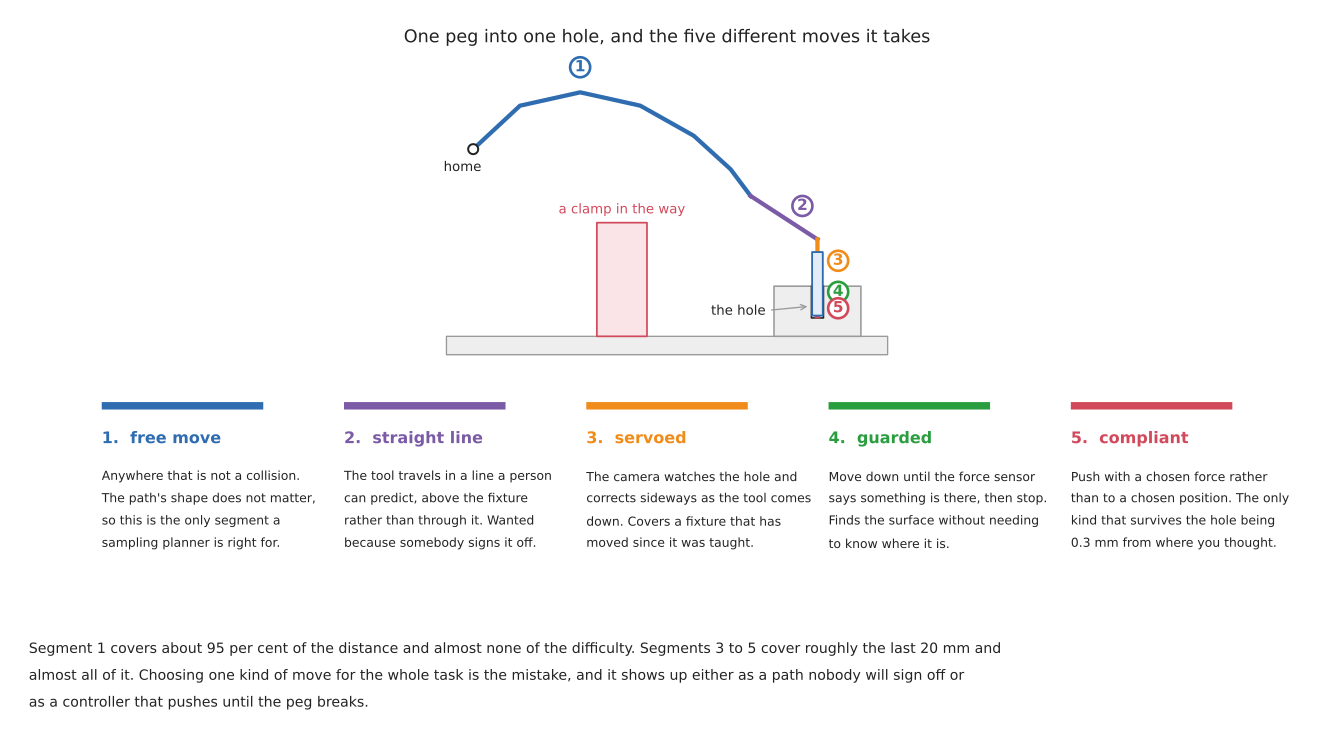
A free move goes from one pose to another and the shape of the route does not matter, only that it hits nothing. This is the segment a motion planner is genuinely the right tool for, and it is usually most of the distance.
A straight-line move keeps the tool travelling along a line in space. It matters when a person has to predict what the arm will do, when the tool is carrying something that must stay level, and when the path passes over equipment the arm must not swing across. It is harder than a free move, not easier, because every point along the line has to have a joint solution and the solutions have to join up smoothly.
A guarded move goes in a direction until something stops it. You do not say where to stop; you say what to stop for. Move down until the force sensor reads more than three newtons, then hold. This is how an arm finds a surface whose height it does not know, and it is the cheapest substitute for a measurement there is.
A compliant move commands a force rather than a position. The arm behaves like a spring with a stiffness you chose, so a millimetre of unexpected contact produces a modest push instead of an escalating one. This is the only kind of move that survives being slightly wrong about where the world is.
A servoed move closes the loop on a sensor while the arm is moving. A camera watches the target and the arm corrects towards it continuously, rather than measuring once and then executing blind. It costs a control loop running at tens of hertz and it buys immunity to the target having moved since you looked.
The practical rule is that the kind of move is a property of the segment, not of the task. Almost every job in this area contains at least two of the five, and choosing one for the whole job is where the trouble starts.
The table below reads left to right: what each kind of move needs from you, what it gives back, and the situation in which it is the wrong choice.
| The move | What you give it | What it gives back | Wrong when |
|---|---|---|---|
| free | a goal pose and a model of the obstacles | any collision-free route | the route has to be predictable or repeatable |
| straight line | two poses and a step size | a tool path that is a line, or a partial one | the line leaves the reachable region, which it can do while both ends are inside it |
| guarded | a direction and a stopping condition | contact, and the position at which it happened | the sensor cannot observe the event you are waiting for |
| compliant | a stiffness or a force | contact that does not escalate | you need the arm to hold a position against a load |
| servoed | a target in sensor units and a loop rate | continuous correction | the sensor is slower than the loop needs, which makes it unstable rather than merely slow |
2. What your task actually needs#
People reach for a motion planner because it is the piece with the tutorials. The table below is real task types against what they genuinely use. Read the last column carefully; it is where the effort usually goes that need not have.
| Task | What it uses | What it skips, and why |
|---|---|---|
| machine tending | taught poses, joint moves between them | no planner at all. The machine and the fixture do not move, so the route was decided once and never needs deciding again |
| palletising | a straight-line approach, joint moves between layers | no collision search. The stack geometry is arithmetic, and a planner would give a different answer every run |
| bin picking | a free move into the bin, then a straight-line lift | no taught poses, because the grasp is different every time. This is the one task where sampling planners earn their keep outright |
| assembly and insertion | a guarded move to find the surface, then compliance | almost no planning. The whole difficulty is in the last few millimetres, and a planner has nothing to say about them |
| polishing, deburring, sanding | a Cartesian path along the surface, with force control normal to it | no free moves during the work. The path is the part's geometry, not a search result |
| welding and dispensing | Cartesian paths with speed held constant along the seam | no collision avoidance in the work, and no replanning. The speed matters more than the route |
| lab and kitchen handling | free moves, then servoed or guarded approach | rarely force control. The objects are light; the difficulty is that they are not where you were told |
| anything with a person nearby | slow joint moves, monitored speed | no clever paths. Everything is subordinate to being able to say what the arm will do |
Four things follow from that table, and each of them saves work.
Most industrial arm motion is not planned. It is taught, or computed deterministically from geometry, and then replayed. A planner is what you reach for when the scene changes between runs. If your scene does not change between runs, a planner buys you a different path every time, which is a cost rather than a feature.
The hard part is almost always the last twenty millimetres. Look down the table and the tasks people describe as difficult — insertion, polishing, connector seating — are the ones whose difficulty is entirely in contact. A better planner does not help with any of them, and this is the single most common misallocation of effort in the field.
Cartesian control and force control travel together. Every row that needs a straight line also needs to care about what happens when the line meets something. This is why controlling the move treats them as one subject rather than two.
The cheapest motion is the one you do not have to compute. A fixture, a hard stop, a taught pose. Planning is what you reach for when the geometry stopped being known in advance, which is the same argument the perception area makes about fixtures, for the same reason.
2.1 When a planner makes things worse#
The instinct, when an arm has to cope with a scene that varies, is to reach for a planner. Often that is right. Three times it is not, and it is worth knowing which three.
A planner gives a different answer every time, and that is its design. The sampling planners in planning a path draw random configurations. Run the same problem twice and you get two paths, both valid, neither the same. For a research demonstration that is irrelevant. For a cell somebody has to sign off, it means you cannot state what the arm will do, and proving a machine safe usually requires exactly that.
A planner hides a reachability problem instead of reporting one. If the goal is awkward, a sampling planner does not say "this pose is near a singularity and the wrist will have to spin". It either finds a path that does spin the wrist, or it times out with no explanation. Both outcomes lose an afternoon. Reaching and reachability is about finding out first.
A planner plans in a world you described, and the description is where the error lives. The path avoids the obstacles you put in the planning scene. It does not avoid the cable you forgot, the fixture that was moved, or the object now in the gripper that you did not attach to the model. The most common planning failure is not a bad path; it is a good path through a world that was wrong.
None of this says planners are wrong. It says they are right for one of the five kinds of move and are routinely asked to do all five.
3. What you know before the arm moves#
The single best predictor of which approach you need is not how hard the motion looks. It is how much of the scene was decided before the robot was switched on. The table below reads from the top down, from knowing the most to knowing the least, and the work goes up as you go down.
| What is fixed in advance | What that lets you do | What it costs |
|---|---|---|
| everything: part, fixture, and where they sit | teach the poses once and replay them. No planner, no perception, no inverse kinematics at runtime | a fixture, and a part mix that does not change |
| the part, but not where it is | plan or compute a path to a pose that perception supplies | a camera, a calibration, and a reachability check per pose |
| where it is, but not what shape it is | plan freely, and let contact find the detail | force sensing, and a controller that can be soft |
| nothing: the scene is different every cycle | plan continuously, or learn a policy | either a planner fast enough to run every control cycle, or a training pipeline |
Most projects that get into trouble here have reached for the bottom row while genuinely in the top two. The bottom row is what the papers are about, so it is what people read first.
4. Plan once, plan continuously, or do not plan#
There are three postures towards motion and they are not degrees of the same thing. They have different failure modes and different hardware.
Compute the path once, then execute it. The arm plans, gets a trajectory, hands it to the controller, and the controller follows it. This is what MoveIt does by default and it is what nearly every tutorial shows. It assumes the world holds still while the arm moves, which in a fixtured cell is true.
Replan every cycle. The planner runs continuously, tens or hundreds of times a second, each time from where the arm actually is. The arm is no longer following a path; it is reacting. This needs a planner fast enough, which in practice means one running on a graphics card. It changes what the arm can do rather than merely making it faster, and it is the live area of development.
Do not plan; compute. Point-to-point, linear and circular moves between taught poses, worked out deterministically from geometry, following a speed profile the controller guarantees. This is how the great majority of installed industrial arms move. It looks limited if you have only met sampling planners, and it is indispensable if you have ever had to prove what a machine will do.
The table below is those three against the questions that decide between them. Read the last column first if you are choosing.
| Same answer every run | Needs a model of obstacles | Reacts to change | Typical hardware | |
|---|---|---|---|---|
| plan once | no, for sampling planners; yes, for optimisers | yes | no, unless you replan on failure | any computer |
| replan every cycle | no | yes | yes | a graphics card |
| compute, do not plan | yes | no — you avoid obstacles by choosing the poses | no | the arm's own controller |
5. The one calculation underneath everything#
Every difficulty in this area reduces to one relationship. The tool's speed is the joint speeds multiplied by a matrix called the Jacobian, which says how far the tool moves when each joint turns a little. Turn that round and the joint speeds are the tool speed multiplied by the Jacobian's inverse. When the Jacobian is close to being uninvertible, a modest tool speed needs an enormous joint speed, and the arm either lurches or refuses.
The arm area builds this arm: two links, 3 m and 2 m, lying flat. For that arm the relationship is exactly
determinant of the Jacobian = L1 · L2 · sin(q2) = 6 · sin(q2)
where q2 is the elbow angle. When the elbow is straight, sin(q2) is zero, the
determinant is zero, and the arm cannot move its tool along its own length at
any speed at all. Nothing is broken and nothing has collided. The geometry simply
ran out.
That is the whole of singularity, and everything in reaching and reachability is a consequence of it. The same sentence in three registers:
- in geometry, the arm has reached the edge of what it can do
- in arithmetic, a matrix stopped being invertible
- on the bench, the wrist spins violently, or the controller throws a fault, or the arm stops a millimetre short and you cannot see why
6. Where the millimetres go#
Before reaching for a better planner it is worth knowing what "the arm went to the wrong place" actually consists of. Five causes account for nearly all of it, and they are not equally large.
Repeatability and accuracy are different numbers, and almost every datasheet quotes only the first. Repeatability is how close the arm gets to the same place when sent there twice. Accuracy is how close it gets to the place you named. Industrial arms are far more repeatable than they are accurate, because accuracy depends on the arm's model of its own dimensions and that model is nominal rather than measured — the arm knows what the drawing said, not what was built. Both numbers come from the arm's datasheet, and most datasheets quote only the flattering one. Any workflow that commands a pose computed from a camera is using accuracy. Any workflow that replays a taught pose is using repeatability. The second is the better number and most projects quietly assume it while relying on the first.
The tool offset is the largest term nobody measures. If the software thinks the tool tip is 140 mm from the flange and it is 143 mm, every commanded pose is 3 mm out, and no amount of planning fixes it. Worse, an error in the direction of the tool becomes a position error that grows with how far the tool sticks out.
Hand-eye calibration puts the perception error into the motion. This is covered properly in the perception error budget, and the number quoted there is worth repeating: one degree of hand-eye error costs 5.9 mm at a 340 mm reach. The arm did nothing wrong; it was told the wrong place.
Deflection under load is real and is not in the model. An arm holding a payload at full extension sags. The encoders are at the motors, so the controller cannot see it, and the arm reports that it is exactly where it was asked to be.
Following error is what the arm actually did while it was moving. A trajectory says where each joint should be at each instant, and the joint is always somewhat behind. At the end of the move it catches up. In the middle of the move it does not, which matters when something in the middle of the move was close to an obstacle. This is the subject of section 3 of controlling the move.
7. Why a plan that succeeds can still fail#
This is the part of the area worth reading twice, because every failure in it is silent. Nothing throws. Nothing logs an error. The arm does something reasonable and the task is broken anyway.
A Cartesian path can leave the workspace while both of its ends are inside it. Two poses are checked for reachability and both pass. The straight line between them passes through a region the arm cannot reach, and the interpolator stops partway and reports the fraction it managed. If the calling code does not read that fraction, it executes a partial motion and the arm stops in mid-air. Section 2 of reaching and reachability works this out on the repo's own arm.
A joint-space plan between two poses does not travel between them. The tool sweeps whatever curve the joints happen to trace. On the repo's arm, two poses 4.123 m from the base give a path that bows 588 mm away from the straight line — into space the planning scene may or may not have been told about. Section 5 of planning a path draws it.
A limit meant to bound the search bounds the answer instead. MoveIt gives its inverse kinematics solver 50 milliseconds by default, and its default solver is iterative and seeded from a guess. "Unreachable" therefore means "no solution found within 50 ms from the seeds it happened to try", which is a much weaker statement than "no solution exists" — and the two are reported identically. Worse, the joint limits a planner is told about need not be the arm's real ones: the official Universal Robots description deliberately halves the UR5e elbow's range, for reasons that are good and that make half the arm's nominal travel invisible to every planner that reads the file. Section 4 has that verbatim.
A tolerance tighter than the thing it is measuring never succeeds, and a
tolerance of zero never fails. Both live in the same configuration file.
joint_trajectory_controller ships with its trajectory and goal tolerances set
to 0.0, and zero means the tolerance is not applied — so by default the
controller reports success without ever comparing where the joint is with where
the trajectory said it should be. Meanwhile a goal orientation tolerance of a
thousandth of a radian, on an arm whose accuracy is a millimetre, produces a
planner that times out on a goal it is physically capable of reaching.
An early choice can make a later step impossible. This is the one that costs whole days. A pick-and-place is planned step by step: plan the reach, execute it, then plan the place. Each step succeeds. But the grasp chosen at step one fixed the wrist's orientation, and from that orientation there is no solution for the place — the wrist would have to pass through a joint limit that has no way round. Nothing was wrong with either plan. The failure is that the first was committed to before the second was checked.
The fix is not to adopt a task-planning framework. The fix is to verify the whole chain before committing to any of it: solve the grasp, then solve the place from that grasp, and only then move. If you cannot solve the place, pick a different grasp — you have not moved yet, so it costs nothing. Section 9 of planning a path is about this, including when the framework does become worth its cost.
8. The five documents that follow#
The table lists them in reading order, with the question each one answers.
| What it answers | |
|---|---|
| Reaching and reachability | can the arm get there at all: workspace, joint limits, singularities, elbow configurations, where to bolt the arm down, and how to find out before you commit |
| Planning a path | the planner families and what each costs, Cartesian paths, the planning scene, timing, and planning a whole task as one thing |
| Controlling the move | executing the trajectory, joint against Cartesian control, impedance and admittance, force, visual servoing, predictive control, and what "the move failed" actually means |
| Learned motion | what learning replaces in the move, what is downloadable in 2026, and where it is honestly not the right tool |
| Licences and platforms | what you may ship, what runs on a Mac without an NVIDIA card, the ROS 2 packages and versions, and every method side by side |
If you are starting a project rather than reading it through, the order that wastes least time is: this document, then reaching and reachability, then controlling the move. Reach for planning a path when you know the scene really does change between runs, which for a table-top arm is later than most people expect.