This page explains the behaviour tree, which is the most common way to write the task logic of a robot arm today, and it answers five questions. What is a behaviour tree, and how does it decide what to run tick by tick? Where does a robot arm use one, when does it go wrong, and which libraries give you one ready-made?
It is written for a reader who has read the page on finite state machines, because that page explains states, events, retries and the pick-and-place task. This page then writes the same task as a tree, so that the two can be compared directly.
Contents#
- Introduction
- The idea in one sentence
- How it works, step by step · Ticks and the three answers · The kinds of node · The pick-and-place tree · How a parent combines its children's answers · A worked run, tick by tick · Pseudocode · Adding a recovery · Reacting while a step runs · Sharing data: the blackboard
- Where it is used on a robot arm
- Where it is useful, and where it is not
- Libraries that provide it
- Why a behaviour tree, and what it costs
- The learned alternative
- Where to read next
- Using it in Python
1. Introduction#
The state machine on the previous page works well for eight states, but real tasks grow. A customer asks for a second way to grasp, a check that the bin is not full, and a stop when a person comes near. Each of those adds arrows to several states, so soon nobody can change the drawing safely.
A behaviour tree solves this by changing the shape of the description. Instead of listing situations and the arrows between them, it lists steps and groups them with a small number of rules such as "do these in order" and "try these until one works". This means a retry or a recovery is then one new branch in one place, and the rest of the tree does not change.
Behaviour trees came from video games, where they control the characters, and robotics took them up because of this one property: they stay readable as the task grows. So most robot arm programs written with ROS 2 today use one for the top layer.
2. The idea in one sentence#
Since the aim is a shape that stays readable, here is that shape in one sentence. A behaviour tree is a tree of steps and checks that is re-checked many times a second, where each node answers "success", "failure" or "still running", and each parent node combines its children's answers by a fixed rule.
Here is an everyday example of the same shape, making a cup of tea. You do these in order: boil the water, put tea in the cup, pour the water, and wait. Then, to put tea in the cup, you try these until one works: use a tea bag, or use loose tea with a strainer. So if there are no tea bags you do not start over, because you just try the next way. And if neither way works, the whole "make tea" fails, and you know exactly which step stopped it.
Those two phrases, "in order" and "try until one works", are the two main rules of a behaviour tree, and everything else is built from them.
3. How it works, step by step#
Ticks and the three answers#
Unlike a state machine, a behaviour tree does not run once from top to bottom. Instead a loop ticks the tree many times a second, often 10 to 100 times, where a tick is one visit that starts at the top node, called the root, and passes down to the children.
Every node that is ticked gives back one of three answers:
- success: this step is done and it worked;
- failure: this step is done and it did not work;
- running: this step has started but is not finished yet.
The third answer is what makes behaviour trees fit robots, because a move takes two seconds. So the "move above mug" node answers "running" on every tick until the arm arrives, and then it answers "success". Meanwhile the loop stays free, so other checks in the tree can still run on each tick.
The kinds of node#
Given those three answers, a tree is built from a small set of node kinds.
- An action does something in the world, such as "move above mug" or "open gripper". It may take many ticks, so it can answer "running".
- A condition is a yes-or-no check, such as "holding mug?", and it answers at once, with "success" for yes or "failure" for no, so it never answers "running".
- A Sequence runs its children from left to right, moving to the next child when the current one succeeds, and it stops and fails as soon as one child fails. So it succeeds only when every child has succeeded, and it is drawn with an arrow, →.
- A Fallback tries its children from left to right, moving to the next child when the current one fails, and it stops and succeeds as soon as one child succeeds. So it fails only when every child has failed, and it is drawn with a question mark, ?. Some libraries call it a Selector instead.
- A decorator has one child and changes that child's answer. For example, a Retry decorator starts its child again after a failure, up to a set number of times, while an Inverter swaps success and failure and a Timeout fails its child if it runs too long.
- A Parallel node ticks all of its children on every tick, and it succeeds once enough of them have succeeded.
Actions and conditions are the leaves, meaning the nodes at the bottom with no children. You write the leaves yourself, because they are what call the rest of your robot program: the detector, the planner, the gripper driver. But the Sequence, Fallback, decorator and Parallel nodes come ready-made in every library.
The pick-and-place tree#
Because those node kinds are easier to see on a real task, the picture below shows the running example as a behaviour tree, doing the same job as the state machine on the previous page.
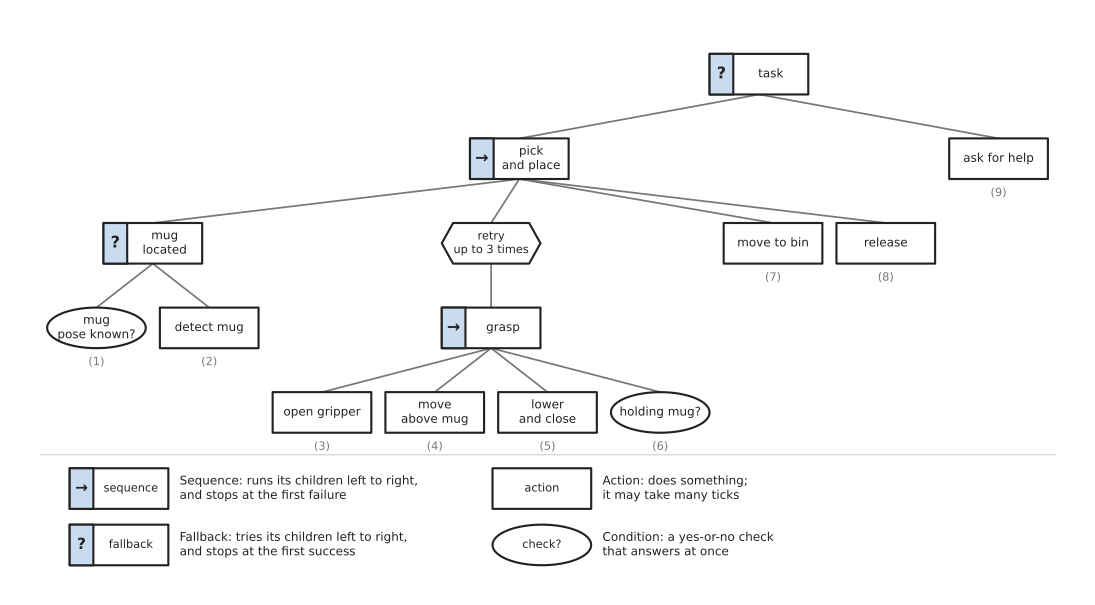
The small numbers under the leaves are the order in which they run when everything works, and the tree is read from the top down.
- The root, "task", is a Fallback. It first tries "pick and place". If that fails, it runs "ask for help". This one node replaces the three red "ask for help" arrows of the state machine.
- "pick and place" is a Sequence of four children: make sure the mug is located, grasp it with retries, move to the bin, and release.
- "mug located" is a Fallback. If the mug's position is already known, the condition succeeds and nothing else runs. If not, "detect mug" runs.
- "retry up to 3 times" is a decorator over the "grasp" Sequence. The Sequence opens the gripper, moves above the mug, lowers and closes, and then checks "holding mug?". If the check fails, the whole Sequence fails, and the Retry starts it again from "open gripper".
There is no retry counter anywhere in the task code, because the Retry node keeps it instead. That is the extra number which the state machine had to carry by hand.
How a parent combines its children's answers#
Since Sequence and Fallback do most of the work, their rules are easiest to see on small cases, and the picture below shows three of them.
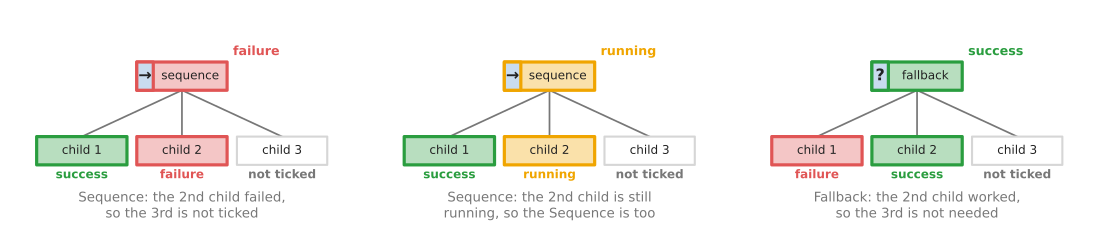
On the left, a Sequence's second child failed, so the Sequence fails too and never ticks the third child. In the middle, the second child is still running, so the Sequence answers "running" and will tick that child again next time. On the right, a Fallback's first child failed, so it tried the second, which worked, and the Fallback then succeeds without ticking the third.
The two rules mirror each other. A Sequence goes on after success and stops at failure, while a Fallback goes on after failure and stops at success, but both of them pass "running" straight up to their own parent.
A worked run, tick by tick#
Since the tree is easier to trust once you have seen it run, the diagram script for this page holds a small behaviour tree engine and the tree above, and it ticks that tree 10 times a second. Each action takes a fixed number of ticks: 4 to detect, 2 to open the gripper, 15 to move above the mug, 8 to lower and close, 20 to move to the bin, and 3 to release. The "holding mug?" check fails on the first try and succeeds on the second.
The picture below shows every node's answer on every tick of that run. Each row is one node, indented under its parent, while each column is one tick, and a grey cell means the node was not ticked at all on that tick.
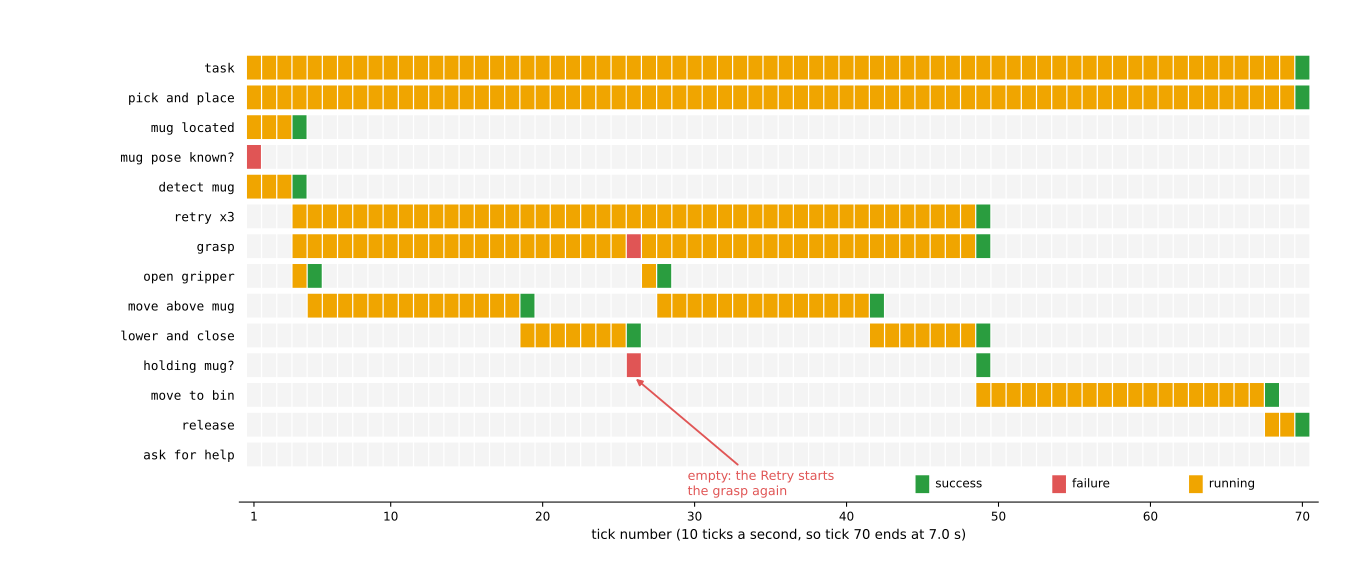
Here is what happened in that run, as the script printed it.
- On tick 1, "mug pose known?" fails, because no picture has been taken yet. So the "mug located" Fallback ticks "detect mug", which answers "running".
- On tick 4, "detect mug" succeeds. In the same tick, "pick and place" moves on to its second child, and "open gripper" starts. A Sequence moves to its next child as soon as one succeeds; it does not wait for the next tick.
- Ticks 5 to 26 run the first grasp: "move above mug" from tick 5 to 19, then "lower and close" from tick 19 to 26.
- On tick 26, "holding mug?" fails. The "grasp" Sequence fails. The Retry counts one failure and answers "running", so nothing above it notices.
- Ticks 27 to 49 run the second grasp. On tick 49, "holding mug?" succeeds. The Retry succeeds, and "move to bin" starts in the same tick.
- On tick 70, "release" succeeds. "pick and place" succeeds, and so does the root. The loop stops.
The whole task took 70 ticks, which is 7.0 s, and each grasp try took 23 ticks. The actions add up to 2 + 15 + 8 = 25 ticks, but each new action starts in the tick its predecessor finishes, which saves one tick at each of the two joins.
The script also ran the same tree with all three grasps failing, and then the third failure comes on tick 72. The Retry gives up and fails, so "pick and place" fails, and the root Fallback ticks "ask for help" in the same tick. The root then answers "success", because one of its children succeeded. So here "success" means "the task was handled" rather than "the mug is in the bin", and the log is what shows which way it went.
Pseudocode#
Once the node kinds are clear, the whole engine is one short function that calls itself on the children, plus a loop. The pseudocode below does not depend on any programming language. Each Sequence and Fallback remembers which child was running, so it carries on from that child on the next tick.
function tick(node):
    if node is a condition:
        if the check is true: return SUCCESS
        else:                 return FAILURE

    if node is an action:
        do a little more of the action (or start it)
        return RUNNING, SUCCESS or FAILURE

    if node is a Sequence:
        for each child, starting from node.current:
            answer = tick(child)
            if answer is RUNNING:
                node.current = this child
                return RUNNING
            if answer is FAILURE:
                node.current = first child
                return FAILURE
        node.current = first child
        return SUCCESS

    if node is a Fallback:
        (the same as Sequence, with SUCCESS and FAILURE swapped)

    if node is a Retry with limit n:
        answer = tick(node.child)
        if answer is FAILURE:
            node.failures = node.failures + 1
            reset node.child, so it starts again from the beginning
            if node.failures < n: return RUNNING
            node.failures = 0
            return FAILURE
        if answer is SUCCESS: node.failures = 0
        return answer

main loop, 10 times a second:
    answer = tick(root)
    if answer is not RUNNING: stop
This is exactly the logic the diagram script runs, and the trace above is its own output.
Adding a recovery#
The main advantage of a behaviour tree only shows when the task changes. Suppose you find that most failed grasps happen because the mug sits too near the edge of the tray, where the fingers hit the wall. Then the fix is to nudge the mug towards the centre and look again before the next try.
In a behaviour tree that fix is one new branch, and the picture below shows the grasp part before and after the change.
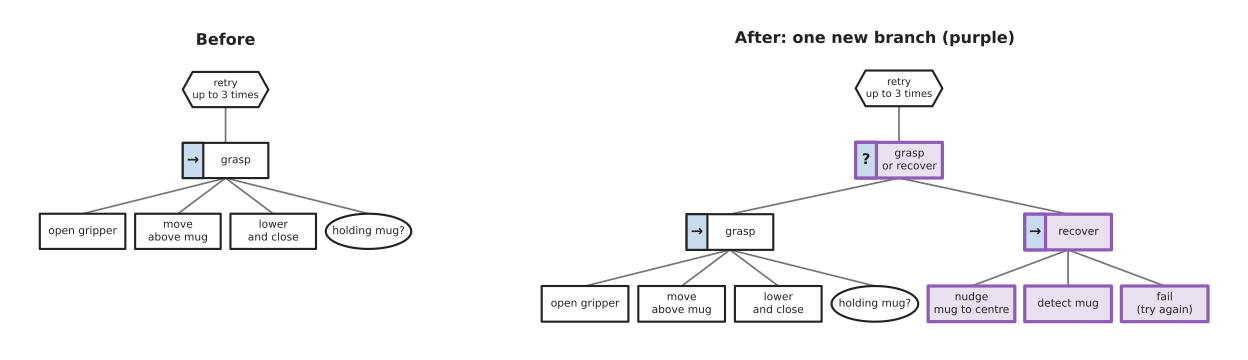
The new Fallback "grasp or recover" first tries the grasp, and if the grasp fails it runs "recover", which nudges the mug to the centre, detects it again, and then fails on purpose. That last failure makes the Retry count one try and start again, now with the mug in a better place, and nothing outside the purple nodes changed at all. In the state machine, by contrast, the same change needs a new "nudge" state, a new arrow out of "check grasp" into it, and a new arrow from it back to "detect".
Reacting while a step runs#
The Sequence above checks "mug located" once and then does not look at it again while the grasp runs, which is usually right. But some checks must be made on every single tick. For example, a safety check such as "no person in the work area?" must stop a move the moment it fails, not after the move ends.
For this, libraries offer a reactive Sequence, which starts from its first child on every tick instead of from the one that was running. So a condition placed first is re-checked every tick, and if it fails while "move to bin" is running, the Sequence fails and tells the running action to stop. Stopping a running action this way is called halting it, so each action you write must handle a halt, for example by telling the arm controller to stop smoothly.
In BehaviorTree.CPP this node is called ReactiveSequence, while in py_trees the same
choice is the memory setting of a Sequence, where memory=False makes it reactive.
Sharing data: the blackboard#
The nodes above also need to pass data to each other, because "detect mug" finds a
position and "move above mug" needs it. So a behaviour tree keeps such data in a
blackboard, which is a shared table of named values. Here "detect mug" writes the
value mug_pose, "move above mug" reads it, and the condition "mug pose known?" simply
checks whether mug_pose is set.
The blackboard is also what keeps the nodes independent, because "move above mug" does not need to know which node found the mug. So you can swap the detector without touching the move at all.
4. Where it is used on a robot arm#
Because a tree decides which step runs rather than doing the work itself, behaviour trees usually sit at the top of the program, above perception, planning and control, and the list below gives several concrete places.
- The task. Pick and place, as above, and longer jobs such as loading a machine: open the door, take out the finished part, put in a new one, close the door, press start. Each step has its own retries and fallbacks.
- Choosing a grasp. A Fallback tries "grasp from above", then "grasp from the side", then "push the object away from the wall and try again". Book 3's behaviour trees section shows the first two in real code.
- Planning with a backup. A Fallback first asks the planner for a path with a short time limit, and if that fails, asks again with a longer one or a different planner. The sampling-based planning page explains why a second try can find a path the first missed.
- Perception with a backup. A Fallback first tries a fast colour mask, as on the thresholding and colour masks page. If it finds nothing, it runs a slower learned detector.
- Safety checks during motion. A reactive Sequence re-checks "work area clear?" and "force below limit?" on every tick while the arm moves, and halts the move when either fails.
- Mobile arms. The ROS 2 navigation stack, Nav2, runs its navigation as a behaviour tree built with BehaviorTree.CPP. An arm on a mobile base often uses one tree for driving and another for the arm.
- Under a language model. A language model can choose which subtree to run from a spoken request, while the tree still does the running. Book 7's language models as planners page describes this.
5. Where it is useful, and where it is not#
The uses above all ask for the same thing, because a behaviour tree is useful when the task has many steps and many ways to recover. It is then easy to add a new recovery, to reuse a subtree in two places, and to watch the tree run in a viewer, while each leaf can be tested on its own.
But it goes wrong in a few common ways, and the table below lists them. Read each row as one mistake, giving the sign you would see and the usual fix.
| Problem | The sign you would see | What people do instead |
|---|---|---|
| An action blocks the tick. It waits for the move to end before returning. | The whole tree freezes during each move. Safety checks and the stop button stop working. | Actions start the work and return "running" at once. The work runs on its own. |
| A running action is not halted properly. | A move keeps going after its branch failed, or the next move starts while the last is still running. | Write a halt step for every action, and test it. |
| The wrong kind of Sequence. | With memory: a safety check is not re-checked during a move. Reactive: a finished step is started again when an earlier condition flickers. | Use a reactive Sequence only for true "must stay true" checks, and a Sequence with memory for steps. |
| "Success" is read as "the job worked". | The log says success, but the mug is still on the table, because "ask for help" succeeded. | Log which branch succeeded, or write the outcome to the blackboard. |
| Too much data on the blackboard. | Nodes depend on values written far away in the tree. A change in one branch breaks another. | Keep blackboard names few and clear; pass values through each node's declared inputs and outputs. |
| The tree grows into one huge file. | Nobody can find where a behaviour is decided. | Split it into named subtrees, each in its own file. |
| The task changes every day, not just its recoveries. | Someone rewrites the tree for each job. | A task planner, or a language model that picks subtrees. |
A behaviour tree is also not the right tool for the lowest levels, because a gripper driver or a controller's safety modes have few, clear states and must be checked by hand, so a finite state machine is better there. Behaviour trees do not choose the best order or set either, since that is the job of greedy algorithms and optimisation solvers, which a tree can call as one action.
6. Libraries that provide it#
Since the engine is the same for every task, you rarely write it yourself. The table below lists the well-known libraries, and the third column names the main class or node to look for.
| Library | Languages | Where to start | Note |
|---|---|---|---|
| BehaviorTree.CPP | C++, trees in XML | BT::BehaviorTreeFactory; XML nodes Sequence, Fallback, ReactiveSequence, RetryUntilSuccessful, Parallel | The most used library in ROS 2. You write leaves in C++ and the tree in XML, so the tree can change without rebuilding. |
| Groot2 | a graphical editor | draws and edits BehaviorTree.CPP trees | Shows the tree running live, with each node coloured by its answer. |
| py_trees | Python | py_trees.composites.Sequence, py_trees.composites.Selector, py_trees.composites.Parallel, py_trees.decorators, py_trees.trees.BehaviourTree | The same ideas in Python. A Fallback is called a Selector. Good for learning and for small projects. |
| py_trees_ros | Python, ROS 2 | the py_trees_ros package | Connects py_trees to ROS 2 topics, services and actions, with a viewer. |
| Nav2 | C++, ROS 2 | the nav2_bt_navigator package | Not an arm library, but the best-known real behaviour tree in ROS 2, and a good example to read. |
BehaviorTree.CPP and py_trees both offer a blackboard, decorators for retries and timeouts, and a way to print or log the tree's answers on each tick. So Book 3 can show the same small tree in both libraries, in behaviour trees: putting a task in order.
7. Why a behaviour tree, and what it costs#
This section answers the four questions for a behaviour tree: what it is, what it does for you, why it rather than the obvious alternative, and what it costs.
A behaviour tree is a tree of actions and checks, grouped by Sequence, Fallback and a few other ready-made nodes, and ticked many times a second. This means it gives you a task that can react to failures, retry, try alternatives and stop safely, written in a shape that stays readable as the task grows.
The obvious alternative is a finite state machine, which is simpler for a handful of clear situations and easier to prove correct. But each new recovery adds arrows to several states. In a behaviour tree, a recovery is one new branch, as the recovery example showed, and a whole subtree can be reused in another task. The retry counter lives in a Retry node, not in your own code. That is why most robot arm programs choose a tree for the task layer and keep state machines for drivers and safety modes.
The costs are these. First, you must learn a new way to think, which includes steps that answer "running", ticks, and the difference between a Sequence with memory and a reactive one. Every action must also be written so that it does not block and can be halted. "Success" at the root does not always mean the job worked, so you need good logging as well. You add a library too, and with BehaviorTree.CPP a second language, XML, that a newcomer must read. And a tree only ever does what you drew, because it does not plan a new task on its own.
8. The learned alternative#
Book 6 compares a behaviour tree directly with a language model as planner, which chooses the order of the robot's steps from a request in plain words. The planner earns its place when the request changes from one day to the next and nobody can list every request in advance. For a task that never changes, such as the same box packed the same way every day, Book 6 says the tree is the better choice, because it is free to run, fast, and always does the same thing. A vision-language-action model goes further and turns pictures and an instruction straight into arm movements, but its success rates are still well below what a production line needs. In practice the two meet: a language model picks a subtree, as section 4 showed, and a learned model such as collision and failure detection can serve as a condition such as "grasp failed?".
9. Where to read next#
- The finite state machines page writes the same task as states and arrows, so reading the two side by side is the fastest way to see the difference.
- The chapter overview shows how task logic fits with the choosers: greedy algorithms and set cover and optimisation solvers.
- Book 3 has real code in behaviour trees: putting a task in order, a comparison with state machines in scripted logic, and a project that uses a tree in sequencing the job: behaviour trees.
10. Using it in Python#
Section 3 explained ticks, the three answers, the kinds of node and the blackboard, and section 6 listed the libraries that provide all of that. What no section has shown yet is a leaf node in a file. This section shows one, together with the few lines that build a tree around it, so that after reading it you know what the library hands you and what every leaf costs you.
The example uses py_trees, because it is the Python library named in section 6 and the
one you can run while reading. BehaviorTree.CPP is the more common choice in ROS 2, but
its leaves are C++ classes and its trees are XML files, so it cannot be shown as a short
Python snippet.
import py_trees

class CloseGripper(py_trees.behaviour.Behaviour):
    """One leaf. Every line inside it is yours; py_trees only calls it."""

    def initialise(self):                     # runs once, when this leaf becomes active
        send_gripper_command(width=0.0, force=20.0)

    def update(self):                         # runs on every tick while this leaf runs
        if gripper_width() < 0.002:           # closed on nothing, so no mug is held
            return py_trees.common.Status.FAILURE
        if gripper_is_still():
            return py_trees.common.Status.SUCCESS
        return py_trees.common.Status.RUNNING

    def terminate(self, new_status):          # runs when the leaf stops, for any reason
        stop_gripper()

grasp = py_trees.decorators.Retry(name="up to 3 grasps",
                                  child=CloseGripper("close"), num_failures=3)
root = py_trees.composites.Sequence(name="pick", memory=True)
root.add_children([MoveAbove("move above"), Descend("descend"), grasp, Lift("lift")])

tree = py_trees.trees.BehaviourTree(root)
while root.status != py_trees.common.Status.SUCCESS:
    tree.tick()
    print(py_trees.display.unicode_tree(root, show_status=True))
    sleep_until_next_tick()
What the library does for you is the engine and the vocabulary. tree.tick() walks the
tree, works out which leaf is active, and combines the children's answers the way section
3 describes, so a Sequence stops at its first failure and a Selector stops at its
first success. The Retry decorator holds the retry counter that section 3's recovery
needed, which means you do not add a counter to your own code. py_trees also calls
initialise once when a leaf starts and terminate when it stops for any reason,
including when a higher branch takes over, which is what stops a half-finished grasp from
being left running. Finally py_trees.display.unicode_tree prints the whole tree with
each node's answer, which is how you debug a tree at all.
What you still write is every leaf, and that is most of the work. send_gripper_command,
gripper_width, gripper_is_still and stop_gripper are your functions, and so are
MoveAbove, Descend and Lift, which follow the same three-method shape as
CloseGripper. A leaf must also never block: update has to return within one tick, so
a move is started in initialise and only checked in update, and writing a leaf that
waits for the arm to arrive will freeze the whole tree. The loop and its timing are yours
too, because py_trees does not provide a clock; py_trees_ros from section 6 does,
along with the ROS 2 topics and actions.
What you have to decide or measure sits in three places. The first is memory, and it
changes the behaviour of the tree more than its name suggests. With memory=True a
Sequence remembers which child was running and resumes there, while with memory=False
it starts again from the first child on every tick, so the earlier checks are re-run and
the tree becomes reactive in the way section 3 describes. The second is the tick rate,
which has to be fast enough that a failure is noticed in time and slow enough that every
check finishes inside one tick. The third is the thresholds inside your leaves, such as
the 2 mm gripper width above and the 20 N closing force, which are measurements from your
gripper and your mugs rather than numbers to copy.