The camera example found a ball in the camera's pictures, and
the arm example moved an arm by publishing its joint angles. This
example joins them: a program called follower watches the camera, finds the
ball, and points the arm at it, so that the arm follows the ball as it moves.
It is the smallest version of what a robot does when it picks something up,
which is to see where a thing is and then move towards it.
The ros_camera_arm package holds only the follower. The camera comes from the
ros_camera package and the arm from the ros_arm package, which shows how ROS
packages are built to be reused.
Contents#
1. How the pieces connect#
Four nodes take part. Three of them are the ones from the other two examples, and only the follower is new:
flowchart LR
    C["camera_publisher<br/>(from ros_camera)"] -->|"/camera/image_raw<br/>/camera/camera_info"| F["follower<br/>(this package)"]
    F -->|"/joint_states"| R["robot_state_publisher<br/>(with ros_arm's URDF)"]
    R -->|"/tf"| V["RViz"]
    C -->|"/camera/image_raw"| V
The follower takes the place of the arm example's arm_mover. Both publish the
arm's joint angles on /joint_states, and robot_state_publisher does not know or
care which one is doing it. The only difference is where the angles come from:
arm_mover makes them up, and the follower works them out from the camera's
pictures. This is the main thing to take from the example: because nodes only
meet through topics, one can be swapped for another that publishes the same
messages, and nothing else changes.
The follower subscribes to two topics, and publishes on one. It needs the pictures to find the ball, and it needs the camera info, because the lens numbers are what turn a position in the picture into an angle.
2. From a pixel to an angle#
The camera sits at the arm's base, looking the same way the arm points when both of its joints are at zero, straight ahead along x. So if the ball appears in the middle of the picture, it is straight ahead, and the arm should not turn at all. If it appears to the right of the middle, the arm has to turn right, and the question is how far.
The camera basics explain that
every pixel looks out along one straight line from the lens, so a pixel is a
direction. A pixel that is u - cx pixels to the right of the middle looks along
a line that goes u - cx to the side for every fx it goes forward, where fx
is the focal length in pixels. That makes a right-angled triangle, and the angle
at its corner is the angle the arm has to turn:
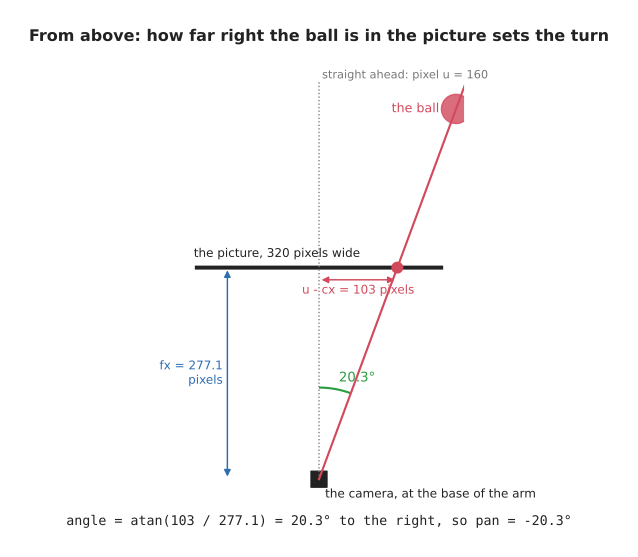
angle to the side = atan((u - cx) / fx)
angle up          = atan((cy - v) / fy)
The second line is the same thing for up and down, using v, the pixel's row.
It is cy - v rather than v - cy because v counts downwards from the top of
the picture, so a ball above the middle has a v smaller than cy.
The ball in the camera doc's picture is at
pixel (263, 188). It is 103 pixels right of the middle and 68 pixels below it,
and the camera's fx and fy are 277.1, so the arm has to turn 20.3° to the
right and tip 13.8° down. The arm's joints measure turning left and tipping up as
positive, as the arm doc shows, so the follower publishes
a pan of −20.3° and a tilt of −13.8°, in radians: −0.354 and −0.241.
3. The program#
The follower does its work each time a picture arrives. In pseudo code:
when the program starts:
    subscribe to /camera/camera_info, and keep the lens numbers
    subscribe to /camera/image_raw, and call on_picture with every picture
    create a publisher for joint angles, on /joint_states

on_picture:
    if no lens numbers have arrived yet, wait for the next picture
    find the ball, as the camera subscriber does
    if there is no ball, leave the arm where it is
    pan  = -atan((u - cx) / fx)        right of the middle is a turn to the right
    tilt =  atan((cy - v) / fy)        above the middle is a tilt up
    publish a JointState with pan, tilt, and the gripper held open
This is the core of ros_camera_arm/follower.py. It does not find the ball
itself: it imports find_ball() from the ros_camera package, which the camera
subscriber uses too.
from ros_camera.camera_subscriber import find_ball


def pixel_to_angles(u: float, v: float, fx: float, fy: float,
                    cx: float, cy: float) -> tuple[float, float]:
    pan: float = -math.atan2(u - cx, fx)
    tilt: float = math.atan2(cy - v, fy)
    return pan, tilt


class Follower(Node):
    def __init__(self) -> None:
        super().__init__('follower')
        self.bridge: CvBridge = CvBridge()
        self.lens: tuple[float, float, float, float] | None = None     # fx, fy, cx, cy
        self.create_subscription(CameraInfo, '/camera/camera_info', self.on_camera_info, 10)
        self.create_subscription(Image, '/camera/image_raw', self.on_picture, 10)
        self.publisher: Publisher = self.create_publisher(JointState, '/joint_states', 10)

    def on_camera_info(self, msg: CameraInfo) -> None:
        self.lens = (msg.k[0], msg.k[4], msg.k[2], msg.k[5])

    def on_picture(self, msg: Image) -> None:
        if self.lens is None:
            return
        picture: NDArray[np.uint8] = self.bridge.imgmsg_to_cv2(msg, desired_encoding='rgb8')
        ball: tuple[float, float] | None = find_ball(picture)
        if ball is None:
            return
        pan: float
        tilt: float
        pan, tilt = pixel_to_angles(*ball, *self.lens)
        joints: JointState = JointState()
        joints.header.stamp = msg.header.stamp
        joints.name = ['pan', 'tilt', 'gripper']
        joints.position = [pan, tilt, 0.02]           # the gripper stays open
        self.publisher.publish(joints)
math.atan2(a, b) is the angle whose tangent is a / b, which is the atan
from section 2, written the way Python prefers. The joint message is stamped with
the picture's timestamp, so that anyone reading it knows which picture the angles
came from. The arm's URDF also has a gripper, as the
arm doc explains, and robot_state_publisher needs a
position for every joint before RViz can draw the whole arm, so the follower
keeps the gripper open at 0.02 metres.
This package's package.xml lists ros_camera and ros_arm among the packages
it needs, which is what lets the follower import from ros_camera, and lets its
launch file start ros_camera's publisher and read ros_arm's URDF:
with open(os.path.join(get_package_share_directory('ros_arm'), 'urdf', 'arm.urdf')) as urdf:
    description: str = urdf.read()
...
Node(package='ros_camera', executable='camera_publisher'),
Node(package='robot_state_publisher', executable='robot_state_publisher',
     parameters=[{'robot_description': description}]),
Node(package='ros_camera_arm', executable='follower', output='screen'),
4. Running it#
make ros.camera_arm
This builds the workspace and starts the launch file. RViz shows the arm and the camera's picture side by side, and as the ball moves in the picture, the arm turns to follow it. The follower prints what it sees and how it turns the arm, once a second:
[follower-3] [INFO] [...] [follower]: ball at pixel (205, 161): pan -9°, tilt -8°
[follower-3] [INFO] [...] [follower]: ball at pixel (257, 190): pan -19°, tilt -14°
The ball in the first line is 45 pixels right of the middle and 41 below it, so the arm turns 9° right and tips 8° down, and a second later the ball has moved further right and down, and the arm has followed it. Press Ctrl-C to stop it.
In a second terminal, ros2 topic info --verbose /joint_states shows who is
publishing the joint angles and who is receiving them. --verbose adds the name
of each node:
Publisher count: 1
Node name: follower
Endpoint type: PUBLISHER
Subscription count: 1
Node name: robot_state_publisher
Endpoint type: SUBSCRIPTION
It is the same topic as in the arm example, with the follower publishing on it
instead of arm_mover. ros2 run tf2_ros tf2_echo base_link tip shows the tip of
the arm moving, as it does in the arm doc.
5. What changes on a real robot#
The idea is exactly the same on a real robot, and the node graph from section 1
barely changes: a real camera driver takes the place of camera_publisher, and
the arm's controller takes the place of publishing /joint_states directly, as
the arm doc explains. Three things do get harder.
- Where the camera is. Here the camera sits exactly at the arm's base, looking the same way, so a direction from the camera is a direction from the arm. On a real robot the camera is somewhere else, and its position is measured by calibration and published on TF, which then moves every direction from the camera's frame into the arm's.
- How far away the ball is. A picture only gives a direction, so this arm can point at the ball, but it cannot reach it, because it does not know how far away it is. A depth camera gives the distance too, and the one-box intro shows how a direction and a distance make a point in the room.
- Finding the object. A red ball on a grey background is easy to find by colour. Real objects need better methods, which is what most of a robot's vision code is about.