Every gripper family, with real products and real numbers: what each one can hold, how fast, how accurately, what it costs you, and which ROS 2 driver talks to it under which licence. It also covers the things that bolt on around the gripper — tool changers, and the sensors that tell you what the gripper is doing.
Every figure below was taken from a manufacturer's datasheet or product page fetched in September 2026, and the URL is given so you can check it. Where the manufacturer states the conditions a figure was measured under, those conditions are repeated here, because in this subject they matter more than the figure. Where a figure could not be verified, the document says so rather than guessing.
Who this is for#
Someone choosing a gripper, or trying to work out why the one they have is not performing as advertised. The overview introduces the six mechanisms; this document is the hardware itself. If you are trying to decide where the fingers should go rather than what the fingers should be, that is choosing a grip.
Contents#
- How to read a gripper datasheet
- Two-finger parallel and adaptive grippers
- Suction
- Magnetic grippers
- Soft and compliant grippers
- Multi-finger hands
- Tool changers, and custom tooling
- The sensors that go on a gripper
- Drivers, ROS 2 packages and licences
- Hardware for touching what you are not grasping
1. How to read a gripper datasheet#
Four numbers appear on every gripper datasheet and three of them mean less than they appear to. It is worth knowing which before reading any of the tables below.
Payload is a static number. It is what the gripper holds standing still. OnRobot say this explicitly for their tool changers — "the values for a situation with an acceleration of 2g are half of the static values" — and Robotiq work it through for the 2F-85 in the arithmetic reproduced in the overview. The rated payload is a ceiling you spend some of on every move.
Grip force depends on the object as well as the gripper. Section 2.2 has the measured evidence. A single number on a datasheet is the best case, on a hard object, with a particular fingertip.
Stroke is quoted with the manufacturer's own fingertips. Fit anything else and both the maximum and the minimum opening move. Robotiq's manual allows custom fingertips up to 100 mm in height and width from the base, and says they remain subject to the equilibrium line rule, which means a custom fingertip can change the kind of grasp the gripper makes as well as its size.
Repeatability is not accuracy. It is how consistently the fingers return to the same commanded position, not how close that position is to the number you asked for. Robotiq quote 0.05 mm of position repeatability on the 2F-85 and separately a position resolution of 0.4 mm, which is the smallest change a one-count command produces. The second number is the one that bounds what you can ask for.
One more thing that is not on any datasheet and decides a great deal: whether the gripper is underactuated. An underactuated gripper has fewer motors than joints, so the fingers fold to fit the object rather than moving rigidly. That is why a Robotiq 2-finger gripper can curl around a cylinder, and it is also why it can do so when you did not ask. A rigid parallel gripper such as the OnRobot 2FG7 always produces the same finger motion, which is less adaptable and much more predictable. Neither is better; they fail differently, and the underactuated one fails more interestingly.
2. Two-finger parallel and adaptive grippers#
The default choice, and the one most cells use. Two fingers, one or two motors, a commanded position and a commanded force.
2.1 The products, and their published numbers#
Read the table as: what it opens to, what it holds, how hard it can squeeze, and how fast. Every figure is from the manufacturer's own datasheet, linked in the first column.
| Gripper | Stroke | Payload | Grip force | Speed | Weight |
|---|---|---|---|---|---|
| Robotiq 2F-85 | 85 mm, minimum encompassing diameter 43 mm | 5 kg, friction or form fit | 20 to 235 N | 20 to 150 mm/s | 925 g |
| Robotiq 2F-140 | 140 mm, minimum encompassing diameter 90 mm | 2.5 kg | 10 to 125 N | 30 to 250 mm/s | 1,025 g |
| Robotiq 3-Finger | 0 to 167 mm, maximum encompassing diameter 155 mm | 10 kg encompassing, 2.5 kg fingertip | 70 N maximum at the fingertips | 110 mm/s closing | 2.3 kg |
| OnRobot RG2 | 0 to 110 mm, adjustable | 2 kg force fit, 5 kg form fit | 3 to 40 N | 38 to 127 mm/s | — |
| OnRobot 2FG7 | 38 mm total; grip width 1 to 39 mm fingers inwards, 35 to 73 mm outwards | 7 kg force fit, 11 kg form fit | 20 to 140 N | 16 to 450 mm/s | — |
Four things in that table repay a second look.
Opening wider costs you force and payload. The 2F-140 opens to 140 mm and holds half what the 2F-85 does, at half the grip force. This is a lever-arm consequence and it applies to every adaptive gripper: a longer finger applies less force at its tip for the same motor. Choosing the widest gripper that fits your budget is the wrong instinct.
Three fingers cost you force too. The Robotiq 3-Finger weighs two and a half times the 2F-85 and produces 70 N at the fingertips against the 2F-85's 235 N. It buys you an encompassing payload of 10 kg and the ability to change grasp mode deliberately, and it pays for those in raw squeeze.
OnRobot publish two payloads and Robotiq publish one. Robotiq's manual lists 5 kg for both a friction grasp and a form-fit grasp on the 2F-85, which reads as though the distinction does not matter. OnRobot's two figures — 2 kg and 5 kg on the RG2 — say that it matters by a factor of two and a half. Both are honest presentations of the same physics, and the second is much more useful. See the overview's section 5.
The precision figures differ by an order of magnitude. Robotiq specify position repeatability of 0.05 mm on the 2F-85 and a force repeatability of ±10 per cent. OnRobot specify a repetition accuracy of 0.1 to 0.2 mm on the RG2 and a gripping force deviation of ±25 per cent, with 0.1 to 0.3 mm of reversing backlash. If you are calculating a squeeze force and then relying on it, a quarter is a large error to absorb into your safety factor.
A word about the Robotiq product pages, because it will save you time. As of September 2026 the specification tables on Robotiq's redesigned website are placeholder text — the visible table on the adaptive gripper pages reads "Morem ipsum dolor sit amet" and repeats "Stroke 50 mm" for every row. The real numbers are in the instruction-manual PDFs linked above, which are complete and precise. Do not take a Robotiq number from the website.
2.2 The force you command is not the force you get#
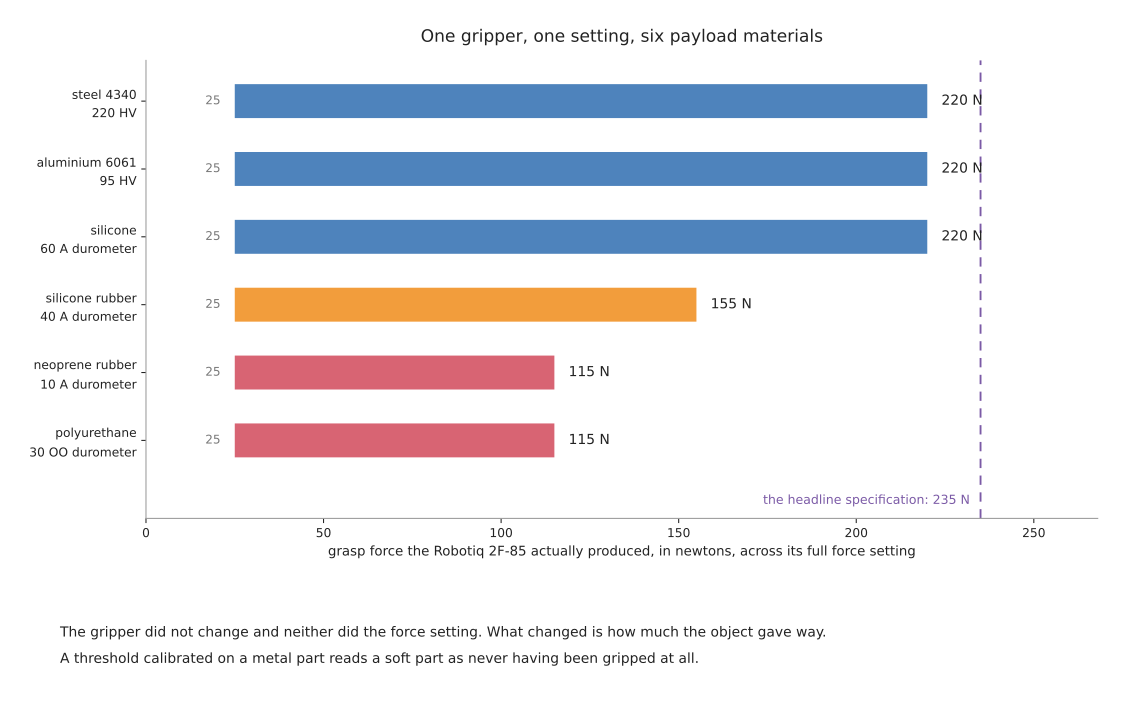
Robotiq's manual publishes something most manufacturers do not: measured forces against payloads of six different hardnesses, using the same fingertips and the same firmware, tested with a load cell.
| Finger pad | Payload | Measured force, 2F-85 | Measured force, 2F-140 |
|---|---|---|---|
| steel 4340, 220 HV | steel 4340, 220 HV | 25 to 220 N | 15 to 120 N |
| aluminium 6061, 95 HV | aluminium 6061, 95 HV | 25 to 220 N | 15 to 120 N |
| aluminium 6061 | silicone, 60 A durometer | 25 to 220 N | 15 to 120 N |
| aluminium 6061 | silicone rubber, 40 A durometer | 25 to 155 N | 15 to 100 N |
| aluminium 6061 | neoprene rubber, 10 A durometer | 25 to 115 N | 15 to 75 N |
| aluminium 6061 | polyurethane rubber, 30 OO durometer | 25 to 115 N | 15 to 75 N |
The gripper's maximum force is nearly halved by the object being soft. The reason is in the mechanism: the force setting is a motor current limit, and an underactuated linkage converts motor torque into fingertip force at a ratio that depends on the finger angle. A soft object lets the fingers travel further before the force builds, and at that angle the linkage is less effective.
The practical consequences are two.
A force threshold calibrated on a hard object is wrong for a soft one, and wrong in the direction that reads a successful grip as a failure. If your grip-verification logic checks that the commanded force was reached, it will reject soft objects.
Do not read a headline force figure as achievable. Robotiq's own mechanical specification says 20 to 235 N for the 2F-85 with their flat silicone fingertip. Their measured table, with the same fingertip, says 25 to 220 N. The gap is small and it tells you which kind of number each one is.
2.3 The equilibrium line, and grasps you did not command#
Robotiq's 2-finger grippers choose between a parallel fingertip grasp and an encompassing grasp on their own. Their manual is explicit: "whether the fingers close to produce an encompassing or fingertip grasp is decided at the Gripper level automatically", depending on the object's geometry and its position relative to the gripper.
The boundary between the two regions on the finger is called the equilibrium line. Contact above it gives a parallel grasp; contact below it, nearer the palm, gives an encompassing one. Robotiq's own guidance is worth quoting because it is a warning rather than a feature description: "Grasping an object that could be grasped by an encompassing grasp (a cylinder for example) on the equilibrium line is not recommended, as slight variations on the position will switch the grasp from parallel to encompassing and vice versa. Robot programming should be done so that the grasping mode will be predetermined."
This is the most important sentence on this page. A cell that grips near the line gets a form-fit grasp most of the time and a force-fit grasp occasionally, against the same object, with the same program, and no signal anywhere that the mode changed. The payload capacity halves when it does. If you are using an adaptive gripper, decide the grasp mode deliberately and grip well clear of the line.
2.4 The limits that are not the grip force#
Robotiq publish a separate set of limits for forces the arm applies through the gripper, which are much lower than the grip force and are about damaging the gripper rather than dropping the object.
| 2F-85 | 2F-140 | |
|---|---|---|
| force in any direction, Fx, Fy, Fz | 50 N | 25 N |
| moment about x and y | 5 Nm | 5 Nm |
| moment about z | 3 Nm | 3 Nm |
Their own example makes the use clear: after picking its normal payload, the arm may push with up to 50 N in any direction, and the gripper can hold a screwdriver and apply 3 Nm of torque to drive a screw. Exceeding these damages the gripper or loses the payload. Any force-controlled task — insertion, wiping, pressing — has to respect them, and they are lower than most people assume.
Maintenance is also worth planning for. Robotiq specify a periodic inspection semi-annually or every million cycles, finger pad replacement annually or every two million cycles, and a factory overhaul recommended after two million cycles, done by Robotiq at the user's expense. At a ten-second cycle running one shift, two million cycles is about four years; at three seconds running two shifts it is under a year. A gripper is a consumable on a fast line.
Five jobs a two-finger gripper suits:
- picking rigid objects with two opposed faces, which is most of a table top
- anything needing a known, repeatable grip geometry for a downstream insertion
- cells where custom fingertips can convert a hard problem into an easy one
- tasks needing the object held precisely, where suction permits rotation
- small parts, where suction cups become fiddly and magnetic grippers too coarse
Five jobs it cannot do:
- pick an object flush against a wall or its neighbours, with no room for fingers
- pick a large flat sheet or a carton, which has no gettable sides
- handle anything porous, soft and heavy at once
- apply more than its published external force limits, which are far below its grip force
- guarantee its grasp mode, if it is underactuated — see section 2.3
3. Suction#
A cup is sealed against the object, air is removed, and the atmosphere pushes the object onto the cup. It is the most-used gripper in logistics by a wide margin, because a carton has one large flat face and nothing else.
3.1 The arithmetic, and the three numbers it turns into#
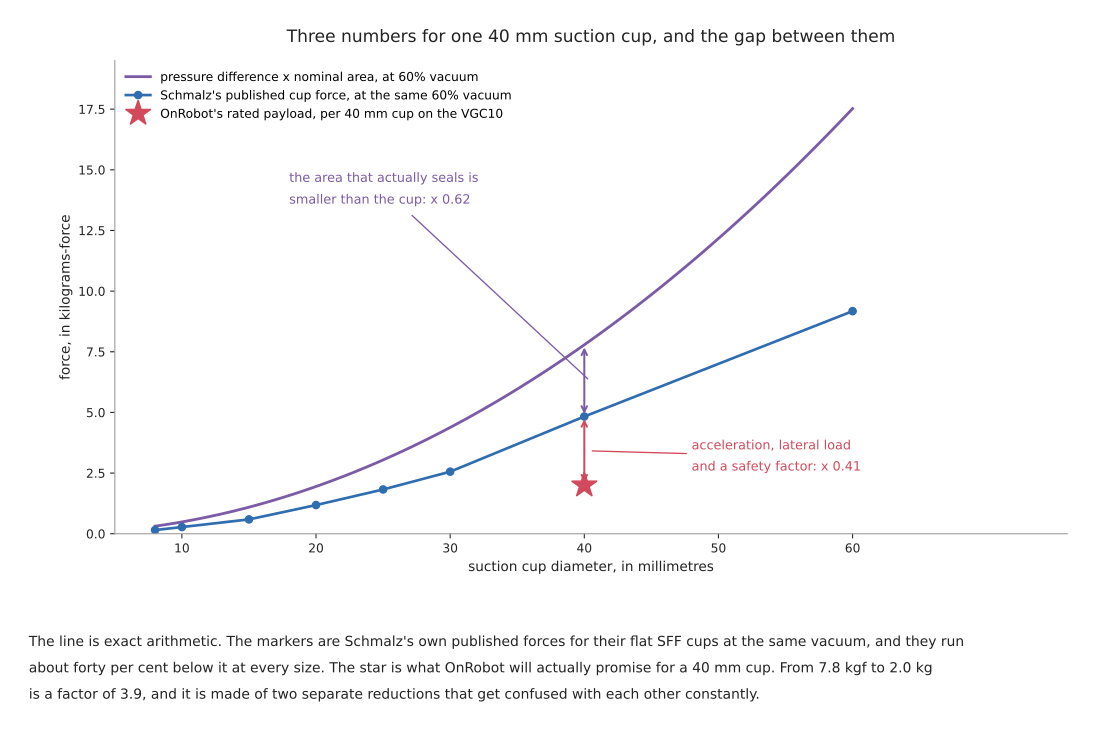
The force is the pressure difference multiplied by the sealed area:
F = pressure difference x area
That is exact and it is the number people compute. It is also the largest of three numbers you will meet for the same cup, and confusing them is the usual cause of an undersized vacuum gripper.
For a 40 mm cup at 60 per cent vacuum, the arithmetic gives 76.4 N, which is 7.8 kilograms-force. Schmalz's own datasheet for their flat SFF cups gives 47.4 N for the 40 mm size at the same −0.6 bar, which is 4.8 kilograms-force. And OnRobot's VGC10 datasheet rates a payload of 6 kg using three 40 mm cups, which is 2.0 kg per cup.
Two separate reductions, which get blamed on each other:
The area that seals is smaller than the cup. Schmalz's published forces run at about 0.5 to 0.6 of the nominal-diameter arithmetic at every size in their range, because the sealing lip and the cup's own geometry take up part of the diameter. This is a property of the cup, not a safety margin, and it applies before you have done any engineering.
The rating then absorbs acceleration, lateral load and a safety factor. Schmalz state that their catalogue forces are "theoretical values at a vacuum of -0.6 bar and with a smooth, dry workpiece surface" and "do not include a safety factor".
Their published full range of flat cup forces at −0.6 bar, which is a useful ready-reckoner:
| Cup | 8 mm | 10 mm | 15 mm | 20 mm | 25 mm | 30 mm | 40 mm | 60 mm |
|---|---|---|---|---|---|---|---|---|
| flat, SFF | 1.5 N | 2.7 N | 5.8 N | 11.6 N | 17.9 N | 25.1 N | 47.4 N | 90.0 N |
A bellows cup of the same diameter is far weaker. Schmalz's SFB1 bellows cup at 40 mm gives 8.81 N against the flat SFF's 47.4 N — a fifth of the force. A bellows cup exists to reach down onto an uneven surface and to lift gently, and it pays for that in holding force. Choosing cup shape by appearance rather than by the datasheet is a five-fold error.
3.2 Safety factors, and the direction they must be applied#
Schmalz publish the design calculation in three load cases, and the difference between them is larger than the safety factor. Read this as: where the cup is, where the force points, and what that does to the required force.
| Load case | Formula | What it means |
|---|---|---|
| cup horizontal, force vertical | F = m x (g + a) x S | lifting straight up off a table; the simple case |
| cup horizontal, force horizontal | F = m x (g + a / mu) x S | the object is being accelerated sideways and friction at the cup has to resist it |
| cup vertical, force vertical | F = (m / mu) x (g + a) x S | the cup is on the side of the object and friction alone carries the whole weight |
Their worked example uses a 61.33 kg steel sheet at 5 m/s² and gives 1,363 N, 1,822 N and 3,633 N for the three cases. The same object needs two and a half times the suction when the cup is on its side rather than on its top, and the difference is entirely friction. If your cup is not on the top face, this is the first calculation to redo.
Their guidance on the safety factor is specific: a minimum of 1.5 for smooth, dense workpieces, and "2.0 or greater must be used for critical, heterogeneous, porous, rough or oiled workpieces". Elsewhere they note that the German accident prevention regulation UVV prescribes a binding factor of 1.5, that they themselves recommend at least 2, and that swivelling a workpiece during handling requires 2.5 or higher.
The friction coefficients they publish for the cup against the workpiece are worth having beside the ones in choosing a grip: 0.2 to 0.3 for wet surfaces, 0.5 for wood, metal, glass and stone, 0.6 for rough surfaces, and 0.1 to 0.3 for oiled ones.
On porous materials nobody will give you a number. Schmalz's published guidance is to raise the safety factor and to "conduct a corresponding suction trial with the original workpiece". That is the honest answer and it means a porous-material vacuum gripper cannot be designed from a datasheet. Budget for a test.
3.3 Venturi ejector against electric pump#
Two ways to make the vacuum, and the choice is not close once you know the application.
A Venturi ejector blows compressed air through a nozzle, which entrains air from the cup. It has no moving parts, it is light enough to sit on the wrist, and it makes vacuum almost instantly. It consumes compressed air continuously while running, which is expensive. Schmalz's SCPi and SMPi compact ejectors publish the numbers, all at their optimal operating pressure of 4.5 bar:
| Ejector | Nozzle | Evacuation | Suction rate | Air consumption | Weight |
|---|---|---|---|---|---|
| SCPi 15 | 1.5 mm | 85% | 75 l/min | 115 l/min | 0.6 kg |
| SCPi 20 | 2.0 mm | 85% | 140 l/min | 180 l/min | 0.6 kg |
| SCPi 25 | 2.5 mm | 85% | 195 l/min | 290 l/min | 0.6 kg |
Notice that the air consumed exceeds the air moved, at every size. That is inherent to the principle and it is why compact ejectors include an air-saving control that stops generating vacuum once a safe level is reached, and only restarts if it falls. On an airtight workpiece that runs the pump for a fraction of the cycle; on a leaking one it runs continuously, which is the case that surprises people.
An electric pump — the OnRobot VGC10 has one built in, a brushless DC unit — needs only electrical power, so it works on a robot with no air supply at all. Its published figures are 5 to 80 per cent vacuum, an air flow of 0 to 12 l/min, 0.35 s to grip and 0.20 s to release, and a warranty of three years or three million cycles.
Schmalz's own selection guidance is one line and it is the right heuristic: short cycle times favour an ejector, long transport distances favour a pump or a blower.
Piab publish their cup forces as a function of vacuum level, which is more useful than a single figure. Their B75P bellows cup gives 121 N parallel and 83 N vertical at 20 kPa of vacuum, 229 N and 196 N at 60 kPa, and 298 N and 255 N at 90 kPa. The parallel and vertical split is the same friction question as Schmalz's three load cases, quantified per product.
One warning that is printed on OnRobot's own datasheet and is easy to skip past: "Do not use vacuum grippers in wet or damp conditions, particularly in CNC applications with moisture or cutting fluids. It can damage the gripper." A vacuum gripper pulls whatever is on the workpiece into itself.
Five jobs suction suits:
- cartons, bags, books, sheets, panels and anything with one large flat face
- objects with no accessible sides, which is most things in a full tote
- high-rate picking, where a 0.35 s grip is faster than a finger closure
- objects too large or too heavy for fingers to get around
- cells that need the perception requirement to stay cheap, since a plane fit and a surface normal is all a cup needs
Five jobs it cannot do:
- porous, permeable or fabric surfaces, where no seal forms and no datasheet will help you
- ribbed, corrugated or tightly curved surfaces
- oily, dusty or wet parts, which foul the cup and void the warranty
- hold an object against rotation about the cup's own axis
- work where the only reachable surface is a thin edge
4. Magnetic grippers#
Strong, simple, and applicable to a narrow and well-defined set of objects: ferromagnetic ones. Steel and iron yes; aluminium, copper, brass, plastic, glass and the austenitic stainless grades no.
Two technologies matter. A pneumatic or electropermanent gripper moves or switches a permanent magnet, so it holds with no power at all and needs energy only to change state. An electromagnet needs continuous current and drops its load when power fails, which is usually disqualifying.
The published numbers, from three manufacturers:
| Gripper | Holding force | Conditions the manufacturer states |
|---|---|---|
| Schmalz SGM-HP 20 | 28 N, or 19 N with a friction ring | optimum sheet thickness 1 mm; apply a safety factor of 3 |
| Schmalz SGM-HP 30 | 130 N, or 90 N with a friction ring | optimum sheet thickness 2 mm |
| Schmalz SGM-HP 40 | 320 N, or 235 N with a friction ring | optimum sheet thickness 4 mm |
| Schmalz SGM-HP 50 | 560 N, or 385 N with a friction ring | optimum sheet thickness 6 mm |
| Goudsmit electropermanent, 71 mm | advised working load 330 N; maximum tear-off 990 N | safety factor 3 per EN 13155; minimum material thickness 8 mm |
| OnRobot MG10 | 10 kg parallel to the ground, pulling force 300 N | at 3 g; pure steel, no surface treatment; all four fingers in contact on a 65.4 by 65.4 mm workpiece |
Four things here are worth knowing before you specify one.
The derating is severe and the manufacturer publishes it. OnRobot state that the MG10's maximum payload falls to 30 per cent of the maximum with their own delivered protective pads fitted, 41 per cent on cylindrical workpieces, and 28 per cent when gripping perpendicular to the ground. So the headline 10 kg is 2.8 kg in the orientation a great many cells actually use.
Sheet thickness decides the force, and thin sheet is the hard case. Schmalz quote an optimum thickness per gripper size, from 1 mm on the smallest to 6 mm on the largest. Goudsmit's 71 mm electropermanent gripper wants at least 8 mm. Below the optimum the magnetic circuit is not filled and the force drops.
Thin sheet also brings the double-pick problem. Steel sheets stick together, especially oiled ones, and a magnet strong enough to lift one will lift two. The industry answer is a separate device: Goudsmit's neodymium sheet separators sit beside the stack and force the sheets apart magnetically, and they publish a range of 1.4 to 3.5 mm thickness and 45 to 370 mm stack height. If you are picking sheet, budget for the separator as well as the gripper.
Residual magnetism is real and is published. Schmalz quote a "remaining holding force" of 0.3 N for every size in the SGM-HP range. That is small, and it is not zero, which matters for a light part: a 20 g stamping weighs 0.2 N and will stay attached. If your part is light, plan an ejector pin or a blow-off, and do not rely on gravity to separate it.
Two more figures worth noting. Goudsmit's electropermanent gripper draws 5 A at 24 V during switching but only 0.2 A for its logic, and publishes a duty cycle of twelve on and twelve off per minute — magnetic switching is not free and not unlimited. Schmalz note that a workpiece up to 350 °C can be handled, and that temperature can reduce holding force by up to 30 per cent.
Five jobs a magnetic gripper suits:
- steel plate, blanks and stampings, where there is nothing to get fingers round
- press and machine tending on ferrous parts
- parts too hot or too dirty for a suction cup
- parts with holes or openings that would defeat a seal
- picking from a stack, given a sheet separator
Five jobs it cannot do:
- anything non-ferrous, which rules out aluminium, most stainless and everything non-metallic
- hold a part precisely, since a flat magnet permits sliding and rotation
- release a light part cleanly, because of residual magnetism
- work near anything a stray field would damage, such as magnetic media or some sensors
- deliver its rated force on thin sheet, or through a coating that adds a gap
5. Soft and compliant grippers#
Fingers that conform to the object. The contact pressure is low and spread out, which is why these dominate food handling and fragile goods.
The market changed recently and it is worth stating plainly. Soft Robotics Inc, which was the best-known name in this category, announced on 6 August 2024 the divestiture of its gripper business to the Schmalz Group and now trades as Oxipital AI, working on vision inspection. Its mGrip product line is now sold by Schmalz. If you find a tutorial or a comparison that lists Soft Robotics as a gripper vendor, it predates that.
The published numbers for the two products you would actually consider:
| Gripper | Payload | Configuration | Food rating | Cycle rate |
|---|---|---|---|---|
| Schmalz mGrip | up to 10 kg | 2 to 6 silicone fingers, parallel or circular; gripping distance 20 to 245 mm; workpiece width to 300 mm | optional FDA-compliant silicone; finger module IP69K | up to 120 picks per minute |
| OnRobot Soft Gripper | 2.2 kg with the stiffer cup, 1.5 kg with the softer | spindle stroke 11 to 40 mm, spindle force to 380 N; IP67; 0.77 kg base | FDA 21 CFR 177.2600 and EC 1935/2004, tested and approved for non-fatty food only | 0 to 32 grips per minute |
OnRobot publish something unusually useful here: payload by workpiece shape, all measured on 65 mm objects with the same grip width and surface, so the only variable is the shape.
| Workpiece | Payload |
|---|---|
| cylinder, 65 by 30 mm | 2.2 kg |
| hexagon | 1.8 kg |
| cylinder standing on end, 30 by 65 mm | 1.6 kg |
| ellipse | 1.0 kg |
| equilateral triangle | 0.7 kg |
| sphere, 65 mm | 0.5 kg |
| square | not applicable |
A sphere is held at less than a quarter of the payload of a cylinder, and a square is not held at all. That is the whole character of a soft gripper: it wraps what it can wrap and it has very little to say about anything else. If your object set includes both cylinders and cubes, one soft gripper will not cover it.
Two limits are also worth reading off. The stated cycle rate of the OnRobot unit is up to 32 grips per minute against the mGrip's 120 — soft grippers vary by a factor of four in speed. And the food approval is narrower than it looks: the OnRobot silicone is approved for non-fatty food objects, which excludes a large part of what a food line handles.
Festo's adaptive grippers could not be verified for this document. Every automated request to festo.com returned HTTP 403, including with full browser headers, and their regional mirrors serve an empty JavaScript shell. Their DHAS and DHEF grippers and the MultiChoiceGripper are genuinely interesting hardware and no payload or stroke figure for them is quoted here, because none could be obtained from a source that resolves.
Five jobs a soft gripper suits:
- food, produce and anything that bruises
- fragile packaging, blister packs and thin-walled containers
- an object set that varies in size but is consistently roundish
- wash-down environments, where the IP69K rating is the binding requirement
- cells where the cost of damaging a product exceeds the cost of a slow cycle
Five jobs it cannot do:
- hold a flat or square object, which OnRobot mark as not applicable
- hold anything heavy — the ceiling is a couple of kilograms on a small unit
- locate the object precisely, since the finger conforms rather than positioning
- run fast, at 32 grips a minute on the slower products
- handle fatty foods on the food-approved silicone, which is rated for non-fatty only
6. Multi-finger hands#
Several independently controlled fingers. They can do what nothing else can — hold a tool and use it, reorient an object without putting it down — and they are expensive, complicated and rare outside research.
The two you would actually meet, with their published specifications:
| Allegro Hand V5 and V5 Plus | Shadow Dexterous Hand | |
|---|---|---|
| degrees of freedom | 16 active on the V5 Plus, 9 on the V5 | 20 actuated, plus 4 under-actuated movements across 24 joints |
| weight | 1,024 g | 4.3 kg including the forearm |
| payload | "15 kg, depending on the measurement method" | "up to 4 kg" in a power grasp |
| actuation | direct drive, stall torque 0.92 to 1.84 Nm | 20 DC motors driving tendons |
| sensing | joint resolution 0.088 degrees | 40 tendon load sensors, over 100 sensors in total |
| control rate | CAN at 500 Hz | 1 kHz over EtherCAT, with a 5 kHz torque loop inside each motor unit |
Neither manufacturer publishes a price. Shadow's page says to contact them to discuss pricing; Allegro's pages carry no price at all. That is the norm in this category and it is a useful signal in itself about who these are sold to.
Two things in the table deserve comment. Allegro's payload figure carries the manufacturer's own hedge — "depending on the measurement method" — which for a multi-finger hand is an honest admission rather than evasion, because a hand's capacity genuinely depends on which grasp it is making. And Shadow's own technical specification is admirably plain about its force sensors: they "have a resolution of about 30 mN. They are zeroed but not calibrated." A sensor you have to calibrate yourself is not a defect, but it is a week of work nobody budgets for.
Shadow also publish a figure that quietly bounds what these hands can do: "typical parameters allow a full-range joint movement in free space to operate at a frequency of 1.0 Hz". One full finger movement per second is not fast.
Five jobs a multi-finger hand suits:
- research into in-hand manipulation, which is what they exist for
- tool use, where the grasp must permit the tool's function
- teleoperation from a human hand, where matching the kinematics matters
- tasks needing several distinct grasp types from one end effector
- collecting demonstration data for dexterous policies
Five jobs it cannot do:
- justify itself against a two-finger gripper for ordinary pick and place
- be bought at a published price, or quickly
- run fast, at roughly 1 Hz of joint movement on the Shadow hand
- deliver a supported, maintained software stack comparable to an industrial gripper's
- be used without calibrating its own sensors, on the Shadow hand at least
7. Tool changers, and custom tooling#
7.1 Tool changers#
A tool changer is a coupling between the wrist and the gripper so that a cell can use several end effectors. The two you would meet are quite different products.
| ATI QC-11 | OnRobot Quick Changer | |
|---|---|---|
| suggested payload | 35 lb, about 16 kg | 25 kg |
| locking force | 240 lb at 80 psi | — |
| static moment | 180 lbf-in about x and y, 110 about z | 40 Nm |
| repeatability | 0.0004 in, about 0.010 mm | ±0.02 mm |
| weight coupled | 0.54 lb, about 245 g | 60 g |
| operating life | — | 5,000 tool changes |
ATI publish a full model table running from the QC-1 at a 3 lb payload to the QC-40Q at 110 lb, in imperial units only. Their QC-11 also has a useful mechanical property they call No-Touch locking, which allows up to 1.5 mm of plate separation at the moment of locking — that is the tolerance your approach has to hit, rather than a perfect seat.
The two rows worth comparing are repeatability and operating life. ATI's changer repeats to a hundredth of a millimetre with a pneumatic lock; OnRobot's repeats to two hundredths and states an operating life of 5,000 tool changes. Five thousand is not many. At one change per hour on a single shift it is about three years; on a cell that changes tools every few minutes it is weeks. Check that number against your cycle before designing a multi-tool cell around a light changer.
OnRobot also state the acceleration derating explicitly — "the values for a situation with an acceleration of 2g are half of the static values" — which is the same lesson as section 1 applied to the coupling instead of the fingers.
Schunk's SWS quick-change range could not be verified for this document. Their product pages return HTTP 200 but are entirely rendered in the browser, so no payload, repeatability or model identifier is present in the served page, and SWS models are absent from their product sitemap. Schunk make well-regarded changers; no number for them is quoted here because none could be obtained.
Five jobs a tool changer suits:
- a cell that genuinely needs two or more end effectors, such as suction for cartons and fingers for loose items
- swapping a gripper for a sensor, a screwdriver or a dispensing head
- maintenance, since a changer makes swapping a failed gripper a one-minute job
- machine tending where a dual gripper halves the cycle
- development, where you are still deciding which gripper to use
Five jobs it cannot do:
- add itself for free: it costs payload, reach, mass and stiffness at the wrist
- survive an unlimited number of changes on the lighter products
- hold position better than its repeatability, which adds to every downstream error
- pass every signal through, since each model supports a fixed set of pneumatic and electrical pass-throughs
- replace designing one gripper that handles the whole part mix, which is nearly always better when it is possible
7.2 Custom tooling#
The option nobody writes about and a great deal of working automation uses. A shaped nest, a mandrel that enters a bore, a hook, a pair of machined fingertips that fit one part in one orientation.
It deserves a place in a document about grippers because of what it deletes. A shaped fingertip converts a force fit into a form fit, which is the factor of two in the overview. A V-groove fingertip holds a cylinder without the system needing to know the cylinder's diameter, which deletes a measurement. A nest that admits one orientation deletes a pose estimate. Each of those is a piece of perception you no longer have to build, test and maintain.
The trade is that it fits one part. When the part mix is fixed, that is not a cost. When it is not, it is fatal.
8. The sensors that go on a gripper#
Three kinds, answering three different questions. The perception area's touch section covers what you do with them; this is what you can buy.
8.1 Force and torque at the wrist#
The workhorse. It reads the whole load below it, so it tells you the weight of what you are holding, when contact happened, and how the object is loading the grip.
Robotiq's FT 300-S product sheet publishes the figures that actually matter, which are the noise ones rather than the range:
| forces, Fx, Fy, Fz | torques | |
|---|---|---|
| measuring range | ±300 N | ±30 Nm |
| overload capacity | 500% | 500% |
| signal noise | 0.1 N | 0.005 Nm about x and y, 0.003 Nm about z |
| recommended threshold for contact detection | 1 N | 0.02 Nm about x and y, 0.01 Nm about z |
| tool deflection at maximum load | 0.01 mm | 0.17 and 0.09 degrees |
It outputs at 100 Hz over Modbus RTU and weighs 440 g.
The row to plan around is the recommended contact-detection threshold of 1 N, ten times the noise floor. A guarded move cannot reliably detect a contact gentler than that, which for a 100 g object is the whole weight. If you need to feel something lighter, this sensor is the wrong instrument and the answer is a gentler approach speed, not a lower threshold.
The 0.01 mm of tool deflection at maximum load matters for a different reason: the sensor is a spring, so it sits between the arm's encoders and the tool, and its deflection is added to every position the arm thinks it has achieved.
8.2 Tactile sensing at the contact#
A camera watching a gel, or an array of pressure elements, reporting what is happening in the contact patch itself.
GelSight Mini is a camera behind a soft silicone gel: when the gel presses on something the camera sees it deform. Its published specification is an 8-megapixel camera at 25 frames per second over a field of view of 18.6 by 14.3 mm, with a 4.25 mm gel. Two things it does not publish are worth noticing: there is no micrometres-per-pixel figure anywhere on the sheet despite the marketing language about superhuman resolution, and the gel's stated durability is 1,000 coin presses, which is a consumable rather than a sensor. Replacement gels are $57 and the sensor itself is $510, or $560 for the robotics package, from their own store — which makes GelSight the only manufacturer anywhere in this document that publishes a price.
Contactile's PapillArray takes a different approach: a three-by-three array of silicone pillars, each reporting three-dimensional displacement and force. Per element the displacement range is ±1 mm sideways and +2.5 mm into the surface, with a resolution better than 0.01 mm; the force range is ±4 N sideways and 15 N normal, with a resolution better than 0.05 N. Each pillar is sampled at 1,000 Hz at 16 bits, and the controller computes slip onset and a friction estimate from the raw readings.
Their specification sheet is unusually honest about two limitations, both of which you should plan for: "temperature variations can cause drift in sensor readings… bias removal in software prior to operation is necessary", and the v2.0 sensor "does not yet have ingress protection".
No manufacturer in this category publishes a slip-detection latency. It is the number you would most want, it is not in Contactile's specification sheet and it is not in their gripper manual. The nearest defensible statement is the 1,000 Hz per-pillar sampling rate, which bounds it from below and is not the same thing.
8.3 The cheap sensors that are enough#
Worth a paragraph because they are usually the right answer.
A contact switch costs pennies and answers one bit. For a guarded move, that bit plus the arm's joint encoders gives you the same positional accuracy as any tactile array, because the measurement comes from the encoders and the sensor only says when.
A one-point infrared range sensor between the fingers reports that an object is arriving a centimetre before contact, for a few pounds, which is a cheap check on a camera measurement that might be wrong.
The gripper's own finger position is free and already published by every electric gripper. It is worth knowing exactly what it can and cannot see, which is section 4.1 of holding on.
Five jobs a gripper-mounted sensor suits:
- weighing what is held, which no camera can do
- detecting contact, so the arm can stop on touch rather than on position
- finding the true height of a surface before placing something on it
- detecting slip, given shear or high-frequency sensing
- verifying that a release actually happened, by watching the load leave
Five jobs it cannot do:
- detect a contact below its noise floor, which on a wrist sensor is around 1 N
- survive indefinitely, in the case of a consumable gel rated for 1,000 presses
- report in the world frame without being rotated into it first, which is a trap the perception area documents
- work through temperature drift without a zeroing step
- give you a published slip-detection latency, because nobody publishes one
9. Drivers, ROS 2 packages and licences#
Read this as: the software you talk to the hardware with, its licence read from the project's own licence file in September 2026, and its state. The licence column is doing real work — one major vendor ships its ROS 2 drivers under the GPL.
| Hardware | ROS 2 package | Licence | State |
|---|---|---|---|
| Robotiq 2F-85 | PickNikRobotics/ros2_robotiq_gripper | BSD-3-Clause | active, pushed September 2026; the de facto choice, and see the note below |
| Robotiq EPick vacuum gripper | PickNikRobotics/ros2_epick_gripper | BSD-3-Clause | its companion |
| Robotiq, vendor packages | robotiq/ros | BSD-3-Clause | the vendor's own, ROS 1 lineage |
| Schunk mechatronic grippers | SCHUNK-SE-Co-KG/schunk_mechatronic_gripper | GPL-3.0 | active, pushed September 2026 |
| Schunk SVH five-finger hand | SCHUNK-SE-Co-KG/schunk_svh_ros_driver | GPL-3.0 | active |
| OnRobot grippers | OnRobot/onrobot-ros2 | BSD-3-Clause | the vendor's own, pushed September 2026 |
| OnRobot, without ROS | OnRobot/onrobot-tool-api | BSD-3-Clause | a C++17 Modbus library |
| Franka Hand | frankarobotics/franka_ros2 | Apache-2.0 | active; also the Cartesian impedance examples |
| Allegro Hand | simlabrobotics/allegro_hand_ros_v4 | BSD-2-Clause | the vendor-adjacent driver |
| Shadow Dexterous Hand | shadow-robot/sr_interface | BSD-3-Clause | the vendor's own |
| LEAP Hand | leap-hand/LEAP_Hand_API | CC BY-NC 4.0 | non-commercial — see below |
| any gripper, generically | ros-controls/ros2_controllers | Apache-2.0 | parallel_gripper_controller, active |
| GelSight | gelsightinc/gsrobotics | GPL-3.0 | the vendor's SDK |
| DIGIT tactile sensor | facebookresearch/digit-interface | CC BY-NC 4.0 | archived, last pushed 2021 |
| AnySkin magnetic skin | raunaqbhirangi/anyskin | MIT | active enough |
Two things about the Robotiq row that its stars do not tell you. Its own README says "this is not sponsored or maintained by Robotiq", so the most widely used driver for the most widely used collaborative gripper is a community project. And the same README says the repository "initially supported only the 2f-85"; its released-package table covers Humble, Iron and Rolling, and Jazzy is not among them. Since Jazzy is the long-term release most cells are on today, that is worth checking before you plan around it.
Four licence traps in that table, each verified from the file rather than a badge.
Schunk's own ROS 2 drivers are GPL-3.0. This is unusual for a vendor driver and it is a real consideration: linking a GPL library into a product obliges you to publish the source of the result. Their force-torque sensor driver is the same. Robotiq, OnRobot and Franka all use permissive licences, so this is a Schunk decision rather than an industry norm.
GelSight's SDK is GPL-3.0 too, and it is the largest piece of tactile software that exists. If you build a product around a GelSight sensor, plan for that.
Meta's DIGIT driver is CC BY-NC 4.0. That is a non-commercial licence, on a hardware driver, from a company selling nothing — and a Creative Commons licence is a poor fit for software, since it addresses neither patents nor source distribution. The repository is also archived. The sensor is sold and the driver is not usable in a product.
The LEAP Hand has two different licences depending on which artefact you take. Its driver API is CC BY-NC 4.0, so you may not use the real hand commercially. Its MuJoCo simulation model, in mujoco_menagerie, is MIT. You may simulate it commercially and not drive it.
One further thing about mujoco_menagerie, because it is the easiest place to
get a gripper model and it is easy to get wrong. Its root licence file is a
machine-generated concatenation of per-model licences and GitHub reports it as
unclassified. The individual models differ: the Robotiq 2F-85 model is
BSD-2-Clause from ROS-Industrial, the Wonik Allegro model is BSD-2-Clause from
SimLab, the Shadow Hand model is Apache-2.0, and the LEAP Hand and UMI gripper
models are MIT. Read the per-model file, never the root one.
Two notes on simulation that are not about licences.
Gazebo Harmonic has no vacuum or suction gripper system. Its full system list
contains contact, detachable_joint, force_torque, optical_tactile_plugin
and touch_plugin, and no gripper of any kind. A suction gripper in Harmonic is
something you build from detachable_joint plus contact. Every "Gazebo vacuum
gripper" repository on GitHub is either for Gazebo Classic or is an unlicensed
personal fork, and none is usable as a dependency.
MuJoCo and its model collection run natively on Apple Silicon, which makes them the practical route for developing gripping logic on a Mac. The full picture is in licences and platforms.
10. Hardware for touching what you are not grasping#
An arm does not always have to pick an object up to move it. It can push it across the table, nudge it away from its neighbour, drag it to an edge, or topple it onto a face the gripper can reach. The physics of what happens when it does is in pushing and sliding, and the decision of when a push is the right move rather than a pick is in singulation and pre-grasp. Both of those assume there is something on the end of the arm making the contact. This section is about what that something is.
The short answer is that you almost certainly already own it, that the parts you can buy are sold for a different job, and that the rest is made in the workshop. The rest of this section says why, and what each option costs.
10.1 The gripper you already have, used closed#
The cheapest pusher is the gripper on the arm with its fingers commanded shut, and it is what most cells use. It costs nothing, it needs no tool change, and it is available on every cycle. It is also worth understanding before you trust it.
Three published properties of a closed two-finger gripper decide what it can do.
A closed electric gripper holds its position without help. Robotiq's manual states plainly that "the Gripper is self-locking", so once the fingers are shut the motor is not fighting the push and the fingers do not open under load. That is what makes the closed gripper a usable rigid tool rather than a spring.
The force you may push with is much smaller than the force you may grip with. Section 2.4 has the numbers: the 2F-85 may take 50 N in any direction through the gripper, and 25 N on the 2F-140, against a grip force of up to 235 N and 125 N respectively. So the gripper can squeeze roughly five times harder than the arm may push with it. If your push needs more than 50 N you need different hardware, and no amount of care in the trajectory will change that.
The moment limit binds at the same time as the force limit. Robotiq allow 5 Nm about x and y, measured, as their manual says, from the base of the fingertips. Fifty newtons applied 100 mm from that base is exactly 5 Nm, and 100 mm is exactly the maximum fingertip height Robotiq permit on a custom design. The two limits therefore meet at the longest fingertip the manual allows. With the standard silicone fingertip the lever arm is far shorter than 100 mm, so force is the limit that binds first; put a long custom pusher on the fingers and the moment becomes the limit instead.
The contact geometry is the part people get wrong. A closed two-finger gripper is not a flat plate. It presents two fingertips side by side with the finger structure between them, so the contact is a small, hard, roughly rectangular region, or often two regions with a gap. You have to know that geometry to a millimetre to predict anything, for the reason in section 10.3.
A second geometric point is easy to miss and changes the friction. The silicone pads face inwards, because they exist to grip. Unless you push with the bottom edge of the closed fingers, the surface that touches the object is the outer face of the fingertip, which is not the pad. Robotiq publish a tested static friction coefficient of 0.3 for their silicone fingertip against a lubricated steel object, and publish nothing at all for the outside of the fingertip. The surface you have characterised is not the surface you are pushing with.
Robotiq do publish the fingertip as a dimensioned drawing, Figure 6-14 in the instruction manual, and that drawing is where the contact geometry comes from. No pad dimension is quoted here, because the dimensions in that manual are inside the drawings rather than in a table, and measuring the fingertip you actually have is the more reliable route in any case.
10.2 Dedicated pusher tooling#
If the closed gripper is not good enough, the next step is a tool whose only job is to touch things. There are three shapes and they behave very differently.
A rod, or a pin, gives you something close to a point contact. Its virtue is that you know exactly where the force is applied, to the accuracy of the arm. Its vice is that you have no control at all over how hard you are pushing, because the contact is stiff and the arm is a position device. A number already in this document shows the scale of the problem: the Robotiq FT 300-S deflects 0.01 mm at its maximum load of 300 N, which is a stiffness of about 30,000 N per millimetre. The arm and the object are softer than that, so the real figure is lower, but a stiff chain turns a fraction of a millimetre of commanded overtravel into hundreds of newtons. Setting a push force by commanding a position does not work against a rigid contact.
A flat plate gives you a wide contact. It is the shape that makes a push travel straight, and section 10.3 explains why. It costs you reach, because the plate is in the way of everything else, and it costs you the ability to reach into a gap.
A compliant tip changes the contact from a point to a patch. Put a few millimetres of polyurethane, silicone or foam on the end of a rod and three things change at once. The tip spreads under load, so the contact becomes an area rather than a point. The contact stiffness falls by orders of magnitude, so a position error of a millimetre produces a few newtons instead of hundreds. And the friction within that patch resists the object sliding sideways off a curved surface, which a point contact does not.
A compliant tip takes back the one thing a rigid rod gave you. You no longer know exactly where the contact is. The tip deflects by an amount you did not measure, so the object's position relative to the flange is uncertain by that deflection. Rubber creeps and takes a set, so the deflection changes over the tool's life. And the compliance sits in series with the wrist sensor, so it acts as a low-pass filter on everything section 10.4 wants to detect.
The bought version of a compliant tip is a compliance device, and those do exist. Read the table as: what the device does, how far it gives, and how hard it can push. Both PushCorp figures are from the manufacturer's own product pages.
| Device | Kind | Maximum force | Compliant stroke | Weight |
|---|---|---|---|---|
| PushCorp AFD62 | passive compliance | 120 N, quoted as 27.0 lbf | 20 mm, quoted as 0.8 in | 1.9 to 2.0 kg by variant |
| PushCorp AFD120 | active force control | 120 N, quoted as 27 lbf | 20 mm | 2.3 kg, maximum payload 12.3 kg |
The AFD120 also publishes a force resolution of ±1.0 N, which is the figure that matters if you intend to command a push force rather than a push position. Twenty millimetres of stroke is the other number to notice: it means a position error of a millimetre is absorbed entirely, which is the whole point of the device.
ATI sell a compliance device family of three kinds — a lateral compensator, a universal compensator that gives in lateral, rotational and compression directions, and a remote centre compensator built from elastomer shear pads. Their overview page publishes no travel, force or weight figure for any of them, so none is quoted here.
FerRobotics sell the Active Contact Flange in three sizes, described as ACF XS, ACF and ACF HD. The product exists and the page describes real force control with gravity compensation, but it publishes no force, stroke, weight or response figure; the numbers are in downloadable datasheets. No figure for it is quoted here for that reason.
None of PushCorp, ATI or FerRobotics publishes a price for any of these.
10.3 Why the contact patch matters more here than in grasping#
This is the hardware consequence of the physics in pushing and sliding, and it is the reason the shape of the thing on the end of the arm matters more for a push than for a pick.
A grasp is mostly a question of force. The Coulomb friction model that the friction cone is built on says the available friction is the coefficient multiplied by the normal force, and it does not contain the contact area at all. That is why the sections above dwell on how hard each gripper squeezes and say very little about the size of the patch it squeezes with. Within reason, a grasp cares that the force is big enough and that it points into the cone.
A push is a question of where. The object slides on the table, and whether it also rotates depends on where the pushing force's line of action passes relative to the friction spread under the object. A force through the middle of that distribution pushes the object straight. The same force applied a centimetre to one side pushes it and turns it. Nothing about the magnitude changes that; only the position does.
The hardware follows directly. A contact patch that is wide compared with the object behaves like a single force through its middle, and it also resists the object rotating within the contact, because friction across the width of the patch opposes the turn. A point contact does neither. It applies the force at one place you must have located correctly, and it lets the object pivot around that place freely. That is the whole argument for a flat plate over a rod, and for a compliant tip over a hard one.
It is also the argument for measuring the closed gripper you are using as a pusher. Two fingertips separated by a gap apply the force at two places, and if the object is not centred between them the pair applies a turning moment you did not ask for. A gripper closed on nothing is a worse-defined tool than it looks.
10.4 Sensing a push#
The instrument that tells you a push is happening is the wrist force-torque sensor, which section 8.1 covers as hardware. Its behaviour during a push is different enough from its behaviour during a grasp to be worth setting out on its own.
Start from the published figures for the Robotiq FT 300-S: a range of ±300 N, a signal noise of 0.1 N, a recommended contact-detection threshold of 1 N, and an output rate of 100 Hz.
The sensor resolves four things well during a push. It tells you contact has happened, as soon as the force passes the 1 N threshold. It tells you the magnitude and direction of the resultant force, which is the push force plus everything else acting on the tool. It tells you when that force changes, which is how you detect that the object has stopped moving. And it tells you when the force falls away, which is how you detect that the object has left the tool or has fallen off the edge you pushed it towards.
Detecting a jam is the case worth doing the arithmetic for. When a pushed object runs into something fixed, the force rises from the sliding friction level to whatever the arm can deliver, within a few milliseconds. At 100 Hz you learn about it up to 10 ms late, and 10 ms at a push speed of 100 mm/s is a millimetre of extra travel; at 250 mm/s it is two and a half millimetres. That figure, not the sensor's force resolution, is what bounds how gently a stop-on-jam can stop.
There are four things it cannot resolve, and each of them matters more during a push than during a grasp.
It cannot tell you where on the tool the contact is. It reports six numbers at one point, its own origin. You can recover a contact position from the moments if you assume there is exactly one contact, and that inverse is badly conditioned when the force is small or when the contact is close to the sensor's axis. Two simultaneous contacts are indistinguishable from their resultant, so the two-fingertip contact of section 10.3 reads as one force in a place neither fingertip touched.
It cannot see the pressure distribution in the patch, which is the quantity that decides whether the object rotates. The sensor tells you the object is being pushed. It cannot tell you the object is about to spin.
It cannot separate the push force from the tool's own inertia. This is the sharpest difference from grasping. While the gripper holds an object the arm is often stationary or moving gently, so the reading is close to static and you can average over many samples to get below the noise. While pushing, the arm is moving, accelerating and changing orientation, so the tool's mass times its acceleration is added to everything. A one-kilogram pusher accelerated at 1 m/s² contributes 1 N, which is exactly the recommended contact threshold. A push controller has to compensate for the tool's weight and its inertia, and a grasp controller usually gets away with compensating for weight alone.
It cannot see a push much lighter than a newton. A one-kilogram object on a surface with a friction coefficient of 0.3 needs about 2.9 N to keep sliding, which is only three times the threshold. Push a light object on a smooth surface and the whole signal sits near the sensor's floor. The answer there is the same as in section 8.1: a gentler approach and a lighter tool, not a lower threshold.
The alternative instrument is the arm's own joint torque sensing, on an arm that has it. It sees contact anywhere on the arm rather than only below the wrist, which matters when the thing you collide with is the object's neighbour rather than the object. It is coarser at the tool, because it is looking at the tool through the arm's own friction and inertia.
10.5 Swapping between a gripper and a pusher#
A tool changer makes it possible to carry a proper pusher and a proper gripper and use each in turn. Section 7.1 has the products. Whether it is worth doing comes down to two numbers on those datasheets, and the answer is usually no.
The first is the operating life. OnRobot publish 5,000 tool changes for the Quick Changer. Suppose a cell pushes on one pick in five, and each push costs two changes, out to the pusher and back to the gripper. That is 0.4 changes per pick, so 5,000 changes is 12,500 picks. At a ten-second cycle, 12,500 picks is about thirty-five hours of running. The changer is a consumable with a life of under a week on one shift, used that way.
The second is the repeatability, which is ±0.02 mm on the OnRobot changer and 0.010 mm on the ATI QC-11. That is small, but it is added to every push and every pick afterwards, and it is added afresh after every change rather than once at commissioning.
Neither manufacturer publishes a time for a tool change on the datasheets cited in section 7.1, so no cycle-time figure is quoted here. What can be said without a published number is that a change is a move to the dock, an unlock, a retract, a move to the second dock, a lock and a move back, and that this is several robot moves against the fraction of a second a push itself takes.
So the honest position is this. A changer earns its place when the pushing is batched — separate everything in the tote, change once, then pick everything — because then the change happens twice per tote rather than twice per pick. It does not earn its place when pushing and picking alternate. In that case the answer most cells reach is to stop changing tools and put the pusher permanently on the gripper: a machined fingertip with a flat outer face, a spur on the side of the gripper body, or a plate bolted to the coupling beside it. That costs payload and collision volume and nothing else, and both tools are then present on every cycle.
10.6 What you can actually buy#
Dedicated pusher tooling is not a product category, as far as this document could establish. None of the gripper vendors above publishes a product described as a pusher. Their ranges cover fingers, cups, magnets, soft fingers, hands, changers and sensors, and stop there. That is a negative finding from their published ranges rather than a proof, and it is weaker for Schunk than for the others, because their pages are rendered in the browser and cannot be read from the served page at all, as section 7.1 records.
What is sold, and is the closest thing available, is hardware for controlling the force of a contact with a fixed surface rather than for moving a loose object. The PushCorp AFD family and the FerRobotics Active Contact Flange are sold for sanding, grinding and polishing. ATI's compliance devices are sold for assembly misalignment and peg-in-hole work. ATI also sell robotic collision sensors, which break the connection to the tool when a crash exceeds a trip level and are worth knowing about if you intend to push into fixtures, though that page publishes no trip force or repeatability figure and none is quoted here. All of these are useful for pushing and none was designed for it.
Everything else is shop-made, and the vendors expect it to be. Robotiq publish the distal phalanx that holds a fingertip as a dimensioned drawing, allow custom fingertips up to 100 mm in height and width, and state in the manual that "the user can customize their own fingertips from blanks or create them from scratch". That is a manufacturer documenting how to make your own tool, because they do not sell the one you want. Section 7.2 makes the general case for custom tooling. A pusher is the clearest example of it, because there is no bought alternative to compare it against.
Five jobs a pushing tool suits:
- moving an object that has no graspable feature at all, such as a flat part lying flush on a table
- separating objects that are touching, so that a grasp becomes possible afterwards
- clearing an object out of the way, at a fraction of the cycle time of a pick and a place
- driving an object against a wall or a fixture, which replaces a pose estimate with a known position
- toppling or rolling an object onto a face the gripper can take
Five jobs it cannot do:
- move an object to a predictable pose without knowing the friction underneath it
- push harder than the wrist's external force limit, which is 50 N through a Robotiq 2F-85 and 25 N through a 2F-140
- push with the gripper's own gripping surface, since the silicone pads face inwards and the outer face has no published friction figure
- tell you where on the tool the contact happened, from a wrist force-torque sensor alone
- be bought as a catalogue pusher from any gripper vendor in this document