The fingers have closed. Everything up to this point has been a prediction, and from here on there is a real object in a real gripper and a sensor that can tell you something about it. This document is that half: how hard to squeeze, how to find out whether the squeeze was right, what to do when the object moves in the fingers, and how to put it down without dropping it.
It is the part of gripping with the most silent failures, because almost everything here can go wrong without producing an error. A grip that is 30 per cent too loose looks identical to a good one until an acceleration arrives. A slip check watching a sensor that cannot observe slipping reports "no slip" forever. A release that has not actually released looks like a successful place until the arm moves away.
The first eight sections follow the object from the moment the fingers close to the moment they let go. The last two are not steps in that sequence. They are two standing rules that apply to all of it: what to do when a reading cannot be produced, and which of these quantities a simulator can be trusted about.
Who this is for#
Someone whose robot picks things up and sometimes drops them, or crushes them, or puts them down in the wrong place. It assumes choosing a grip for the friction arithmetic and the overview for the distinction between a force fit and a form fit. The force-sensing hardware itself is in grippers and hardware, section 8, and the perception area covers measuring by touch, which this document builds on rather than repeats.
Contents#
- The squeeze sequence
- What force control a gripper actually gives you
- Compliance: impedance and admittance
- Slip, and the checks that cannot fire
- Feedback, and what to do with it
- Regrasping
- In-hand manipulation
- Letting go
- Never fall back silently
- Sim-to-real for contact
1. The squeeze sequence#
The force you need depends on the mass, and you cannot weigh the object until you are holding it. That circularity is the whole structure of this section, and it resolves into a five-step sequence that is worth following in order.
Estimate. Before touching anything, produce a mass estimate from the measured geometry. For a hollow object the right model is a shell rather than a solid: take the outline, multiply the swept wall area by a wall thickness and a density, and add the base as a disc. The perception area works this through. Expect to be about a third out in either direction, and design for that rather than trying to improve it.
Grip gently. Apply the force the estimate demands, using the friction formula, and no more. Being too gentle costs you a slip you will detect; being too firm costs you an object you cannot un-break.
Lift a little. Ten millimetres is enough. The point is to transfer the weight to the wrist without committing to a move.
Weigh. Read the wrist force sensor with the arm held still, take the median of a few dozen samples rather than a single reading, and rotate the measured wrench into the world frame before taking the vertical component. Both of those are traps the perception area documents in detail, and both produce confidently wrong numbers rather than errors.
Correct. Recompute the required force from the measured mass and apply it. If the measured mass exceeds what the object's damage cap allows you to hold, refuse rather than clamping to the cap and lifting anyway.
The reason to have all five steps rather than three is that each one fails in a way the next catches. If the estimate were reliable you would not need the wrist sensor. If it were absent you would not know where to start. The sequence is a cheap guess checked by an expensive measurement, which is a pattern worth recognising because it appears throughout robotics.
1.1 What this costs in cycle time#
The pause to weigh is the expensive part, and it is worth knowing how expensive before deciding to skip it. A median over 32 samples at 100 Hz is a third of a second. The settling time before those samples are worth taking is comparable. Against a pick-and-place cycle of eight to twelve seconds, the whole weighing step is well under ten per cent, which for anything fragile is the cheapest insurance available.
For comparison, the gripper's own motion is faster than most people assume. Robotiq specify finger speeds of 20 to 150 mm/s on the 2F-85 and 30 to 250 mm/s on the 2F-140. OnRobot quote a gripping time of 200 ms for the 2FG7, including brake activation, and 0.35 s to grip and 0.20 s to release for the VGC10 vacuum gripper. Closing the fingers is rarely the bottleneck.
2. What force control a gripper actually gives you#
"Force control" on a gripper means much less than it does on an arm, and the gap between the two is a common source of disappointment.
2.1 The command is a torque request, not a force#
On an electric two-finger gripper you send a position, a speed and a force setting. The force setting is a current limit on the motor. The gripper drives the fingers closed until it reaches the commanded position or until the motor current reaches the limit, and then it stops and holds.
What that means in practice:
You cannot command a force directly. You command a position the fingers will not reach and a current limit they will. The force that arrives at the object is whatever the mechanism produces at that current, in the configuration it happens to be in.
The force that arrives depends on the object. Robotiq publish measured forces for the 2F-85 against payloads of different hardness. Against a steel part the range is 25 to 220 N. Against a 40 A durometer silicone rubber part it is 25 to 155 N. Against a 10 A durometer neoprene part it is 25 to 115 N. Same gripper, same setting, half the force, because a soft object gives way and the mechanism reaches its geometry before it reaches its current limit.
The gripper's own specification is not internally consistent. Robotiq's headline mechanical specification for the 2F-85 gives a grasp force of 20 to 235 N with their standard silicone fingertip. Their measured table, taken with the same fingertip, gives 25 to 220 N. The difference is small and it is a useful reminder that a headline figure is a design target and a measured table is a measurement.
The accuracy varies enormously between products. Robotiq specify force repeatability of ±10 per cent on the 2F-85. OnRobot specify a gripping force deviation of ±25 per cent on the RG2 and a tolerance of ±5 N on the 2FG7. A quarter is a lot when your calculated requirement is 8 N, and it has to go into your safety factor.
2.2 The things a gripper does automatically#
Two behaviours are built into most industrial grippers and they surprise people because they are not commanded.
Self-locking. Robotiq state that the 2-finger gripper is self-locking, and OnRobot state that the RG2 holds the workpiece in the event of power loss. The mechanism holds without motor torque. This is a safety property and it is a good one, and it also means that "the gripper is holding" tells you nothing about whether the motor is still commanding anything.
Automatic regrasp. Robotiq's 2-finger grippers re-squeeze on their own if the object creeps. The behaviour is tied to the force setting, and the coupling is one of the sharpest traps in this document:
| Force setting | Behaviour | Regrasp |
|---|---|---|
| 0 | very fragile and deformable objects, lowest force | off |
| 1 to 127 | solid and fragile objects, low torque | on |
| 128 to 255 | solid and strong objects, high torque | on |
The one setting you would choose for a fragile object is the one setting with no automatic slip recovery. That is a defensible design — you would not want a gripper squeezing harder on its own around a wine glass — and it is not what anyone expects. If you set the force to zero for glassware, the entire burden of detecting and responding to slip moves to your software, and nothing tells you that it has.
2.3 The grasp-detected signal answers a weaker question than it appears to#
Every two-finger gripper reports whether it stopped because it hit something. Robotiq expose four states: the fingers are moving, they stopped on contact while opening, they stopped on contact while closing, or they reached the requested position with nothing detected. The third state is what people read as "grasp successful".
It means the fingers stopped early. It does not distinguish between:
- a good grip on the object
- a grip on the wrong part of the object
- a grip on two objects at once
- a grip on the edge of a fixture or the tote wall
- a finger fouled on something else entirely
- an object gripped but about to rotate out, because the grasp missed the centre of mass
The check that distinguishes these is the wrist taking the weight, which is a different sensor answering a different question. The pattern — watch the sensor that observes the event you care about, not the one nearest to it — is the same one the perception area sets out for the guarded move, and it recurs so often in contact work that it is worth treating as a rule.
Robotiq's object-detection state does contain one genuinely useful transition: if the state was "stopped on contact while closing" and becomes "reached the requested position", the object has left the fingers. That is a real loss detector and it is free. It fires when the object has gone completely, which is later than you want but better than nothing.
3. Compliance: impedance and admittance#
Compliance means the robot yields when something pushes on it, rather than insisting on its commanded position. It is what lets an arm slide a part into a hole it is slightly misaligned with, and it is how anything is assembled by a robot.
There are two ways to achieve it and they are not interchangeable.
Impedance control commands forces and lets the position follow. The controller decides what force to apply based on how far the arm is from where it was asked to be, exactly like a spring. It needs an arm that can be commanded in torque, which means an arm with torque sensing or very good motor-current control.
Admittance control commands positions and lets the force decide them. The controller reads a force sensor, works out how the arm should move in response, and commands that motion. It needs a force sensor and a position-controlled arm, which is the common industrial case.
The practical difference is which hardware you have:
| Impedance | Admittance | |
|---|---|---|
| what the controller commands | torque | position |
| what it needs from the arm | torque control | position control, which every arm has |
| what it needs in sensors | joint torque sensing, ideally | a wrist force-torque sensor |
| behaves well against | stiff environments | soft environments |
| behaves badly against | very soft environments, where it feels sluggish | stiff environments, where it can go unstable |
| typical arms | Franka, KUKA iiwa, anything with joint torque sensors | a UR or an industrial arm with a wrist sensor bolted on |
The instability in the bottom-right cell is the one to know about. An admittance controller on a stiff arm pressing against a stiff surface is a loop with high gain and real delay in it, and it oscillates — the arm buzzes against the surface, which is loud, alarming and occasionally destructive. Reducing the apparent mass and damping to make the arm feel responsive is exactly the change that makes this worse. If your compliant insertion works against foam and chatters against metal, this is why, and the fix is more damping rather than more force resolution.
The arm's side of this — what the controller is actually doing between a trajectory and the motors, and what happens at a singularity — is controlling the move.
One thing that is not compliance control. A collaborative arm's safety function, which stops the arm when it detects an unexpected force, is not compliance. It is a monitor with a threshold, it acts by stopping rather than by yielding, and it will happily trigger in the middle of an insertion you intended. The two are configured separately and confusing them is common.
3.1 What ROS 2 actually ships#
This is worth stating precisely, because the gap between the literature and the packages is wide.
ros2_controllers (Apache-2.0,
actively developed) contains exactly four things relevant here:
parallel_gripper_controller, admittance_controller,
force_torque_sensor_broadcaster and pid_controller. There is no impedance
controller in upstream ros2_controllers. If you want impedance control you are
going outside the core packages.
| Package | Licence | State in September 2026 | What it gives you |
|---|---|---|---|
| ros2_controllers | Apache-2.0 | very active | admittance control, gripper control, the force-torque broadcaster |
| cartesian_controllers | BSD-3-Clause | last pushed October 2024 | FZI's Cartesian force and compliance controllers; the best-known option and going stale |
| crisp_controllers | MIT | pushed August 2026 | Cartesian impedance and operational-space control for any arm with an effort interface; the maintained permissive option |
| franka_ros2 | Apache-2.0 | pushed September 2026 | Cartesian and joint impedance, as example controllers rather than a supported product |
| moveit2 | BSD-3-Clause | very active | nothing here at all — see below |
MoveIt 2 has no force control and no grasping. It plans collision-free arm motion to a pose you supply. There is no compliance package and no grasp package anywhere in the repository. The two add-ons that filled the gap are separate: moveit_grasps was last pushed in November 2022 and should be treated as unmaintained, and moveit_task_constructor is actively maintained and is the live route for sequencing a pick and place. This surprises people because MoveIt is what the tutorials use for pick and place; the pick in those tutorials is a taught grip and a fixed squeeze.
Five jobs compliant control suits:
- inserting a part into a hole with a tolerance tighter than the arm's accuracy
- sliding along a surface — polishing, deburring, wiping
- placing an object on a surface whose exact height you do not know
- any contact where the alternative is to position perfectly, which is more expensive than to comply
- hand-guiding, where a person moves the arm directly
Five jobs it cannot do:
- make a bad grasp good; it operates on the arm, not on the fingers
- replace a safety function, which is separate certified equipment
- work without a force sensor or torque-capable joints
- stay stable against a stiff surface if it is admittance-based and badly tuned
- help at all during free motion, where there is nothing to comply with
4. Slip, and the checks that cannot fire#
Slip is the object moving relative to the fingers. It is the characteristic failure of a force fit, it is almost always caused by too little friction rather than too little force, and detecting it is harder than it looks for one specific reason.
4.1 The finger-gap check, and what it cannot see#
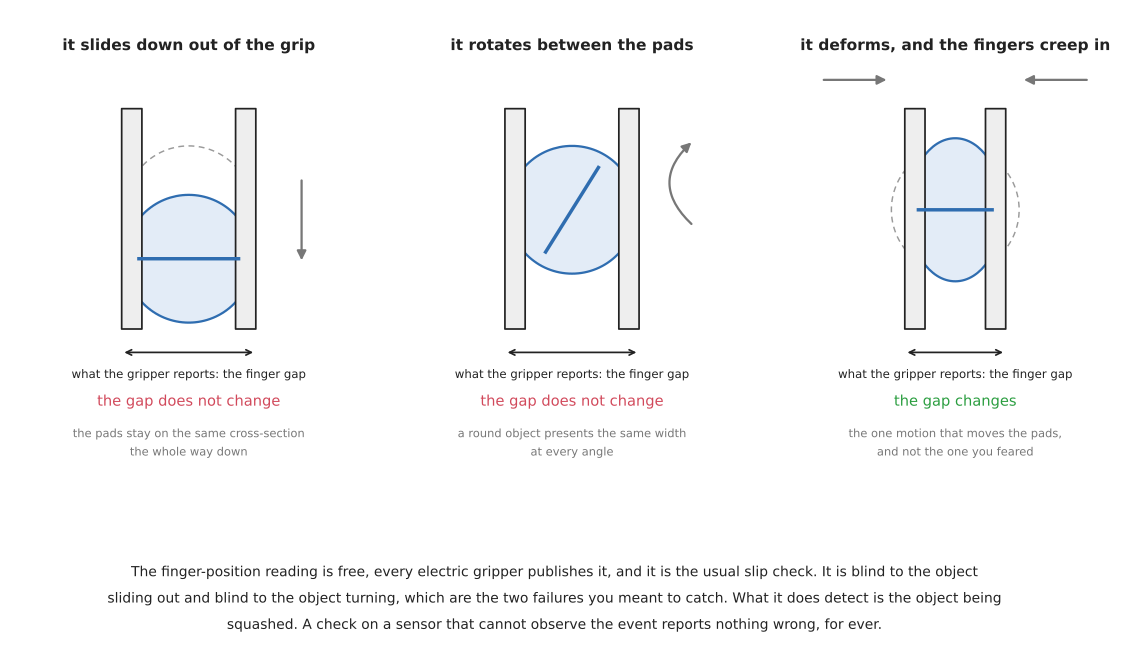
The cheapest slip detector watches the gripper's own finger position. If the fingers creep closed, the object is being squeezed out or is deforming, and something is wrong. Every electric gripper reports finger position, so this check is free.
It detects exactly one of the three ways an object moves in the fingers, and it is not the common one.
Sliding down out of the grip is what people mean by slip, and the finger gap does not change while it happens. The pads stay pressed against the same cross-section of the object the whole way. The gap changes only at the moment the object has left entirely, at which point the fingers snap shut on nothing. The gripper's own loss detector — Robotiq's transition from "stopped on contact" to "reached the requested position" — fires exactly then, which is to say after the object is on the floor.
Rotating between the pads is what an off-centre centre of mass produces, and for a round or symmetric object it changes nothing about the gap at all. The object ends up at an angle, arrives at the next station in an orientation nobody planned, and the gripper reports a perfect grip throughout.
The fingers creeping closed is the one case the gap does see. It happens when the object is deforming under the squeeze, or when a tapered object is being drawn into a narrower section. Both are real and neither is what you were worried about.
So the free check misses the two failures you care about and catches the one you did not ask about. This is the clearest example in these documents of a check on a sensor that cannot observe the event, which the perception area raises as a diagnosis-ladder rung and which keeps turning out to be the actual cause.
4.2 What does see slip#
A tactile sensor reading shear. A sensor that measures the sideways force at the contact patch, rather than just the normal force, sees the object beginning to move before it has visibly moved. This is the right instrument and it is the expensive one.
High-frequency vibration. Slipping surfaces produce a characteristic micro-vibration, and an accelerometer or a tactile sensor sampled fast enough picks it up. This detects incipient slip, which is the useful moment, because the response — squeeze a little harder — still works.
A second look. A wrist camera checking the object's pose after the lift costs one picture and catches all three motions. It is slow, it only works once the motion has finished, and it needs the object to be visible, but it requires no extra hardware at all and it is what most working cells actually do.
The wrist force sensor. The weight reading changes if the object's position relative to the wrist changes, because the torque changes even when the force does not. Watching the torque rather than the force is a sensitive test for rotation in the fingers, and it uses a sensor you probably already have for the weighing step.
4.3 The state of the open-source software, which is worth saying plainly#
There is essentially none. A search of GitHub in September 2026 for maintained slip-detection software returns nothing above single-digit star counts: the largest result in the entire category has eight stars and no licence file. The tactile field as a whole is quiet — GelSight's own SDK, gsrobotics, is the largest real piece of software in the area at around 200 stars, and it is GPL-3.0, which is a copyleft obligation if you link it into a product. Meta's digit-interface driver is CC BY-NC 4.0, which is both non-commercial and an odd choice of licence for a device driver, and the repository is archived. Its sibling simulator tacto is MIT and also archived.
So if a tutorial implies you can install slip detection, it is wrong. What exists is research code, mostly unlicensed, mostly one-off. Plan to write the check yourself against whatever sensor you have, and plan for it to be one of the four things in 4.2 rather than a library.
Five jobs slip detection suits:
- objects whose mass you could not estimate well, where the first grip is a guess
- anything that may be wet, oily or dusty, where the friction coefficient moves
- long carries, where a slow creep accumulates
- verifying a grasp before a delicate placement
- collecting evidence about why a cell drops things, which is often not what the team assumes
Five jobs it cannot do:
- see sliding or rotation, if it is a finger-gap check — section 4.1
- act fast enough to help if it only fires once the object has moved
- work on a suction gripper, which has no equivalent signal short of a vacuum pressure drop
- be bought as a maintained library, as above
- substitute for getting the grasp geometry right, which is where slip is actually prevented
5. Feedback, and what to do with it#
Everything above produces signals. This section gathers them into one place, because the pieces are spread across the sections that introduced them and the useful question — what can I actually know, and what do I do about it — is answered by the set rather than by any one of them.
5.1 Every signal you can get, and what each one settles#
Read the table as: what the signal is, what hardware it needs, the question it genuinely answers, and the question people wrongly believe it answers.
| Signal | Needs | What it settles | What it cannot tell you |
|---|---|---|---|
| finger position and gap | any electric gripper | how wide the fingers ended up, so whether the object is the width you expected | whether the object is sliding out or turning — it sees squashing only |
grasp-detected, stalled | any electric gripper | that something stopped the fingers early | what stopped them — object, tote wall or jammed finger are identical |
| commanded against achieved force | varies by product | roughly how hard you are pressing | the actual force, which depends on the object's hardness |
| wrist force, world vertical | a wrist force-torque sensor | the weight, so whether you are holding anything at all | nothing, until the wrench is rotated into the world frame |
| wrist torque | the same sensor | the centre-of-mass offset, and rotation in the fingers | which of the two changed, without the weight as well |
| contact sensors on the pads | pad sensors | that the pads touched something | anything about what the object touched — its base is not the pads |
| a tactile array | GelSight, DIGIT, a pressure grid | the shape of the contact patch, and incipient slip | where the object is, which is not a local measurement |
| a second look | a wrist camera | the object's actual pose after the lift | anything quickly, and nothing if the gripper hides it |
Two things fall out of that table and both are worth carrying.
No single signal confirms a good grasp. The one people reach for — grasp-detected — is the weakest in the set. The pair that actually settles it is the finger gap agreeing with the measurement and the wrist taking the expected weight, which is two sensors answering two different questions.
Match the signal to the event. Watch the sensor that observes the thing you care about rather than the one physically nearest to it. Setting an object down is a transfer of weight, not a touch, so the wrist settles it and the pad sensors cannot. This rule recurs throughout contact work and the perception area states it for the guarded move.
5.2 The five responses, in order of cost#
Detecting slip is only useful if there is a response, and there are four, in increasing order of cost.
Squeeze harder. The obvious one, and it is right only when the slip was caused by too little force and the object can take more. Check it against the damage cap before doing it. If the required force now exceeds the cap, this object cannot be held and the correct response is to put it down carefully and report, not to squeeze to the cap and hope.
Slow down. If the slip started when the move started, the cause is acceleration, and reducing the acceleration costs cycle time and nothing else. This is almost always the right first experiment, and it is almost never the one people try first.
Put it down and grip again. Section 6.
Give up on this object. The most underrated response. An object that has slipped twice is telling you something about its surface, its mass or its shape, and a cell that records that and moves on is more useful than one that retries indefinitely.
There is a fifth response that is worth naming because people reach for it and it is usually wrong: changing the grasp point on the fly. Once the object has moved in the fingers, you no longer know where it is, so a corrected grasp point computed from the original measurement is computed from stale data. Re-measure first or do not correct.
6. Regrasping#
Regrasping is putting the object down and picking it up again differently. It sounds like a failure recovery and it is more often a deliberate step in a plan.
Three situations need it:
The grasp that was reachable is not the grasp that is useful. The only way to pick an object off a table may be from above, and the only way to insert it may be from the side. Neither is wrong; they are different grasps and something has to convert one into the other.
The object needs to be turned over. Nothing about a two-finger grasp lets you invert an object you gripped from above without releasing it.
The first grip was wrong. The object rotated, or is held too near its end, or the fingers landed on the region you wanted to avoid.
The mechanics are straightforward and the planning is not. You need a place to put the object down where it will be stable, and an assurance that it will land in a known pose. The second of those is the hard part, and it is the reason regrasping is less common in industry than in papers: an object set down on a table settles into whichever of its stable poses it was nearest to, and predicting which one requires knowing its centre of mass and its friction. The industrial answer is a fixture — a shaped nest that admits exactly one pose — which converts an unpredictable settle into a known one for the price of a machined part.
Five jobs regrasping suits:
- converting a pick grasp into an insertion grasp
- turning an object over, which no two-finger grasp does in the hand
- recovering from a grip that is geometrically valid and functionally wrong
- reducing the requirement on the first grasp, which can then be the easy one
- any cell that already has a fixture, where the second pose is free
Five jobs it cannot do:
- work without somewhere to put the object down
- guarantee the intermediate pose, unless a fixture provides it
- fit in a tight cycle time, since it costs a full extra pick and place
- handle anything that cannot be set down — a liquid, something hot, something that must not touch a surface
- replace in-hand manipulation for continuous reorientation
7. In-hand manipulation#
Moving the object relative to the hand without putting it down. It is the thing multi-finger hands exist for, and it is worth being accurate about how available it is.
Three kinds, in increasing difficulty.
Controlled sliding, where you deliberately reduce the grip until the object slides under gravity to a new position, then grip again. This works with two fingers, it needs only force control, and it is genuinely used — letting a screwdriver slide through the fingers until the shaft is where you want it is a real technique.
Pivoting, where you loosen the grip and let the object rotate about the grasp axis under gravity, then re-tighten. Also achievable with two fingers. Also genuinely used, and the same physics as the unwanted rotation in section 4.1, deliberately.
Finger gaiting, where fingers release and re-place one at a time so the object is continuously held while being reoriented. This needs a multi-finger hand and it is the hard research problem. The literature is large and the deployed systems are approximately none.
The practical reading is that the first two are available to you today with the gripper you have, and are underused; the third is not available and you should plan around regrasping instead.
Five jobs in-hand manipulation suits:
- adjusting how far a long object protrudes from the fingers
- correcting a small rotation without a full regrasp
- tool use, where the tool must be held in a specific way to function
- reducing cycle time against regrasping, when it works
- research on multi-finger hands, which is where the third kind lives
Five jobs it cannot do:
- be planned reliably, since it depends on friction you do not know precisely
- work on anything fragile, since it involves deliberately allowing slip
- reorient an object through a large angle with two fingers
- be done without either gravity or a surface to push against
- be bought as a working capability in 2026
8. Letting go#
The last step, and the one with the most failures per line of code.
Opening the fingers is not releasing. Three mechanisms keep an object attached after the command:
- A soft or tacky surface sticks to the pad, and the object comes away with one finger and then falls.
- A form-fit grip needs the fingers to open past the object's widest point before the object is free, which is further than they opened to grip it.
- Suction does not stop when the pump does. Residual vacuum in the cup and the line persists for a noticeable time, which is exactly why vacuum grippers have a blow-off function that pushes air back through the cup. A release sequence that turns the pump off and moves away will drag the object with it.
Magnetic grippers have the same problem in a different form: residual magnetism in the part keeps it attached after the magnet is switched, and some grippers include a demagnetising pulse for this.
Contact is not support. Having lowered the object until something touched, you have not established that the object is being held up. An object whose rim has caught on the lip of a fixture registers a perfectly good contact while still hanging entirely from the gripper, and opening the fingers then drops it. Before releasing anything, confirm the weight has actually gone: the wrist should be back to reading the gripper alone. The perception area covers this and the related trap that a pad sensor cannot feel a held object's base touching down, because the sensor that observes the event is the load leaving the wrist rather than anything on the fingers.
Retract along the direction that does not disturb what you placed. Lifting straight up from a placed object is usually safe. Moving sideways at the moment the fingers open is how placed objects get knocked over, and it is a common consequence of blending the release into the next move for cycle time.
A release sequence that works, in order:
- Move down until the weight leaves the wrist, not until something touches.
- Confirm the wrist reads the gripper alone.
- Open the fingers past the object's widest point, not merely to the width you gripped at.
- For suction, apply blow-off and wait for it; for magnetic, switch and allow the demagnetising pulse.
- Retract straight along the approach direction before any other motion.
- Confirm the object is where you put it, if the cost of it not being there is higher than the cost of a picture.
Step 6 is optional in the sense that most cells skip it, and it is the difference between a cell that reports a failed placement and one that carries on stacking onto a gap.
9. Never fall back silently#
Everything above this point is a step in the business of holding something. This section and the next one are not steps. They are two rules that apply to all of the steps, and they sit at the end because each is easier to state once the whole sequence is on the page.
The rule in this section is one sentence. When a reading cannot be produced, refusing is recoverable and substituting a default is not. A default here means a number your own code invented because the real one was unavailable: a zero, a configured constant, a value left over from last time. The rest of the section is why that is worse than it sounds, the shapes it takes in contact work, and how to write code that cannot do it.
The repository has said this several times already in passing. The squeeze sequence in section 1 refuses rather than clamping to the damage cap and lifting anyway. The list of responses in section 5.2 refuses to correct a grasp point from measurements that are now stale. It is worth having once as a rule with examples, because a principle you have met in passing is not a thing you reach for at four in the afternoon with a line down.
9.1 Why a default is worse than an error#
An error stops the run. It stops it at the line where the problem was, with the name of the sensor in the message, and somebody reads that message within minutes. That is a failure that looks expensive and is cheap to diagnose.
A default does not stop the run. It hands a wrong number to the next step, and the next step has no way to tell that it is wrong, because a defaulted mass of 0.8 kg is bit-for-bit identical to a measured mass of 0.8 kg. The code downstream is not being careless when it accepts the number. There is nothing in the number to reject.
Work one through
the squeeze formula,
which is F = m * (g + a) * S / (2 * mu). Take a cell that handles two parts, one
of 0.8 kg and one of 1.2 kg, on pads with a friction coefficient of 0.4, at a
safety factor of 2, on a move slow enough to treat the acceleration as zero. The
1.2 kg part needs 1.2 * 9.81 * 2 / (2 * 0.4), which is 29.4 N per pad. Suppose
the weighing step fails on that part and the code quietly reuses the last mass it
managed to measure, 0.8 kg. It then applies 0.8 * 9.81 * 2 / (2 * 0.4), which is
19.6 N.
Nothing visible goes wrong. Two pads at 19.6 N with a coefficient of 0.4 produce
2 * 0.4 * 19.62, which is 15.7 N of friction, against a weight of
1.2 * 9.81, which is 11.8 N. The part is held, with a real safety factor of
15.7 / 11.8, which is 1.33 rather than the 2 the engineer asked for. It stays
held on the bench, it stays held through a slow demonstration, and it lets go when
the effective weight reaches 15.7 N. That happens at an upward acceleration of
15.7 / 1.2 - 9.81, which is 3.3 m/s². A collaborative arm running a production
cycle passes 3.3 m/s² without anybody thinking of it as fast.
That is the whole argument. The bug was in the weighing step, the symptom is a dropped part during a fast move weeks later, and the two are joined by a number that carried no evidence of where it came from. The failure surfaces somewhere else entirely, which is why this class of bug is expensive to diagnose and cheap to prevent. A refusal at the weighing step would have cost one aborted cycle and named the sensor.
9.2 The shapes it takes in contact work#
The same mistake wears five different faces in this area. Each is worth recognising on sight, because none of them looks like a fallback when you write it.
The code reads the force before the sensor has settled. The reading is real, the sensor is publishing, and the value is wrong because the mechanical transient has not died away. Section 1.1 puts the settling time at roughly the same third of a second as the median over 32 samples at 100 Hz, which is 0.32 s. Code that reads immediately after commanding a grip is not defaulting in the obvious sense, but it is substituting a number produced by the wrong physical process for the one it wanted, and the result is the same.
The library returns zero when the sensor is not publishing. This is the purest form. A wrist force-torque sensor that has stopped sending gives a client library nothing to return, and a great deal of code returns 0.0 N. Zero is inside the normal range. It means "nothing is being held", which is a legitimate reading with a legitimate consequence, so the release logic in section 8 will cheerfully conclude that the weight has left the wrist and open the fingers.
The code coerces a NaN to zero. NaN is short for "not a number", the
special floating-point value that arithmetic produces when there is no answer,
and its useful property is that it poisons everything it touches: any sum or mean that
includes one is also NaN. That property is the whole point of it, and a line
like if math.isnan(v): v = 0.0 throws it away. The one signal in the system that
was designed to be impossible to ignore has been converted into a plausible
measurement.
The code reuses a last-known-good value after the thing it described has moved. This is the case worked through in 9.1, and it is the most defensible-looking of the five, because the number was measured, once, from a real sensor. What has gone is not the provenance but the validity: the object it described is no longer the object in the fingers. A cached mass, a cached grasp pose and a cached friction coefficient all fail this way.
The code treats a timeout as a successful grasp. The gripper was commanded, no confirmation came back within the window, and the code continues. This is the worst of the five because it is not even a number. It is a control-flow default: the absence of an answer has been read as the answer you hoped for. The honest reading of a timeout is that the state of the gripper is unknown, and unknown is not a synonym for closed.
9.3 A default is not a fallback, and the difference is the whole rule#
The rule as stated so far would forbid a lot of good engineering, so it needs the distinction that makes it usable.
A default is a value you invented. A fallback is a different method producing a real value. Returning 0.0 N because the force sensor is silent is a default, because no instrument produced that zero. Weighing the object with the wrist sensor and, when that is unavailable, falling back to the geometric mass estimate from the perception area is a fallback, because the estimate is a real computation over real measured geometry with its own known error of about a third.
Fallbacks are fine and often good. The condition is that the record says which method produced the number. A mass that arrives at the force calculation as a bare float is indistinguishable whichever way it came; a mass that arrives as a value plus the name of the method that produced it lets the force calculation choose a larger safety factor for the estimate than for the measurement, lets the log explain a later failure, and lets somebody grep for how often the wrist sensor is actually working. The cost is one extra field. The benefit is that the chain of custody survives.
The practical test is a question. If this number turns out to be wrong later, will anything in the system be able to say where it came from? A default fails that test by construction, because it came from nowhere.
9.4 How to write code that cannot do it#
Three changes are enough, and none of them is difficult.
Raise rather than return a sentinel. A sentinel is a value chosen to mean "there is no value", such as -1 for a distance or 0.0 for a force. Every sentinel depends on every caller remembering to check for it, and callers written later by other people do not. An exception does not depend on anybody remembering. It is the difference between a convention and a mechanism, and the reason to prefer the mechanism is that the convention has no way to tell you it was forgotten.
Make the absence of a reading a distinct state rather than a value inside the
normal range. If the interface cannot raise, return something that is not a
float: an option type, a result object, a tuple of value and validity. The
property you want is that the absence cannot be arithmetic on by accident. A force
of 0.0 N can be multiplied by a friction coefficient; a None cannot, and the
TypeError it produces arrives at the line that made the mistake.
Record the method next to the number. This is the fallback discipline from 9.3 in code. Carry the provenance with the value rather than in a log line somebody has to correlate afterwards.
9.5 The one legitimate exception, and why it is narrower than it looks#
There is one case where a special value in the data is right, and it is worth stating precisely, because it is the case people cite to justify all the others. A special value is legitimate when it has a documented meaning and downstream code checks for it. Both halves are required.
The clearest worked example in robotics is REP
117, a ROS
Enhancement Proposal, which is the ROS project's form of design document. REP 117
covers distance measurements, and it defines three conditions that are not
distances: a reading too close to measure is negative infinity, a reading with no
return within range is positive infinity, and an erroneous or missing measurement
is NaN. The document is in the public domain, so there is no licence question in
quoting it.
Two things about REP 117 are the reason to cite it here rather than in the perception area. The first is that it exists at all: the meanings are written down, in a numbered document, so a special value arriving at a consumer has a definition to be read against rather than a convention to be guessed at. The second is the failure it was written to fix. REP 117 records that the previous practice was to mark an invalid point as "maximum range plus one", and it notes that data logged under that practice cannot afterwards be separated into real readings and discarded ones. That is exactly the failure this section is about, discovered in a field that had already paid for it.
REP 117 also does the thing that makes the exception safe. It publishes the check before it publishes the values, as a reference implementation, and it works through what happens to code that does not run the check. The check must exist before the value does. A special value invented without a consumer that recognises it is not an exception to the rule in this section. It is the rule, with a comment.
Five jobs refusing suits:
- any measurement that feeds a force calculation, where a wrong number becomes a wrong squeeze with no intermediate step that could notice
- the weighing step in section 1, where the whole point of the step is that the estimate might be wrong
- the release sequence in section 8, where the confirmation that the weight has gone is the only thing standing between a place and a drop
- any cell where a dropped or crushed object costs more than an aborted cycle, which is most of them
- collecting honest statistics about how often a sensor is unavailable, which a default destroys permanently
Five jobs it cannot do:
- keep a cell running when a sensor genuinely fails, which is what a real fallback method is for
- catch a reading that is wrong but in range, such as an unsettled force reading, since refusing only fires when the reading is absent
- help if the refusal is caught and swallowed by a caller, which is the same bug one level up
- substitute for a timeout, which still has to be chosen and still has to be treated as unknown rather than as failure
- tell you what to do next, which is a question about the cell and not about the reading
10. Sim-to-real for contact#
Sim-to-real is the problem of making something developed in a simulator work on the real machine. The perception area covers it in general terms in what simulation will not tell you, and the frontier area covers what research has done about it in simulation, world models and evaluation. This section is the gripping half, and it is here rather than there because grasping and holding depend on precisely the quantities that simulate worst.
The argument in one sentence is that every number deciding whether a grip holds is either a property of two things that the model stores on one of them, or a solver parameter with no physical instrument behind it. Free motion simulates honestly. Contact does not.
The simulators referred to below are the ones this repository uses or is likely to
meet: MuJoCo, Apache-2.0;
Gazebo, Apache-2.0, which delegates physics
to gz-physics, Apache-2.0, which by
default loads the DART engine, BSD-2-Clause; and
Bullet, whose LICENSE file states the
zlib licence for everything outside Extras and examples/ThirdPartyLibs. The
world file format is SDFormat, the Simulation Description Format, whose
specification is in sdformat, Apache-2.0.
10.1 Friction is a property of a pair, not of a material#
There is no such thing as the friction coefficient of steel. Friction is a property of two surfaces in contact, so steel on steel, steel on silicone and silicone on glass are three unrelated numbers, and none of them belongs to either material on its own.
Every simulator ignores this, because it has to. A model file describes one body at a time, and the body's collision shape gets one friction number. The pair coefficient is then manufactured at contact time by combining the two stored numbers, and the combining rule is a choice each engine made separately. Read the table as: the engine, the term its model file uses for a collision shape, how it turns two friction numbers into one, and how it does the same for restitution. Each row was read from the engine's own source or specification in September 2026.
| Engine | Shape term | Friction of a pair | Restitution of a pair |
|---|---|---|---|
| MuJoCo | geom | the element-wise maximum of the two, unless one shape has higher priority, in which case its numbers win outright | no coefficient of restitution exists as a parameter |
| DART, and so Gazebo by default | shape node | the minimum of the two | the product of the two |
| Bullet | collision object | the product of the two | the product of the two |
The disagreement is not academic, because the squeeze force depends on the
coefficient directly. Author a silicone pad at 0.9 and a steel part at 0.4, which
are both defensible numbers, and ask each engine what the pair coefficient is.
MuJoCo takes the maximum and says 0.9. DART takes the minimum and says 0.4. Bullet
takes the product and says 0.9 * 0.4, which is 0.36. Now put a 0.5 kg part
through F = m * (g + a) * S / (2 * mu) at a safety factor of 2 and no
acceleration. At 0.9 the answer is 0.5 * 9.81 * 2 / (2 * 0.9), which is 5.5 N.
At 0.4 it is 12.3 N. At 0.36 it is 13.6 N. The same two numbers in the same
model file produce a required squeeze that differs by a factor of 2.5 depending on
which engine read the file, and none of the three engines is wrong, because none
of them was given the quantity that actually exists.
There is a second trap underneath the first. SDFormat gives the ODE friction
coefficient mu a default of 1, and the Gazebo physics plugin reads the surface
element in a way that creates it with defaults when the model file omits it. So a
collision shape with no friction specified is simulated at a coefficient of 1.0,
which is roughly dry rubber on dry concrete and about the most generous value
anybody would defend. Nobody chose it. It is what an unmentioned surface gets, and
it is the surface most tutorial worlds are built from.
The practical reading is that a friction number tuned until a simulated grasp held is a number about that engine's combining rule, and it does not transfer to another engine, let alone to a pad.
10.2 Pressure across the pad, and why a held object turns#
A real pad touches over an area, and the pressure is not the same everywhere in it. That distribution is what decides how much torque about the contact normal the grip resists, which is to say whether the object turns in the fingers. Rotation in the fingers is the failure in section 4.1 that the finger-gap check cannot see, so this is not a detail.
Simulators reduce the patch to a small number of contact points. Each point
carries a normal force and a tangential friction force, and by default it carries
no torque about the normal at all. MuJoCo makes this legible, because its
dimensionality parameter condim defaults to 3, which its documentation describes
as a regular frictional contact generating normal and tangential force only.
Setting condim to 4 adds torsional friction, the resistance to twisting about
the contact normal, and MuJoCo's own documentation says that this "is useful for
modeling soft fingers, and can substantially improve the stability of simulated
grasping". The same documentation notes that torsional friction coefficients have
units of length, interpretable as the diameter of the contact patch.
Read that carefully, because it says two things at once. The parameter that decides whether a simulated grasp resists turning is off by default. And when you turn it on, the number it asks you for is the diameter of a contact patch you have not measured, on a pad whose pressure distribution you have no instrument for.
The consequence for anybody developing a grasp in simulation is that a simulated object which never rotates in the fingers has told you nothing. It may be held well. It may be in a model with no rotational resistance and no rotational disturbance, where nothing could have turned it either way.
10.3 Compliance and contact stiffness, whose numbers are invented#
Real surfaces do not pass through each other. Simulated ones do, slightly, and contact stiffness is the fiction that pushes them back apart: force per unit of interpenetration. It is not a material property, it is a solver parameter, and there is no instrument that measures it.
The numbers in the specifications make the point without help. SDFormat's ODE
contact block gives kp, described as the stiffness-equivalent coefficient for
contact joints, a default of 1000000000000.0, which is 10^12 newtons per metre,
and gives kd, the damping-equivalent, a default of 1.0. A stiffness of a
million million newtons per metre is a number chosen to mean "rigid", not a
measurement of anything.
The situation is worse than invented numbers, and this is the part worth checking
before you spend a day tuning. Gazebo's default physics plugin reads, from a
collision's <surface> element, the friction coefficients mu and mu2, the
slip compliances, the friction direction, the restitution coefficient, and the two
collision bitmasks. From the <contact> element it takes the bitmasks and nothing
else. kp, kd, soft_cfm, soft_erp, max_vel and min_depth are parsed
by SDFormat and never reach the solver. The file validates, no warning is
printed, and the stiffness you tuned has no effect on anything. That is an
instance of the failure in section 9, committed by
the tooling rather than by you, and it is the reason to check what your engine
consumes rather than what your file format accepts.
MuJoCo's equivalents are solref and solimp, which its documentation places in
the solver chapter rather than anywhere near materials. They are combined across a
pair by a weighted average using a solmix attribute, or by the element-wise
minimum when either is given in the direct stiffness-and-damping format. A
weighted average of two invented numbers is an invented number.
This lands directly on section 3. An admittance controller tuned against a simulated contact has been tuned against a stiffness nobody measured, and the instability that section warns about — the buzzing against a stiff surface — is precisely the behaviour that appears only when the surface is real. A compliant insertion that works in simulation and chatters on the bench has not regressed. It was never tested.
10.4 Restitution#
Restitution is how bouncy a collision is: the fraction of the approach speed that comes back as separation speed. Zero means the object stops dead, one means it leaves as fast as it arrived.
Three facts about it are worth having. DART's default restitution coefficient is
0.0 and it combines a pair by multiplication, so a single unspecified body makes
every collision it takes part in perfectly inelastic. SDFormat's bounce element
defaults its restitution coefficient to 0 as well, and pairs it with a threshold
described as the capture velocity below which the effective coefficient is 0,
defaulted to 100000; Gazebo's default physics plugin does not read that threshold
at all. And real restitution is not a constant: it falls as the impact speed
rises, and against a soft pad most of the energy goes into deforming the pad
rather than into either body's rebound.
For holding things, restitution is the least important of the parameters in this section, and it is the one most often quoted as though it were a material constant. It matters at exactly one moment, which is when the fingers close on a hard object faster than the loop can stop them, and at that moment what you actually want is a lower closing speed rather than a better bounce model.
10.5 What changes when the pad is soft#
Almost every gripper worth using has a compliant fingertip, and almost every simulation of one models the pad as rigid with a friction coefficient attached. Five things change when the pad is genuinely soft, and none of them is in that model.
The contact patch grows with the applied force, because the pad wraps further
around the object the harder it is pressed. That breaks the proportionality that
F = m * (g + a) * S / (2 * mu) assumes, in the helpful direction: the effective
holding capacity rises faster than the squeeze does. It is one of the reasons a
real silicone pad outperforms its own coefficient.
The patch resists turning, which a point contact does not, and this is the physical mechanism behind MuJoCo's remark in 10.2 about soft fingers improving grasp stability. A soft pad is the cheapest fix available for rotation in the fingers, and it does not appear in a default simulation at all.
The pad stores energy while it is squeezed and gives it back when the fingers open, which is one of the mechanisms behind objects that do not release cleanly in section 8. A rigid model releases instantaneously and always correctly.
The finger gap now reports pad compression as well as object deformation. The one thing the finger-gap check could see in section 4.1 becomes a mixture of two causes, which makes the cheapest check less informative rather than more.
The contact stiffness that matters becomes the pad's rather than the object's, and this is the single case in this section where a stiffness number is genuinely measurable: press a pad against a load cell with a dial indicator on it and read force against displacement. It is also the case where the simulator has nowhere sensible to put the answer.
10.6 What you can calibrate in an afternoon, and what you cannot#
The useful question is not whether these parameters are wrong. They are. It is which of them you can fix cheaply on real hardware and which you should stop trying to fix. Read the table as: the quantity, how you would actually measure it with equipment a small cell has, and whether an afternoon is enough.
| Quantity | How you would measure it | An afternoon? |
|---|---|---|
| friction coefficient for one pad against one object | tilt a sample of the pad material until the object slides, and take the tangent of the angle | yes, minutes per pair |
| the force the gripper actually delivers at each setting | close the fingers onto a load cell and sweep the force setting | yes |
| the mass and the centre-of-mass offset | the wrist sensor, exactly as in section 1 | yes |
| the damage cap for a kind of object | squeeze spare parts until they fail, and record the force | yes, if you can spare the parts |
| settling time and noise of the force sensor | log it at rest, then log it after a step | yes |
| pressure distribution across the pad | a tactile array, if you have one | no |
| contact stiffness and the solver parameters | nothing measures it; you fit it to observed behaviour | no |
| restitution at the speeds you care about | drop tests at several speeds, since it is not a constant | no |
| how friction moves with dust, oil, humidity and wear | the same measurement repeated over weeks | no |
The tilt test in the first row is worth spelling out because it is the highest
value hour in the list. An object resting on an inclined surface begins to slide
when the tangent of the angle reaches the friction coefficient, so the coefficient
is tan(theta) at the angle where it moves. An object that slides at 22 degrees
gives tan(22), which is 0.40. That one number replaces the most consequential
guess in the whole squeeze calculation, and it costs a protractor and an offcut of
pad material.
The pattern across the table is simple enough to use as a rule. Anything you can put a number on with a force sensor, a protractor and a stopwatch is an afternoon. Anything that is a distribution across a surface, a parameter of a solver, or a trend over time is not, and the honest response to those is to widen the safety factor rather than to keep tuning the model.
Five jobs developing contact behaviour in simulation suits:
- checking that the sequence of steps is right, such as whether the code weighs before it corrects and refuses when it should
- reachability and collision checking for the approach, which is geometry and simulates honestly
- generating labelled training data for a grasp model, where the labels are free and exact
- exercising the failure branches, because a simulator can make a sensor go silent or an object slip on demand and a real cell cannot
- teaching the system to somebody new, at no risk to the hardware or the object
Five jobs it cannot do:
- tell you the squeeze that holds a real object, because the pair coefficient is manufactured by a rule that differs between engines
- predict whether a held object turns, because the default contact carries no torque about the normal
- tune a compliance controller, because contact stiffness is a solver parameter and may not even reach the solver
- tell you the force at which anything breaks, which has to come from destroying real samples
- tell you whether a grasp survives dust, oil, a worn pad or a wet object, none of which the model contains