This page is about models that guess the hidden back of an object, because a camera only ever sees the side of an object that faces it. A shape completion model takes the points of that seen side and fills in the rest. So the page answers the three questions below, in that order. How can a model guess a side it never saw, and what does it need to learn from? And when should a robot arm trust the guess instead of simply looking again from another side?
It is for a reader who has read the chapter overview and point cloud models. You should know what a point cloud is, and that a point cloud model can turn a cloud into a list of numbers that describes its shape.
Contents#
- What it is
- What goes in and what comes out
- How it works inside
- How it is trained
- Well-known models · 5.1 AdaPoinTr, the one people still run · 5.2 PCN, the point completion network · 5.3 DeepSDF · 5.4 Occupancy Networks · 5.5 TRELLIS · 5.6 How to choose
- Where this is going
- Where to read next
1. What it is#
Since the introduction said the model guesses, this section says what it guesses from. A shape completion model takes the part of an object that a camera saw and guesses the whole object.
People do this all the time without noticing it. When you see the front of a mug, you already expect a round back, a flat bottom and an open top. This is because you have seen thousands of mugs, so you know what mugs usually look like without walking round this one. A shape completion model learns the same kind of expectation from thousands of 3D shapes.
The problem it solves is easy to see from above. A depth camera sends out its measurements in straight lines, and each line stops at the first surface it hits.
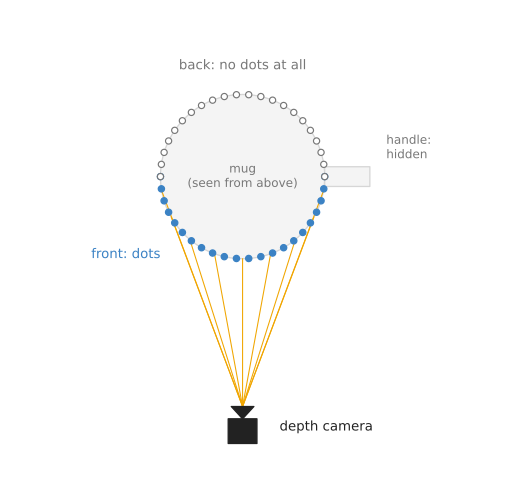
The lines from the camera reach the front of the mug, so the front has points, while the back and the handle get no points at all.
So the point cloud of a single object is never a whole object. It is a thin shell over the half that faces the camera, and often it is less than half, because other objects stand in the way.
2. What goes in and what comes out#
Because that thin shell is all the model has, what goes in is the point cloud of one object as the camera saw it. Usually a segmentation model or an outline from a seeing model has already cut this object out of the scene. Many models also want the points moved so that the middle of the seen points sits at zero, because that makes all inputs look alike in size and position.
What comes out is the whole object, written down in one of three ways that the next section describes. The simplest of the three is a new point cloud with points all over the object, front and back.
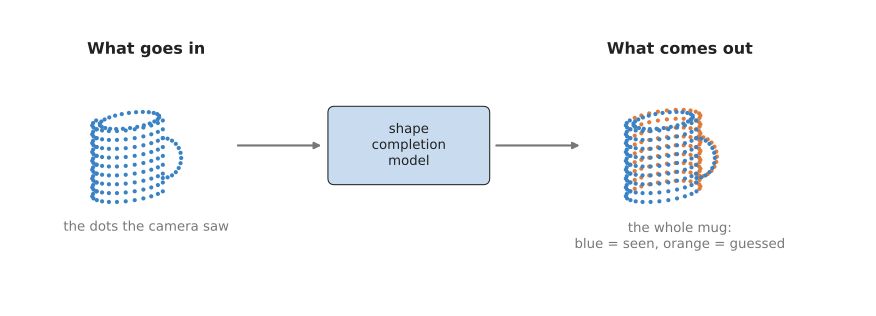
The model keeps the blue points it was given and adds the orange points it guessed for the back and the handle.
3. How it works inside#
Squeeze, then grow#
Most shape completion models have two halves, which are called the encoder and the decoder.
- The encoder reads the seen points and squeezes them into one short list of numbers. That list describes the shape only in general, such as "a round thing, about this wide, with something sticking out on one side". The encoder is usually a point cloud model like PointNet, from the previous page. The newest completion models put attention over small groups of points in its place, which is what AdaPoinTr does, and section 5.1 recommends that model.
- The decoder takes that short list and grows a whole shape from it. It has never seen the back of this object, so it only knows what backs usually look like for shapes whose front gives this list.
The squeeze in the middle is what makes this work, because the short list has no room for every point and can only hold the general shape. The decoder then draws that general shape in full, including the parts that were missing.
Many decoders work in two passes rather than one. The first pass gives a rough cloud of a few hundred points that shows the overall shape, and the second pass adds detail around each of those points. This two-pass decoder comes from PCN, and section 5.2 keeps that model in the list below for this reason. It is the clearest place to read the pattern, rather than software to install. The pattern itself is the same "coarse first, fine later" idea that PointNet++ uses in the other direction.
Three ways to write down the whole shape#
As the last section said, there are three common ways for the decoder to write down the whole object.
- A point cloud. The decoder gives a fixed number of points, such as 2,048 or 16,384, spread over the whole surface, and this is the easiest form to use with other point cloud tools. Both AdaPoinTr and PCN write their answer this way.
- A voxel grid. Space around the object is cut into small cubes, and the decoder says for each cube whether it is inside the object. A grid of 40 cubes along each side is already 64,000 cubes, so grids have to stay coarse. The 2017 robot work that section 5 opens with fills a grid like this.
- A function. The decoder becomes a small network that answers, for any spot in space, whether that spot is inside the object. Some versions answer how far the spot is from the surface instead. You can ask about as many spots as you like, so the shape has no fixed resolution, and software then finds the surface where the answer changes from inside to outside. DeepSDF answers how far the surface is and Occupancy Networks answers inside or outside, and sections 5.3 and 5.4 cover both.
The function form is the most detailed of the three. However, the point cloud form is the most common on robots, because the next step, a grasp model, usually wants points.
One model in the list below writes the shape in none of these three ways. TRELLIS gives a mesh, which is a surface made of flat triangles with a picture painted over it. It also invents a believable whole object rather than completing the points you measured, and section 5.5 explains when that difference is what you want.
4. How it is trained#
Whichever form the decoder uses, shape completion has one great advantage over other models in this book. Its training data can be made on a computer, with nobody labelling anything by hand.
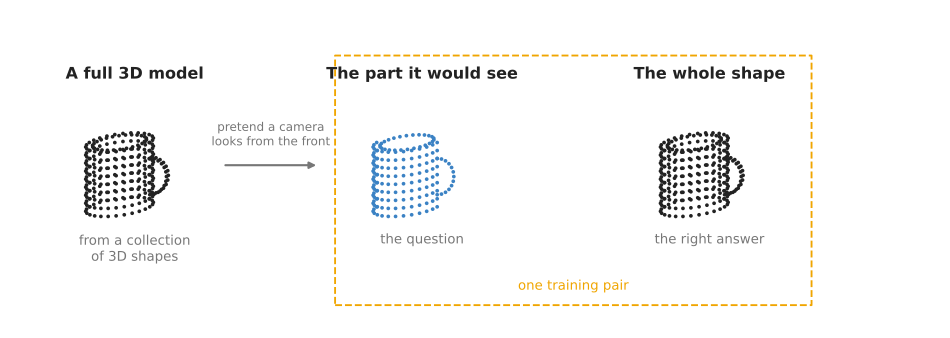
The seen part is the question and the whole shape is the right answer, and both come from the same 3D model.
The training program then does the following for each example.
- Take a full 3D model of an object from a collection such as ShapeNet, which holds many thousands of 3D models of everyday things, made by people in 3D design programs.
- Pick a random viewpoint and pretend a depth camera looks at the model from there, keeping only the points that camera would see. Those points are the question.
- Keep points from the whole surface as the right answer.
- Show the model the question, and compare its guess with the right answer.
- Adjust the model a little so that its next guess is closer.
Each 3D model gives many training pairs, one for every viewpoint, so a few thousand 3D models give hundreds of thousands of pairs.
To compare the guess with the answer, most models use a simple score called the Chamfer distance. For every guessed point, find the nearest point in the right answer and measure the distance, and then do the same the other way round for every right-answer point. Add all those distances up, and a small total means the two clouds lie on top of each other. Training makes this total as small as it can.
Before it is used on a real robot, the model is usually also trained with noise added to the question points. This is because a real depth camera never gives the clean points that a computer model does.
5. Well-known models#
This section names the models that people actually run for shape completion, and it says plainly which of them you can install. Shape completion is still a research subject more than a product, so most of what follows is code published with a paper rather than a library you can add to a project. The work that started it on robot arms is the oldest example of that. Jacob Varley and four colleagues filled a voxel grid from one depth view and planned grasps on the result in 2017 (paper), and their code is a package for the Robot Operating System (ROS) of that year with no licence file at all, so read the paper and take the idea rather than the software.
The table below has two columns. The left column names the model and says how current it is. The right column holds everything else about it: what it gives you, what it is best at, how many numbers it holds, its licence, how you obtain it, and when to pick it.
Read the part that says how you get a model with most attention, because that decides how
much work it costs you. A research repository means cloning code, compiling parts of it
with a C++ compiler, and downloading a trained file by hand. The size is how many numbers
the model holds, which most of these projects never published, so those rows say
not stated rather than a guess. Every licence was read from the project's own licence
file.
| Model | What decides it |
|---|---|
| AdaPoinTr, most used in 2026 | This model gives back a point cloud, and it is the best here at filling in one cut-out object seen from one side. It is a research repository with trained files to download, the licence is MIT, and its size is not stated. Pick it when you can clone code and you have an NVIDIA graphics card. |
| PCN, historical | This model gives back a point cloud, and it is best at explaining the coarse-then-fine decoder. Its research repository needs TensorFlow 1.12 and Python 3.5, the licence is MIT, and its size is not stated. Pick it when you are reading the paper rather than building a robot. |
| DeepSDF, historical | This model writes the shape as a function, which gives a watertight surface at any resolution. The licence is MIT, but the repository is marked read-only and the completion code was never released, and the size is not stated. Pick it when you want to understand the function form. |
| Occupancy Networks, historical | This model writes the shape as a function too, with the same watertight surface at any resolution, and its research repository has a demo that still runs. The licence is MIT and the size is not stated. Pick it when you want to try the function form today. |
| TRELLIS, worth betting on | This model gives back a mesh with texture, and it is best at inventing a whole object from one photo. The released models hold up to 2 billion numbers, the code and the weights are both MIT, and you clone the repository and take the weights from Hugging Face. Pick it when you need a complete object more than a measured one. |
5.1 AdaPoinTr, the one people still run#
AdaPoinTr is most used in 2026, because it is the only point cloud completion project in this list whose code is still changing and whose trained files you can download today.
Size not stated, an NVIDIA card with no published memory figure, MIT for the code, with no separate licence on the trained files.
PoinTr is a completion model from Tsinghua University, presented at the International Conference on Computer Vision in 2021 by Xumin Yu, Yongming Rao and five colleagues (paper). It cuts the seen cloud into small groups of points, treats each group as one item in a sequence, and runs attention over that sequence. AdaPoinTr is the same model with an extra step that scores the decoder's candidate starting points and keeps the best of them, published by the same group in 2023 (paper) and accepted by the journal IEEE Transactions on Pattern Analysis and Machine Intelligence that September. One repository, yuxumin/PoinTr, holds both models.
The one idea AdaPoinTr is built on is that filling in a shape is a translation job. A translation program reads one sentence and writes another one, and it works on whole words rather than on single letters. PoinTr treats a surface the same way. It cuts the seen cloud into small groups of nearby points, and each group becomes one item that stands for a patch of surface, the way a word stands for part of a sentence. The model reads the items of the patches the camera saw and writes the items of the patches it did not. The paper's own name for this is a "set-to-set translation problem".
That changes the squeeze described in section 3. PCN, in the next section, pushes every point through the same small network and then keeps, for each number in the result, the largest value found anywhere in the cloud, which leaves one list of numbers for the whole object. After that step nothing in the model knows which part of the object a number came from. AdaPoinTr never makes that single list. Each group of points keeps its own list, together with the position of the group's centre, and the model runs attention over those lists, which means every group's list is rewritten by looking at all the other groups' lists. So a group of points on a bowl's rim can be answered by a group on its base. The paper adds what it calls a geometry-aware block for the part attention cannot do by itself, because attention has no idea which groups are physically near each other until something tells it.
The decoder works the same way in reverse. It starts from a set of candidate starting points, called queries, and grows one patch of output points around each of them. AdaPoinTr's two additions to PoinTr both act on those queries. A small scoring part ranks a bank of candidate queries and keeps only the best of them, so an object seen as a narrow sliver is given a different set of starting points from one seen almost whole, rather than the same fixed set every time. And during training only, the model is also handed queries whose centres have been moved by random noise and asked to draw the patch at the correct centre anyway, which the authors report both shortens training and improves the result. The finished cloud is then assembled from the items the model read and the items it invented together, so the half you measured stays in the answer instead of being redrawn from a summary of itself.
What the idea costs is work per object. Attention over all those items is heavier than one largest-value step, and the answer is still a fixed number of loose points with no surface and no inside, so a collision checker cannot ask it whether a spot is inside the mug. On an arm the difference from PCN shows up on a shelf of boxes where each box is seen as a different sliver, because the amount missing changes from object to object and the scored queries change with it, while a model with one global list and a fixed decoder answers every sliver with the same number of guesses.
The obvious alternative is PCN, the model every later paper cites, and there are two reasons to pick AdaPoinTr over it. PCN's code needs TensorFlow 1.12, CUDA 9.0 and Python 3.5, so it cannot be installed beside anything else you own, while the PoinTr repository is PyTorch and still receives commits. AdaPoinTr is also the more accurate of the two in its authors' own measurement, because the repository's table of trained files reports a chamfer distance of 6.53e-3 for AdaPoinTr on the PCN benchmark against 7.26e-3 for PoinTr.
What it costs you is a day of setup. There is no package, so you clone the repository and build three pieces of CUDA code: the chamfer distance, the PointNet++ operations and a k-nearest-neighbour search. That build is what most often goes wrong, and the README links to the issue thread where people fix it. The trained files were made from ShapeNet, so the model knows ordinary household and manufactured shapes and nothing else. Scale is the second trap, because the training clouds were centred and scaled first, as DATASET.md describes, and a cloud in millimetres from a depth camera gives nonsense until you prepare it the same way.
There is no library to import, so the repository is the interface.
git clone https://github.com/yuxumin/PoinTr && cd PoinTr
pip install -r requirements.txt
bash install.sh                 # builds the chamfer distance, which needs a GPU

# Download AdaPoinTr_PCN.pth from the README's table of trained files into ckpts/.
# --pc_root takes a folder of clouds; --pc takes one file.
python tools/inference.py \
    cfgs/PCN_models/AdaPoinTr.yaml ckpts/AdaPoinTr_PCN.pth \
    --pc_root demo/ --out_pc_root inference_result/
You supply the cloud of one object, already cut out of the scene and prepared that way, and the transform that puts the completed cloud back into your robot's frame. The repository supplies the model, the trained file, and the reading and writing of cloud files.
5.2 PCN, the point completion network#
PCN is historical. It is here because its decoder is the one section 3 described, and because its benchmark is the number later papers report.
Size not stated, an NVIDIA card old enough for CUDA 9.0, MIT for the code, with no separate licence on the trained files.
PCN, short for Point Completion Network, came from Carnegie Mellon University in 2018, by Wentao Yuan, Tejas Khot, David Held, Christoph Mertz and Martial Hebert, at the International Conference on 3D Vision (paper). It was the first model to go straight from a partial cloud to a dense cloud with no voxel grid in between, and it is where the coarse-then-fine decoder comes from: the network gives a few hundred points for the overall shape, then grows a small patch of points around each of them.
The one idea PCN is built on is that the answer can be points. Before it, a network that had to produce a 3D shape produced a grid of filled and empty cells, because a grid is a fixed-size block of numbers that a convolution can write into and a list of points is not. PCN's abstract claims the opposite is possible, since the model "directly operates on raw point clouds without any structural assumption". That claim is why the output forms in section 3 are three rather than one.
Inside, the encoder is the plain squeeze. Every point goes through the same small network on its own, and then, for each number in the result, the largest value found over all the points is kept. Two things follow from that largest-value step. The order of the input points stops mattering, which it has to, because a point cloud has no order. And the whole object is now one list of numbers. The decoder then grows the cloud back in two stages. A fully connected layer turns that list into a coarse cloud that gives the overall shape. Then, for each coarse point, a step called folding takes a small flat square of grid coordinates, hands the global list to every corner of the square, and bends the square into a patch of surface sitting around that coarse point. The dense cloud is all of those patches put together.
What the two stages buy is a dense output without a huge last layer, since one fully connected layer wide enough to print the whole dense cloud would have to learn far more numbers, while folding reuses one small network for every patch. What they cost is detail. Everything the decoder knows about this particular object arrived through that one global list, so a feature the list did not keep cannot come back. A bent square is also a sheet, and a sheet has no hole in it, so the only holes a PCN answer can have are the gaps left between neighbouring patches.
On an arm that difference lands on the handle. A mug's handle is a thin bar with a hole under it, and that hole has to survive as a gap between patches of a smooth sheet, which is the hardest thing for this decoder to produce. AdaPoinTr grows each patch from an item that kept its own neighbourhood, and it is the more accurate of the two in the measurement section 5.1 quotes, which is the same point said as a number. So read PCN to see where the coarse-then-fine decoder came from, and run AdaPoinTr on the robot.
The reason to open PCN rather than AdaPoinTr is that PCN is small enough to read in an afternoon, which is the fastest way to understand what every later completion model does. The reason not to run it is the environment: the README states that the code was built with TensorFlow 1.12 and CUDA 9.0 and tested on Ubuntu 16.04 with Python 3.5, and its point distance operations are compiled against that old CUDA. A container can get that running, and the effort teaches you nothing the paper does not.
The code is in wentaoyuan/pcn, and its demo is one command.
# Inside the old TensorFlow 1.12 environment the README describes.
python3 demo.py                 # --input_path switches between the examples in demo_data
You supply that environment and the trained files linked from the README, and the demo gives back a completed cloud for one example input, which is enough to watch the coarse-then-fine decoder work.
5.3 DeepSDF#
DeepSDF is historical. It is the paper the function form in section 3 comes from, and current code that writes shapes as functions still follows it.
Size not stated, an NVIDIA card with no published memory figure, MIT for the code, and no trained files for completion were ever released.
Jeong Joon Park, Peter Florence, Julian Straub, Richard Newcombe and Steven Lovegrove published it at the Conference on Computer Vision and Pattern Recognition in 2019 (paper). The model is a small network that answers, for any point in space, how far that point is from the surface, with a minus sign when the point is inside. Each shape also gets its own short list of numbers, and completing a partial cloud means searching for the list whose surface passes through the points you measured.
That idea takes a moment to accept, and it is the strangest of the three forms in section 3, so it is worth going slowly. The model does not store the shape at all. It answers questions about the shape. You hand the network three numbers, which are a place in the room, and it hands back one number, which is how far that place is from the object's surface. The number is negative when the place is inside the object, positive when it is outside, and zero exactly on the surface. That one number is called a signed distance, and the signed distance is the whole shape: the object is the set of places where the answer is zero. Nowhere in the model is there a point of the mug, or a cell, or a triangle.
So there is no fixed output at all, and that is the real break from AdaPoinTr and PCN above. Those two decide how many points they will produce when the model is designed, and you get that many points whatever you do with them. DeepSDF produces one number per question, so you choose the detail when you ask. Ask at the corners of a coarse lattice of places for a quick answer, ask on a fine lattice for a careful one, or ask only along the line the gripper is about to travel and never look at the rest of the object. Marching cubes, the software section 3 mentioned, is what turns a lattice of answers into a surface, by finding the places where the answer crosses zero.
One more part of the design follows from having no fixed output. The network holds a whole class of shapes rather than one shape, and a single shape is picked out by a short list of numbers handed to the network beside the place. Training learns the network and one such list per training shape at the same time, and there is no encoder anywhere: no part of the model turns a point cloud into a list. That is why completing a measured cloud works as the paragraph above describes, by starting from a guessed list and nudging it until the surface it describes passes through the points you measured.
That search is what the idea costs, because a pass through PCN is one trip through a network while fitting a DeepSDF list is many trips with an adjustment after each. What it buys shows up when the arm has to check clearance. Given a completed cloud of points, asking whether the gripper fits behind the mug means guessing whether a gap between points is a hole in the object or a hole in the sampling. Given a signed distance, you ask for the number at the place a fingertip will occupy, and a positive answer is free space with the clearance already written on it.
The obvious alternative is Occupancy Networks, published the same year, which answers whether a point is inside instead of how far the surface is. Prefer a signed distance when the number itself is useful, because a collision checker can read it directly as the clearance left for the gripper, while an inside-or-outside answer reports a collision only once it has happened.
What it costs you is more than it looks. The repository facebookresearch/DeepSDF is marked read-only on GitHub, so nothing in it will be fixed, and its README states that "the current release does not include code for shape completion", which is the part this page is about. Fitting one shape is slower than a single pass through a completion network, because the README explains that shapes are reconstructed by gradient descent from a random start, which also means two runs on the same input differ slightly.
What the repository does give you is training and reconstruction for shapes that its own preprocessing has prepared.
# After the repository's preprocessing has written signed distance samples.
python reconstruct.py -e <experiment_directory>
You supply the training data, the preprocessing run, and the completion step itself. Treat this model as reading rather than as software.
5.4 Occupancy Networks#
Occupancy Networks is historical as well, but it is the one function-form repository that still produces a mesh on a current machine.
Size not stated, an NVIDIA card with no published memory figure, MIT for the code, with no separate licence on the trained file its demo downloads.
Lars Mescheder, Michael Oechsle, Michael Niemeyer, Sebastian Nowozin and Andreas Geiger published it at the Conference on Computer Vision and Pattern Recognition in 2019 (paper). The network answers, for any point in space, how likely it is that the point is inside the object, and software called marching cubes then draws the surface where that answer crosses one half.
This is the same idea as DeepSDF with one word changed. You still hand the network a place in space, but the answer is not a distance. It is a probability that the place is inside the object, so the network is a classifier, and the surface is simply the border between the places it calls inside and the places it calls outside. The paper puts it exactly that way: the 3D surface is "the continuous decision boundary of a deep neural network classifier".
Changing the answer changes two things inside. The first is that this model has an encoder and DeepSDF has none. An ordinary image network reads a single photo, or a PointNet of the kind the previous page describes reads a point cloud, and either of them produces the shape's short list of numbers in one pass, so completing a new object needs no search and no nudging. The second is the training data. A signed distance has to be measured against a watertight mesh, because somebody has to know the true distance in order to write it down, while an inside-or-outside label only needs a test of whether a place falls within the mesh. So the paper can simply scatter places through the box around each training object and label each one.
Getting a surface out is arranged around the yes-or-no answer too. The repository asks at the corners of a coarse lattice first, marks only the cells whose corners disagree with each other, splits each of those cells into eight, asks again at the new corners, and repeats. Detail is therefore paid for only where there is surface, which is how a closed mesh comes out at a fine resolution without a fine grid ever being held in memory. The abstract's claim of a shape "at infinite resolution without excessive memory footprint" is this procedure.
What the yes-or-no answer costs is the number itself. A probability near one half says that a surface is near the place you asked about, but not how far away it is, so a collision test gets a verdict rather than a clearance and has to probe several places to work out the distance. The threshold is also yours to choose, and the paper says plainly that it sets the thickness of the extracted surface, so the same trained model gives a slightly fatter or thinner mug depending on a number you picked. On an arm, choose this model over DeepSDF when you want a watertight mesh of the hidden side today, because its demo produces one and DeepSDF's completion code was never published, and choose DeepSDF when the distance itself is the thing you were going to compute anyway.
The obvious alternative is DeepSDF, and the practical reason to choose this one is that its demo runs. The second is the training data, because a signed distance function has to be trained against true distances computed from watertight meshes, while this model needs only points labelled inside or outside.
What it costs you is an environment of its own, because the repository pins its dependencies in a conda file from 2019 and shares nothing with the rest of your work. One of its extensions needs CUDA, and the README tells you to comment that extension out when the build fails, which is a fair measure of the age of the code.
The code is in autonomousvision/occupancy_networks, and three commands take you from a clone to a mesh.
git clone https://github.com/autonomousvision/occupancy_networks
cd occupancy_networks
conda env create -f environment.yaml && conda activate mesh_funcspace
python setup.py build_ext --inplace     # comment out the dmc entries if this fails
python generate.py configs/demo.yaml    # writes meshes into demo/generation
You supply the conda environment and, past the demo, the dataset. The last command writes a folder of meshes made from the example inputs, which is the quickest way to see the function form produce a watertight surface.
5.5 TRELLIS#
TRELLIS is worth betting on, because the attention on guessing hidden geometry has moved from completion networks to generative 3D models, and TRELLIS is the one of those with a licence a company can use.
Size l, a big card, MIT for both the code and the weights.
Microsoft published TRELLIS in December 2024 (paper). It takes one photo, or a text prompt, and generates a whole object with texture, as a mesh, a set of 3D Gaussians, or a radiance field. Its README states that the released models were trained on 500,000 3D objects. It is not a completion model, and that difference decides when you use it: it does not take your point cloud, so what it returns is not lined up with the points you measured and has no real-world size. Use it when you want a believable whole object, such as an asset for a simulator, and not when you need the back of this mug in metres relative to your gripper.
The one idea TRELLIS is built on is about where to put the numbers. A grid laid over a whole object is mostly empty, because a surface is a thin skin and the air around it and the middle inside it carry nothing. So TRELLIS keeps only those cells of a coarse 3D grid that the object actually touches, and gives each kept cell a short list of numbers describing the surface inside it. The paper calls the pair of those things a structured latent, where the structure is which cells are occupied and the latent is the list in each occupied cell.
What flows through the model is therefore unlike anything else on this page. The four models above are handed your measurement and asked to extend it. TRELLIS is handed a photo or a sentence and asked to produce a structured latent out of random numbers, in two goes: first which cells are occupied, then the list for each occupied cell. The machinery for that is a rectified flow transformer, which is a network trained to move a set of random numbers, a step at a time, towards numbers that look like a real object's. Because each cell carries its own list, and those lists were built from the features of an image model looking at objects from many sides, the same latent can be read out three ways, which is why the outputs include a mesh, a set of 3D Gaussians and a radiance field.
Generating rather than completing costs more than the alignment the paragraph above mentions. Two runs from different random starts give two different backs, and the mistakes look confident: a generated mug is a clean mug rather than a blurry one, so a wrong back has nothing about it that says it is wrong. On an arm the place this changes the result is an object that no completion model has ever seen. AdaPoinTr knows the household and manufactured shapes of its training set and little else, while TRELLIS was trained on half a million objects and will produce something plausible for an odd machined part from one photo. It will also produce something plausible when it has no idea, which is the same sentence read the other way round.
The obvious alternative is Tencent's Hunyuan3D 2.0, which is at least as good at meshes and more widely used for 3D art. The reason to pick TRELLIS is the licence. The Hunyuan3D 2.0 Community License states on its third line that the agreement does not apply in the European Union, the United Kingdom and South Korea, and grants its rights for the rest of the world only. TRELLIS is MIT in its repository and on its weights page, so a team in London can use it and cannot use the other.
What it costs you beyond the card is the platform. The README says the code is tested
only on Linux and compiles its submodules against CUDA 11.8 or 12.2, so a Mac or a
Windows machine is not a supported place to run it. The library is the repository's own
trellis package, and the code below is the short version of its example.py.
import os
os.environ["SPCONV_ALGO"] = "native"    # skips a benchmarking step at start-up

from PIL import Image
from trellis.pipelines import TrellisImageTo3DPipeline
from trellis.utils import postprocessing_utils

pipeline = TrellisImageTo3DPipeline.from_pretrained("microsoft/TRELLIS-image-large")
pipeline.cuda()

image = Image.open("mug_from_the_front.png")    # one photo, background removed
outputs = pipeline.run(image, seed=1)

# A textured mesh, written to a .glb file a planner or a simulator can load.
glb = postprocessing_utils.to_glb(outputs["gaussian"][0], outputs["mesh"][0])
glb.export("mug.glb")
You supply a photo with the object cut out from its background, and then the step nobody can do for you: scaling the mesh to real size and lining it up with the points you did measure. Iterative closest point is the usual tool for that, and until it is done the mesh is a picture rather than a measurement.
5.6 How to choose#
If you need the hidden side of a single cut-out object of an ordinary kind, and you have an NVIDIA graphics card and a day for the setup, clone the PoinTr repository and run the AdaPoinTr trained file. It is the only choice here that is both current and usable, and four things change it.
If you cannot run research code at all, there is no learned option, and the honest fallback is Poisson surface reconstruction in Open3D. It stretches a surface over the points you already have, so it closes small holes and gives a watertight mesh, but it cannot invent the back of the mug, because no point there ever suggested a surface. The Open3D tutorial describes the call below.
import open3d as o3d

seen = o3d.io.read_point_cloud("mug_one_view.ply")
seen.estimate_normals()     # Poisson has to know which way each surface faces

mesh, _ = o3d.geometry.TriangleMesh.create_from_point_cloud_poisson(seen, depth=9)
filled = mesh.sample_points_uniformly(number_of_points=2048)
o3d.io.write_point_cloud("mug_filled.ply", filled)
If the whole shape is needed for collision checking rather than for placing fingers, prefer the function form, because it gives a closed surface. Start with Occupancy Networks, since its demo runs, and read DeepSDF for the signed distance idea.
If what you want is a complete textured object rather than the measured back of this one, use TRELLIS.
If the camera can move, move it, because a measured back always beats a guessed one.
Whichever you pick, measure it with the chamfer distance from section 4 before you trust
it, because that is the number every paper above reports and you can compute it on your
own objects. PyTorch3D provides it as
chamfer_distance, and
it needs no graphics card for clouds of a few thousand points.
6. Where this is going#
This section is about the next few years of guessing hidden geometry. It was written on 4 October 2026, and every link in it was checked on that day. It sorts claims the way Book 3's frontier chapter does in its section on four kinds of claim. A demonstration is a recording of something working once, under conditions the publisher chose. A product announcement says that a thing can be bought or downloaded, which you can go and check. A research result is a measured number on a stated task. A projection is a statement about a date that has not arrived, and it is the weakest kind. Where a sentence below is my own judgement rather than a report of somebody else's claim, it says so.
How it got here#
The question being asked changed. The first systems took the points you had measured and extended them, which is what section 1 describes and what AdaPoinTr still does. The systems that get the attention now are not handed your points at all. They are handed one photo, asked what object this is, and they draw the whole thing, which is what TRELLIS in section 5.5 does. That change matters because the two kinds of system are judged by different people. A completion network is judged by roboticists on how close its surface comes to the real one, and a generative 3D model is judged by artists and game studios on whether the result is usable, so the second kind has far more paying users behind it.
Where it is used in industry today#
Almost nowhere, and the plain version of that sentence is worth more than a paragraph of hedging. I could not find a robot product whose own documentation says it runs a learned shape completion model, and nobody appears to have published one. Everything in this section is therefore about the generation side, which does have products.
Generated 3D objects are sold as a service, and the customer is the graphics industry rather than robotics. Meshy is the clearest example. Its own documentation describes a platform that "transforms text descriptions, 2D images, and conversational prompts into production-ready 3D assets", names Meshy 7 as its newest model, exports GLB, FBX, OBJ, STL, USDZ and 3MF files, and offers "a free plan with 100 credits per month". That is a product announcement, which you can check by signing up. Nothing in that documentation is about robots.
The downloadable side is the part that actually reaches a robotics team, and three releases define it. Microsoft's TRELLIS.2 is a 4-billion-parameter image-to-3D model whose weights are MIT-licensed, and its README states about 3 seconds for a 512-resolution asset on an H100 graphics card and that "an NVIDIA GPU with at least 24GB of memory is necessary". Meta's SAM 3D Objects "reconstructs full 3D shape geometry, texture, and layout from a single image, excelling in real-world scenarios with occlusion and clutter"; its model card dates the checkpoints to 19 November 2025, and the repository carries the SAM License, which does permit commercial use but has to be passed on unchanged with anything you redistribute. Tencent's Hunyuan3D 2.1 is the third, under the community licence that section 5.5 warns about, and its weights have not been updated since June 2025.
How much these are used is checkable rather than a matter of opinion. Hugging Face's image-to-3D listing is ranked by downloads, and on the day this was written its programming interface reported 2.13 million downloads in the previous thirty days for the original TRELLIS weights and 1.74 million for TRELLIS.2. Those two numbers are the strongest evidence on this page that generated 3D has an audience and that completion does not.
What is being worked on right now#
The liveliest use of generated objects in robotics is not perception on the robot. It is filling a simulator. ZeroBot, from September 2026, is the clearest case. Given one view of an object and a goal pose for it, ZeroBot uses an image-to-3D model to make a complete mesh, puts that mesh in a simulator, and learns the task by trial and error there, with no human demonstrations and no pretrained policy. Its authors report an 87 per cent success rate on real tasks with an average training time of 119 seconds. That is a research result on the authors' own tasks rather than a product, and the training time is the number to read carefully, because it counts the learning and not the generation that came before it. Scene-SAM3D, from July 2026, takes the same idea from one object to a whole scene by choosing a few complementary views and fusing them, and it needs no fine-tuning. Book 3's frontier chapter covers the wider version of this under real-to-sim.
The second front is making a generated object something a physics engine can use. A mesh is a surface and nothing else. It has no mass, no friction and no joints, so a drawer in it does not open. PhysX-Omni, from May 2026, attacks that directly by generating what its authors call simulation-ready assets for rigid, deformable and articulated objects, and by publishing a dataset called PhysXVerse to train on. Book 3's frontier chapter makes the same complaint about reconstructed scenes, in the sentence that "a splat reconstruction has no mass, no friction and no articulation". Until that gap closes, a generated object is scenery rather than something to practise against.
The third front is completion aimed at the grasp instead of at the object. TOSC, from January 2026, argues that completing the whole shape is the wrong task when the camera saw very little of it, and completes only the regions the fingers are likely to touch, guided by what pretrained models believe the object is for. That is a research result, and I did not find a code release for it.
The fourth front is using a sense other than the camera. ShapeGrasp, from May 2026, completes the shape and grasps at the same time using touch as well as vision, and a comparison of contact modes for building a shape from touch appeared in February 2026. Touch is the only sense that can measure the far side of an object without moving the camera around it.
What is still unsolved#
Three problems have resisted the whole period this page covers.
The first is that a generated object has no size and no place. TRELLIS returns an object in its own coordinates, as section 5.5 explains. SAM 3D Objects predicts layout as well as shape, which is a real step, but layout is relative to the camera that took the photo rather than to your gripper, so the alignment work still has to be done by you. Nobody has published a generative model that returns an object already in metres in a robot's own frame.
The second is that these models do not know when they are wrong, and a confident wrong back is worse than a blurry one. Papers that measure this exist, including one that predicts which regions of a completion are uncertain and one that uses that uncertainty to choose better grasps, and neither has turned into something people install. Until a completion comes back with a number a planner can compare against a threshold, the planner has to treat a guess and a measurement in the same way, and that is the wrong thing to do.
The third is that the measure does not match the job. Chamfer distance, from section 4, scores the whole surface, including the parts no finger will ever touch. TARGO is the benchmark that asks the question a roboticist cares about, which is grasping under occlusion, and its authors report that even the best grasp model they tested gets worse as the occlusion level rises. No benchmark named on this page scores a completion by whether the grasp held afterwards.
The next two to three years#
Five expectations follow, each with its reason, because the reason is the part worth reading. All five are my own judgement unless a sentence says otherwise.
I expect the first place a robotics team uses 3D generation to be a simulator rather than a robot. The reason is that the two faults which make a generated mesh unusable at run time do not matter offline. A mesh with no metric size is fine if you are going to scale it by hand once and then train against it ten thousand times, and a model that gives two different backs from two different random starts is fine if you wanted variety in your training scenes anyway. On top of that, the asset pipeline is already paid for by games and online shops, so robotics gets it for the cost of a download. ZeroBot is a measured result in exactly this shape, and the large simulated corpora that Book 3 describes under simulation benchmarks already ship thousands of 3D objects, so the appetite is established.
I expect the licence rather than the accuracy to decide which generator teams build on, and this part is not a projection, because the licence files say it today. TRELLIS and TRELLIS.2 are MIT for both code and weights. Hunyuan3D's community licence does not apply in the European Union, the United Kingdom and South Korea. The SAM License permits commercial use but binds anyone you pass the weights to. A team in London can ship on one of those and not on another, and that decision gets made before anybody compares output quality.
I expect completion aimed at the contact region to displace completion aimed at the whole object. The reason is the third unsolved problem above: a network trained to minimise error over the whole surface spends its capacity on parts of the object that do not affect the outcome. TOSC is the first paper I have seen to state that in those words, so this is a direction with one clear argument behind it rather than an established trend, and it could stay a single paper.
I expect touch and a second camera view to be folded into completion rather than offered as alternatives to it. The reason is that an arm can move and can feel, so the cheapest repair for a bad guess is a measurement, and the expensive part is knowing which guess needs repairing. That makes this expectation depend on the second unsolved problem: a completion that cannot say where it is unsure cannot tell the arm where to look or where to touch. The two move together, and if calibrated uncertainty does not arrive then this does not either.
What I do not expect, within three years, is a robot product whose documentation names shape completion as a stage. The reason is that it has to beat moving the camera, and moving the camera keeps getting cheaper as reconstruction gets faster, which is the trend Book 3 reports under real-to-sim above. Section 5.6 already gives that advice for today, and I think it survives this whole list.#
7. Where to read next#
- Scene reconstruction is the next page, and it covers the "look again" route in full, by building a whole scene from many photos.
- Point cloud models explains the encoder that most completion models start with.
- Six-DOF grasps shows the grasp models that take the completed points.
- Models that grasp in Book 3 goes deeper into grasp models and the data they need.