This chapter is about neural network models that work in three dimensions. The last chapter, seeing models, worked on flat pictures, while the models in this chapter work on 3D points and whole scenes instead. So this page says what they are for, which question each kind answers for a robot arm, and how they connect to the rest of the book.
It is for a reader who has read the first chapter, what models are. You should already know that a model takes some numbers in and gives some numbers out after learning from examples. You do not need to know anything about 3D maths. This is because the page starts by explaining the one new idea the whole chapter uses, which is the point cloud.
Contents#
- What a point cloud is
- What 3D models are for
- The question they answer
- The four kinds in this chapter
- Comparing the four kinds
- How 3D models connect to the other chapters
- How this chapter writes size, machine and licence
- Where to read next
- Using it in Python
1. What a point cloud is#
Since the whole chapter rests on this one idea, it is worth building it up from a normal photo. A photo is a flat grid of small coloured squares called pixels, and each pixel says what colour something is without saying how far away that thing is. So a photo of a mug on a table tells you that the mug is there, but not whether it is 30 cm away or 3 m away.
A depth camera is a camera that also measures distance, because for each pixel it reports how far away the surface in that pixel is. Book 2 explains how depth cameras do this, in the sensors document.
Once you know the direction of a pixel and the distance along it, you know one spot in the room. That spot can be written as three numbers:
x, how far it is to the side,y, how far it is forwards,z, how high it is.
These three numbers together are called a point. Do this for every pixel and you get a large collection of points, which is called a point cloud. The word "cloud" only means that the points are scattered in space, with no fixed order and no lines joining them.
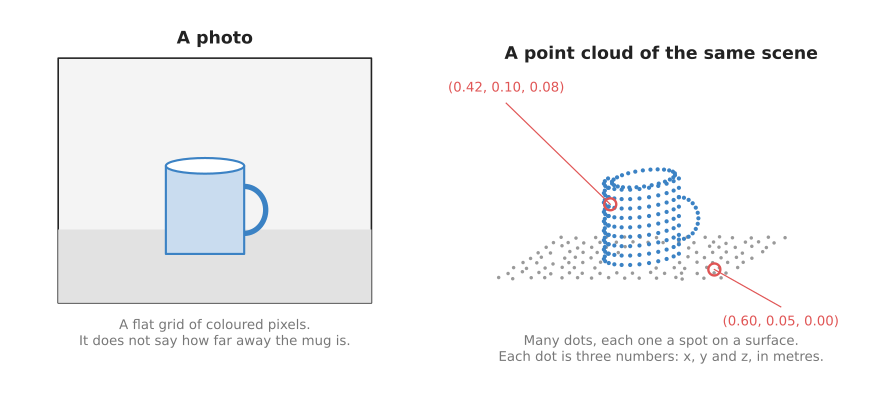
The photo on the left is a grid of colours. The point cloud on the right is a list of places, and each place is three numbers in metres.
A point cloud has three features that matter for the rest of this chapter.
- It only has points where the camera could see a surface, so the back of the mug has no points because the camera never saw it.
- The points have no order, which means point number 1 in the list could be on the mug or on the table. Swapping two rows of the list changes nothing about the scene.
- A typical depth camera gives tens of thousands of points or more in one shot. The camera in Book 2's project gives one point per pixel, and it has 76,800 pixels (the one-box project).
A robot arm wants points more than it wants pixels, because a pixel is only a direction while a point is a place. So the gripper has to go to a place, not to a direction.
2. What 3D models are for#
Now that a point cloud has a meaning, the models that work on one can be defined. A 3D model in this book is a neural network that takes 3D information in, or gives 3D information out, or both. That information is usually a point cloud, or a set of photos taken from known places around a scene.
The programmed methods in Book 2 already do some 3D work without any learning. For example, they can find the flat table in a point cloud and cut it away. They can also group the points that are left into separate objects (programmed methods, section 1.6). Those methods only use the distances between points, and nothing else. So they cannot say that a group of points is a mug, or that a part of it is the handle. They also cannot say what the side facing away from the camera looks like.
3D models fill those gaps, because they learn from many examples what 3D shapes usually look like. Then they use that to name points, guess hidden parts, rebuild a whole scene, or attach meaning to places in 3D.
3. The question they answer#
Those four jobs sound different, but for a robot arm every model in this chapter answers some version of one question:
What is where, in 3D, around the arm, including the parts I cannot see yet?
The arm needs the answer in 3D because its gripper moves in 3D. So a box drawn around a mug in a photo is not enough to pick the mug up. The arm also needs to know how far away the mug is, how wide it is, and where its handle points.
4. The four kinds in this chapter#
This chapter has four pages after this one, and each of them answers a different version of that question. The picture below shows what each kind answers, all about the same mug.
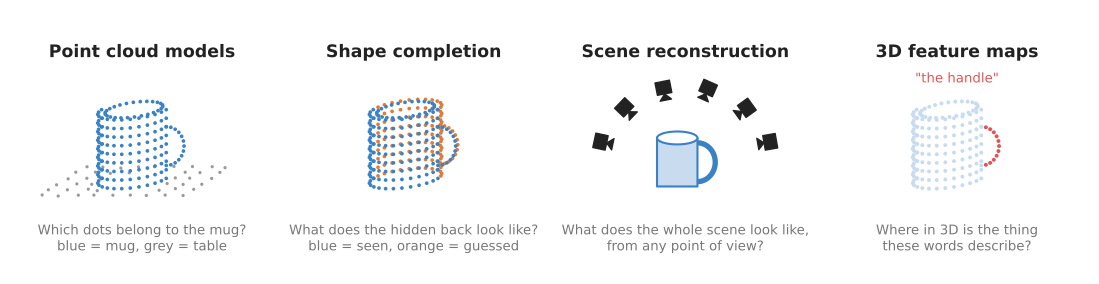
Each panel shows one kind of model and the question it answers about the same mug.
- Point cloud models take a point cloud and say what it is, or which object each point belongs to, and PointNet is the best-known one.
- Shape completion takes the points of the side the camera saw and guesses the hidden back of the object.
- Scene reconstruction takes many photos from known places and builds a whole 3D scene that can be viewed from any direction, and NeRF and Gaussian splatting are the two best-known methods.
- 3D feature maps build a 3D map in which every point also carries meaning, so that the arm can be asked where the handle is in plain words.
Most used, and also used#
The pages of this chapter are in two groups, because some of the four kinds come up far more often than the others. The first group, most used, holds point cloud models and scene reconstruction. Point cloud models work on what a depth camera gives you directly, so they are the ones most arm projects meet first. Scene reconstruction, instead, is used widely to build a 3D copy of a work cell or an object. The second group, also used, holds shape completion and 3D feature maps. Those two solve real problems, but fewer projects need them, and many of the models are still research code.
5. Comparing the four kinds#
Now that all four kinds have been named, the table below puts them side by side. Read each row across to see what goes into that kind of model, what comes out, and how it is usually trained.
| Kind | What goes in | What comes out | How it is trained |
|---|---|---|---|
| Point cloud models | one point cloud | a name for the cloud, or a name for every point | once, on many labelled point clouds |
| Shape completion | the points of the seen side | the points of the whole object | once, on many complete 3D shapes |
| Scene reconstruction | many photos, and where each was taken | a 3D scene you can view from anywhere | fitted again for every new scene |
| 3D feature maps | photos or point clouds, and a trained image model | a 3D map where each point carries meaning | usually no new training; it borrows an image model |
The next table says when a robot arm reaches for each kind, so read it as "if you need this, then use that".
| If the arm needs to... | use |
|---|---|
| know which points are the mug and which are the table | a point cloud model |
| grasp an object from a side the camera cannot see | shape completion |
| see a shiny or see-through object that a depth camera misses | scene reconstruction |
| find "the red cup" or "the handle" from a spoken or typed request | a 3D feature map |
The last column of the first table matters more than it looks. Point cloud models and shape completion are trained once and then used on new objects, but scene reconstruction is different. A NeRF or a Gaussian splat is fitted to one scene, so it has to be fitted again when the scene changes, and the scene reconstruction page explains why.
6. How 3D models connect to the other chapters#
Since 3D models are only one family, it helps to see where they sit. The book lists seven families of model, and each one has a one-line job.
- Seeing models turn a picture into names, boxes, outlines, poses or depth.
- 3D models work on 3D points and whole scenes instead of flat pictures.
- Grasp models decide where and how to hold an object.
- Movement models decide how the arm should move, moment by moment.
- Language models understand words, and connect words to pictures and actions.
- World models predict what will happen next if the arm does something.
- Touch and body models make sense of touch, force and the arm's own body.
3D models sit between seeing and grasping, so they take in from one side and give out to the other.
- They take from seeing models, because a depth model from depth from pictures can turn a plain photo into a point cloud, and an outline from segmentation can pick out which points belong to one object. 3D feature maps lift the numbers of an open-vocabulary model into 3D.
- They give to grasp models, since most grasp models that choose a full 3D grasp take a point cloud as input, and many of them are built on a point cloud model inside. See six-DOF grasps.
- They give to movement models, because some policies take a point cloud of the scene as their input instead of a photo.
- They give to language models, and a 3D feature map is one way to turn "the cup on the left" into a place the arm can reach.
- World models can predict how points will move when the arm pushes something, which is the same kind of input used to look ahead.
The map of models shows all seven families on one page.
7. How this chapter writes size, machine and licence#
Every model section in this chapter says three things about what a model costs you, and it says them in the same short words rather than explaining them again each time. This section is where those words are defined. The same three scales are used in every chapter of this book, so you only have to learn them once.
Size is the number of parameters, which is the count of numbers the network learned during training. It is a rough guide to how capable a model is and to how much memory it needs, and nothing more: a well-trained small model beats a badly trained large one.
| Size | Parameters |
|---|---|
| xs | under 10 million |
| s | 10 to 100 million |
| m | 100 million to 1 billion |
| l | 1 to 10 billion |
| xl | more than 10 billion |
Machine is what you need to run the model once, not to train it. Training needs more, usually several times more, and each model section says so where it matters.
| Machine | What it needs |
|---|---|
| laptop | an ordinary processor, with no graphics card |
| small card | a graphics card with less than 8 GB |
| big card | a graphics card with 8 to 24 GB |
| workstation | a graphics card with 24 to 80 GB |
| cluster | more than one card of 80 GB |
Licence is given as the name alone, such as Apache-2.0 or MIT. Two things about that name matter more than the name itself. The code licence and the weights licence are often different, so a model with permissive code can still forbid you from selling what you build, and each model section says when the two differ. And a name is not legal advice: read the project's own licence file before you ship anything, because this book records what those files said on the day they were read.
8. Where to read next#
Start with point cloud models, because the other three pages in this chapter build on its idea of a model that reads points directly.
If you want the deeper, non-learned side of 3D first, Book 2 covers it:
- The one-box project makes a point cloud from a depth camera, step by step.
- Programmed methods finds objects in a point cloud without any model at all.
- Models that measure compares 3D reconstruction methods by how accurate they are, and lists their licences.
9. Using it in Python#
Section 1 explained the point cloud, and every model in this chapter takes one or produces one. So before any of those models can run, something has to make a point cloud out of what the camera gives you. This section shows that step in Python, because it is the one piece of code that all four of the following pages assume you already have.
Open3D is the library for it. It is a package for reading, building and handling 3D data, and it is used here rather than writing the geometry yourself because the projection below is fiddly to get right and Open3D's version is also much faster.
import numpy as np
import open3d as o3d

# A depth picture: one distance per pixel, held as whole millimetres.
depth_mm = np.load("depth.npy").astype(np.uint16)
height, width = depth_mm.shape

# The camera's lens numbers, from calibrating it once: two focal lengths and the
# pixel the lens looks straight through.
intrinsic = o3d.camera.PinholeCameraIntrinsic(width, height,
                                              615.0, 615.0, 320.0, 240.0)

cloud = o3d.geometry.PointCloud.create_from_depth_image(
    o3d.geometry.Image(depth_mm),
    intrinsic,
    depth_scale=1000.0,   # how many of the stored units make one metre
    depth_trunc=3.0,      # throw away anything further away than 3 metres
)
cloud = cloud.voxel_down_sample(voxel_size=0.005)

points = np.asarray(cloud.points)   # (N, 3): x, y and z of every point, in metres
print(points.shape, points.min(axis=0), points.max(axis=0))
What the library gives you out of the box is the whole of that conversion, plus the steps that usually follow it. Open3D reads and writes the common 3D file formats, thins a cloud out by voxel, finds the table as a flat plane, splits the rest into separate clumps, estimates the direction each surface faces, and lines two clouds up with each other. None of that is a neural network, which is the point worth taking from this section: Open3D is the plumbing that every learned model in this chapter sits on top of, and a great deal of real 3D robot code is nothing but this.
What you still have to write yourself is the camera's numbers and the meaning. The
six numbers in PinholeCameraIntrinsic come from calibrating your own camera, and
the cloud that comes out is in the camera's frame, so moving it into the arm's frame
is your code. Beyond that, a point cloud on its own says only where surfaces are,
and turning "where surfaces are" into "that is the mug and here is where to hold
it" is what the rest of this chapter is about.
What you have to decide is how much detail to keep. The voxel_size above keeps one
point per five-millimetre cube, which cuts a 300,000-point camera frame down to a
size a model can read, and a larger value is faster but loses small features such as
a thin handle. You also decide depth_trunc, because points from the far wall are
usually noise for a table-top task. These two numbers change the answer of every
model that follows, so they are worth setting deliberately rather than by default.