This chapter is about models that move a robot arm. The earlier chapters of this book were about models that look at a picture and say what is in it, or where to hold an object. However, none of those models moves the arm itself. The models in this chapter go one step further, because they decide how the arm should move, moment by moment.
This page is the overview of the chapter, so it answers four questions before the later pages go into detail. It says what a movement model is for, why people call it a policy, and what kinds of movement model there are. It also says how this kind of model connects to the other kinds in this book.
It is for a reader who has read what a model is and how a model learns. You do not need anything else, because every new word is explained where it first appears.
Contents#
- What a movement model is for
- Why a movement model is called a policy
- What a policy takes over, and what it leaves alone
- The pages in this chapter
- The kinds side by side
- How movement models connect to the other kinds
- How this chapter writes size, machine and licence
- Where to read next
- Using it in Python
1. What a movement model is for#
The introduction said that a movement model decides how the arm should move, moment by moment. So this section explains what that means in practice, and it starts with a job that people do every day.
Think about picking up a mug from a table, because a person does that without planning every tiny movement of the hand in advance. Instead they look, move the hand a little, look again, and move a little more. When the hand gets close they slow down, and if the mug slides they follow it. So the movement is made of many small decisions, and each one uses what the person can see at that moment.
A movement model does the same job for a robot arm. So the question it answers at every moment is this:
Given what the camera sees now, and where the joints are now, what should the arm do next?
The answer is a small move, such as "turn joint 1 by 2 degrees and joint 2 by minus 1 degree, and keep the gripper open". The arm makes that move, and then the model looks again and chooses the next one. So the whole loop repeats many times a second until the job is done.
This is different from the other models in this book, because none of those models produces motion. A seeing model says "there is a mug here", and a grasp model says "hold the mug by its handle, with the gripper turned this way". But neither of those answers moves the arm, so a movement model is the one that actually produces the motion.
2. Why a movement model is called a policy#
The previous section described what a movement model does, and people who work on robot learning usually call such a model a policy. You will see this word in almost every paper and code library in this field, so it is worth knowing where it comes from.
In everyday life, a policy is a rule that says what to do in each situation. For example, a shop might have a returns policy: if the item is unused and you have the receipt, you get your money back. Because it only looks at the situation, the rule does not care who you are.
In robot learning, a policy is the same kind of thing: a rule that looks at the situation and gives the action to take. But nobody writes this rule by hand, since the rule is a trained neural network that learned what to do from examples, or from practice.
Two more words go with it, and both of them come back on every later page of this chapter.
- An observation is what the policy is given about the situation, and for an arm it is usually one or more camera pictures plus the current joint angles. A joint angle is how far a joint is turned, read from a sensor in the joint.
- An action is what the policy gives back, and for an arm it is usually the joint angles the arm should move to next, or how far the gripper should move, plus whether the gripper should open or close.
So a policy turns an observation into an action, and it does that again and again. The page actions and observations looks at these numbers in detail, and the picture below shows the loop they run in.
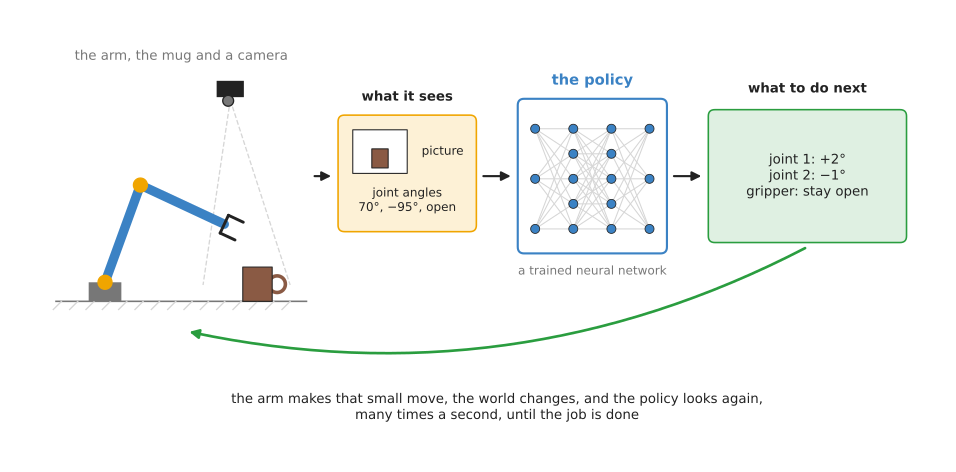
The camera and the joint sensors give the observation. Then the policy turns it into the next small move, the arm makes that move, and the policy looks again.
How often does this loop run on a real robot? The policies in this chapter usually choose a new action somewhere between 10 and 50 times a second. But the motors run much faster than that, so there is always ordinary control code underneath the policy. That code takes each target and moves the motors smoothly towards it.
3. What a policy takes over, and what it leaves alone#
Now that the word policy is clear, the next question is how much of the arm's software a policy replaces. It is easy to picture a policy as one network that does the whole job, but a policy does not replace everything that moves an arm.
A robot arm that does not use learning at all has several layers of ordinary code. One layer chooses the route through free space so that the arm does not hit the table, and that layer is called a motion planner. Another layer turns each target into motor commands and keeps the motors within their speed limits, and that layer is called the controller. Book 3 explains both of them in the arm movement chapter.
Most policies take over one part of this, which is choosing the next small move close to the object. This is where the hard part of the task usually is. The mug might be in a slightly different place each time, the drawer might stick, and the towel might fold in a new way. These things are hard to write rules for, but they are easy to show by example. That is why a learned policy is used for them at all.
The policy still needs a controller underneath it, and for a long move through free space the ordinary planner is usually still the better tool. This is because the ordinary planner is fast, it checks for collisions, and it gives the same answer every time. The Book 3 page learned motion goes through this layer by layer.
4. The pages in this chapter#
Section 3 said which part of the job a policy takes over, and the rest of the chapter describes the kinds of policy that do it. The chapter has eight pages in two groups, and most of them describe one kind of movement model. These kinds differ in how they learn, and in what they give back.
The first group, most used, holds the pages you need for almost any learned policy on a robot arm today. Three of them describe the copying models that most real systems are built from. The fourth is about the numbers those models take in and give out, which every policy depends on.
- Behaviour cloning. A person does the task many times, and the model learns to copy what the person did at each moment. This is the simplest kind, and it is the base for most of the others. It also shows how to tell a policy which of several tasks to do.
- Action chunking transformers. A copying model that chooses a whole burst of moves at once, instead of one move at a time. The best-known example is ACT, which is short for Action Chunking with Transformers.
- Diffusion and flow policies. A copying model that starts from a random guess of the next moves and cleans it up, step by step, into a good path. This lets it keep two different good ways of doing a task apart, instead of mixing them together.
- Actions and observations. Not a kind of model, but the numbers every kind uses: joint angles or gripper position, a place or a change, how a turn is written, and how every number is rescaled. These choices decide whether data from another robot can be used, so they are worth settling before you record anything.
The second group, also used, holds kinds that are used often, but less than the first three. Each one solves a problem that copying alone cannot solve, and there are four such problems. Either no person can show the task, or the ordinary planner is too slow, or nobody can write a score, or there are too few robot recordings.
- Reinforcement learning policies. A model that learns by trying the task many times, usually in a computer simulation, and getting a score for each try. So it needs no person who can already do the task.
- Learned motion planners. A model that learns to do one job of the ordinary planning code, such as finding a route around obstacles or working out joint angles. It does that job much faster than the ordinary code can.
- Reward and progress models. A model that looks at the camera pictures of an attempt and judges how well it is going. So it gives reinforcement learning a score when nobody can write one by hand, and it can also tell a copying policy's owner which attempts failed.
- Learning from human video. Models that take something useful for the robot out of videos of people using their hands, so the robot needs fewer recordings of its own.
The picture below shows the idea behind the first five kinds in one small drawing.
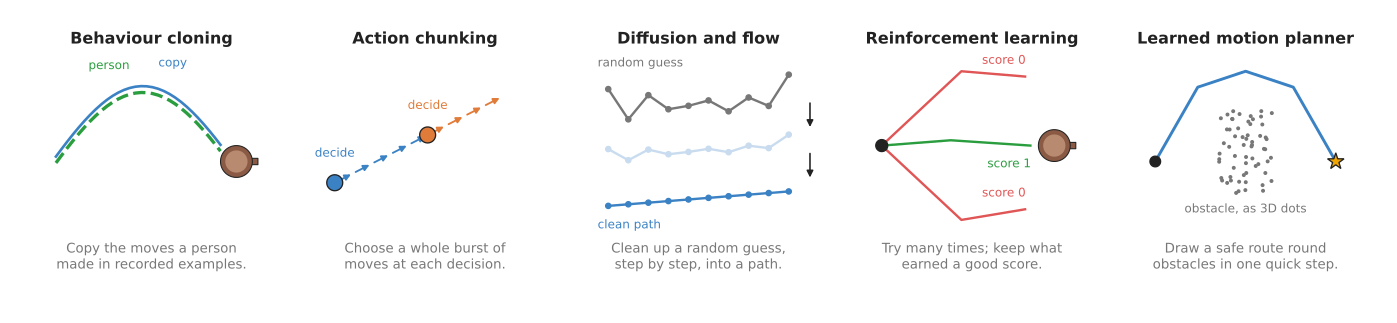
The first three kinds all learn from people doing the task. The fourth learns from its own tries, and the fifth learns from the output of an ordinary planner. The two newer kinds, judge models and learning from human video, help the others rather than replacing them. This is because one of them supplies a score, and the other supplies cheaper data.
One classical way to learn a motion from demonstrations lives in another chapter, so it is worth naming here before you read on. Movement primitives learn one smooth motion, such as a pour or a wiping stroke, from one to a few hand-guided demonstrations, with no camera and no neural network. They adapt the motion to a new goal, but they do not react to what the camera sees during it. So they suit a single smooth motion with few demonstrations, while a policy suits a task where the arm must react as it goes.
5. The kinds side by side#
The list above described each page on its own, and the table below puts the kinds next to each other instead. Read each row across to see what one kind learns from, what it gives back, what it is good at, and what it costs. Then read down a column to compare the kinds on one point. The actions page row is not a kind of model, because it applies to all of them, and the last row is movement primitives, the classical method from chapter 2.
| Page | Group | What it learns from | What it gives back | What it is good at | What it costs |
|---|---|---|---|---|---|
| Behaviour cloning | most used | recordings of a person doing the task | the next single move | simple to build and to train | small mistakes add up; it mixes different ways of doing the task |
| Action chunking transformers | most used | recordings of a person doing the task | the next burst of moves, often about 100 | fine, smooth two-handed tasks from a few dozen recordings | slower to react inside a burst; a bigger network |
| Diffusion and flow policies | most used | recordings of a person doing the task | the next burst of moves, cleaned up from a random guess | keeps two good ways of doing a task apart | slower to run, because it cleans up in several steps |
| Actions and observations | most used | nothing; it is about the numbers the others learn from | a choice of how each number is written and rescaled | making a policy train well, and data from different robots agree | careful conversion, where a mistake gives no error message |
| Reinforcement learning policies | also used | its own tries, each given a score | the next move | tasks that are hard to show by hand, such as pushing a peg into a tight hole | millions of tries, a simulator, and a score that is hard to write |
| Learned motion planners | also used | the answers of an ordinary planner or solver | a route, a collision distance, or joint angles | the same answer as the slow code, in a short fixed time | cannot promise the answer is safe, so it still has to be checked |
| Reward and progress models | also used | pictures of attempts, labelled as good or bad, or with how far along they are | a score for how well an attempt is going | a score for tasks nobody can write a rule for | it can be fooled, and a policy trained on it will find its mistakes |
| Learning from human video | also used | videos of people using their hands, plus a little robot data | hand movements, or a head start, for a robot policy | using video that is cheap and plentiful | a hand is not a gripper, so some robot data is still needed |
| Movement primitives (classical chapter) | classical | one to a few hand-guided demonstrations | a whole smooth path to a given goal | one smooth motion from very few demonstrations, with no camera | one motion per model; it does not react to what it sees |
Two things stand out when you read the table down its columns. First, the three copying kinds all need a person who can do the task, while reinforcement learning does not. Instead, reinforcement learning needs a score and a lot of practice, and a judge model is one way to get that score. Second, only learned motion planners are aimed at the free-space part of the move. So the others are mostly used close to the object.
6. How movement models connect to the other kinds#
The table compared the kinds of movement model with each other, but a movement model rarely works alone. Instead it uses, or sits next to, most of the other categories in the map of models.
The first link is to seeing, because inside almost every policy that takes a camera picture, the first part is a seeing network. It turns the picture into a list of numbers before the rest of the policy decides what to do. So everything in seeing models about how a network reads a picture applies here too.
The second link is to grasp models, which are the main alternative for pick-up tasks. A grasp model chooses where to hold an object, and then an ordinary planner moves the arm there. A policy instead does both of those jobs in one network. The grasp-model way is easier to check, and it is more common in factories. But the policy way copes better with soft objects, and with tasks that are more than one grasp.
The third link is to language, because a plain policy does only one task. So if you want to tell the arm which task to do in words, you need a model that understands language. The language models chapter covers this, and its page on vision-language-action models describes very large policies that take a sentence as part of the observation. They are movement models too, since they use the same ideas as this chapter, such as chunks of actions and flow matching. Large vision-language models are also used as judges, as the page on reward and progress models describes.
The fourth link is to prediction, because a world model predicts what will happen if the arm makes a move. Some reinforcement learning methods therefore train a policy inside such a model instead of on the real arm, because the tries are free there.
The last link is to touch, because most policies only look at pictures and joint angles. For tasks with a lot of contact, such as pushing in a plug, force readings help a great deal. So touch and body models turn those readings into something a policy can use.
7. How this chapter writes size, machine and licence#
Every model section in this chapter says three things about what a model costs you, and it says them in the same short words rather than explaining them again each time. This section is where those words are defined. The same three scales are used in every chapter of this book, so you only have to learn them once.
Size is the number of parameters, which is the count of numbers the network learned during training. It is a rough guide to how capable a model is and to how much memory it needs, and nothing more: a well-trained small model beats a badly trained large one.
| Size | Parameters |
|---|---|
| xs | under 10 million |
| s | 10 to 100 million |
| m | 100 million to 1 billion |
| l | 1 to 10 billion |
| xl | more than 10 billion |
Machine is what you need to run the model once, not to train it. Training needs more, usually several times more, and each model section says so where it matters.
| Machine | What it needs |
|---|---|
| laptop | an ordinary processor, with no graphics card |
| small card | a graphics card with less than 8 GB |
| big card | a graphics card with 8 to 24 GB |
| workstation | a graphics card with 24 to 80 GB |
| cluster | more than one card of 80 GB |
Licence is given as the name alone, such as Apache-2.0 or MIT. Two things about that name matter more than the name itself. The code licence and the weights licence are often different, so a model with permissive code can still forbid you from selling what you build, and each model section says when the two differ. And a name is not legal advice: read the project's own licence file before you ship anything, because this book records what those files said on the day they were read.
8. Where to read next#
Now that you know what the chapter holds, start with behaviour cloning. The idea of copying recorded moves is the base for the next two pages, and its main problem, which is small mistakes that add up, explains why those two pages exist. Then read actions and observations before you record or train anything, since it decides how your data is written down.
If you want to know where the recordings come from, read where the data comes from. And if you want to know how a trained policy is run on a real arm, read running a model on a robot.
For a deeper and more critical view, Book 3 has two pages on this subject. Learned methods for one arm compares every way of learning to move an arm, and says which ones are worth your time. Learned motion says which part of the arm's software a policy replaces, and it lists policies you can download.
9. Using it in Python#
Section 2 explained that a policy is a function from an observation to an action, and section 3 said which part of the robot's software it replaces. This section shows that function being called in Python on a real arm, because every kind of policy in this chapter is run the same way. After reading it you will know the shape of the loop, and you will know which parts of the job no library can do for you.
The library that packages this is LeRobot,
from Hugging Face, installed with pip install lerobot. The example below runs a
trained policy on an SO-101 arm. It uses ACTPolicy as the class, but the same five
lines work for a diffusion policy or a vision-language-action model, because they all
inherit the same select_action method.
from lerobot.datasets import LeRobotDatasetMetadata
from lerobot.policies import make_pre_post_processors
from lerobot.policies.act import ACTPolicy
from lerobot.policies.utils import build_inference_frame, make_robot_action
from lerobot.robots.so_follower import SO101Follower, SO101FollowerConfig

policy = ACTPolicy.from_pretrained("<my-user>/my_policy")
meta = LeRobotDatasetMetadata("<my-user>/my_dataset")   # only the metadata is downloaded
preprocess, postprocess = make_pre_post_processors(policy.config,
                                                   dataset_stats=meta.stats)

robot = SO101Follower(SO101FollowerConfig(port="/dev/tty.usbmodem58760431631",
                                          id="my_follower_arm"))
robot.connect()

while True:
    frame = build_inference_frame(observation=robot.get_observation(),
                                  ds_features=meta.features, device="cpu")
    action = postprocess(policy.select_action(preprocess(frame)))
    robot.send_action(make_robot_action(action, meta.features))
LeRobot gives you four things here. It gives you the policy classes and the weights,
downloaded by name from the Hugging Face hub. It gives you the drivers, so
robot.get_observation() reads the joint positions and every camera in one call, and
robot.send_action() writes the joint targets back. It gives you the conversion
between the robot's dictionary of named numbers and the tensors the network wants,
which is what build_inference_frame and make_robot_action do. And it gives you the
rescaling of every number into the range the network was trained on, which is
preprocess and postprocess, computed from the statistics of the dataset the policy
was trained on. That last piece is why meta.stats appears: a policy run with the
wrong statistics moves, and moves wrongly, which is a hard fault to find.
What you have to supply is the dataset and the training run behind
from_pretrained. This is the part that the shortness of the code hides. Nobody has
published a policy that works on your arm, in your room, on your task, so
"<my-user>/my_policy" is a model you trained yourself, from demonstrations you
recorded yourself. LeRobot has three command line programs for that cycle:
lerobot-record drives the arm from a leader arm and saves what happens,
lerobot-train trains a policy on the result with, for example,
--policy.type=act --dataset.repo_id=<my-user>/my_dataset, and lerobot-rollout
runs the trained policy. The recording is the slow step. The LeRobot tutorial suggests
at least fifty demonstrations for one object in a few places, and that is an evening
of driving the arm by hand for a task as simple as putting a brick in a box.
What you have to decide is everything the recording fixes in place. Where the cameras sit, because the policy learns the view and not the world, and moving a camera afterwards breaks it. How many places you put the object in, because the policy only works where you showed it. Whether to drive the arm by joint angles or by gripper poses, which the actions and observations page covers. And which policy to train, which is what the rest of this chapter is for.