The previous page supplied the score that the earlier methods needed, and this last page of the chapter supplies the other scarce thing, which is the data. It answers one question: can a robot arm learn from videos of people doing a task, instead of from recordings of the robot itself? Robot recordings are slow and costly to make, whereas video of people using their hands is cheap, and there is a huge amount of it. But the catch is that a video of a person does not say what the robot should do. So this page explains the models that bridge that gap, and where the gap stays open.
The page is for a reader who has read behaviour cloning. Behaviour cloning learns from demonstrations, which are recordings of the robot doing the task while a person steers it. Each such recording pairs what the cameras saw with the movement command at that moment. But a video of a person has the pictures, and not those commands. Every new word is explained where it first appears.
Contents#
- What it is
- What a human video has, and what it lacks
- The four ways to use it
- Latent actions: learning actions without labels
- The gap between a hand and a gripper
- Well-known models and libraries
- Where this is going
- Where to read next
1. What it is#
The introduction said that these models bridge a gap, so here is the idea in one sentence. Models that understand hands and video pull something useful for a robot out of videos of people. So the robot then needs only a little of its own data to fill in the rest.
For example, think of learning to fold a paper plane from a video, where nobody moves your hands for you. Instead you watch the person's hands, see where each fold goes, and copy it with your own hands. You do this even though your hands are a different size, and even though the camera was somewhere you are not. A robot learning from a person's video has the same job, but with a harder version of each problem. Its "hand" is a two-finger gripper, its eyes are cameras in fixed places, and it cannot feel what the person felt.
2. What a human video has, and what it lacks#
Section 1 said the robot needs something useful out of the video, so this section says exactly what is there and what is missing. A robot demonstration has two things in every frame, which are the pictures and the action. An action is the movement command the robot was given at that moment, such as "move the gripper 2 mm left and close it a little". But a video of a person has only the first of these. So the table below lists what each kind of recording contains. Read each row as one kind of information, and the two right columns as whether each recording has it.
| Information | Robot demonstration | Video of a person |
|---|---|---|
| pictures of the scene and the objects | yes | yes |
| what the task looks like when done | yes | yes |
| the movement command at each moment | yes | no |
| a body the robot has | yes | no: a human hand and arm |
| a camera where the robot's cameras are | yes | usually no |
| how hard things were pressed | sometimes, from a force sensor | no |
So the question is always the same one. How do you get the missing movement command, or else do without it? The frontier document puts it this way: turning a video into training data "means inventing the missing action labels", and the quality of that invention is the whole subject. The human video section of that document covers the research in depth, while this page explains the models underneath.
3. The four ways to use it#
Section 2 ended with the question of the missing action, and there are four ways to answer it. But they give different amounts of help, and they need different amounts of robot data afterwards.
Pretrain the robot's eyes. A camera encoder is the part of a policy that turns a picture into a list of numbers the rest of the network can use. You can train the encoder on human video first, with no actions at all, so that it learns what hands, objects and contact look like. Then you train the policy on a small number of robot demonstrations, starting from that encoder. For example, R3M and VC-1 are two encoders trained in this way, and sub-section 6.6 covers R3M. VC-1 is named here only to show that R3M is not the only one, and section 6 leaves it out because its repository is Attribution-NonCommercial. The same idea is now also applied to a whole policy rather than only to its encoder, and GR00T N1.7 in sub-section 6.4 is one you can download with that pretraining already done. This route gives the least help, but it is the safest, because the video never has to say anything about movement.
Track the hand and map it onto the gripper. A hand pose estimator is a model that finds the position of each joint of a hand in a picture, and it runs on every frame of the video. Sub-sections 6.1 and 6.2 recommend two of these, one for live video and one for video processed afterwards. Then a second step, called retargeting, turns the hand's motion into a motion the robot's gripper can make, and sub-section 6.3 recommends a library for that step. The result is a demonstration with actions, made up from the video, and section 4 works through one frame of it.
Learn actions from the video itself. A latent-action model watches two frames of video and learns a short code for "what changed between them". However, nobody tells it what the codes mean at all. Later, a little robot data links each code to a real robot movement, and section 5 explains this. LAPA, in sub-section 6.5, is the one openly published model of this kind.
Edit the video. Some 2026 work redraws the video, so that the human hand becomes a robot gripper. The frontier document calls this the video-editing route, and it is new, so this page does not cover it further. Section 6 has no model for it either, because nothing from that route can be downloaded yet.
The frontier document names three routes, which are visual pretraining, retargeting and video editing. Latent actions sit between the first two, because like pretraining they need no hand tracking, and like retargeting they produce something that stands in for an action. This page gives them their own section, because they are a separate kind of model.
4. Latent actions: learning actions without labels#
The third of the four ways needs no hand tracker at all. The word latent means hidden, because the model finds the actions itself, and nobody ever labels them. So a latent-action model learns in two separate parts.
- Learn codes from video. The model sees two frames, one just after the other, and it must describe what changed using only a code from a short list, such as one of a few dozen. A second part of the model must then redraw the later frame from the earlier frame and the code. So if the redrawing is good, the code has captured the change. Over millions of frame pairs, each code comes to stand for one kind of change, such as "the hand moved left" or "the hand closed".
- Link codes to the robot. A policy is trained to predict the code for each moment of human video. Then a small amount of robot data teaches it which real robot command each code stands for.
The example below shows the idea with numbers you can see, and it is much simpler than a real model. Each dot is how an object moved between two frames of a made-up video, in centimetres, and nobody labelled the dots. A simple grouping method, k-means, was run on them in the script. It puts each dot in the group whose centre is nearest, then moves each centre to the middle of its group, and then repeats.
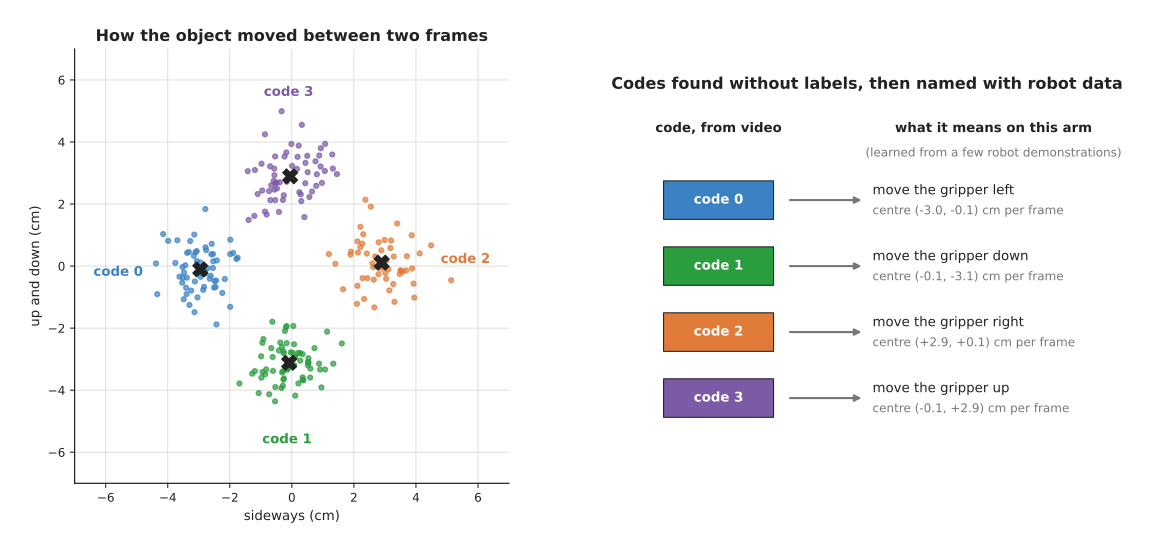
The four groups it found have centres at about (−3.0, −0.1), (−0.1, −3.1), (+2.9, +0.1) and (−0.1, +2.9) centimetres per frame, and these are the four codes. On the right, a few robot demonstrations give each code a name on this arm, which are left, down, right and up. A real latent-action model finds its codes from the pictures themselves, and not from measured motions. But the result has the same shape, which is a short list of codes found without labels, then named with a little robot data.
The appeal is that it works on any video, including video with no visible hand. The cost is that nothing makes the codes match what the robot can do. So a code can stand for a camera shake, or for something that happened with no action at all. The model to look at if you want to try this is LAPA, in sub-section 6.5, which is the only openly published one.
5. The gap between a hand and a gripper#
The tools in section 6 all work, so the hard part is not the models themselves. Instead it is that a hand is not a gripper, and a person is not a robot. The frontier document names three things that human video still cannot supply, and this section explains each of them, then adds two more.
The hand can do things the gripper cannot. A hand has five fingers and a turning wrist. So a person rolls a pen in the fingers, holds two things at once, or pushes with the side of the palm, and a two-finger gripper can do none of that. A large part of any human video therefore shows movements the robot cannot make, and these have to be found and thrown away, or else the policy learns them wrongly. The sign is a retargeted gripper that closes on nothing, because the person was using three fingers.
The path may be out of the robot's reach. A person's arm is a different length and moves from a different place. So a path that is easy for a person can be outside the robot's reach, and nothing in the video says so.
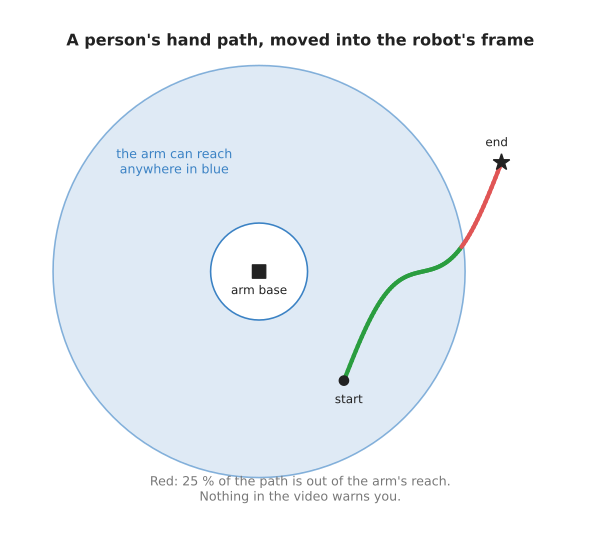
The picture shows a made-up hand path after it has been moved into the robot's frame, where the blue ring is the area the arm can reach. The script checks every point, and 25 % of the path is outside the ring. So a reach check like step 6 of the worked example has to run on every frame. And even a reachable path can need a joint angle the arm does not have, which a check with the arm's inverse kinematics catches.
Force is missing. A video shows where a hand went, and not how hard it pressed. So for tasks that are about contact, such as pushing a plug into a socket, the video is missing the part that mattered.
The camera is in the wrong place. The person's video was filmed from their head or from across the room, whereas the robot's cameras are somewhere else. So a policy that learned from one view can fail from another. The sign is a policy that works on the human video it trained on, and does badly on the robot's own pictures.
The hand hides the object. In many frames the person's hand covers the thing it is holding. So the hand tracker loses fingers, as in the pinch graph in section 4, and the object tracker loses the object.
So these five gaps are why every method still needs some robot data at the end. The frontier document's section on what human video cannot supply makes the same point. And its section on the 2026 result explains why the robot data may now be a small final step rather than most of the work.
6. Well-known models and libraries#
Section 3 described the four ways to use human video, and this section names the tools people actually run, in that same order: the two hand trackers, then the library that turns a tracked hand into robot commands, then two models whose own pretraining used human video, and last the camera encoder that started the pretraining route.
Each tool carries one mark: most used in 2026 means a developer starting today would reach for it, worth betting on means it is not the default yet but the field is moving that way, and historical means it is kept because it explains how the current tools work.
The table is the short answer. Read each row as one tool. The left column names
the tool and carries its mark. The right column says what the tool is best at,
how big it is and what hardware it needs, its licence, and when to pick it.
Where a row says not stated, the figure is not published.
| Tool | What decides it |
|---|---|
| MediaPipe Hand Landmarker, most used in 2026 | This one finds 21 hand points per frame while the camera runs. The model file is 7.8 MB, and it runs on a laptop processor. The library is Apache-2.0. Pick it when you want hand tracking on your own video today. |
| HaMeR, most used in 2026 | This one recovers a full 3D hand from one picture, including hidden fingers. Its size is not stated, and its install instructions target an NVIDIA graphics card. The code is MIT, and the MANO hand model it uses has its own registration. Pick it when the video is processed after recording and MediaPipe loses fingers. |
| dex-retargeting, most used in 2026 | This one turns tracked hand points into robot joint commands. It is a solver rather than a network, so it runs on the processor. Its licence is MIT. Pick it when you have hand points and need gripper commands out of them. |
| NVIDIA Isaac GR00T N1.7, worth betting on | This is a policy whose pretraining already included 20,000 hours of human video. It has 3 billion parameters, it is about 6 GB to download, and it wants 16 GB or more of video memory. The code is Apache-2.0, and the weights carry the NVIDIA Open Model License. Pick it when you have an NVIDIA graphics card and want that pretraining done for you. |
| LAPA, worth betting on | This one learns actions from video that has no action labels at all. It has 7 billion parameters, and its fine-tuning ran on four 80 GB graphics cards. The code and the published weights are MIT. Pick it when you have a lot of video, little robot data, and a cluster. |
| R3M, historical | This is a camera encoder trained on human video, and you start a small policy from it. It is a ResNet-50 encoder, and it runs on a laptop. Its licence is MIT. Pick it when you will train your own policy and want the cheapest gain there is. |
Three much-discussed 2026 results are deliberately absent, because you cannot download any of them. They are Skild's S1, explained in prompting with a demonstration, and the large retargeting and video-editing corpora HuRo and RoboEdit, which the frontier document records in the three mechanisms people actually use. Read those to see where the field is going, and build with the six tools above.
6.1 MediaPipe Hand Landmarker#
This is the tool most used in 2026 for getting hand points out of video, because it is the only one here that runs in real time on a laptop with no graphics card.
Size not stated, and the model file is 7.8 MB. A laptop. Apache-2.0.
MediaPipe Hand Landmarker is Google's hand tracking task, part of the MediaPipe library. For each hand it finds, it returns the 21 points of section 4 in the same numbering, so point 4 is the thumb tip and point 8 is the index fingertip.
The one idea is to split the work so that the expensive half runs rarely. There are two models in the file you download, not one. A palm detector looks at the whole picture and finds where a hand is, and a landmark model then looks only at the cut-out around that hand and gives the 21 points. On video the box found in one frame is used to cut out the hand in the next, and Google's own description says the palm detector is re-run only when the landmark model stops finding a hand there.
What that changes inside is that the output is 21 separate points, each with its
own coordinates, and nothing in the model holds the set of them together as a
hand. There is no fixed skeleton with fixed bone lengths for the points to hang
on. So when a finger goes behind the object, the model has nothing to fall back
on, and the point for that fingertip goes wherever the picture suggests. That is
the difference from HaMeR in sub-section 6.2, which is asked for a hand rather
than for a set of points. The second
thing to know about the output is that the model gives you two versions of every
point and neither is a distance from the camera: hand_landmarks is in picture
coordinates and hand_world_landmarks is in metres measured from the middle of
the hand.
What the design buys is that it runs at camera rate on a processor, which no other model on this page does, so you can hold your own hand in front of a webcam and watch the numbers move. What it costs is the two things above: no depth, and points that come apart under occlusion. Both of those are what the retargeting step is then handed, and a bad point becomes a bad gripper command with nothing in between to notice.
The difference shows up on any task where the hand wraps around the thing it is holding. A person pinching a small bolt covers it with their own fingers, the index fingertip is lost for a few frames, the measured pinch distance jumps, and the gripper command built from it closes hard on nothing. For a task where the hand stays open and in clear view, such as pushing a box across a table, this tracker is as good as the one below and runs on the laptop you already have.
You would pick it rather than HaMeR, the other tracker below, because HaMeR needs an NVIDIA graphics card and a separate registration before it runs at all. MediaPipe runs on the computer you already have, which is what you want while you are still finding out whether your task survives the hand-to-gripper gap of section 5. Once you know that it does, HaMeR's accuracy starts to matter.
Its cost is depth, and this is the mistake people make most often with it. The
library returns two versions of each point:
hand_landmarks holds them in picture coordinates, scaled from 0 to 1 across the
width and the height, and hand_world_landmarks holds them in metres. Those
metres are measured from the middle of the hand, and not from the camera.
The library is mediapipe, installed with pip install mediapipe. You also
download the model file, hand_landmarker.task, from
Google's own page for the task.
import mediapipe as mp

options = mp.tasks.vision.HandLandmarkerOptions(
    base_options=mp.tasks.BaseOptions(model_asset_path="hand_landmarker.task"),
    running_mode=mp.tasks.vision.RunningMode.IMAGE,
    num_hands=1,
)
with mp.tasks.vision.HandLandmarker.create_from_options(options) as landmarker:
    image = mp.Image.create_from_file("frame_0001.jpg")
    result = landmarker.detect(image)

points = result.hand_world_landmarks[0]      # 21 points, in metres
thumb_tip, index_tip = points[4], points[8]  # the two points section 4 used
pinch = ((thumb_tip.x - index_tip.x) ** 2
         + (thumb_tip.y - index_tip.y) ** 2
         + (thumb_tip.z - index_tip.z) ** 2) ** 0.5
The library gives you the palm detector, the landmark model, the fixed numbering
of the 21 points, and, in handedness, whether it saw a left or a right hand. For
video you pass RunningMode.VIDEO and call detect_for_video with a timestamp,
which lets the model follow the hand between frames.
What you supply yourself is everything that places the hand in the room. The pinch above is real, in metres, which is why step 5 of section 4 could turn it into a gripper opening, but steps 2, 3 and 4 need a depth camera, two cameras or HaMeR, and then the calibration that says where the camera sits relative to the robot's base. The cleaning in section 4 is also yours to write, and it is not optional, because a tracker that loses the index finger for four frames will otherwise tell the gripper to close hard on nothing.
6.2 HaMeR#
HaMeR, which stands for hand mesh recovery, is the tracker most used in 2026 for video that is processed after recording rather than live. Pavlakos and colleagues released it in December 2023 with the paper Reconstructing Hands in 3D with Transformers, and it rebuilds a complete 3D hand surface from one picture.
Size not stated, a big card, MIT for the code, and the MANO hand model it needs has a licence and a registration of its own.
The one idea is that the model is asked for a hand and not for points. MANO is a hand model: a fixed surface with a fixed skeleton, which bends and stretches according to a few dozen numbers. HaMeR predicts those numbers. So whatever comes out of it is a hand that a hand could actually be, because the model has no way of describing anything else.
What that changes inside, compared with MediaPipe in sub-section 6.1, is where the 21 points come from. There, they were the model's direct output. Here they are read off a posed hand surface afterwards, so a fingertip that is completely hidden still has a position, taken from where the rest of the hand says it must be. The other change is one of scale, and the paper makes no secret of it: a large vision transformer reads the cut-out of the hand, trained on many separate hand datasets pooled together, in place of a small network designed specially for hands. Where MediaPipe's two models are built to be small enough for a phone, this is built to be as accurate as a big network and a lot of data allow.
What the design buys is a complete hand in every frame and a surface you can render and judge by eye, which is how you tell a good fit from a bad one. What it costs is that a large transformer cannot keep up with a camera, so this is for video you process after recording, and that nothing runs at all until you have the MANO file. The distance from the lens is also worked out using a focal length taken from the configuration rather than measured from your camera, so it is an estimate even though it comes out in metres.
The difference shows up on a person screwing a cap onto a bottle, with the hand wrapped around the cap so that three fingertips never appear. MediaPipe's points for those fingertips wander, and the pinch distance built from them is unusable. HaMeR returns a closed hand with the fingers in plausible places, and the retargeted gripper opening follows the real one. The difference runs the other way in live teleoperation, where a person's hand drives the arm as they move: there, only MediaPipe is fast enough to be in the loop at all.
You would pick it rather than MediaPipe Hand Landmarker when fingers keep disappearing. The project's own record is the only accuracy claim this page repeats: it took second place in the Ego-Pose Hands task of the Ego-Exo4D Challenge in June 2024.
It costs you set-up, since the install instructions target NVIDIA hardware and
extra packages are needed for person detection and pose estimation. More
importantly, the model will not run without MANO_RIGHT.pkl, the MANO hand
model, and you get that only by registering on
the MANO website and accepting its own licence. So
a commercial project has to read a licence that is not the repository's.
The project is run as a program rather than imported.
git clone --recursive https://github.com/geopavlakos/hamer.git
cd hamer
pip install -e ".[all]"
pip install -v -e third-party/ViTPose   # the pose estimator it depends on
bash fetch_demo_data.sh                 # downloads the trained weights
# Now put MANO_RIGHT.pkl in _DATA/data/mano yourself, after registering.
python demo.py \
    --img_folder example_data --out_folder demo_out \
    --batch_size=48 --side_view --save_mesh --full_frame
The project gives you the detector, the hand model and the rendering, so you can judge the fit by eye. What you supply yourself is the step from a hand surface to a gripper command: the output holds the hand's parameters, its vertices and one camera translation per detected hand, and turning that into the two fingertip positions of section 4 is your code.
6.3 dex-retargeting#
This is the library most used in 2026 for the retargeting step, which section 3 described as turning a tracked hand into a motion the robot can make.
No parameters at all, because it is a solver rather than a network. A laptop. MIT.
The library comes from the AnyTeleop project of Qin and colleagues, published in 2023, and it holds several optimisers rather than one. Each solves the same problem: find the robot joint angles whose fingertips best match the measured human ones.
The one idea is that this step needs no learning. Everything else in this section is a network that was trained on something; this is a sum that is solved from scratch for every frame of your video. It has no training data, so it cannot be wrong about a kind of scene it never saw, and it cannot be right about one either.
What it matches is the detail worth understanding, because it is not positions. A position would be hopeless: the person's hand is somewhere in their kitchen and the robot's gripper is somewhere in your cell, and the two will never coincide. What the library matches is the vector from one tracked point to another, which means the direction and the distance between them. The default configuration for the Panda gripper reads points 4 and 8, the thumb tip and the index fingertip, takes the vector between them, scales it, and looks for the joint angles whose own fingertip vector comes closest, staying inside the robot's joint limits. So sub-sections 6.1 and 6.2 take a picture and produce a measurement, while this takes a measurement and produces a command, having never seen a picture.
What the design buys is independence from data: no card, no download of weights, no question about whether your task resembles a training set, and it works for every hand whose description file the repository ships. What it costs is that it inherits every error in the points it was given. A tracker that lost a fingertip hands it a vector that is simply wrong, and a solver with no idea what hands normally do will faithfully turn that into a gripper command. It also sets the fingers only, so where the gripper goes in the room is still entirely your problem.
The difference shows up as soon as the robot has more than two fingers. For a two-finger gripper there is one number to set, and the few lines under sub-section 6.1, which measure the distance between the thumb tip and the index fingertip, very nearly do the job on their own. For a Shadow or an Allegro hand there are twenty-odd joints, several fingers to match at once and limits that must hold, and that is a real optimisation problem which this library has already solved and tested. The difference runs the other way on the simplest case: with one number to set, a few lines of your own are easier to debug than a configuration file and an optimiser.
You would use it rather than writing the midpoint arithmetic of section 4 yourself, and the reason is the robot rather than the hand. Section 4 works because a two-finger gripper has one number to set. As soon as the robot has a multi-finger hand, or you want the wrist oriented as well, that arithmetic becomes a small optimisation problem with joint limits, and this library has already solved it for real hands, including Allegro, Shadow, LEAP, Inspire, Ability, Schunk SVH and the two-finger Panda gripper.
It costs you little beyond the line above, and it installs with
pip install dex_retargeting. Two things catch people. The library returns
joint positions in its own order, so you must map them to your simulator or driver
by joint name, which the project's notes warn about. It also needs the robot's URDF
file, the file that describes a robot's links and joints, and the ones for the
supported hands come with the repository rather than with the installed package.
from dex_retargeting.constants import (
    RobotName, RetargetingType, HandType, get_default_config_path,
)
from dex_retargeting.retargeting_config import RetargetingConfig

# panda here is Franka's two-finger gripper, so the whole hand becomes one number.
config = get_default_config_path(RobotName.panda, RetargetingType.vector, HandType.right)
RetargetingConfig.set_default_urdf_dir("assets/robots/hands")  # from the repository
retargeting = RetargetingConfig.load_from_file(config).build()

# joint_pos holds the 21 hand points of section 6.1 as metres, one row per point.
indices = retargeting.optimizer.target_link_human_indices      # [[4], [8]]
ref_value = joint_pos[indices[1, :], :] - joint_pos[indices[0, :], :]
qpos = retargeting.retarget(ref_value)   # one angle, for panda_finger_joint1
The two numbers in target_link_human_indices are worth noticing, because they
are 4 and 8: the configuration that ships for the Panda gripper reads the thumb
tip and the index fingertip, the pair section 4 used by hand. The value it is
given is the direction and distance from one tip to the other, and the
configuration scales that by 1.5 before matching it, because a human pinch and a
gripper opening are not the same size.
What you supply yourself is the hand points, from section 6.1 or 6.2, and
everything about where the gripper goes, because this library sets the fingers and
not the position of the wrist in the room. The repository's own example,
detect_from_video.py, puts MediaPipe and this library together over a video
file, and it is the shortest complete thing to read next.
6.4 NVIDIA Isaac GR00T N1.7#
This model is worth betting on, because it is the only released model here whose own pretraining used human video at scale, so the transfer this page is about has already been paid for by somebody else. GR00T is NVIDIA's open vision-language-action model, meaning one network that takes pictures and a sentence and produces movement commands. The frontier document's section on it records that N1.7 was tagged as a general-availability release on 18 April 2026, and that it was pretrained on 20,000 hours of human video from a corpus NVIDIA calls EgoScale, alongside robot demonstrations.
Size l, a big card, Apache-2.0 for the code and the NVIDIA Open Model License for the weights.
The one idea is to make a person and a robot describe movement in the same words, so that one network can be trained on recordings of both. The words chosen are relative ones. The repository says N1.7 uses a relative end-effector action space shared across robot and human embodiments, which means every action is a change from where the gripper or the hand is now. Three centimetres to the left means the same thing for a hand and for a gripper, where a coordinate in the room does not, and that single choice is what lets human video count as training data at all.
Inside, there are two parts and a label. The first part is a vision-language backbone, and in N1.7 it is Cosmos-Reason2-2B, which replaced the backbone used in N1.6; it reads the pictures and the sentence. The second is the action head, which does not print a command. It is a diffusion transformer: it starts from noise and cleans it up, over a fixed number of passes, into a block of several future movement commands at once. The label is the embodiment tag, which tells the model which state and action fields to read and how to rescale them, so the same weights can serve a human recording, the DROID arm and yours. Compare the route through sub-sections 6.1 to 6.3, which measures a hand in a picture and converts the measurement into a command. This measures no hand anywhere. The human recordings entered training already expressed as relative movement, which is what sharing the action space with human embodiments means, so the network only ever saw movement.
What the design buys is the one thing you cannot buy any other way, which is 20,000 hours of people handling objects, already paid for. The transfer happened once, in the form the numbers take, instead of happening again in your code on every frame of every video. What it costs is control over what you are standing on. You cannot see those hours of video, you cannot check what was in them, and when the model behaves oddly on your task you have no way of telling whether something in that pretraining is the reason. The practical costs come with it: NVIDIA hardware, and an embodiment tag that must really describe your arm, since the wrong tag produces commands of the wrong shape rather than an error message.
The difference shows up when you have a new task and forty recordings of your own arm doing it. The pipeline of sub-sections 6.1 to 6.3 would need video of that task with a visible hand, a depth estimate for every frame and a calibrated camera, and would give you a few hundred invented demonstrations with the errors of section 5 in them. This needs the forty recordings and a fine-tuning run. The difference runs the other way if you have no NVIDIA card: MediaPipe and dex-retargeting run on a laptop, and this does not run at all.
You would pick it rather than building the pipeline of sections 6.1 to 6.3 yourself. That pipeline gives you a few hundred retargeted demonstrations of one task, from one camera, with the error chain described above; this gives you a policy that has already watched 20,000 hours of people handling objects, which you then fine-tune on your own recordings. Its mechanism is also the one you would have to copy anyway: its movement commands are relative to where the gripper is now, so three centimetres to the left means the same thing for a hand and for a gripper, while a target coordinate does not.
It costs you an NVIDIA graphics card, and there is no way round that. Fine-tuning
wants more than running it does, and nothing about it runs on a Mac. The
NVIDIA Open Model License Agreement
on the weights permits commercial use while adding conditions Apache-2.0 does
not, so it is the document to read rather than the one on the code. The thing
that most often goes wrong on a first run is neither of those: the base model
loads a gated backbone, nvidia/Cosmos-Reason2-2B, so without Hugging Face
access to it the run stops with a GatedRepoError.
The code is the Isaac-GR00T repository, and the shortest real thing you can do is run the base model on the sample data it ships with.
uv run python scripts/deployment/standalone_inference_script.py \
    --model-path nvidia/GR00T-N1.7-3B \
    --dataset-path demo_data/droid_sample \
    --embodiment-tag OXE_DROID_RELATIVE_EEF_RELATIVE_JOINT \
    --traj-ids 1 2 \
    --inference-mode pytorch \
    --execution-horizon 8
That runs the model over two recorded episodes and compares its predicted movements with the recorded ones, which proves the installation works before any robot is involved, and the weights download on the first run. What you supply yourself is your own robot: a dataset in the GR00T LeRobot format, an embodiment tag that describes your arm's state and action layout, and a fine-tuning run. The tag above belongs to the DROID dataset's arm, and using it for your own arm produces commands of the wrong shape.
6.5 LAPA#
LAPA, which stands for latent action pretraining from videos, is also worth betting on, because it is the only openly published implementation of the latent-action route that section 5 explained. Ye and colleagues published it in October 2024, and it was accepted at ICLR 2025. The released model, LAPA-7B-openx, learned its codes from video and was then pretrained on the pooled Open X-Embodiment data without using its action labels at all.
Size l, a big card to run it once and a cluster to fine-tune it, MIT for the code and the weights.
The one idea is the opposite of GR00T's. GR00T made the person and the robot share an action space that a human being designed. LAPA designs nothing: it makes the model invent its own vocabulary of movement from the video, and only at the very end does anybody tell it what those words mean on a robot.
The paper's method is three stages, and they map onto section 4. In the first, a VQ-VAE looks at pairs of neighbouring frames and learns a set of discrete codes for the change between them. To quantise is to force a continuous description to be one of a fixed set of choices, and the published model's set gives 4,096 of them. In the second stage, a vision-language-action model is trained to predict which code comes next from the picture and the sentence, and this is what ran over the pooled Open X-Embodiment video with its real action labels thrown away. Only in the third stage does robot data arrive, teaching the model which real command each code stands for. Compare GR00T again: GR00T's action head produces a movement because movement is what it was trained on. LAPA's produces a code number, and the project says so plainly, so a freshly downloaded LAPA tells you nothing a robot can execute.
What the design buys is the widest intake of video on this page. It needs no visible hand, no depth, no calibrated camera and no action labels, so footage that the whole of sub-sections 6.1 to 6.3 would have to throw away is usable here. What it costs is the thing section 5 named: nothing in the first stage knows what your robot can do, so a code can stand for the camera being knocked, or for an object moving because somebody else pushed it. It also costs a cluster and a second language, because the code is JAX rather than PyTorch.
The difference shows up on footage nobody filmed for robotics. A warehouse's overhead cameras see parcels moving and almost never see a clear hand. MediaPipe and dex-retargeting produce nothing at all from that, because there is no hand to measure. LAPA only needs pairs of frames, so that footage is training data. The difference runs the other way when you have thirty careful close-up videos of one task: retargeting turns those into usable demonstrations this week, where LAPA's first stage learned its codes from a quantity of video that thirty clips do not approach.
You would pick it rather than the retargeting route of sections 6.1 to 6.3 when the video has no usable hand in it. Retargeting needs a visible hand, a depth estimate and a calibrated camera, and it fails on video that has none of them. LAPA needs only pairs of frames, so it can use video where the hand is out of shot, where the camera moved, or where the person did something a gripper could never copy. The price is the one section 5 named: nothing makes the learned codes match what your robot can do.
It costs you a second training stage, and the project's fine-tuning scripts were run on four graphics cards at once. The misunderstanding to avoid concerns the output, and the project states it plainly: inference gives you a latent action, one of 4,096 possible codes, and not a robot command.
There is no installable package, so the model is run from the repository.
git clone https://github.com/LatentActionPretraining/LAPA.git
cd LAPA && pip install -r requirements.txt
mkdir lapa_checkpoints && cd lapa_checkpoints
# The three parts of the checkpoint: text tokeniser, image tokeniser, weights.
wget https://huggingface.co/latent-action-pretraining/LAPA-7B-openx/resolve/main/tokenizer.model
wget https://huggingface.co/latent-action-pretraining/LAPA-7B-openx/resolve/main/vqgan
wget https://huggingface.co/latent-action-pretraining/LAPA-7B-openx/resolve/main/params
cd ..
python -m latent_pretraining.inference   # prints a latent action, not a command
The project gives you both halves of section 5 already built: the code book learned from video, and a policy that predicts a code from a picture and a sentence. What you supply yourself is the robot data that gives the codes meaning, because the fine-tuning step wants real trajectories with their actions and gripper states. So the robot recordings this page is trying to avoid are still needed at the end, only fewer of them.
6.6 R3M#
R3M is historical, and it is kept here because it is the clearest example of the cheapest idea on this page. Nair and colleagues of Stanford and Meta released it in March 2022 and published it at the Conference on Robot Learning that year.
Size s, a laptop, MIT for the code and the weights.
R3M is a camera encoder trained on Ego4D, a large collection of first-person video of people doing everyday tasks, and it was trained so that its output follows how a task unfolds over time and matches the words that describe the video. The models of sections 6.4 and 6.5 now do that for a whole policy rather than for the encoder alone, which is why this one is historical and not current.
The one idea is the modest one, and it is the reason this page lists R3M first among the safe routes. The cheapest thing human video can give a robot is not actions at all. It is a better way of looking at a picture, and a way of looking asks nothing of the video about movement, so none of the five gaps in section 5 has to be bridged at all.
What that means inside is that only one piece of the robot's software comes from the video. R3M is a ResNet-50 that turns a picture into 2048 numbers, and the training pushed those numbers in two directions at once: frames close together in a video were pulled together while frames far apart in time were pushed apart, so that the numbers follow how a task unfolds, and the numbers were matched against the words describing the clip. Then it stops. It is frozen, and your own policy, trained on your own robot demonstrations, reads those 2048 numbers and decides what to do. Sub-sections 6.4 and 6.5 trained whole policies on human video, so what they learned from people includes what to do; R3M learned only what to notice.
What the design buys is that there is nothing to go wrong. It runs on a laptop, it is one line in your policy's constructor, and since it cannot propose a movement it cannot propose a bad one. What it costs is that the freezing cuts both ways. Whatever those 2048 numbers leave out is gone for good, so a task that turns on a thin wire or a small printed mark may not be represented at all, and no amount of robot data will put it back. The gain is also the smallest on this page, because the hard part, which is deciding what to do, is still learned entirely from your own recordings.
The difference shows up when you have two hundred demonstrations and a small policy you were going to train anyway. Starting its encoder from R3M rather than from random numbers costs you one line and nothing else, where GR00T N1.7 would give far more and demands a card you may not own. The difference runs the other way when two hundred recordings are not enough no matter how good the encoder is. R3M cannot help with that, because it never learned a movement, and that is exactly the wall the two models above were built to get over.
You would still pick it over VC-1, the obvious alternative, for a reason that has nothing to do with accuracy. VC-1, from Meta in 2023, was trained on a wider mix of first-person video and ordinary pictures and tested on more robot tasks, and MVP, from the University of California, Berkeley, in 2022, learns by filling in hidden patches of the same kind of video. But the repository that holds VC-1 carries a Creative Commons Attribution-NonCommercial 4.0 licence, and so does MVP's, so neither can go into a product. R3M's repository is MIT. This is the kind of detail this book exists for, because the model you can measure is not always the model you can ship.
It costs you almost nothing to try, which is its point. Its real cost is age, because the repository has not changed since March 2023, so you are on your own with new versions of PyTorch. And since the encoder is normally frozen, whatever it throws away is gone, so a task that turns on a thin wire or a small printed mark may not be represented at all.
import torch
import torchvision.transforms as T
from PIL import Image
from r3m import load_r3m

r3m = load_r3m("resnet50")   # resnet18 and resnet34 are also published
r3m.eval()

transforms = T.Compose([T.Resize(256), T.CenterCrop(224), T.ToTensor()])
image = transforms(Image.open("frame_0001.jpg")).reshape(-1, 3, 224, 224)
with torch.no_grad():
    embedding = r3m(image * 255.0)   # R3M expects values from 0 to 255
print(embedding.shape)               # torch.Size([1, 2048])
The library is r3m, installed from its repository, and the multiplication by 255
is not a mistake, because ToTensor divides by 255 and R3M wants the original
range back. What you supply yourself is the policy that sits on top of those 2048
numbers, the robot demonstrations to train it on, and the decision whether to keep
the encoder frozen or let training change it. Nothing here produces a movement
command on its own.
6.7 How to choose#
Start with MediaPipe Hand Landmarker and dex-retargeting, because they run on the computer you already have and they tell you within a day whether your task survives the hand-to-gripper gap of section 5, which is the question that decides everything else. Five situations change that answer.
If the video is processed after recording and the hand keeps hiding its own fingers, replace MediaPipe with HaMeR, and accept the graphics card and the MANO registration as the price.
If you have an NVIDIA graphics card with 16 GB or more of video memory, start from GR00T N1.7 instead of building a pipeline, because its pretraining already included 20,000 hours of human video and yours will not.
If you have a large amount of video in which no usable hand is visible, and a cluster to train on, LAPA is the route that needs no hand tracker.
If you will train a small policy on your own robot demonstrations anyway, add R3M as the encoder and keep the rest of your plan. Do not reach for VC-1 or MVP in a commercial project, because both repositories are Attribution-NonCommercial.
If you can still choose how the data is recorded, do not use bare-hand video at all. A person holding an instrumented gripper removes the hand-to-gripper gap completely, and the frontier document's section on handheld grippers says what you can print and what you can buy.
One rule cuts across all five. Read the licence on the weights and not the one on the code, because GR00T, HaMeR and VC-1 each pair permissive code with different terms on the part you actually run.
7. Where this is going#
Section 6 named the tools that exist today, and this section says where this kind of model is heading. This is the area where the strongest claims in the chapter are made, so each statement below says what kind of claim it rests on, using the four kinds the frontier chapter sets out, and where a judgement is mine rather than somebody's claim the sentence says so.
7.1 How it got here#
For years this was a pretraining trick. You trained a camera encoder on human video, as R3M did in sub-section 6.6, and then collected robot demonstrations for everything that actually mattered. The change since then is that human video now supplies the bulk of the training in several published systems, with robot data reduced to a small alignment step at the end. Whether that is the right order is still being argued, and the rest of this section is about that argument.
7.2 Where it is used in industry today#
Separating what is sold from what is shown matters more here than anywhere else on this page, so start with the distinction. No robot you can buy is sold on the strength of having learned from human video. What you can obtain are the capture tools, some corpora, and one pretrained policy.
The policy is GR00T N1.7, from sub-section 6.4. Its pretraining included 20,000 hours of human video from a corpus NVIDIA calls EgoScale, and the weights are on the Hugging Face Hub under the NVIDIA Open Model License. That is a product announcement in the only sense this page cares about: you can fetch it and run it. EgoDex from Apple is 829 hours of first-person video across 194 tabletop tasks with paired three-dimensional hand and finger tracking, recorded with Apple Vision Pro, and it is publicly downloadable. Meta's Project Aria supplies research glasses, which its own page says are used by Meta and over 200 academic and corporate partners, through an application for a research kit rather than a purchase. That is a shipped programme you have to be accepted into, not hardware you can buy.
The largest claims in this area come from companies whose evidence is a demonstration rather than a product, and the difference is worth holding on to as you read them. Figure's Index is the exception that is genuinely a product: a phone app anybody can install and contribute video to. The company reports 44,000 weekly active users across 108 countries, more than 16 million videos uploaded, and an intake of 30 minutes of video every second, along with a diversity measure of 373 unique tasks, 1,146 objects and 116 environments per 1,000 hours collected. The app is shipped and the corpus is not published. The model trained on it, Helix 2.5, reports 56 per cent success on three long tasks in 30 homes where no data was collected, against 9 per cent for the same model trained from scratch, scored with no partial credit. That is a demonstration with company-reported numbers and no released artefact.
Dyna-2, from Dyna Robotics in August 2026, is the other one worth knowing. The company says it was pretrained on more than one million hours of first-person human video, and reports a mean normalised score across 14 manipulation tasks rising from 20 to 28 to 45 to 53 per cent as that pretraining grows from one thousand to one million hours. Nothing is released: no weights, no code, no dataset. The frontier chapter records the detail and the separate commercial deployment claim, and the deployment is the one part of it a customer could in principle confirm. Skild's S1 belongs in the same column: in commercial use, and not obtainable by you.
7.3 What is being worked on right now#
The result that moved the argument is HumanScale, from 18 June 2026. Holding the amount of pretraining data fixed and the later training fixed, a model pretrained on first-person human video beat the same model pretrained on teleoperated real-robot trajectories: 24 per cent lower validation loss on predicting robot actions, 52.5 per cent higher success on tasks like those it trained on, and 90 per cent higher on tasks unlike them. The contribution the paper claims is not an architecture but a filtering and labelling pipeline applied before pretraining. That is a research result and it had not been independently replicated at the time of writing, which is the single most important qualification in this section.
The engineering front is turning human video into something a policy can train on at scale, and the two largest efforts take the two routes section 3 named. HuRo, September 2026, takes the retargeting route and publishes about 630,000 robotized episodes and 142 million processed frames drawn from five human-video sources; raising the amount of that video lifted completion on four real tasks from 51.5 to 80.3 per cent, and completion under visual and spatial change from 34.9 to 72.2 per cent. RoboEdit, August 2026, takes the editing route and rewrites video so the hand becomes a robot, producing 174,000 aligned pairs across seven robot bodies. Both are research results with no obtainable dataset at the time of writing, so neither is something you can build on yet.
The more interesting work is the work that admits the labels are wrong. ACE-Ego-0 trains on 4,530 hours of robot and simulated data together with 1,480 hours of human video converted to invented actions, and weights the human examples down where they are least trustworthy. The method is built around the knowledge that its own human labels are unreliable, and that is an unusually honest piece of design. UMI-Bridge goes further and removes the uncertainty instead of modelling it: it uses a handheld gripper as a translator between human video and robot data, aligning them by what the action is rather than by what the pixels look like, and reports 91.7 per cent mean success against 73.3 for naively mixing human and robot data, while matching a robot-only baseline with a quarter of the robot demonstrations.
Two things sit beside that work. The field now has a current survey, Robot Learning from Human Videos from April 2026. And its own evidence disagrees with itself: HumanScale argues human video is the better pretraining source, while PrimeBot in September 2026 reports that more teleoperated robot data keeps paying off where a 2024 scaling law said it saturates. Both are research results and they cannot both be the general case.
7.4 What is still unsolved#
The five gaps in section 5 all survive the 2026 results, and nothing has been done about the missing force at all. Nothing in HumanScale, HuRo, RoboEdit or Dyna-2 recovers how hard a hand pressed, because that information was never recorded. So the tasks this page can help with are still the tasks where position is the whole problem, and pushing a plug into a socket is still not one of them.
The hand-to-gripper gap has been worked around rather than closed. Every pipeline either filters out the multi-finger behaviour, as HumanScale's does, or down-weights it, as ACE-Ego-0's does, or sidesteps it by changing the recording device, as UMI-Bridge does. Nobody has published a method that converts five-finger manipulation into two-finger manipulation without throwing most of it away, and I would be surprised if one existed, because the information really is absent.
The third problem is about evidence rather than about robots. Every headline number in sub-section 7.2 was produced and published by the organisation that benefits from it, on tasks it chose, with nothing released for anybody to check. Figure, Dyna Robotics and Skild have each published a strong result and no artefact. That is not an accusation of dishonesty, it is a statement about what you can verify, which is nothing. Notice also that the two claims you can check, GR00T N1.7's weights and the Index app, are far more modest than the claims you cannot.
7.5 The next two to three years#
Everything in this sub-section is my own expectation unless the sentence names somebody else's commitment.
I expect human video to become the default pretraining source, with robot data kept as a small alignment step, and the reason is that three groups working separately have now reported the same shape of result. HumanScale reports it as a controlled comparison, Dyna-2 reports a scaling law across the gap between a human and a robot, and Figure reports a scaling law accurate enough to predict a training run's loss before paying for it. Any one of those could be a selection effect. Three results pointing the same way, with different data and different robots, are the kind of agreement that usually comes before a change in common practice. I am confident about the direction and not about the timing, and none of the three has promised a date.
I expect the handheld gripper to beat bare-hand video for anything you actually ship, and this is the prediction I would act on myself. It removes the hand-to-gripper gap instead of modelling it, and UMI-Bridge has measured what that is worth. Grabette is a €490 handheld recorder that writes a standard LeRobot dataset, so the data arrives in the format your training code already reads. Bare-hand video stays the right answer for pretraining, where quantity matters more than fidelity, and the wrong answer for the fifty demonstrations of your own task.
I expect robotized video corpora to become a download category of their own, and the reason is mechanical rather than scientific. HuRo and RoboEdit are pipelines, not models, and a pipeline's output is a set of files that somebody else can host and train on. The Hugging Face Hub already distributes robot datasets, and LeRobot already reads them. Nobody has announced such a release, so this is my expectation about how published pipelines usually end up, not news.
I expect more of any human video corpus to become usable as robot hands gain fingers, and the reason is the filter. A pipeline today discards the frames where a person used three fingers, a wrist roll or the other hand, and the frontier chapter's section on multi-finger hands records five-finger hands priced from $4,420 down to parts costing under €200. A robot with fingers throws away less. I hold this loosely for the reason that same section gives: the cheap hands publish no payload, so they are research instruments rather than a way to pick things up.
Last, I expect somebody to publish a benchmark that measures what an hour of human video is worth against an hour of teleoperation, and the reason is that the contradiction in sub-section 7.3 cannot be settled any other way. HumanScale and PrimeBot disagree, both honestly, and the existing shared evaluations — RoboArena, RoboChallenge and the ones the frontier chapter lists — compare policies rather than data sources. Until one exists, the sensible position is the one this page already takes: use human video for the pretraining, collect your own data for the task, and do not believe a number you cannot download.
8. Where to read next#
This is the last page of the chapter, so the reading below either closes the thread that ran through it or opens the chapters that build on it.
In this chapter:
- Reward and progress models covers judge models, several of which are trained on the same human video.
- Behaviour cloning is the learner that uses the demonstrations made from video.
- The movement models overview compares every kind in this chapter.
In other chapters of this book:
- Keypoints and object pose explains how models find points in a picture, which is what a hand pose estimator does for the joints of a hand.
- Where the data comes from compares human video with every other source of training data.
- Video prediction models are close relatives of latent-action models, because they learn from video what happens next.
Deeper documents elsewhere in this repository:
- Human video instead of teleoperation gives the 2026 research, its numbers and its maturity.
- Project 4: copy it from video is a hands-on project that builds hand tracking and retargeting in simulation.