This book, Learned Models, describes many learned models, and most of them are neural network models. They have different names, take in different things and give out different answers, so this document is the map of all of them. It sorts the neural network models into seven kinds, which this book calls categories, and for each category it says what the models do and where to read about them. It also lists every page of the book's chapter on classical machine learning, the learning methods that are not neural networks.
It answers three questions: what are the seven kinds of model, where does each kind do its job when one robot arm does one task, and in what order should you read the chapters of this book?
It is for a complete beginner who has read the earlier documents in this chapter, especially what a model is. You can also come back to it at any time, when you want to see where one chapter fits among the others.
Contents#
- One task, seven kinds of model
- The seven categories · Seeing models · 3D models · Grasp models · Movement models · Language models · World models · Touch and body models
- All seven in one table
- Every page in this book
- When each kind does its job
- How the categories connect
- Find a method by job
- A suggested reading order
- Where to read next
- Using it in Python
1. One task, seven kinds of model#
The easiest way to see all seven categories is to follow one task. A person says to a robot arm: "Put the red mug in the sink." The arm has a camera on its wrist, and there is a red mug and a blue mug on the counter, with a sink at one end.
To do this, the robot must do several separate things. First it must understand the words, and then it must find the red mug in the camera picture, and not the blue one. It must work out the mug's exact shape and position in space, so that it can choose where to put its fingers. Then it must move there, pick the mug up and carry it, while feeling whether the mug is slipping. And it helps if it can predict what will happen when it lets go.
So each of these jobs is done by a different kind of model.
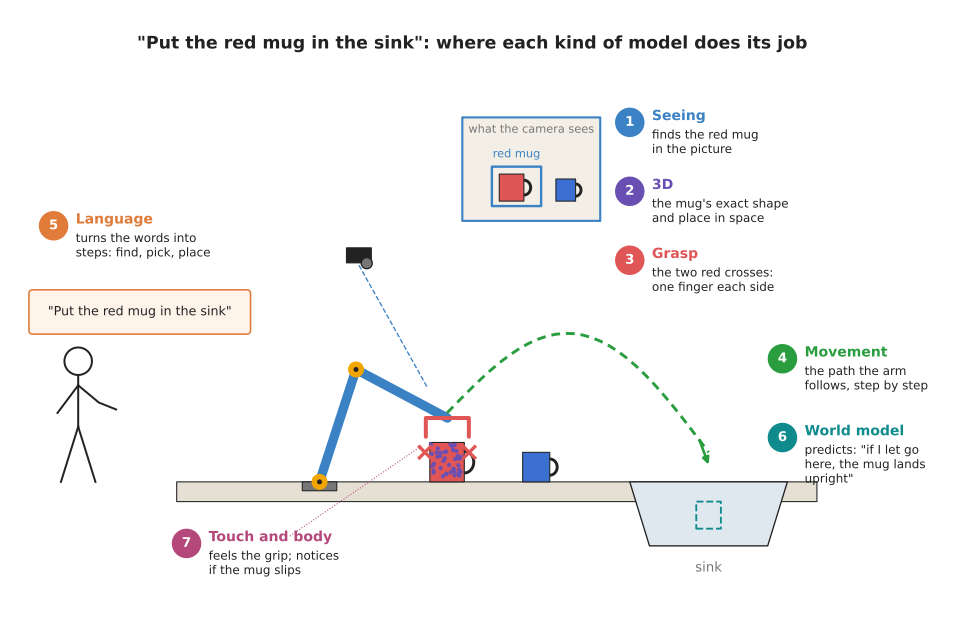
The picture shows the task with the seven kinds of model numbered. Each number sits next to the part of the scene that the model works on: the words, the camera picture, the mug's shape, the finger positions, the path, the sink and the fingertips.
A real robot does not always use all seven, because many robots use only two or three, and some large models do several of these jobs at once. But every model in this book does at least one of these jobs.
2. The seven categories#
Now that one task has shown where the seven kinds fit, this section describes each of them. Each category below has one paragraph that says what its models do, followed by a link to the chapter overview, and that overview lists every kind of model in the category.
Seeing models#
Seeing models turn a picture into names, boxes, outlines, poses or depth, which means they take a camera picture and say what is in it and where. The simplest ones give one name for the whole picture. But others draw a box around each object, trace its exact outline, find special points such as a mug's handle, or guess how far away each pixel is. Some can even be told what to look for in ordinary words, such as "the red mug". So in the mug task, a seeing model finds the red mug in the picture, and the seeing models overview lists every kind.
3D models#
3D models work on 3D points and whole scenes instead of flat pictures. A depth camera gives many points, each with a position in space, and together these points are called a point cloud. 3D models can say which points belong to the mug, or guess the shape of the side of the mug that the camera cannot see. They can also build a full 3D copy of the room from many pictures. So in the mug task, a 3D model gives the mug's exact shape and position, which keeps the gripper from bumping into it, and the 3D models overview lists every kind.
Grasp models#
Grasp models decide where and how to hold an object, so they take a picture or a point cloud and give one or more grasps. A grasp is a position and direction for the gripper, together with how wide to open its fingers. Some grasp models also say where a suction cup should go, or which part of an object is meant to be held, such as a mug's handle. Others instead score a grasp to say how likely it is to work. So in the mug task, a grasp model chooses where the fingers go on the mug, and the grasp models overview lists every kind.
Movement models#
Movement models decide how the arm should move, moment by moment, so they take what the robot sees and feels now and give the next movement, or the next few movements. Many of them learn by copying people who drove the robot, while others learn by trial and error, in the real world or in a simulator. Some only help a programmed planner, by checking paths or suggesting them. So in the mug task, a movement model guides the arm to the mug and on to the sink, and the movement models overview lists every kind.
Language models#
Language models understand words, and connect words to pictures and actions. For example, a language model can turn "put the red mug in the sink" into a list of steps. A vision-language model can instead answer questions about a picture, such as "is the mug in the sink now?". A vision-language-action model goes further and takes a picture and an instruction and gives arm movements directly. So in the mug task, a language model turns the person's words into steps: find the red mug, pick it up, put it in the sink, and the language models overview lists every kind.
World models#
World models predict what will happen next if the arm does something, so they take the state of the scene now and a planned action and give the state that should follow. Some predict positions, some predict whole future pictures, and some predict how cloth or liquid will move. A robot can use this to try out actions in its "imagination" before doing them for real. So in the mug task, a world model predicts whether the mug will land upright if the gripper lets go at a certain point, and the world models overview lists every kind.
Touch and body models#
Touch and body models make sense of touch, force and the arm's own body. They take signals from touch sensors on the fingers, from force sensors in the wrist, or from the arm's own motors. So they can say whether the fingers are touching something, how hard they are pressing and whether the object is slipping. They can also notice when the arm has bumped into something it should not have, and learn how the arm itself really moves. So in the mug task, a touch model notices if the mug starts to slip out of the fingers, and the touch and body models overview lists every kind.
3. All seven in one table#
Now that each category has been described, the table below puts them side by side. Read each row across: what the model is given, what it gives back, and one question it answers for a robot arm.
| Category | Input (what goes in) | Output (what comes out) | Example question |
|---|---|---|---|
| Seeing models | a camera picture | names, boxes, outlines, points or depth for each pixel | "Where is the red mug in this picture?" |
| 3D models | a point cloud, or several pictures of a scene | labelled points, a full 3D shape, or a 3D copy of the scene | "What is the mug's full shape, including the back I cannot see?" |
| Grasp models | a picture or a point cloud | gripper positions and directions, each with a score | "Where should my fingers go to lift this mug?" |
| Movement models | pictures and joint angles now | the next movement, or the next few | "How should I move my joints in the next second?" |
| Language models | words, often with a picture | steps, answers in words, or arm movements | "What steps does 'put the red mug in the sink' need?" |
| World models | the scene now and a planned action | the scene a moment later | "If I let go here, where will the mug end up?" |
| Touch and body models | touch, force and motor signals | contact, force, slip, or a warning | "Is the mug slipping out of my fingers?" |
The first three categories look at the world, while the next one acts in it. Language models connect people's words to the rest, world models look ahead in time, and touch and body models check what is happening at the fingers and inside the arm.
4. Every page in this book#
This section lists every page in the book, so you can find any one of them from here.
The first chapter, the one this page is in, explains the ideas that every later page uses. Its six pages are meant to be read in order:
- What a model is
- How a model learns
- Inside a neural network
- Learning signals: the four ways a model is taught, which are supervised, self-supervised, imitation and reinforcement learning.
- Where the data comes from
- The map of models. This page.
The second chapter, classical machine learning, covers the learning methods that are not neural networks but are used next to them on robots. They learn from a short list of measured numbers, often with only tens or hundreds of examples. After its overview, its pages come in two groups, like the family chapters below:
- Most used, the general tools that learn from a table of numbers: linear and logistic regression, decision trees and forests, Gaussian processes and Bayesian optimisation, and nearest neighbours and locally weighted regression.
- Also used, the methods with a narrower job: mixture models and hidden Markov models, movement primitives, PCA and shrinking data, and support vector machines.
Each of the seven family chapters after that starts with an overview page, and the rest of its pages are split into two groups. The most used group holds the kinds of model that robot arm projects use most often, or that matter most, so read these first. The also used group holds kinds of model that are used often, but less, because some of them do a narrower job, while others are newer and are not yet in everyday use.
The table below lists every page in the seven family chapters. Read each row as one chapter: its overview, then its most-used pages, then its also-used pages.
The split is about how often a page's kind of model is used, not about how good it is, so an also-used model can still be the right choice for your task. For example, if your robot must learn a skill by trial and error, reinforcement learning is the page to read, even though it sits in the also-used group.
The last chapter, making models work on an arm, is not a family of models, because it is about what every model needs before a real arm can rely on it. It has an overview and the same two groups:
- Most used: fine-tuning, which adapts a model that someone else trained to your own robot and objects; running a model on a robot, which puts the model inside the loop that drives the arm; and evaluation and failure, which measures whether it really works and how it fails.
- Also used: uncertainty and confidence, which tells the robot when a model is unsure, and what to do then; and prompting with a demonstration, which teaches a task by showing the model one recording of it instead of collecting examples and training on them.
5. When each kind does its job#
The map picture shows where each kind of model works, but it is also useful to see when each one works. The same task can be split into six steps: hear the words, find the mug, choose the grip, reach and close the gripper, carry the mug to the sink, and let go.
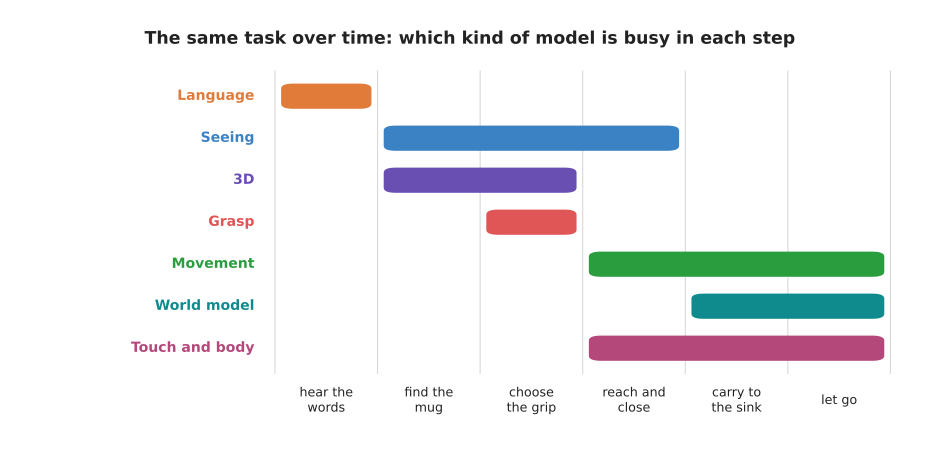
Each coloured bar shows the steps during which one kind of model is busy. Language works first and only briefly, while seeing keeps working as the arm reaches, because the mug may move. Movement, world and touch models then take over once the arm is moving.
This is one possible way to build the task, and not the only one. For example, a robot built around a single vision-language-action model would have one long bar that covers language, seeing and movement at once.
6. How the categories connect#
The seven categories are separate chapters, but the models in them depend on each other. The output of one is very often the input of the next.
A seeing model finds the mug, and then a 3D model takes the points inside the mug's outline and gives its shape. A grasp model takes that shape and chooses a grasp, and a movement model, or a programmed planner, moves the arm to that grasp, while a touch model checks the grip. This chain, from picture to movement, is the most common way to build a picking robot.
Some models cross the borders between two categories or more. An open-vocabulary seeing model uses language to know what to look for, so it belongs partly to seeing models and partly to language models. A vision-language-action model does the jobs of seeing, language and movement in one network. A world model can be used inside a movement model, so the movement model can try actions in its imagination first. The chapters point out these links where they matter.
The categories also share their data sources, which the where the data comes from document described. Seeing and language models learn mostly from pictures and text, often from the internet, while movement models learn mostly from demonstrations and simulation. Touch and body models learn from the robot's own sensors. And almost all of them run inside the loop described in running a model on a robot.
7. Find a method by job#
Most people come to these books with a job in mind, not a method, so this section starts from the job instead. Read each row across: a job the arm must do, the Book 2 or Book 3 page that helps you choose how to do it, the written techniques in Programming Techniques that can do it, and the learned models in this book that can do it.
Most jobs have both a written and a learned answer, and the Book 2 or Book 3 page says which one suits which case. Two rows in the table have only one side, however. No learned model is in common use to check whether the arm can reach a pose, because inverse kinematics already gives an exact answer quickly. And no written technique can follow an instruction in free wording, because a person can say the same thing in too many ways to list them all. Many real arms mix the two sides, so a learned model finds the object and written techniques do the rest.
So the classical machine learning methods of chapter 2 appear in the rows where the input is a few measured numbers. Those jobs are correcting a sensor, tuning a controller's gains, learning a motion from a few demonstrations, and scoring grasps or spotting faults from logged numbers.
8. A suggested reading order#
You can read the chapters of this book in any order, because each one explains its own terms. But some chapters are easier to follow after others. The list below is the order this book suggests, with the reason for each step.
- This chapter, what models are. Everything else uses its words: model, training, neural network, learning signal and data. Its six pages are listed in section 4.
- Classical machine learning. Read it now if your inputs are a few measured numbers, such as forces or distances, and you have only tens or hundreds of examples. Otherwise you can come back to it later. Its linear regression page is the simplest learned model there is, and it makes the weights of a neural network easier to picture.
- Seeing models. Most robot arms start with a camera, and most other models use what a seeing model finds.
- 3D models. They take the step from flat pictures to positions in space, which an arm needs to reach anything.
- Grasp models. They use what seeing and 3D models give, and decide how to pick an object up.
- Movement models. They decide how the arm moves. Many of the best-known recent results in robot learning are movement models.
- Language models. They are easier to follow once you know seeing and movement models, because the largest of them combine both.
- World models. They predict the future, which makes most sense once you know what a movement model does with a prediction.
- Touch and body models. They finish the families with the sense that works closest to the object itself.
- Making models work on an arm. It takes any of the models above from a notebook to a real arm: fine-tuning, running it in the robot's loop, measuring it, and knowing when it is unsure. Read it once you have a model you want to use.
If you have one specific job in mind, you can also jump straight to its chapter. For example, if you only want to pick objects from a bin, read seeing models and then grasp models.
Inside each chapter, read the overview first, then the most-used pages, and then whichever also-used pages fit your task.
9. Where to read next#
- The seeing models overview is the next chapter in the suggested order.
- Running a model on a robot explains the loop that every one of these models runs inside.
- Foundation models and generalist policies in Book 3 lists the large models that try to do many of these jobs at once.
- Learned methods for one arm in Book 3 shows how these kinds of model are used to teach a single arm a task.
10. Using it in Python#
This page sorted the models of the book into seven categories, and section 4 listed every page. Almost every one of those models is used from Python in one of two shapes, and this section shows both, because knowing which shape a method takes tells you in advance what work it will be. This is the shape of the idea rather than a program to run.
# Shape 1: the classical methods of chapter 2. Fit on your own table, then predict.
from sklearn.ensemble import RandomForestClassifier

model = RandomForestClassifier().fit(X, y)
answer = model.predict(X_new)

# Shape 2: the neural networks of every other chapter. Build the layers, load
# somebody else's trained numbers into them, then call the result.
import torch
from torch import nn

network = nn.Sequential(nn.Linear(10, 64), nn.ReLU(), nn.Linear(64, 7))
network.load_state_dict(torch.load("policy.pt", weights_only=True))
network.eval()
with torch.no_grad():
    answer = network(observation)
The difference between the two shapes is where the numbers come from. In shape 1
you train the model yourself, on a table you collected, and it takes seconds. In
shape 2 you almost never train from scratch, because the trained numbers are a
download of hundreds of megabytes that somebody spent a great deal of computing
time producing. weights_only=True tells PyTorch to load numbers only and not
to run any code stored in the file, which matters when the file came from the
internet.
The libraries follow the categories closely. Every method in
chapter 2 is scikit-learn,
and PyTorch sits under everything else. Beyond that, the seeing models usually
come through Ultralytics or Hugging Face's transformers package, the language
models through transformers, and the movement and world models through the
research code released with each paper. Each chapter has its own "Libraries"
section with the real names.
What you have to write is the same in both shapes, and it is not the model. It is the code that turns the robot's sensor readings into the input the model expects, and the code that turns the model's output into commands the arm can follow. What you have to decide is which category your problem belongs to, and section 7 of this page is the table for that.