This is the first page of Learned Models, which explains the learned models that robots, and robot arms in particular, use today. Most of them are neural networks, although one chapter covers the older learning methods that are not. So this page answers the first question a beginner has: what is a "model"?
The page is for a reader who has never met the word in this sense. So all you need beforehand is to know what a robot arm is and what a camera does, from Books 1 and 2. However, you do not need to know anything about machine learning, and you do not need any maths beyond adding and multiplying.
By the end of the page you will know four things. First, a model is a function that was learned from examples instead of written by hand. Second, because a computer can only do arithmetic, everything that goes into a model and comes out of it is a list of numbers. A neural network is one particular kind of model, and it is the kind that most of this book is about. The last sections then say what the rest of the book covers and how to read it.
Contents#
- A model turns an input into an output
- Rules written by hand, or a model learned from examples
- Everything is numbers
- What "neural network" means
- Why learn a model, and what it costs
- What this book covers
- How to read this book
- Where to read next
- Using it in Python
1. A model turns an input into an output#
A function is anything that takes something in and gives something back. The thing that goes in is called the input, and the thing that comes back is called the output. A function is fixed, which means it gives the same output every time you give it the same input.
You already know many functions:
- A calculator's square root key takes the number 9 and gives back 3.
- A kitchen scale takes a bag of flour and gives back its weight.
- A robot arm's forward kinematics, from Book 1, takes the joint angles and gives back where the gripper is.
In each of these, a person worked out the steps: somebody wrote down how to find a square root, and somebody else wrote down the formula for the gripper's position. Because those steps were written by hand from an understanding of the problem, they are exactly right.
A model, in this book, is also a function, because it takes an input and gives an output, but the difference is where its steps come from. Nobody writes them by hand; instead a computer program finds them by looking at many examples, and each example is an input together with the output that a person says is correct.
Here is the kind of job a model does on a robot arm. The input is a photo from the arm's camera, and the output is the name of the object in the photo, either "mug" or "bowl". A person collects a few thousand photos and writes the right name next to each one. Then a program looks at all of them and finds steps that turn each photo into its name, and those steps are the model.
The process of finding the steps is called training, and people also say that the model learns from the examples. The word "learn" here means only this: a program adjusted some numbers until the outputs matched the examples. Because that adjustment is the whole of the learning, the next page shows exactly how it works.
2. Rules written by hand, or a model learned from examples#
The last section said that a model's steps come from examples rather than from a person. So this section compares the two ways of building the mug-or-bowl function, using the same three objects for both.
Suppose you try to write the rule yourself, so you look at a mug and a bowl side by side. A mug is usually taller than it is wide, while a bowl is usually wider than it is tall. So you write a rule that measures the object in the photo and compares its height with its width.
The picture below shows this rule on the left, and a learned model on the right.
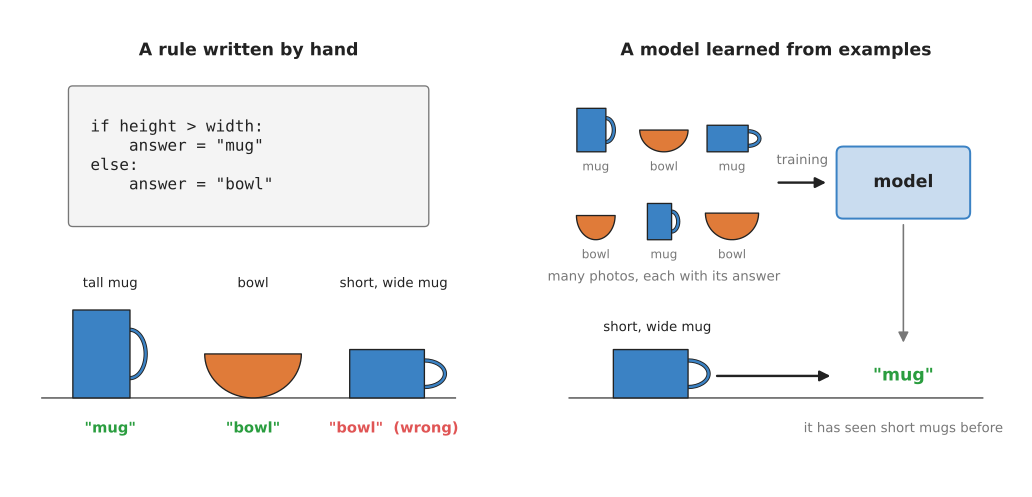
On the left, the rule works on a tall mug and on a bowl but calls a short, wide mug a "bowl"; on the right, a model trained on many named photos calls it a "mug".
The rule fails because it looks at only one thing, the height against the width, while real mugs come in many shapes. Some are short and wide, some have no handle turned towards the camera, and some bowls are deep and narrow. You could add more rules, such as "if it has a handle, it is a mug". But then you need a rule that finds a handle in a photo, and that rule needs rules of its own. Each new rule fixes a few objects and breaks a few others, so the set of rules never settles.
The model on the right was never told about height, width or handles, because it was shown many photos instead, each with the right name written next to it. Some of those photos were of short, wide mugs, and during training the program adjusted the model until it gave the right name for almost all of them. So when it later meets a new short, wide mug, it gives the right answer.
The table below compares the two ways, so read each row across to see how they differ on one point.
| Rules written by hand | Model learned from examples | |
|---|---|---|
| Who writes the steps | a person | a program, from examples |
| What you need to start | an understanding of the problem | many examples with the right answers |
| Works on objects you did not plan for | often not | often yes, if they look like the examples |
| Can you read why it gave an answer | yes, line by line | mostly no |
| How you fix a mistake | change a rule | add examples and train again |
Programmers usually say that the rules approach is programmed and that the model approach is learned, and Books 2 and 3 use the same two words. A real robot usually mixes both: for example, a learned model finds the mug in the photo, and hand-written maths then works out how to move the arm to it.
3. Everything is numbers#
Both ways of building that function, the programmed one and the learned one, run on a computer. But a computer cannot look at a mug, because it can only do arithmetic on numbers. So before a model can use a photo, the photo must become a list of numbers, and the answer must come back out as numbers too.
A digital photo is already made of numbers, because it is a grid of tiny squares called pixels. In a grey photo each pixel is one number that says how bright it is. That scale usually runs from 0, which is black, to 255, which is white. A colour photo has three numbers per pixel, one for red, one for green and one for blue.
The picture below shows a very small grey photo of a mug, only 8 pixels wide and 8 pixels tall, and follows it through a model.
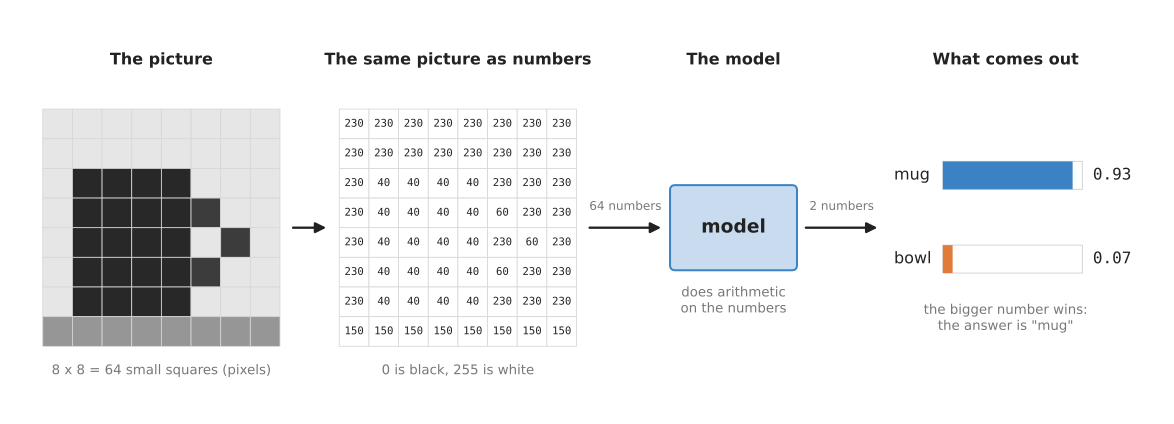
The 64 brightness numbers go into the model, the model does arithmetic on them, and two numbers come out, one for "mug" and one for "bowl".
Read the picture from left to right:
- The photo is a grid of 64 pixels, in which the mug is dark and the background is light.
- The same photo, written as numbers, where the dark mug pixels are 40, the light background is 230 and the table along the bottom is 150.
- These 64 numbers go into the model, which multiplies and adds them in a fixed way that it learned during training.
- Two numbers come out. The first is a score for "mug", 0.93, and the second is a score for "bowl", 0.07. The two scores add up to 1, so people often read them as how sure the model is, and here the model is 93% sure that the photo shows a mug.
The output scores in this picture are an example chosen to show the idea. However, a real camera photo is much bigger than 8 pixels across. A photo 640 pixels wide and 480 pixels tall has 307,200 pixels, which in colour is 921,600 numbers. The model handles them in exactly the same way, and there are simply more of them.
This is true of every other input and output in this book. A robot arm's joint angles are a list of numbers, one per joint, and a force sensor gives a few numbers as well. Even a sentence typed by a person is turned into a list of numbers before a model sees it. The output can be:
- a score for each kind of object, as in the picture above;
- four numbers for a box drawn around an object in the photo;
- a position and an angle for the gripper;
- a list of joint angles for the next moment of movement.
So the question every model answers has the same shape: "given these numbers, what are those numbers?" What changes from one kind of model to the next is only what the numbers mean.
4. What "neural network" means#
The last section said what goes into a model and what comes out of it. But it did not say what happens in between. So a model needs some fixed way of turning its input numbers into its output numbers. Today the most common way is a neural network, and nearly every model in this book is built from one.
A neural network is built from many small, identical pieces called neurons, and a neuron is only a tiny calculation. It takes some numbers in, multiplies each one by a number of its own, adds the results together, and passes the total on. The name comes from nerve cells in the brain, which gave the first researchers the idea in the 1940s and 1950s. However, a neural network in a computer is only arithmetic, so it does not work like a brain in any detailed way.
The neurons are arranged in groups called layers, and the picture below shows a small network with four of them.
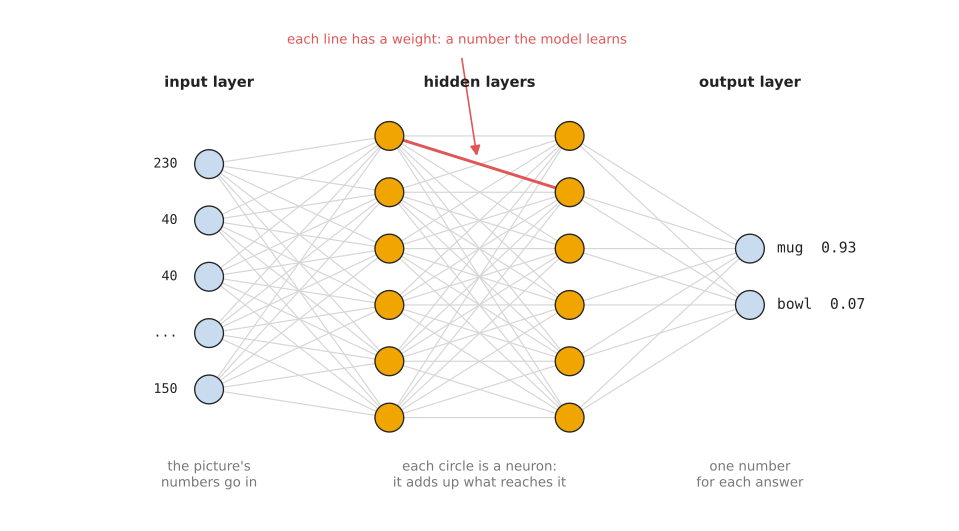
Numbers enter on the left, pass through two hidden layers of neurons, and two scores come out on the right; every line carries a number called a weight.
- The input layer on the left holds the input numbers, for example the brightness of each pixel.
- The output layer on the right gives the answer, here one score for "mug" and one for "bowl".
- The layers in between are called hidden layers, because you never see their numbers directly and you only see what goes in and what comes out.
Each line between two neurons has a number attached to it, and that number is called a weight. The weight says how much the first neuron's number counts towards the second neuron's total. So a big weight means that it counts a lot, while a weight near zero means that it hardly counts, and a negative weight means that it pulls the total down.
The weights are the part that is learned, and before training they are random numbers, which is why the network's answers start out as nonsense. Training changes the weights a little at a time until the answers match the examples. After that the weights stay fixed, so the network is then just a very long, fixed calculation.
Real networks are much bigger than the one in the picture. For example, a network that reads camera photos can have millions of weights, and the largest models in this book have billions. The inside-a-neural-network page opens up a single neuron and shows the special layers that pictures and sentences need.
5. Why learn a model, and what it costs#
Now that you know what a model is and what it is made of, the next question is when you should use one at all. So this section answers the question that every choice in this book comes back to: why use a learned model instead of the obvious alternative, which is rules written by hand?
A learned model does one thing that hand-written rules do badly, which is to handle the huge variety of the real world. For example, mugs come in thousands of shapes and colours, the light in a room changes during the day, and a towel on a table can lie in endless different folds. Writing rules for all of this is not practical, whereas a model can learn it from enough examples.
A model also saves you from having to describe the thing yourself. You may not be able to say in words what makes a grasp secure, or what a ripe tomato looks like. But you can still collect examples of good grasps and ripe tomatoes, and the model finds the pattern in them.
In exchange for that, a learned model costs you four things.
- It needs examples, often thousands of them, each with the right answer written down by a person, so collecting them takes time and money.
- It needs computing power to train, and a large model can take days on many graphics cards. A graphics card, also called a graphics processing unit (GPU), is a chip that can do many multiplications at the same time, which is exactly what training needs.
- You cannot easily read why it gave an answer, because the answer comes out of millions of multiplications and there is no single line to point at.
- It can be wrong in ways that are hard to predict. A model is usually reliable on inputs that look like its examples, but on an input that looks different, such as a photo in much darker light, it may give a wrong answer with a high score.
So the advice in this book is the same as in Books 2 and 3. If a simple hand-written rule does the job reliably, use the rule, because it is cheaper, faster and easier to check. But use a learned model when the world is too varied for rules, which on a robot arm is very often the case for seeing, grasping and moving around real objects.
6. What this book covers#
Now that you know what a model is and when one is worth the cost, this section says what the rest of the book holds. Most of this book is about neural networks, and it sorts the neural network models used on robot arms into seven families. This is because each family answers a different question for the robot. Each family has its own chapter, and each chapter starts with an overview page.
The table below lists all seven of them, so read each row as one family: its name, the question it answers for a robot arm, and the link to its overview.
| Family | What it does | Start here |
|---|---|---|
| Seeing models | turn a picture into names, boxes, outlines, poses or depth | overview |
| 3D models | work on 3D points and whole scenes instead of flat pictures | overview |
| Grasp models | decide where and how to hold an object | overview |
| Movement models | decide how the arm should move, moment by moment | overview |
| Language models | understand words, and connect words to pictures and actions | overview |
| World models | predict what will happen next if the arm does something | overview |
| Touch and body models | make sense of touch, force and the arm's own body | overview |
Each family chapter splits its pages into two groups. The most used group holds the kinds of model that robot arm projects use most often, or that matter most. The also used group holds kinds that are used often, but less. The map of models lists every page of every chapter in its group.
Before those seven chapters come two others, and the first of them is this one, which explains the ideas that every later page uses, over six pages:
- What a model is. This page.
- How a model learns. Examples, guesses, measuring how wrong a guess is, and changing the weights a little at a time.
- Inside a neural network. Neurons, layers, and the special layers for pictures and sentences.
- Learning signals. The four ways a model is taught: from a person's labels, from the data itself, by copying a person, and by trial and error with a score.
- Where the data comes from. How people collect the examples a robot model learns from.
- The map of models. All seven families on one page, every page of the book in its group, and how the families work together on one task.
The second chapter is classical machine learning, which covers the learning methods that are not neural networks, and when a small dataset makes them the better choice. After its overview, its pages come in the same two groups as the family chapters:
- Most used: linear and logistic regression, decision trees and forests, Gaussian processes and Bayesian optimisation, and nearest neighbours and locally weighted regression. These are general tools that learn from a small table of measured numbers.
- Also used: mixture models and hidden Markov models, movement primitives, PCA and shrinking data, and support vector machines. These do narrower jobs, such as learning a motion from a few demonstrations.
After the seven family chapters comes one last chapter, making models work on an arm, which is about taking any model from "it works in a notebook" to "it works on the arm". Its most-used pages are fine-tuning, which adapts a model that someone else trained to your own robot and objects; running a model on a robot, which covers what happens when a trained model is used on a real arm. Then comes evaluation and failure, which measures whether it really works. Its also-used page is uncertainty and confidence, which says how to tell when a model is unsure, and what the robot should do then.
7. How to read this book#
Because the later chapters all build on the same few ideas, the order in which you read them matters. Read the first chapter in order, since each page uses words that the page before it explained, and the first three pages are the base for everything else.
After that, read the classical machine learning chapter when your input is a short list of measured numbers, such as forces, distances or joint angles, and you have tens or hundreds of examples rather than thousands. Its overview says which of its methods fits which job.
The seven family chapters can then be read in any order, because each one starts with an overview page that says what the family is for and lists its kinds of model. Each later page in a chapter covers one kind of model, so read the pages in the most-used group first, and then the also-used pages that fit your task. Those pages all follow the same order, so they each say what the model is, what goes in and what comes out, and how it works inside. Then they say how it is trained, which well-known models are of this kind, where it is used on a robot arm, and what goes wrong.
Read the last chapter, on making models work on an arm, once you have a model you want to use on a real arm.
If you want a quick overview first, read the map of models next, and then come back to the next page.
This book explains ideas, not code, so Books 2 and 3 are where you will find how to download, run and train some of these models on a real arm. The "Where to read next" section at the end of each page links to those deeper pages where they exist.
8. Where to read next#
- How a model learns is the next page, and it shows how training finds the weights.
- Inside a neural network opens up a neuron and the layers built from it.
- Models that find objects in Book 2 lists real seeing models you can download and run today.
- Camera basics in Book 2 explains how a camera makes the grid of pixels that a model reads.
9. Using it in Python#
Section 1 said that a model is a function, and section 3 said that both its input and its output are lists of numbers. Those two sentences become much easier to believe once you have called a model yourself, so this section shows the shortest Python that does it. After reading it you will know what the three steps of using a trained model look like, and you will know that not one of the numbers inside it was written by you.
The model below is ResNet-18, an image classifier that somebody else trained on
ImageNet, a collection of about 1.2 million labelled photographs. It answers
with one of a thousand object names. The library is torchvision, which is the
image part of PyTorch, and it downloads the trained numbers the first time you
ask for them.
import torch
from PIL import Image
from torchvision.models import resnet18, ResNet18_Weights

weights = ResNet18_Weights.DEFAULT   # the trained numbers, downloaded once
model = resnet18(weights=weights)
model.eval()                         # answering mode, not training mode
prepare = weights.transforms()       # the exact resizing this model expects

photo = prepare(Image.open("cup.jpg")).unsqueeze(0)   # one photo, as numbers
with torch.no_grad():                # no training, so no gradients needed
    scores = model(photo)

print(weights.meta["categories"][scores.argmax()])
The variable photo is a block of numbers whose shape is (1, 3, 224, 224),
which means one picture, three colour channels, and 224 rows of 224 columns.
That is section 3's claim made concrete, because the photograph on disk has
become nothing but numbers. The variable scores has the shape (1, 1000), which
is one number per possible name, and argmax returns the position of the
largest of them.
The library gives you almost everything here. It gives you the arrangement of
layers, the 11,689,512 trained numbers inside them, the resizing step that the
model was trained with, and the list of the thousand category names. Because
weights.transforms() comes from the same object as the weights, the photo is
prepared in exactly the way the training photos were, and that matters, since a
model fed differently prepared pictures answers badly.
What you write yourself is short but not nothing. You open the photograph, you decide what the robot should do with the answer, and you decide what to do when the answer is wrong, because the model always returns its most likely name even when the object is not in its list at all.
What you have to decide is which model to use and whether its categories match your job. The thousand ImageNet names include "coffee mug" and "soup bowl", so the mug-and-bowl job of section 1 happens to be covered. However, if your robot handles a part that ImageNet has never seen, no pretrained model helps and you have to collect your own labelled examples and train. The next page is about that.