This page answers one question: how does a model follow things from one video frame to the next? A robot arm often needs to know not only where something is, but also how it is moving, and whether the thing it sees now is the same thing it saw a moment ago.
It is written for a reader who has already read the earlier pages of this chapter, so you should know what a detection box and a segmentation outline are, from object detection and segmentation. Every other page in this chapter looks at one photo at a time, whereas this page looks at a video, which is a series of photos, called frames, taken one after another. It covers three kinds of model: optical flow, point tracking and object tracking.
Before this page, it helps to have read the Kalman filter and assignment and matching. The object trackers in section 3 are built from both: the filter predicts where each object will be, and assignment pairs each new box with an object.
Contents#
- What it is
- What goes in and what comes out
- How it works inside
- How it is trained
- Well-known models
- Where this is going
- Where to read next
1. What it is#
The one-sentence idea is this: a tracking model compares frames of a video and says where each pixel, point or object from one frame has gone in the next.
Here is an everyday example: watch a ball roll across a floor, and you do not see a new ball in every moment, because you see one ball that moves. You also know which way it is going and roughly how fast. So a tracking model gives a robot those same two things: the same identity over time, and the motion.
There are three kinds, from the finest to the coarsest.
- Optical flow says, for every pixel in one frame, where that pixel moved to in the next frame, and it works on two frames at a time.
- Point tracking follows a chosen set of points, such as a few dots on a mug, through many frames, and it keeps following them even when they are hidden for a while.
- Object tracking follows whole objects, as boxes or outlines, through many frames, and it gives each object a number that stays the same while the object is in view.
2. What goes in and what comes out#
Because those three kinds work at different levels of detail, they also take and give different things, so the table below compares them. Read each row as: what goes in, what comes out, and what a robot arm uses it for.
| Kind | What goes in | What comes out | A typical use on an arm |
|---|---|---|---|
| Optical flow | two frames next to each other | an arrow for every pixel: how far it moved and which way | spotting what moved, for example a person's hand entering the scene |
| Point tracking | a video and some starting points | each point's position in every frame, and whether it is visible | following parts of a cloth, or the corner of a lid, while the arm moves it |
| Object tracking | a video, and boxes or outlines from a detector or a click | each object's box or outline in every frame, with the same number each time | picking an object off a moving belt, or keeping count of objects in a bin |
For optical flow, the output is often drawn as arrows on a grid, where each arrow starts where a pixel was and points to where it went.
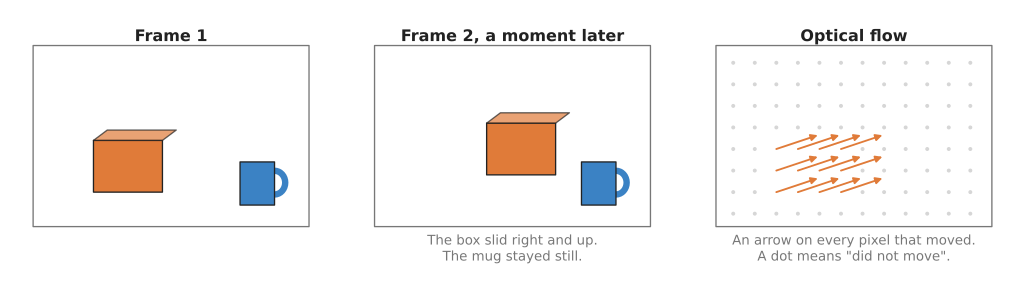
Only the box moved, so only its pixels get arrows, and the still mug and wall get dots.
For point tracking, the output is a path for each point, plus a yes or no for whether the point can be seen in each frame.
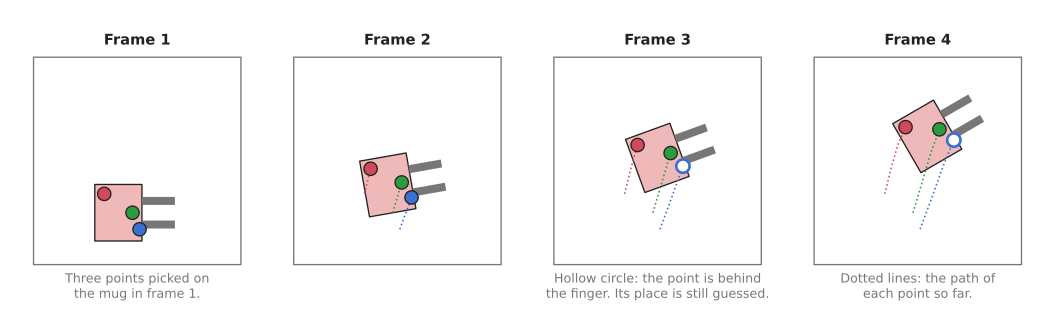
The gripper lifts and turns the mug, and the model keeps following the blue point even while a finger hides it.
For object tracking, the output is a box or an outline per object per frame, together with a number for each object that stays the same.
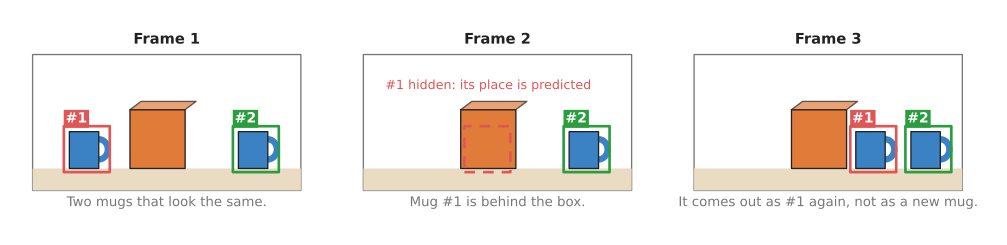
Mug 1 goes behind the box and comes out again, and the tracker still calls it mug 1, not a new mug.
3. How it works inside#
Optical flow#
A modern optical flow model, such as RAFT, works in these steps. RAFT is also the flow model section 5.6 recommends, so the steps below describe a model you would actually install.
- An encoder turns each of the two frames into a grid of small embeddings, where an embedding is a list of numbers that describes a small patch of the picture.
- The model then compares every patch in frame 1 with every patch in frame 2, and stores how alike each pair is, because patches that look alike are likely to be the same bit of the world.
- It starts with a guess that nothing moved at all.
- It improves that guess in many small rounds, and in each round it looks at how well the current guess matches the stored comparisons, and adjusts each arrow a little.
- After enough rounds, it outputs the final arrow for every pixel.
The small rounds in step 4 are what made RAFT accurate, and the same idea is used by RAFT-Stereo on the depth from pictures page, because finding the shift between two stereo photos is the same problem as finding motion between two frames.
Point tracking#
However, a point tracker must follow a point over many frames rather than only two, and it must also keep going when the point is hidden.
- For each starting point, the model records what the picture looks like around it.
- In each new frame, it then searches for the patch that looks most like that record.
- It does not decide each frame alone, because it looks at a window of frames together, so that the path stays smooth and makes sense over time.
- When a point is hidden, the model marks it as not visible, but it still guesses where the point is, from the path so far and from the other points around it.
CoTracker makes that last idea stronger, because it tracks many points together, so if one point on a mug is hidden, the other points on the same mug help place it. CoTracker3, which section 5.5 recommends, is the current version of that model.
Object tracking#
Most object trackers for robots use a method called tracking by detection.
- A detector finds boxes in every frame, but it does not know which box in this frame matches which box in the last frame.
- So a predictor guesses where each known object should be now, from where it was and how fast it was moving. A common predictor is the Kalman filter, an ordinary program that keeps a best guess of position and speed and updates it with each new measurement, and it is not a neural network.
- The tracker then matches each new box to the nearest predicted position, and this step is called association.
- A matched box keeps its object's number, while a box with no match becomes a new object. A known object with no box is kept for a few frames as "hidden", with its predicted position, in case it comes back.
Those four steps are the whole of SORT, which section 5.2 keeps as the clearest way to read the method, and almost the whole of ByteTrack, which section 5.1 recommends. Neither of those two holds any learned weights, so the only network in this route is the detector in step 1. Some trackers also compare how the objects look, using an embedding for each box, so that they can tell apart two objects that pass close to each other.
The other two object trackers in section 5 do not follow this route at all. SAM 2, from section 5.3, needs no detector, because you click once on an object in one frame, and it then keeps a memory of what the object looked like and draws the outline in every later frame. SAM 3, from section 5.4, needs neither a detector nor a click, because you give it a short phrase and one model finds every object the phrase describes, numbers them itself, and then follows them with the memory that SAM 2 uses.
4. How it is trained#
Training data for motion is hard to get from real videos, because no person can label where every pixel moved between two frames, and even labelling a few points through a long video is slow.
So most of these models start with computer-made videos instead. A program moves 3D objects around a scene and renders the frames, and because the program moved the objects, it knows exactly where every pixel went.
- Flying Chairs is a well-known example for optical flow, and it is made of pictures of chairs pasted onto background photos and moved around. It looks nothing like a real room, yet flow models trained on it work on real videos.
- Kubric is a program from Google that renders scenes of objects falling and bouncing, and point trackers such as TAPIR learned from videos made with it.
- Some newer point trackers, such as CoTracker3, add real videos later, because a trained model labels the real videos itself and the new model then learns from those labels. This is the same pseudo-labelling idea described in depth from pictures.
Instead, object trackers mostly reuse a trained detector, and the tracking step on top is often plain code, so it needs no training at all. Trackers that compare how objects look are trained on videos where people have drawn boxes and numbered the objects in every frame.
5. Well-known models#
This section names the trackers a developer would install today, and it keeps the three kinds of this page apart, because picking the wrong kind costs much more than picking the wrong model inside a kind. Two of the best known names below are not learned models at all.
The table compares them. The left column names the model and says how current it
is. The right column begins with which of the three kinds the model belongs to,
because that is the choice that matters most, and then gives what it is best at,
how big it is, what licence it carries, and the case that should make you pick it.
The right column says not stated where the project that made the model publishes
no number.
| Model | What decides it |
|---|---|
| ByteTrack, most used in 2026 | Object tracking, many at once. It is best at keeping one number on each of several objects that your detector already finds. It has no weights of its own, and its original code is MIT. Pick it when a detector already works and several objects move at once. |
| SORT, historical | Object tracking, many at once. It is best at showing in a few hundred lines what tracking by detection is. It has no weights of its own, and its original code is GPL-3.0. Pick it when you want to read the method rather than ship it. |
| SAM 2, most used in 2026 | Object tracking, one object at a time. It is best at following the outline of one object somebody pointed at, through hidden spells and changes of shape. It comes in sizes from 38.9 million to 224.4 million parameters, and both its code and its weights are Apache-2.0. Pick it when something can point at the object once and the camera films without a break. |
| SAM 3, worth betting on | Object tracking, from a written phrase. It is best at finding and then following every object that matches a short phrase, with no detector of your own. It has 848 million parameters, it carries a bespoke SAM License, and its weights need an access request. Pick it when you cannot train a detector and you can say in words what to follow. |
| CoTracker3, worth betting on | Point tracking. It is best at following points you chose on something that bends, such as cloth. Its size is not stated, and most of its code is CC-BY-NC. Pick it when the thing you follow has no fixed shape. |
| RAFT, most used in 2026 | Optical flow. It is best at measuring how far every pixel moved between two frames. It has 5.3 million parameters for raft_large and 1.0 million for raft_small, under the BSD-3-Clause licence. Pick it when you need motion everywhere and no identity. |
Every size above is the number its own project publishes. ByteTrack and SORT have no size because they hold no learned weights at all, as the next two sub-sections explain.
5.1 ByteTrack, for several objects at once#
ByteTrack is the box tracker most used in 2026, because nearly every tracking library ships it and it needs nothing from you except detections.
No weights and therefore no size, a laptop, MIT for the original code.
Yifu Zhang and eight colleagues published it in October 2021, and its one idea is in the title of the paper, Multi-Object Tracking by Associating Every Detection Box. Earlier trackers threw away the boxes a detector was unsure about. ByteTrack instead matches the confident boxes to its existing tracks first, and then offers the unsure boxes a second chance against the tracks that found no match. A partly hidden object usually produces exactly such an unsure box, so that second pass is what keeps its number.
It is worth being plain about what ByteTrack is. It is not a learned model. It is one Kalman filter per track, a measure of overlap between two boxes, and an assignment step, which is the tracking-by-detection recipe of section 3 written out in a few hundred lines of ordinary code. All of the learning happens in the detector you hand to it.
The prediction step is worth spelling out, because it is the part people assume must be learned. Each track carries a handful of numbers: where its box is, how large it is, and how fast each of those is changing. To predict, the tracker adds the speed to the position, which assumes the object carries on as it was. When a box is then matched to that track, the filter does not throw its prediction away and take the measurement instead. It settles somewhere between the two, and how far it leans towards the measurement depends on how uncertain each of them is. That weighing of a prediction against a measurement is the whole of the Kalman filter, and it is arithmetic on a few numbers per object, with no network, no training and no pixels.
The assignment step is the other half. Once every track has a predicted box, the tracker holds two lists, the predicted boxes and this frame's detections, and it has to pair them up. It builds a table of the cost of every possible pair, where the cost is simply how little the two boxes overlap, and then it picks the set of pairs whose total cost is smallest. Taking the best single pair first and working downwards is not the same thing and gives worse answers, so the usual method solves the whole table at once, as assignment and matching explains. ByteTrack's own contribution is to run that entire step twice: once with the confident detections, and then once more with the unsure ones against whatever tracks are still unmatched.
Set that against SAM 2 and SAM 3 below, which do hold weights and do look at pixels. ByteTrack never sees the picture at all. Its input is four numbers and a score for each box, so it costs almost nothing to run, and it fails in one specific way: when two objects' boxes overlap each other more than each overlaps its own prediction, nothing in the method can tell the two objects apart and the numbers swap. Closing that gap means adding a learned description of what is inside each box, which is what BoT-SORT does, and that is the point at which this route stops being free.
On an arm the difference from SAM 2 runs in both directions. ByteTrack numbers every object its detector finds without anybody telling it that those objects exist, which SAM 2 cannot do, so a belt carrying a dozen mixed parts is a ByteTrack job. But an object that leaves the picture and comes back is lost here after a few frames, because a prediction of position is all the tracker has to hold on to, while SAM 2 recognises the object again from how it looks.
The obvious alternative is BoT-SORT, which adds two things to the same recipe: it corrects for a camera that moves, and it compares an appearance embedding for each box so that two similar objects crossing are less likely to swap numbers. Ultralytics ships both, and also TrackTrack, which became its default tracker in version 8.4.63. Pick ByteTrack when the camera is fixed in place and the scene holds a handful of objects, which is the usual table or conveyor belt. It runs no extra network, so it adds almost no time to a frame, and it has fewer settings to get wrong. Move to BoT-SORT or TrackTrack when objects crowd together and swap numbers anyway, or when the camera itself moves.
ByteTrack costs almost no computing time, and its costs appear as behaviour instead. It adds no GPU work of its own, so it runs on a small computer next to the arm. It inherits every mistake the detector makes, because a frame with no detection is a frame with no track. It tracks boxes that line up with the edges of the picture, and that is the thing which most often goes wrong on an arm: on a wrist camera every box moves when the arm moves, so the overlap between one frame and the next falls to nothing even though the objects stood still, as tracking and association explains. The original code is MIT, which places no condition on your own program, but the easiest route to it, Ultralytics, is AGPL-3.0, and that licence applies even to a program you only offer over a network.
The library to use is trackers, which is
Apache-2.0, installs with pip install trackers, and takes detections from any
detector in the supervision format.
from trackers import ByteTrackTracker, frames_from_source

# lost_track_buffer is how many frames a vanished object keeps its number.
tracker = ByteTrackTracker(frame_rate=30.0, lost_track_buffer=15)

for frame_index, frame in frames_from_source("belt.mp4"):
    detections = detect(frame)                 # your detector, as an sv.Detections
    tracked = tracker.update(detections)
    for box, track_id in zip(tracked.xyxy, tracked.tracker_id):
        if track_id == -1:                     # seen, but not a confirmed track yet
            continue
        print(frame_index, int(track_id), [round(v) for v in box])
The library gives you the filter, the two-pass matching, the numbering and the
buffer that holds a number for a few frames after the object disappears. You still
have to supply detect, which is any detector from the
object detection page wrapped so that it
returns an sv.Detections, the detection format of the supervision package. You
also have to turn pixel movement into metres per second with your camera
calibration, and to write the rule for what happens when a number disappears,
because an arm that reaches for an object that has left the picture will hit the
belt.
5.2 SORT, the one that explains the others#
SORT is historical, and it is here because reading it is the fastest way to understand every tracker above.
No weights and therefore no size, a laptop, GPL-3.0 for the original code and
Apache-2.0 for the rewrite in the trackers package.
Alex Bewley and four colleagues published Simple Online and Realtime Tracking in 2016, and it is a Kalman filter for each track, overlap as the cost between a predicted box and a new one, and the Hungarian algorithm to choose the assignment. That is the whole method, and it holds no learned weights either.
The numbers its filter keeps are worth knowing, because they are an assumption about the world. SORT tracks the centre of the box, the area of the box and the ratio of its width to its height, together with the rate at which the first three of those are changing, and it treats the ratio as fixed. So the object it expects is one that moves smoothly and whose apparent size changes smoothly, which describes a part sliding along a belt and does not describe a part tumbling out of a chute. ByteTrack inherits this model unchanged, so the assumption is not something ByteTrack fixed.
The one real difference from ByteTrack is the number of assignment passes. SORT runs the matching once, over the detections the detector was confident about, and a track that receives no box is deleted almost at once. A partly hidden object produces exactly the unsure detection that this single pass ignores, so its track dies and the object comes back as a new object with a new number. That difference, rather than the filter or the matching, is nearly all there is between the two programs.
What SORT buys is a method you can read in one sitting, and what it costs is every case where boxes are missed or uncertain. The learned relative, DeepSORT, adds a network that describes the contents of each box, so two objects that cross are less likely to exchange numbers; that is the step from this route into one that holds weights, and BoT-SORT in section 5.1 is where that step leads. On an arm the practical test is simple. If nothing in your scene ever passes in front of anything else, SORT and ByteTrack agree and SORT is the one you can read. The first time one part passes behind another, SORT renumbers it, and any count of parts you built on those numbers is wrong.
You would not pick SORT over ByteTrack for a working robot, because ByteTrack is the same program with the second pass added and it keeps numbers through brief hiding, where SORT deletes a track almost as soon as the detector misses it. Pick SORT when you are learning, or when you want the smallest amount of tracking code you can read in one sitting.
The cost that matters here is not speed but the licence. The original repository,
abewley/sort, is GPL-3.0, and much of the tracking
code copied from it no longer carries that notice. The same trackers package
holds an Apache-2.0 rewrite of the algorithm, so you can use the method without
accepting the copyleft licence.
from trackers import SORTTracker

# minimum_iou_threshold is the overlap below which a box is not the same object.
tracker = SORTTracker(minimum_iou_threshold=0.3, lost_track_buffer=15)
tracked = tracker.update(detections)           # one frame of sv.Detections
The call has the same shape as ByteTrack's, which is the point: both are matching layers over your detector, so one changed line compares them on your own recording. What you supply is the detector and the thresholds, because an overlap threshold that suits boxes the size of a mug does not suit boxes the size of a screw.
5.3 SAM 2, for following one object you pointed at#
SAM 2 is most used in 2026 whenever a person or a program can point at the object once instead of training a detector for it.
Size s to m across its four checkpoints, a small card, Apache-2.0 for the code and the weights.
Meta released it in July 2024, with the paper SAM 2: Segment Anything in Images and Videos. You give it a click, a box or a mask on one frame, and it carries a memory of that object through the rest of the video, returning the outline in every later frame, through partial hiding and through changes of shape.
The one idea is a memory. The first SAM segmented a single picture from a prompt, which is a click, a box or a rough mask saying which thing you mean. SAM 2 keeps what it has already seen, so a prompt given once on one frame goes on working on every frame after it. What carries the object's identity forward is therefore a record of how the object looked, and not a prediction of where it was going.
Inside, each frame is described once by an image encoder. A second network, the memory encoder, takes the outline the model produced for a frame and turns it into features, which are stored in a memory holding the recent frames together with the frames you prompted. Before the decoder draws this frame's outline, a memory attention step lets the current frame's description look at everything in that memory. Put that beside ByteTrack in section 5.1 and the two are opposites. ByteTrack holds a position and a speed and never looks at the picture, while SAM 2 holds appearance and never predicts motion. One consequence follows immediately: SAM 2 does not care whether the object moves predictably, and ByteTrack does, while SAM 2 needs every frame in between and ByteTrack does not.
What this buys is an outline that survives changes of shape and brief hiding, from one click, with nothing trained. What it costs is a recording with no gaps, a memory that grows as the video runs, and an output with no confidence number in it, so nothing in the model's answer lets you refuse a bad frame. It also costs you one prompt per object, and there is nothing in SAM 2 that notices an object arriving later.
On an arm the difference shows up in who or what decides that an object exists. A person who puts an unfamiliar part into the cell and touches it on a screen gets a tracked outline for the rest of the operation with no training at all, and no detector could have been trained for a part nobody had seen. A belt delivering a dozen mixed parts a minute is the opposite case, because somebody would have to click a dozen times a minute.
The obvious alternative is a detector with ByteTrack on top. SAM 2 wins in two cases. The first is an object your detector was never trained on, because a single click replaces the training. The second is an object with no fixed shape, such as a cloth or a piece of food, where a box has nothing steady to follow and an outline does. Choose the detector and ByteTrack instead when many objects come and go on their own, because something still has to tell SAM 2 which objects exist.
The repository measured its own frame rates on a data-centre graphics card, so a small computer beside the arm will be much slower than those figures suggest. The thing that most often goes wrong is feeding it pictures that are not a video: an arm that photographs a shelf, travels 200 mm and photographs again has given SAM 2 no frames for the part in between, and its memory has nothing to follow, which tracking and association sets out in full.
The library is sam2, from that repository, and the transformers library carries
the same model for a machine with no NVIDIA card.
import numpy as np
import torch
from sam2.build_sam import build_sam2_video_predictor

predictor = build_sam2_video_predictor(
    "configs/sam2.1/sam2.1_hiera_l.yaml", "./checkpoints/sam2.1_hiera_large.pt")

with torch.inference_mode():
    state = predictor.init_state("frames/")        # a folder of frames, or an MP4 file
    predictor.add_new_points_or_box(
        state, frame_idx=0, obj_id=1,              # obj_id is the number you choose
        points=np.array([[420, 300]], dtype=np.float32),
        labels=np.array([1], dtype=np.int32))      # 1 means "the object is here"
    for frame_idx, obj_ids, masks in predictor.propagate_in_video(state):
        outline = (masks[0] > 0).cpu().numpy()[0]  # True for every pixel of object 1
The library gives you the memory, the propagation and the outline at the resolution of your video. What you have to supply is the click. In a real cell that click comes from somewhere else: a detector on the first frame, a point a person touched on a screen, or the place the arm is about to grasp. You also have to turn the outline into something the arm can use, because SAM 2 returns pixels and not a position in the robot's frame, and it attaches no confidence to the outline, so there is nothing in its output to refuse a bad frame with.
5.4 SAM 3, one model that detects and follows what you name#
SAM 3 is worth betting on, because it does detection, segmentation and tracking in one model that you prompt with a short phrase, so you need no detector of your own at all.
Size m, a big card, a bespoke SAM License on the weights, and the download needs an access request.
Meta released it in November 2025. You give it a phrase such as cardboard box,
and it returns an outline, a box and a number for every object in every frame that
matches the phrase, keeping each number as the object moves. A newer set of
weights, SAM 3.1, arrived on 27 March 2026 with a faster way of tracking several
objects together.
The one idea is a prompt that names a kind of thing rather than pointing at one thing. SAM 2 asks you which object you mean, by a click or a box. SAM 3 asks you what kind of object you mean, as a short phrase or as a few example pictures, and it then returns every instance of that kind in the frame. Its repository describes this as segmenting all instances of an open-vocabulary concept, where open-vocabulary means the phrase is not drawn from a fixed list the model was trained on.
Inside, the repository states that a detector and a tracker share one vision encoder, and that the two are kept deliberately separate so that the two jobs do not interfere with each other. The tracker is the SAM 2 design of section 5.3, memory and all, so the following of an object is the same machinery as before and the new part is what decides which objects exist. The repository names one piece of that new part: a presence token, a separate output that answers whether the concept is in the picture at all, kept apart from the outputs that say where its instances are. The repository's reason for separating the two is that it improves telling closely related phrases apart, such as a player in white against a player in red. Notice that SAM 2 has no way to answer the first question at all, because being pointed at an object is already the claim that the object is there.
What this buys is detection, numbering and following in one model, with nothing trained and nobody clicking, and objects that enter the picture later are found without a new prompt. What it costs is that the phrase becomes the thing you tune, and that a phrase model gives an answer even when nothing in the picture matches, so its score needs a threshold that you choose and test.
On an arm this changes what happens when the product changes. With a detector and ByteTrack you collect pictures of the new part and retrain. With SAM 2 somebody clicks on each new part as it arrives. With SAM 3 you edit a phrase and restart the program. The limit is the same as for every model that works from words: two brackets that differ only in a hole nobody has a word for are both found, both numbered, and no phrase separates them, which is where a trained detector is still the only answer.
The obvious alternative is SAM 2 with a detector in front of it. SAM 3 replaces both with a phrase, so nothing has to be trained and nobody has to click, and objects that enter the picture later are found without a new prompt. Keep SAM 2 when the object you want cannot be named in words, or when the licence described below is not acceptable.
The conditions are the real cost. The weights sit behind an access request on
Hugging Face, so a build cannot simply download them, and the licence is a bespoke
SAM License dated 19 November 2025, which you have to read before you ship
anything. People get this wrong because SAM 2, in the same family, is
permissive. The repository's own
install instructions ask for PyTorch built for CUDA, although the transformers
version of the model avoids the parts that must be compiled.
The shortest route is transformers, which has the video model built in.
from transformers import Sam3VideoModel, Sam3VideoProcessor

model = Sam3VideoModel.from_pretrained("facebook/sam3", device_map="auto")
processor = Sam3VideoProcessor.from_pretrained("facebook/sam3")

session = processor.init_video_session(video=video_frames, inference_device="cuda")
processor.add_text_prompt(session, "cardboard box")   # the whole instruction

for outputs in model.propagate_in_video_iterator(session):
    result = processor.postprocess_outputs(session, outputs)
    # object_ids stay the same from frame to frame; boxes are in pixels.
    print(outputs.frame_idx, result["object_ids"].tolist(), result["boxes"].shape)
The library gives you the frames, the text encoding, the detection, the matching
and the numbering, which is every step this page has described, in one loop. What
you supply is the phrase, and choosing it is now the work: box and cardboard box do not return the same objects, and a phrase that matches too much gives
numbers to things you never wanted. You also have to decide what to do with the
score on each object, because a phrase model answers even when nothing in the
picture matches.
5.5 CoTracker3, for points on something that bends#
CoTracker3 is worth betting on for point tracking, because it reached the accuracy of the earlier point trackers with much less training data, which is the direction that makes these models practical to retrain.
Size not stated, a big card for the offline mode, most of the code CC-BY-NC.
Meta published it in October 2024 as CoTracker3: Simpler and Better Point Tracking by Pseudo-Labelling Real Videos. You give it a video and the points you care about, and it returns each point's position in every frame together with a yes or no for whether that point can be seen.
The one idea is that the points should be tracked together rather than one at a time. A point on its own is lost as soon as something covers it. A set of points on the same object constrains one another, because they moved together in the past, so a hidden point can be placed from the visible ones. The paper's second idea is about the training rather than the model: existing trackers were used to label ordinary videos, and the new model learned from those labels, which is why it needed far less hand-made training data than the trackers before it.
Inside, the model is a transformer that takes a window of frames and the current estimate of every tracked point, and updates all of them together. Its attention runs in two directions: along time, over the frames in the window, and across the tracked points, and that second direction is what lets a visible point place a hidden one. The paper reports that CoTracker3 removed or simplified parts of the earlier CoTracker design, so the model is simpler and often smaller than the one it replaces. Compare this with RAFT in section 5.6: RAFT produces one field of arrows between two frames and has no notion of a point keeping its identity over time, while here every point has a path and a visible-or-not flag beside it.
What this buys is identity for places you chose, through long videos and through spells of hiding, on objects whose shape does not stay still. What it costs, besides the licence, is memory in the offline mode, which reads the whole video at once and is the more accurate of the two; the online mode works through a stream in windows instead. It also costs you the choice of points, and that choice decides everything, because a point on a printed logo is followed well and a point in the middle of a plain white fold is not.
The obvious alternative is to run optical flow between every pair of frames and add the arrows up. That drifts, because each step adds its own small error, and it loses a point permanently once the point is hidden for a frame. CoTracker3 keeps the identity of each point over many frames and tells you when it cannot see one, which is exactly what folding a towel needs. Use flow instead when you want motion everywhere rather than a few points you chose. SAM 2 is no substitute either: its outline says where the towel is, and folding it needs to know which part of the towel went where, which only a point does.
The licence is what stops many projects. Most of CoTracker is CC-BY-NC, which forbids commercial use, and the repository says so plainly. If your work is commercial, use TAPIR instead, from the Apache-2.0 tapnet repository.
The model loads straight from torch.hub, with no repository to clone.
import torch

# The video is (batch, frames, 3, height, width), with values from 0 to 255.
video = torch.from_numpy(frames).permute(0, 3, 1, 2)[None].float().cuda()
# Each query is (t, x, y): the frame to start on, then the pixel in that frame.
queries = torch.tensor([[[0, 412.0, 215.0], [0, 455.0, 260.0]]]).cuda()

cotracker = torch.hub.load("facebookresearch/co-tracker", "cotracker3_offline").cuda()
tracks, visible = cotracker(video, queries=queries)   # (B,T,N,2) and (B,T,N,1)
print(tracks[0, :, 0])            # where the first point was in every frame
The library gives you the weights, the joint tracking and the visibility flag. What you supply is the points, and choosing them is the part that decides whether this works: a point on a printed logo is followed well, and a point on a plain white fold is not. You also have to decide what to do with a point marked as not visible, because the model still reports a position for it, and that position is a guess.
5.6 RAFT, for motion at every pixel#
RAFT is the optical flow model most used in 2026, mostly because it is the one you can install without cloning anything: torchvision ships it with trained weights.
Size xs, a small card, BSD-3-Clause for the code and the weights.
Zachary Teed and Jia Deng published it at ECCV 2020 as RAFT: Recurrent All-Pairs Field Transforms for Optical Flow, and section 3 describes how it refines its arrows in many small rounds. It takes two frames and returns, for every pixel, how far that pixel moved and in which direction.
The one idea is to keep one field of arrows at one size and improve it in many small identical steps, instead of producing the answer in a single pass. The networks before it worked from coarse to fine: they estimated the motion on a shrunken version of the picture and then refined it upwards. A small object moving fast disappears from the shrunken version, so its motion was never found and the refinement had nothing to refine. Updating one full-size field repeatedly removes that stage altogether.
Inside, an encoder describes the patches of both frames, and the model then builds the table of all pairs that gives the method its name: how well every patch of the first frame matches every patch of the second. That table is kept at several coarsenesses. A small network with a memory of its previous answer then runs many rounds with the same weights each time, and in each round it reads the table around where the current arrows point and nudges every arrow a little. This is the same machinery as RAFT-Stereo on the depth from pictures page, with two differences there: the search is restricted to one row of the picture, and a measured gap between two cameras turns the result into metres. Here nothing turns it into metres, because the shift being measured is motion and not parallax.
What this buys is an answer in every pixel with nothing chosen by you, which is what "has anything moved" needs. What it costs is that the table of all pairs is the expensive part, so the model is slow out of proportion to how few weights it has, and that two frames carry no identity: the output says a pixel moved, not which object moved, and not where it was three frames ago.
On an arm the difference from CoTracker3 in section 5.5 is about what you can name in advance. A hand entering the cell cannot be given tracked points, because nobody can choose points on something that is not in the picture yet, and flow needs no points: a patch of long arrows where the scene was still is the whole detection. Once you know which object you care about and want to follow a particular place on it over a minute, flow gives you nothing, because adding its arrows up over many frames accumulates its errors and loses the point the first time it is hidden.
The obvious alternative is a point tracker such as CoTracker3. RAFT answers a different question: it tells you about every pixel without you choosing anything, which is what you want for "did something move in this picture at all", and for subtracting the movement the arm's own camera caused. Pick the point tracker when you care about particular places on an object over a long time. SEA-RAFT, from 2024 and also BSD-3-Clause, is the faster and more accurate successor from the same laboratory, and it is the one to try if you are willing to install a repository rather than use torchvision.
The thing that most often goes wrong is the picture size: the model needs a height and a width that divide by eight, and the second most common fault is using flow from a wrist camera without first removing the motion the arm itself caused.
The library is torchvision, and the weights download on first use.
import torch
from torchvision.models.optical_flow import raft_large, Raft_Large_Weights

weights = Raft_Large_Weights.DEFAULT
model = raft_large(weights=weights).eval().cuda()

# The transform only rescales the pixel values; you resize the frames yourself.
img1, img2 = weights.transforms()(frame1_batch, frame2_batch)
with torch.no_grad():
    flows = model(img1.cuda(), img2.cuda())

flow = flows[-1]        # the model returns one field per round; the last is the best
sideways, up_down = flow[0, 0], flow[0, 1]      # movement in pixels, per pixel
The library gives you the architecture, the trained weights and the rescaling. What
you supply is the pair of frames, as (N, 3, H, W) batches whose height and width
divide by eight, and a way to summarise the field, because a field of arrows is not
an answer on its own. Two summaries cover most robot uses: the average arrow inside
a detection box, which is that object's movement, and the number of pixels whose
arrow is longer than a threshold, which tells you that something entered the
scene.
5.7 How to choose#
Start with a detector and ByteTrack through the trackers package. It covers the
common robot job, which is several objects moving in front of a camera that stays
still, it needs no GPU of its own, and its licence puts no condition on your
program.
Four things change that choice.
If nothing in the scene has to be told apart from anything else, and you only want
to know whether something moved, use RAFT and ignore identity. If you
cannot train a detector for your objects, point at them once and use SAM 2, or name
them in a phrase and use SAM 3, accepting its bespoke licence and its access
request. If the thing you follow bends or folds, so that neither a box nor an
outline describes it for long, follow chosen points with CoTracker3, and use TAPIR
instead if your work is commercial. If you have exactly one object, no detector and no GPU,
cv2.TrackerCSRT_create() in OpenCV follows a box you draw once, using no neural
network at all, and it is enough for a single object that moves smoothly in front
of a fixed camera.
Two cases need something other than a model from this page. A wrist camera moving with the arm breaks the box trackers, because every box moves when the arm does, so read tracking and association and track positions in the robot's frame instead of boxes in the picture. And if what you need is the full position and rotation of a known object over time rather than its number, FoundationPose follows an object's six-number pose from frame to frame.
6. Where this is going#
This section is about what to expect from tracking next. The honest summary is that tracking several boxes through a video is mostly solved engineering, and the interesting movement is slow and in one direction: towards methods you point at or describe in words instead of methods you train.
Everything below is labelled by what kind of claim it is, using the four kinds that Book 3 sets out in four kinds of claim, and why the difference decides everything. A demonstration shows something working once, a product announcement says something can be bought or downloaded, a research result is a measured number under a stated protocol, and a projection is a statement about a date that has not arrived. Product announcements carry the most weight because you can check them, and projections the least. Where I give my own judgement the sentence says so, and every link below was checked on 4 October 2026.
6.1 How it got here#
The shape of the change is that tracking kept getting easier because detection kept getting better. When detectors were unreliable, a tracker had to do most of the work itself, predicting where an object would be and recognising it again, and the methods were elaborate. Once a detector found the objects in nearly every frame, all that was left was matching this frame's boxes to the last frame's boxes, which is the small amount of arithmetic that section 5.2 describes. Segmentation models then made the box itself optional, so you could follow an outline you pointed at, and the newest models take a written phrase instead of a point.
6.2 Where it is used in industry today#
Tracking is shipped as a library rather than sold as a product, which is itself the useful fact. Ultralytics ships ByteTrack and BoT-SORT as a track mode you turn on with one argument (Ultralytics track mode), Roboflow ships the same trackers as a separate package (roboflow/trackers), and BoT-SORT's own repository is public (BoT-SORT). All three can be installed today and their code read.
The large deployed systems are in video analytics rather than robotics. NVIDIA's
DeepStream ships a tracker plugin holding several trackers in one library. Its
documentation lists an IOU tracker, NvSORT, which it describes as "the
NVIDIA-enhanced Simple Online and Realtime Tracking (SORT) algorithm",
NvDeepSORT, NvDCF, and a MaskTracker that "simultaneously performs
multi-object tracking and segmentation using advanced vision foundation models
such as Segment Anything Model 2 (SAM2)" (DeepStream
nvtracker).
That is the tracking stack actually running on cameras in buildings, and the
last entry is worth noticing: the segmentation tracker of section
5.3 has already reached a
commercial video pipeline. In sport, FIFA's own page for semi-automated offside
technology states that 12 dedicated tracking cameras follow the ball and up to
29 points on each player 50 times per second, and that the process "happens
within a few seconds" (FIFA semi-automated
offside).
That is a product announcement describing a deployment at a world cup, and it is
worth noting that FIFA's page does not name the supplier.
Retail is the case that cuts both ways. Amazon's Just Walk Out page says the system uses "computer vision or RFID to track what you take" (Just Walk Out). The product announcement is that both are offered. My reading, which is an inference rather than something Amazon states, is that a radio tag is a cheaper route to certainty than following an item visually through a crowded aisle.
For a robot arm, honest reporting is that this page's methods are used less than you might expect, and the reason is in section 5.7: a camera on the wrist moves with the arm, so every box in the picture moves at once and box tracking breaks. Teams solve this by tracking positions in the robot's own frame instead, which Book 2's tracking and association page covers.
6.3 What is being worked on right now#
The front with the most attention is tracking from a written phrase. SAM 3 finds and then follows every object matching a short phrase with no detector of your own (SAM 3, code), and it is covered in section 5.4. OVTrack is the paper that set this up as a measured task with a protocol rather than a demonstration (OVTrack).
The second front turns tracking from a perception output into a way of telling a robot what to do, and it is the most interesting one for robot arms. Three groups built on the same idea, which is that the track of a point through a video is a cheap label you can get from ordinary human video with no robot involved. RoboTAP uses point tracks from a few minutes of demonstration to parameterise a controller (RoboTAP). Any-point Trajectory Modeling pre-trains a model that predicts future point tracks and then uses those predictions to guide policy learning from about ten demonstrations per task; its page reports beating video pre-training baselines by 80 per cent on average across 130 language-conditioned tasks in the LIBERO simulation benchmark, and a cloth-folding task going from 0 to 63 per cent success when 100 human videos were combined with 10 robot demonstrations (ATM). Those are research results, and the protocol matters: the 130 tasks are in simulation, and the real-robot part is five tasks on one UR5 arm. Track2Act works along the same lines (Track2Act).
The third front is making point tracking fast. CoTracker3 from section 5.5 is the model this page recommends, and TAPNext reformulates the problem as predicting the next token, which removes the iterative refinement that makes earlier trackers slow (TAPNext). On the single-object side, several projects extend SAM 2 with a better memory, SAMURAI being the one you will meet first (SAMURAI). All of these publish open code.
The fourth front is measurement. Multi-object tracking was scored for years with a metric dominated by detection quality, so a better detector made your tracker look better; HOTA was designed to separate detection accuracy from association accuracy (HOTA), and reading which metric a paper reports tells you what it actually improved. DanceTrack exists to measure the case that appearance-based matching cannot handle, and its own repository describes it as "a benchmark for tracking multiple objects in uniform appearance and diverse motion" (DanceTrack). A tracker that scores well on pedestrians and badly on DanceTrack has been relying on the objects looking different from each other.
6.4 What is still unsolved#
Identity through a long gap is the oldest unsolved problem here and it has resisted every approach. Re-identification models help when the objects look different from each other and do nothing when they do not. A tray of twelve identical bolts defeats every method on this page, because after one bolt is hidden for two seconds there is no information in the picture that says which of the twelve reappeared. I did not find any published method that claims to solve this, and be suspicious of one that does, because the information needed is not in the video.
A camera that moves with the arm is the second. Every method in section 5 assumes motion in the picture means motion in the world, and on a wrist camera that assumption is false. The workaround of tracking in the robot's frame is sound engineering rather than a solved research problem, and it needs the robot's own joint positions, so it is not available to somebody working from a video file.
Cost is the third, and it is moving the wrong way. ByteTrack needs no graphics card and no weights, while the transformer trackers at the research front need a graphics card per video stream. The production answer and the research answer are drifting apart rather than converging.
Evaluating a promptable tracker is the fourth and the newest. When the prompt is part of the input, two people get two different results from the same video, and I could not find a benchmark that controls for the wording of the prompt. Until one exists, a reported number for a promptable tracker includes the skill of whoever wrote the prompts.
6.5 The next two to three years#
Everything in this part is my expectation rather than anybody's announcement, and each item gives its reason, because the reason is the content and the prediction on its own is noise.
I expect a detector plus ByteTrack-style association to still be the normal production answer in three years. The reason is that it has almost nothing a competitor can undercut: no weights to licence, no graphics card, a few hundred lines you can read, and the same output every time you run it. The improvement it needs arrives whenever somebody releases a better detector. Predicting that something stays is unexciting, and it is the item here I am most confident about.
I expect promptable tracking to take over the jobs that are done once or rarely, and not the jobs that run all day. The reason is which cost it removes. SAM 3 removes training a detector, which is the expensive step when you have one unusual object and a deadline; it does not remove the cost of running a large model on every frame, which is what matters when the line runs for a shift. The brake on adoption here is the licence and the access request described in section 5.4, not the accuracy, and that is a prediction about a legal document rather than about research.
I expect point tracking to become an input to manipulation policies rather than a perception result you look at, and this is the item I would tell a robot developer to watch. The reason is the data: a point track is one of the few useful labels you can get from an ordinary video of a person doing a task, with no robot, no teleoperation rig and no annotation. Three groups arriving at that independently, as section 6.3 describes, is a stronger signal than any one of their numbers. It is still a research result and not a product, so read the success rates as measured under the authors' own protocol.
I expect tracking in the robot's frame to become the standard recipe taught for arms, replacing the image-space recipe this page's models assume. The reason is that wrist cameras are becoming ordinary on arms, and a box tracker cannot work on one. This is an expectation about teaching and tooling, not an announced package.
The thing I do not expect is a single model that replaces the detector and the association step together in production within three years. The reason is diagnosability rather than accuracy. When a factory line stops, somebody has to know whether the camera failed to see the object or failed to keep its number, and two separate components answer that question while one combined model does not. This is my judgement, and the way to check it in a year is to see whether any vendor ships a single-model tracker as the default in a product rather than as a research release.
7. Where to read next#
- Open-vocabulary models is the page before this one, and it shows where SAM 2 comes from, and how to choose the object to follow.
- Keypoints and object pose explains the six-number pose that some trackers follow.
- Video prediction models go one step further, because they predict future frames rather than only following the current ones.
- Movement models use tracked motion to choose what the arm does next.
- For the matching problem in full detail, read tracking and association.