This page explains segmentation, which means models that mark the exact pixels of each object in a picture instead of drawing a box around it. It answers five questions: what a segmentation model does, what the difference is between its two main kinds, how it works inside, how it is trained, and why a robot arm often needs an outline rather than a box.
It is written for a reader who has already read the pages on image classification and object detection, because those pages explain pixels, scores, the backbone, fine-tuning, boxes and confidence, and this page uses those words without explaining them again.
Contents#
- What it is
- What goes in and what comes out
- How it works inside
- How it is trained
- Well-known models · 5.1 SAM 2 · 5.2 SAM 3 · 5.3 Ultralytics YOLO26-seg · 5.4 RF-DETR-Seg · 5.5 Mask R-CNN · 5.6 Mask2Former · 5.7 How to choose
- Where this is going
- Where to read next
1. What it is#
A segmentation model is a model that gives an answer for every single pixel of a picture, because for each pixel it says what that pixel belongs to.
The answer for a whole picture is called a mask, and a mask is a second picture of the same size as the photo. In the mask, each pixel holds a class or an object number instead of a colour. So you can think of it as the photo with every object painted in its own flat colour.
Here is an everyday example: imagine a colouring book page, and a child who colours every mug blue, every bottle green and the table brown, staying inside the lines. Once they finish, every part of the page has one colour, and that colour says what the part is. A segmentation model produces the same kind of result from a photo.
The difference from a detector is the level of detail, because a detector says "there is a mug inside this rectangle", while a segmentation model says "these exact pixels are the mug". So the pixels outside the mug's edge are not mug, even when they lie inside the rectangle.
2. What goes in and what comes out#
The input is one camera picture, exactly as it is for a detector, but the output is one or more masks rather than boxes. There are two main kinds of segmentation, and they give different outputs.
Semantic and instance segmentation#
Semantic segmentation gives every pixel a class, so it says "this pixel is mug", "this pixel is table" and "this pixel is wall". However, it does not tell one mug from another, which means two mugs standing side by side become a single "mug" area.
Instead, instance segmentation gives each separate object its own mask, so it says "these pixels are mug 1" and "these pixels are mug 2". Each object is called an instance, and the background, such as the wall and the table, is usually left out.
The picture below shows the same photo with both kinds of answer.
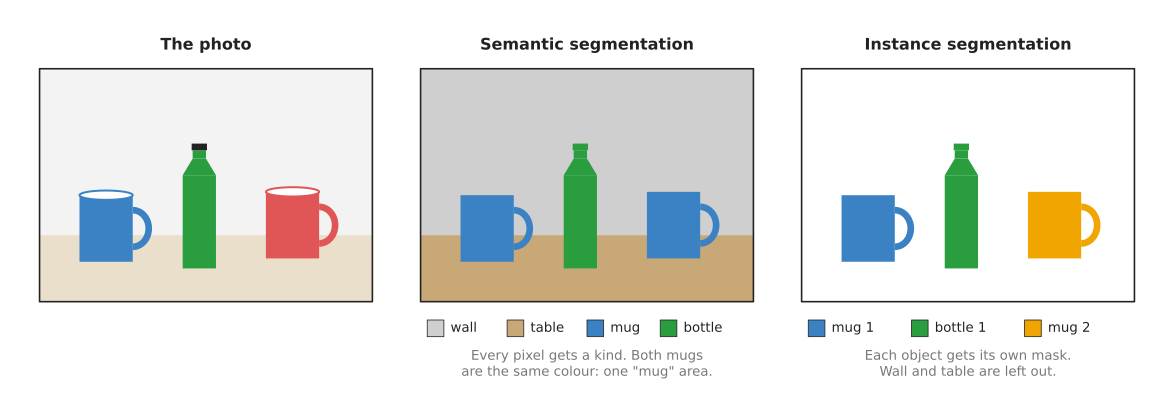
In the middle panel, both mugs share one colour, because they are the same class. In the right panel, each mug has its own colour, because each of them is a separate object.
A third kind, panoptic segmentation, does both at once, since it gives every pixel a class and also separates the objects, and the word "panoptic" itself means "seeing everything".
A robot arm that picks objects usually needs instance segmentation, because it has to pick one particular mug rather than "the mug area". Semantic segmentation is more useful for questions about places, such as which part of the picture is table, where the free space is, or which pixels are a person who has walked into the cell.
An instance segmentation model gives a list with one item per object, and each item has the object's class, a confidence and a mask. Most models also give the object's box, since the box is easy to work out from the mask.
Why an outline and not a box#
A box holds the object, but it also holds whatever happens to be around the object. The picture below compares a box and a mask for one mug.
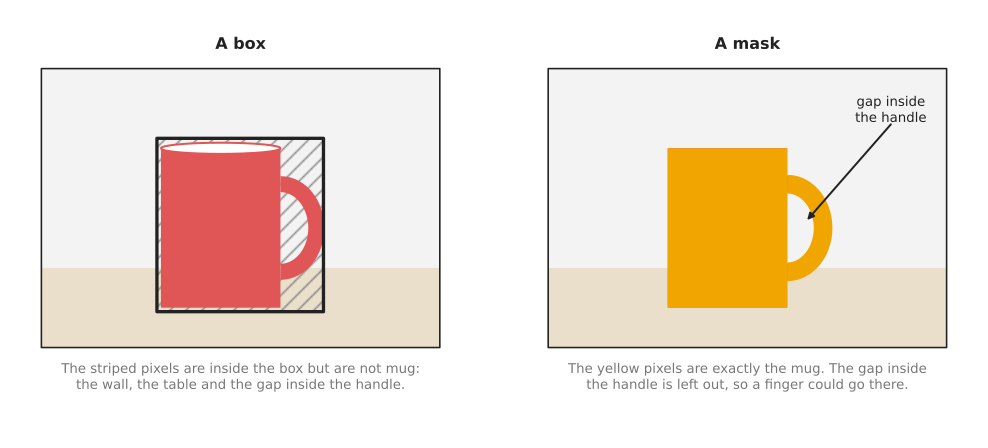
In the left panel, the striped pixels are inside the box but are not part of the mug, and for a mug with a handle that is a large part of the box. In the right panel the mask covers only the mug, and it also shows the gap inside the handle, which a box cannot show at all.
For a robot arm, this matters in three ways.
- The middle of the mask is the middle of the mug, while the middle of the box is pulled towards the handle.
- The depth pixels inside the mask all belong to the mug, whereas the depth pixels inside a box include the table behind it. So a mask gives much cleaner 3D points for the object.
- The mask shows the shape, so the program can find the handle, the rim or the narrowest part, and then choose where the fingers go.
3. How it works inside#
Those kinds of output are produced in different ways, so there are three main ways to build a segmentation model. The first is usual for semantic segmentation, and the second is usual for instance segmentation. The third asks the user for the object instead of learning a list of classes, and it is how the two models the shortlist in section 5 puts first are built. Each way below names the shortlisted models that belong to it.
Shrink, then grow back#
A classifier's backbone makes the grid of numbers smaller and smaller, because that is how it learns what is in the picture. But a mask must be as big as the photo, with one answer per pixel, so a semantic segmentation model adds a second half that makes the grid big again.
- The first half is a normal backbone, which shrinks the picture step by step. At each step the grid gets smaller, and each number carries more meaning, so this half is called the encoder.
- The second half grows the grid back, step by step, until it is the size of the photo again, and this half is called the decoder.
- At each step of the decoder, the model copies in the grid of the same size from the encoder. The small grids know what is in the picture, while the large grids from the encoder still know exactly where the edges are, so joining them gives an answer that is both right about the class and sharp at the edges. These copies are called skip connections.
- At the end, each pixel gets one score per class, and the pixel takes the class with the highest score, just as a classifier does for a whole picture.
The picture below shows the idea on a tiny 8 by 8 picture.
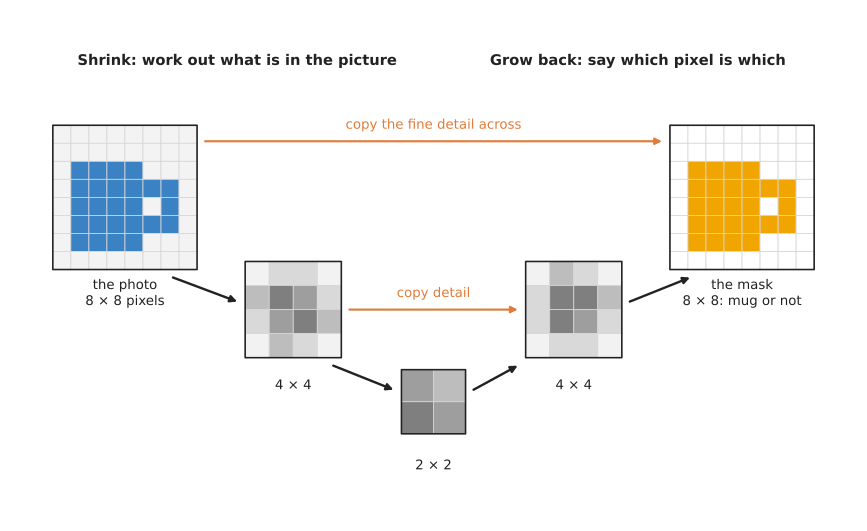
The left grid is the photo, the small grey grids in the middle are the encoder's and decoder's numbers, and the right grid is the mask, where each pixel is either mug or not mug. The orange arrows are the skip connections. Once the model is drawn this way, it looks like a letter U, which is where the U-Net model got its name.
U-Net is in this section to explain the idea rather than to be used. Of the models the shortlist recommends, Mask2Former in section 5.6 is the one that answers semantic questions, and section 5.7 names the plainer alternatives to it.
A detector with a mask added#
For instance segmentation, the most common way is to start from a detector and then add a mask to each box.
- A detector finds the boxes, as on the object detection page.
- For each box, the model cuts out the matching part of the backbone's grids.
- A small extra network, called the mask head, looks at that cut-out part, and gives a small mask, often 28 by 28, that says which pixels inside the box are the object.
- The small mask is then stretched to the size of the box in the photo.
Because each box gets its own mask, two mugs that touch still get two separate masks, and this is exactly how Mask R-CNN works. Section 5.5 recommends Mask R-CNN for fine-tuning in plain PyTorch. Ultralytics YOLO26-seg in section 5.3 gives the same kind of answer from a one-stage detector, but it reaches it in a different order, which is why it keeps up with a live camera and which section 5.3 explains.
Newer models use a transformer instead, in the same way as the detection transformers on the object detection page. So each query gives one object, and each object comes with a mask rather than only a box, which is how Mask2Former works. This means one such model can do semantic, instance and panoptic segmentation. Mask2Former itself is in section 5.6, and RF-DETR-Seg in section 5.4 is the newer transformer of this kind that the shortlist recommends for work on a robot.
A prompt instead of a class list#
Both ways so far need the list of classes before training, because the model learns a fixed set of names. The third way drops that list and asks the user for the object instead, and a model built this way is called promptable.
- The picture goes through a backbone once, as it does in the other two ways.
- The prompt goes through a second, much smaller network. A prompt is a point, a box, a rough region or, in the newest models, a short phrase.
- A third small network reads the picture's numbers and the prompt's numbers together, and gives one mask for whatever the prompt pointed at.
Because the backbone runs only once, a second prompt on the same picture costs only the two small steps, so clicking around one picture feels immediate. The price is that the model gives no name, since a click produces a mask and nothing else, so something else has to decide where to click.
SAM 2 in section 5.1 is built this way and takes a point or a box, and SAM 3 in section 5.2 takes a phrase and returns every object in the picture that matches it. The open-vocabulary models page covers that family in full.
4. How it is trained#
A model built in either of the first two ways learns from pictures where a person has marked the exact outline of every object. However, that is much slower than drawing boxes. For each object, the person clicks many points around its edge to trace a shape, and that shape is called a polygon. So a picture with ten objects can take several minutes to label, where boxes would take less than one.
Two public collections of labelled pictures are used most often.
- COCO, the same collection used for detectors, also has an outline for every labelled object. So most instance segmentation models you can download were trained on it, with its 80 classes.
- ADE20K is used for semantic segmentation instead, because it labels whole scenes, such as kitchens and offices, with 150 classes of things and places, including "wall", "floor" and "table".
Training works in the same way as it does for a detector. Then the model gives its masks for a batch of pictures, and a program compares every pixel of each mask with the traced outline. It counts how many pixels are wrong, and nudges the network's numbers to reduce that count. While doing so, it also checks the classes and the boxes, as for a detector.
A robot project usually fine-tunes, so it starts from a model trained on COCO and trains it on a few hundred of its own pictures. To save labelling time, most labelling tools now use a model to trace the outline. So the person clicks once on the object, a promptable model such as SAM draws the outline, and the person only fixes its mistakes. SAM itself is covered on the open-vocabulary models page, and Book 2 lists such tools in labelling tools.
Pictures from a simulator help even more for segmentation than they do for detection, because the simulator knows which object each pixel belongs to, so it produces perfect masks for free.
5. Well-known models#
This section is the shortlist a real project chooses from. For each model it says what the model is, how it works differently from its neighbours, why you would pick it rather than the obvious alternative, what it costs you, and what to type to run it. The cost is one short line near the top of each sub-section, written in the three scales that the chapter overview defines in how this chapter writes size, machine and licence.
The first thing to decide is not which model but which question you are asking. Three of the models below need a list of classes and give one mask per object in that list. Two need no class list at all, and instead outline whatever you point at or name in words. One answers all three kinds of question from a single design.
Read the table as a shortlist and not as a ranking. The left column names the model and says how current it is. The right column holds everything else about it: how it is built, the job it is best at, its size, its licence, and when to pick it. A size is given as the number of parameters, which is the count of numbers the network learned during training, written in millions. Every number was read from the project's own published table or model card, and each sub-section names which. Two projects measure on different machines, so treat the sizes as a rough guide to scale.
| Model | What decides it |
|---|---|
| SAM 2, most used in 2026 | It is a promptable model, and its four sizes hold 38.9 to 224.4 million parameters, with Apache-2.0 on both the code and the weights. It gives the exact outline of anything you click on or draw a box around. Pick it when you cannot list your objects, or when you already have a box. |
| SAM 3, worth betting on | It is a promptable model of 859.9 million parameters, under a bespoke licence called the SAM License, and its weights need a request you have had approved. It returns every instance that matches a short phrase. Pick it when words have to replace the class list, and when you have read the licence. |
| Ultralytics YOLO26-seg, most used in 2026 | It is a detector with a mask head, and its five sizes hold 2.7 to 62.8 million parameters under AGPL-3.0 or under a paid Enterprise licence. It gives masks on every frame of a live camera. Pick it when you can publish your own source code, or when you pay for the other licence. |
| RF-DETR-Seg, worth betting on | It is a transformer, and its six sizes hold 33.6 to 38.6 million parameters under Apache-2.0. It gives the best permissive masks available at a given speed. Pick it when the licence must stay permissive and the outlines must be good. |
| Mask R-CNN, most used in 2026 for one job | It is a detector with a mask head, and maskrcnn_resnet50_fpn_v2 holds 46.4 million parameters under BSD-3-Clause. It is best at fine-tuning in plain PyTorch with no new dependency. Pick it when you already use torchvision, and a picture a second is enough. |
| Mask2Former, historical | It is a transformer, and its Swin-Large COCO instance checkpoint holds 216.0 million parameters. Its repository is MIT but archived, and its weights card says "other". It answers semantic, instance and panoptic questions from one design. Pick it when you need all three kinds of answer from one model. |
5.1 SAM 2#
Most used in 2026, because it gives a better outline than any class-trained model and it works on objects nobody trained it on.
Size s to m, a small card, Apache-2.0 for the code and the weights.
SAM 2 is the second version of Meta's Segment Anything Model, released in 2024, and the page open-vocabulary models covers the family in full. You give it a point, a box or a rough region, and it returns the exact mask that contains what you pointed at. It does not name anything. SAM 2 also added video, so it can keep the same outline across the frames of a recording, and the Hugging Face SAM 2 page quotes its paper as more accurate and six times faster than the first SAM on images.
The one idea SAM 2 is built on is that the object to be outlined should be an input to the model rather than an entry in a list it was trained on. That sounds like a small change and it is not, because it makes SAM 2 answer a different question from Mask R-CNN and YOLO26-seg below. Those models answer "where is every mug in this picture". SAM 2 answers "draw the outline of the thing at this pixel", and it has no opinion about what that thing is called. Both answers are masks, which is why the two problems get confused, but a class-trained model cannot answer the second question and SAM 2 cannot answer the first.
Inside, that question splits the model into one heavy part and two light ones. A vision transformer called Hiera reads the picture and turns it into grids of numbers, and this is where nearly all the computing happens. A small prompt encoder turns your click or your box into a handful of numbers. A small mask decoder then attends between the picture's numbers and the prompt's numbers and prints one mask. The split is the point: the heavy part runs once per picture, so a second click on the same picture costs only the two light parts, which is why clicking around one photo in a labelling tool feels immediate. A click is also ambiguous, because clicking a mug's handle might mean the handle or the whole mug, so the decoder is built to return three masks at once together with its own guess at how good each of them is, and the caller picks. For video there are two more parts, a memory encoder and a memory attention step, which carry the masks of earlier frames forward so that the same object keeps its outline as it moves.
What this buys is edges that no class list limits and that no small in-box grid flattens, which is why SAM 2's outlines are better than the mask head of any detector in this section. What it costs is that SAM 2 decides nothing. There is no name, no confidence in a class, and no choice of what matters: it will outline a shadow, a reflection or the grain of the table as happily as a part, because you pointed there. The three masks are not a bonus either, they are a question handed back to you, and your program has to answer it.
The difference shows up on a robot arm the first time something arrives that nobody trained for. A customer puts an unfamiliar moulded part on the table, and a class-trained model returns nothing at all, while SAM 2 given one click returns a clean outline whose depth pixels really do belong to that part. The same difference runs the other way on the day the cell has to work with no person clicking, because SAM 2 alone cannot choose which object to outline, and you then need a detector in front of it or the phrase prompt of section 5.2.
The obvious alternative is an instance segmentation model such as Mask R-CNN or YOLO26-seg. Pick SAM 2 when you cannot write down the list of objects in advance, which in a robot cell is the difference between handling your own five parts and handling whatever a customer puts on the table. Pick it also when a detector already gives you a box, because turning that box into a clean outline is the standard pairing, and SAM 2's edges are better than a detector's own mask head. Its repository publishes four sizes, and both the code and the weights are Apache-2.0, read from the repository and the model card, which makes it the safest licence in this section.
The library is transformers, and the code below gives a mask for one box.
import torch
from PIL import Image
from transformers import Sam2Model, Sam2Processor

processor = Sam2Processor.from_pretrained("facebook/sam2.1-hiera-large")
model = Sam2Model.from_pretrained("facebook/sam2.1-hiera-large")

image = Image.open("table.jpg").convert("RGB")
# One box per object, as left, top, right, bottom in pixels. A detector gives you this.
input_boxes = [[[75, 275, 1725, 850]]]
inputs = processor(images=image, input_boxes=input_boxes, return_tensors="pt")
with torch.no_grad():
    outputs = model(**inputs)

# post_process_masks stretches the model's small mask back to the photo's size.
masks = processor.post_process_masks(outputs.pred_masks, inputs["original_sizes"])[0]
print(masks.shape)        # one mask per box, each the height and width of the photo
You supply the box, which means you supply a detector. The library prepares the
picture, runs the network and stretches the mask back to your photo's size. It also
takes a multimask_output argument, which is where the three masks of the paragraphs
above are turned on or off. What you still have to write is the step from the mask to
a place in the room.
5.2 SAM 3#
Worth betting on, because it removes the step that SAM 2 cannot do: it takes a short phrase instead of a click, and it returns every object in the picture that matches the phrase.
Size m, a big card, a bespoke SAM License on the code, and weights whose card says "other" and which are released only on an approved request.
SAM 3 came from Meta in November 2025, in the paper "SAM 3: Segment Anything with Concepts" (arXiv:2511.16719). Its repository calls the new ability promptable concept segmentation, and reports 75 to 80 per cent of human performance on SA-CO, a new benchmark of 270,000 different concepts. Improved checkpoints called SAM 3.1 followed.
The one idea SAM 3 is built on is that the prompt can name a kind of thing instead of pointing at one thing. SAM 2's prompt is a place, so its answer is one mask. SAM 3's prompt is what the paper calls a concept, which is a short noun phrase such as "yellow school bus", or an example picture of the thing, or both, and its answer is a set: one mask for every object in the picture that matches, each with its own identity.
That change forces a different machine from SAM 2's three parts in section 5.1. A prompt encoder and a mask decoder cannot answer "every mug", because a click has only one location, so the paper puts a whole image-level detector and a memory-based video tracker on top of one shared backbone. The detector finds all the matching instances in one picture, and the tracker carries their identities from frame to frame in a video. The part most worth naming is smaller than either. The paper separates deciding whether the named thing is present from deciding where it is, and gives the first decision its own output, which it calls a presence head. In SAM 2 there was nothing like it, because by clicking you had already asserted that something was there. In SAM 3 the model has to be able to say "there is no bolt in this picture", and the paper reports that giving that judgement an output of its own raised detection accuracy, because the outputs that say where things are no longer have to carry the decision about whether anything is there at all.
What the idea buys is that words replace the class list, in one model rather than two, and that you get every match rather than the best match. What it costs is a new kind of fragility. The phrase is now part of your program, and two reasonable wordings of the same request can return different sets of objects, which is a hard thing to make repeatable in a factory. The model is also much larger than SAM 2, so it is no candidate for a small computer on the robot, and the licence is not the Apache-2.0 that SAM 2 taught people to expect.
The difference shows up on a robot arm when the job is "pick every one of these". To clear a tray of bolts, SAM 2 needs one click per bolt or a detector trained on bolts, while SAM 3 given the phrase "bolt" returns all of them from one call. The presence head shows up in the opposite case, which matters just as much in a cell: when the tray is empty, SAM 3 has an output that can say so, whereas a SAM 2 click on an empty tray still returns a confident outline of whatever happened to be under that pixel.
The obvious alternative is Grounding DINO followed by SAM 2, which is the usual way to turn words into masks and which the open-vocabulary models page describes. Pick SAM 3 when you want one model instead of two, and when you need every matching object rather than the one best match. Pick the older pairing when the licence matters. The licence is a bespoke agreement stated in the repository's licence file, and the Hugging Face model card gives the weights' licence as "other" and gates them behind a request you have to make and have approved. Open weights are not the same thing as open source: read this agreement rather than assuming Apache-2.0 because SAM 2 was.
The library is transformers, which has the model from version 5.0.0 with no
compiled parts, so it runs on an ordinary Mac as well as on a graphics card.
from PIL import Image
from transformers import AutoModel, AutoProcessor

# Both lines need an approved access request and a Hugging Face login.
model = AutoModel.from_pretrained("facebook/sam3")
processor = AutoProcessor.from_pretrained("facebook/sam3")

image = Image.open("table.jpg").convert("RGB")
inputs = processor(images=image, text="mug", return_tensors="pt")
outputs = model(**inputs)

# One mask and one box per matching object, rather than one answer for the picture.
print(outputs.pred_masks.shape, outputs.pred_boxes.shape)
You supply the picture and the phrase. The model supplies a mask, a box and a score
for each matching object, and the library's own page explains how to combine its
pred_logits and presence_logits into that score, where the second of those two is
the presence head described above. What you still have to find is the phrase that
works, because two wordings of one request can give different answers, and that is
the part a factory cannot easily make repeatable.
5.3 Ultralytics YOLO26-seg#
Most used in 2026, because it is the fastest way to get one mask per object on every frame of a live camera, and because the same package also trains it on your own pictures.
Size xs to s, a laptop for the smallest of its five sizes and a small card for the largest, AGPL-3.0 or a paid Enterprise licence on both the code and the weights.
Ultralytics publishes a segmentation version of each of its detection models, and
the file name carries a -seg ending, so yolo26n-seg.pt is the smallest of five
sizes. The
instance segmentation documentation
describes the whole family.
The one idea YOLO26-seg is built on is that an object's mask can be mixed from a few pictures of its own. Rather than draw a separate mask for each object, the network draws a small fixed number of mask layers for the whole picture at once, at a lower resolution than the photo. Each layer is a pattern, not an object. Then, for each object the detector found, the head also gives a short list of numbers, one for each layer, saying how much of that layer belongs in this object's mask. The object's mask is those layers multiplied by its own numbers and added together.
In the source the two pieces are called the proto module, which makes the layers, and the mask coefficients, which are the per-object numbers, and the step that combines them multiplies the coefficients by the layers and then cuts the result down to the object's box. That last cut is the part to remember. It differs from Mask R-CNN in section 5.5 in the order the work is done: Mask R-CNN cuts the picture's grids down to the box first and then predicts a mask inside the cut, while YOLO26-seg predicts over the whole picture first and cuts afterwards. YOLO26 also changed this head from the version before it, and the documentation describes a proto module that reads several scales of grid instead of one, together with a new training error term borrowed from semantic segmentation, both of which it credits for better mask quality.
What the design buys is a cost that barely moves with the number of objects, because the expensive half, the layers, is drawn once per picture whether there are three objects or thirty, and only a short multiplication is added per object. That is why this is the model that keeps up with a live camera. What it costs is detail and independence. Every object's mask is mixed from the same few layers, so masks cannot be fully independent of each other, and the final cut to the box exists partly to stop one object's mask spilling onto another. The layers are at reduced resolution, so a thin feature such as a handle or a cable is the first thing to disappear, and because the mask is cut to the box, a box that is slightly too small cuts the mask off along a straight line.
The difference shows up on a robot arm in two opposite situations. Clearing a full tray at camera speed is the case this design wins, because Mask R-CNN's cost climbs with the number of objects on the tray and YOLO26-seg's does not. Finding where to put the fingers on a thin handle is the case it loses, because the handle is a few pixels wide in a mask drawn at reduced resolution, and the mask either misses it or fattens it. In that second case the usual answer is to keep YOLO26-seg for the boxes and pay for one SAM 2 call on the box that matters.
The obvious alternative is Mask R-CNN in torchvision. Pick Ultralytics when the
camera runs at speed and the computer is small. Pick Mask R-CNN when the AGPL-3.0
licence is a problem, because it obliges you to publish the source of anything you
combine Ultralytics with, including software you only run as a service, and the
weights carry the same terms. A paid Enterprise licence removes that obligation, and
Book 2 explains the trap in licences, and the one that will catch you
out.
The accuracy cost between the sizes is real as well: the documentation's own table
gives yolo26n-seg 33.9 mask mAP on COCO, where mAP is short for mean average
precision and a higher number is better, against 47.0 for the largest yolo26x-seg.
The library is ultralytics, which you install with pip install ultralytics.
from ultralytics import YOLO

model = YOLO("yolo26n-seg.pt")           # the "-seg" file adds the mask head
result = model("table.jpg", conf=0.25)[0]

# masks.xy holds one outline per object, as an array of points in picture pixels.
for box, outline in zip(result.boxes, result.masks.xy):
    name = result.names[int(box.cls)]
    centre_u, centre_v = outline.mean(axis=0)
    print(f"{name}: {len(outline)} outline points, "
          f"centre of the outline at ({centre_u:.0f}, {centre_v:.0f})")
The same result also holds result.masks.data, which is the mask as a grid of true
and false values, one grid per object. That is the form you want for picking out the
depth pixels of one object, because you can select from the depth picture with it
directly. What you supply is the picture, the threshold, and everything after the
mask.
5.4 RF-DETR-Seg#
Worth betting on, because it is the direction the field is going: a transformer with a permissive licence that reports better masks than the YOLO family at the same latency.
Size s, a small card, Apache-2.0 for the code and the weights.
RF-DETR comes from Roboflow, with co-authors at Carnegie Mellon University, and its paper is from November 2025 (arXiv:2511.09554). Segmentation is one of three jobs the one package does, and its repository publishes six segmentation sizes, from Nano to 2XLarge.
The one idea RF-DETR-Seg is built on is that a query already describes one object, so that query should be allowed to draw its own mask directly onto the picture. The detector it comes from, described in object detection, carries a set of queries, and each one has gathered everything the model knows about one object into a single list of numbers. The segmentation head takes that list and compares it with every pixel of a feature map covering the whole picture. Where the two agree, the pixel belongs to that object. The result is one full-picture mask per query, at a quarter of the input's width and height.
That is a different choice from either neighbour. YOLO26-seg in section 5.3 mixes a small fixed set of shared layers and then cuts the result to the box, so no pixel outside the box can ever belong to the object. Mask R-CNN in section 5.5 cuts first and predicts inside the cut. RF-DETR-Seg does neither: there are no shared layers to mix and no box to cut to, only a per-object comparison carried out across the whole picture. The head also repeats that comparison once for every layer of the decoder, so the mask is drawn again each time the query's description of the object improves, rather than once at the end.
What this buys is a mask that nothing flattens. It is not limited to combinations of a few patterns, it is not clipped by a rectangle, and it is drawn at a quarter of the picture's size rather than stretched up from a small square. What it costs is work that grows with the number of queries, because every query is compared against every pixel, so a model configured for many objects pays for them whether they are there or not. Its backbone is a DINOv2 vision transformer, so there is no very small version for a tiny computer, and the project is young enough that its API still changes between releases.
The difference shows up on a robot arm when you measure a long thin part lying at an angle. Its box is large and mostly empty, and the box's edges are the hardest thing for a detector to get exactly right on such a shape. With YOLO26-seg a box that is a few pixels too tight shears the mask off along a dead straight line, and a straight cut through a part looks like a real edge to whatever reads the mask next, so the measured length comes out short. RF-DETR-Seg's mask is not cut to the box, so the part keeps its own ends.
The obvious alternative is YOLO26-seg, which is about equally easy to install. Pick RF-DETR-Seg when you want the permissive licence and the better outlines together. Its README reports every row measured in one harness on the 5,000 pictures of the COCO validation split, with latency on an NVIDIA T4 graphics card using TensorRT: RF-DETR-Seg-Nano reaches 40.3 average precision at 3.4 milliseconds, where YOLO26-N-Seg reaches 34.7 at 2.31 milliseconds. Those are the authors' own measurements of their model against a competitor, so read them as a claim with a method attached.
The library is rfdetr, which you install with pip install rfdetr. It returns a
Detections object from the supervision library.
from rfdetr import RFDETRSegMedium
from rfdetr.assets.coco_classes import COCO_CLASSES

model = RFDETRSegMedium()                 # replace with RFDETRSegNano for the small one
detections = model.predict("table.jpg", threshold=0.5)

# detections.mask holds one true-or-false grid per object, the size of the photo.
for class_id, mask in zip(detections.class_id, detections.mask):
    print(COCO_CLASSES[class_id], "covers", int(mask.sum()), "pixels")
You supply the picture and the threshold. The package downloads the weights and
gives you masks in your photo's pixels. The COCO_CLASSES list applies only to the
COCO-trained weights, and the README says to read detections.data["class_name"]
once you have fine-tuned the model on your own classes.
5.5 Mask R-CNN#
Most used in 2026 for one particular job, which is fine-tuning an instance segmentation model on your own objects without adding a dependency to a PyTorch project.
Size s, a small card, BSD-3-Clause for the code and the weights together.
Mask R-CNN came from Facebook AI Research in 2017, and it is the design section
3 describes as a detector with a mask head added. It ships
inside torchvision, the image half of PyTorch, and the newer of its two versions is
maskrcnn_resnet50_fpn_v2.
The one idea Mask R-CNN is built on is that a mask is one more branch on a detector that already cuts each object's region out of the picture. Its paper describes exactly that: take Faster R-CNN, which already produces a class and a box for each proposed region, and add a third branch beside those two that produces a mask for the same region. Nothing about the detector changes. The mask comes free of the work the detector was already doing.
Inside, the mask branch works on the patch of the backbone's grids that belongs to one box, resized to a fixed small square, and the small mask it predicts is then stretched to the size of that box in the photo. Two details are worth knowing. The cut-out is done by an operation torchvision calls RoIAlign, which reads the grid at positions that fall between cells by blending the neighbouring cells rather than rounding to the nearest one, and the "align" in its name is the point: half a cell of rounding is several pixels in the photo, which a class never notices and a mask always does. The other detail is that the branch predicts one mask for every class it knows, and the class branch then chooses which of those masks to keep, so the decision about what the object is and the drawing of its outline are made separately. Compared with RF-DETR-Seg in section 5.4, the order is reversed: there, a query draws over the whole picture and nothing is cut; here, the cut comes first and the mask exists only inside it.
What the design buys is a careful, independent look at each object and a training path short enough to read line by line, which is the real reason it is still recommended. What it costs is two kinds of coarseness. The mask branch runs once per surviving box, so a crowded picture is slower than an empty one. And because the mask is predicted on a fixed small square and then stretched, how precise its edge is depends on how large the object is on screen: a small object's mask is barely stretched, while a large object's mask has each of its cells blown up into a block many pixels across.
The difference shows up on a robot arm when the object fills a lot of the frame. A bin or a large box photographed close up gets a visibly stepped outline from Mask R-CNN, because the fixed square was stretched over hundreds of pixels, and if your program then follows that outline to decide where on the rim the fingers go, the steps are what it follows. Small parts on a tray do not show the problem at all, and that is why a demonstration on small parts does not tell you how the same model will behave on a large one. SAM 2 given the same box has no fixed square and no stretch, which is the standard fix.
The obvious alternative is YOLO26-seg, which is faster and easier to train. Pick
Mask R-CNN when the licence has to be permissive, when you want to read every line
of the training code, and when the camera gives you a picture a second rather than
thirty. Its BSD-3-Clause licence covers the code and the weights together, which is
not true of every model here. The torchvision
model page
gives this version 47.4 box mAP and 41.8 mask mAP on the COCO validation split and
states no speed at all, so measure it yourself. What goes wrong most often is the
preparation of the picture, because the weights expect exactly what
weights.transforms() applies.
The library is torchvision, which arrives with PyTorch.
import torch
from torchvision.io import decode_image
from torchvision.models.detection import (maskrcnn_resnet50_fpn_v2,
                                          MaskRCNN_ResNet50_FPN_V2_Weights)

weights = MaskRCNN_ResNet50_FPN_V2_Weights.DEFAULT
model = maskrcnn_resnet50_fpn_v2(weights=weights).eval()

image = decode_image("table.jpg")
batch = [weights.transforms()(image)]     # the preparation these weights were trained with
with torch.no_grad():
    prediction = model(batch)[0]

for label, score, mask in zip(prediction["labels"], prediction["scores"],
                              prediction["masks"]):
    if score > 0.5:                       # torchvision applies no threshold for you
        # Each mask holds one number per pixel, between 0 and 1, so choose a cut.
        print(weights.meta["categories"][label], int((mask[0] > 0.5).sum()), "pixels")
You supply the picture, the threshold on the score, and the cut that turns the soft mask into a true-or-false mask. The two comparisons in the code are those two choices. Torchvision gives you the network and the matching preparation, and nothing else.
5.6 Mask2Former#
Historical, kept because it explains how one transformer answers all three segmentation questions, and because its successors use the same idea.
Size m, a small card, MIT on an archived repository, and weights whose card says "other".
Mask2Former came from Meta in December 2021, in the paper "Masked-attention Mask Transformer for Universal Image Segmentation". Its paper reports 57.8 panoptic quality on COCO, 50.1 average precision for instance segmentation on COCO and 57.7 mean intersection over union on ADE20K, quoted on the Hugging Face Mask2Former page.
The one idea Mask2Former is built on is that semantic, instance and panoptic segmentation are not three problems. Its paper opens by saying that segmentation means grouping pixels, and that each choice of what the groups mean defines one of the three tasks, while the work itself does not change. So the model predicts the same thing in every case: a set of masks, each with a label. Which of the three answers you get out depends only on how that set is read afterwards, which is why the library offers three different post-processing calls over one model's output.
To make that work without boxes, the model needs some way for a query to concentrate on one region, since Mask R-CNN in section 5.5 got that for free by cutting the picture to a box. Mask2Former's answer is the component its title is named after, masked attention. In an ordinary transformer decoder, a query attends to every pixel of the picture at every layer. Here, a query's attention at each layer is restricted to the pixels inside the mask that same query predicted at the layer before. In plain words, the query looks only where it already believes its object is, and then revises that belief. That is what replaces the region cut: the query is never handed a rectangle, it narrows its own attention instead, and because the restriction is a mask rather than a rectangle it can follow an awkward shape. The segmentation head of RF-DETR-Seg in section 5.4, where a query's numbers are compared against every pixel, is a descendant of the same query-and-pixel idea.
What this buys is one design for all three questions, and panoptic output in particular, where every pixel is assigned to exactly one thing so that nothing is counted twice and no pixel is left over. What it costs is speed and currency. Masked attention has to be recomputed at every layer, which makes the model slower than a single-purpose instance model, and the published checkpoints are still trained one per task, so "one architecture" is not the same as one file of weights that answers everything well.
The difference shows up on a robot arm when one picture has to answer two questions that are usually two models. A cell that must both locate the parts and know which pixels are the floor, the table and the person who has walked in can run one Mask2Former pass and read the panoptic answer, instead of running an instance model and a semantic model and keeping both sets of weights in the robot computer's memory. The panoptic answer also removes an argument you would otherwise have to settle yourself, because the parts and the floor cannot overlap or leave a gap between them when every pixel is assigned exactly once.
The obvious alternative today is RF-DETR-Seg or YOLO26-seg, both of which are faster
at instance masks. Pick Mask2Former only when you need more than instance masks from
one model, for example instance masks of the parts and a semantic mask of the table in
the same pass. If that is your case, compare it with
OneFormer, which is MIT licensed and trains
once for all three tasks. The maintenance cost is real: the original
repository is archived, which means
no fixes and no support for newer dependencies, although the transformers port is
maintained and is the version to use. The licence is also split in the way this book
keeps warning about, because the repository's licence file is MIT while the weights
card for facebook/mask2former-swin-large-coco-instance gives its licence as "other".
The code licence does not tell you the weights licence.
The library is transformers, and the post-processing call is what selects the kind
of answer you want.
from PIL import Image
from transformers import AutoImageProcessor, Mask2FormerForUniversalSegmentation

name = "facebook/mask2former-swin-large-coco-instance"
processor = AutoImageProcessor.from_pretrained(name)
model = Mask2FormerForUniversalSegmentation.from_pretrained(name)

inputs = processor(images=Image.open("table.jpg"), return_tensors="pt")
outputs = model(**inputs)

# The same outputs also feed post_process_semantic_segmentation and
# post_process_panoptic_segmentation, which is the point of this model.
result = processor.post_process_instance_segmentation(outputs, target_sizes=[(480, 640)])[0]
print(result["segmentation"].shape, len(result["segments_info"]))
You supply the picture and the size you want the answer at. The library gives back one grid of object numbers plus a list saying which class each number is. That is a different shape of answer from the one-mask-per-object list the models above return, and the code after it has to expect that.
5.7 How to choose#
Start with SAM 2 if you have a detector already, and with YOLO26-seg if you do not, because between them those two cover almost every robot cell: one turns a box into a good outline, and the other gives boxes and outlines together at camera speed.
Five things change that answer.
- You are selling a product, or running a service, and will not publish your source. Then the AGPL licence rules Ultralytics out, and you take RF-DETR-Seg for the best permissive masks or Mask R-CNN for the plainest permissive code. SAM 2 stays available either way, because it is Apache-2.0.
- You cannot write down your list of objects. Then no closed-set model will do, and the choice is SAM 2 driven by a detector or a click, or SAM 3 driven by a phrase. Read SAM 3's licence first, and read open-vocabulary models for the whole family.
- You want to know which pixels are table, floor or person, not which object is which. That is semantic segmentation, and none of the instance models above is the right tool. Torchvision's DeepLabV3 is the permissive and easy answer, and Mask2Former or OneFormer the stronger one. Do not reach for SegFormer in a commercial product, because Book 2 records its licence as the NVIDIA Source Code License, which is non-commercial.
- The masks have to run on the robot's own small computer. Then take the smallest Ultralytics size, or one of the small SAM variants such as MobileSAM or EdgeTAM, and measure before you promise anything. Running a model on a robot explains what the numbers have to be.
- Your objects are not among the 80 COCO classes. Then the model matters less than the labelling, because you will fine-tune whichever one you pick. Let SAM 2 trace the outlines in your labelling tool, as section 4 describes, because that is what makes outline labelling affordable.
Book 2's mask models lists more of these, each with the licence read from its own licence file.
6. Where this is going#
The sections above describe models that exist now, and this one is about what happens next. It follows the rule set out in four kinds of claim, and why the difference decides everything: a demonstration shows something working once, a product announcement says a thing can be bought or downloaded and is therefore checkable, a research result is a measured number with a stated method, and a projection names a date that has not arrived. Every paragraph below says which of those it rests on, and says when a judgement is mine.
How it got here#
Segmentation has changed by moving the class list out of the training and into the call. The first per-pixel models were trained on a fixed list and could only answer about that list. Mask R-CNN in section 5.5 bolted a mask head onto a detector, so masks came with the same fixed list that detection had. SAM made the object an input instead of an entry in a list, so you point and it outlines. SAM 3 made that input a phrase. Each step moved the decision about what counts as an object later in the process, and closer to the person asking the question.
Where it is used in industry today#
The largest commercial use of promptable segmentation today is not a robot at all. It is making the training data that other models learn from, which section 4 mentions and which is worth naming precisely, because it is checkable. Roboflow's documentation for AI labelling describes Smart Select, which runs the Segment Anything Model in your browser so that one click produces a polygon, and Auto Label, which labels a whole dataset with a foundation model and lists SAM 3 among the models you can choose. Label Studio publishes its own guide to the same idea, and Ultralytics ships SAM 2 inside the package you may already be using for detection. These are product announcements: you can open the page and use the thing today.
Agriculture is where per-pixel decisions run on the most machines, because the machine acts on a plant rather than on a rectangle. Carbon Robotics sells the LaserWeeder, whose specification page states 42 high-resolution cameras, 30 diode lasers of 150 watts each, more than 100 deep-learning crop models, sub-millimetre accuracy, and more than 100 growers across North America, Europe and Australia operating it since February 2022. John Deere sells See & Spray, and Blue River Technology, the Deere subsidiary that builds it, says on its own site that it "uses computer vision and machine learning to distinguish crops from weeds". Neither company publishes which model it runs, so I am not claiming either uses the models in section 5. What is certain from their own pages is the shape of the job: the machine decides for each small piece of ground whether to act on it, and that is a per-pixel question rather than a box question.
Inspection on a production line is the other large use, and a mask fits it for a plain reason: a scratch, a weld bead or a coating fault has a shape and an area, and neither survives being reduced to a rectangle. MVTec sells HALCON and MERLIC, and its deep learning methods page offers semantic segmentation for texture recognition, part separation and pose estimation, and instance segmentation for multi-object detection and packaging inspection. The named deployment is useful: MVTec's own case study says Endress+Hauser Flow in Reinach, Switzerland uses MERLIC in a digital assistance system for manual assembly, verifying each assembly step as a worker performs it, and MVTec tags that story with object detection and semantic segmentation. MVTec also publishes the benchmark this market measures on, MVTec AD 2, a dataset for finding defects nobody has shown the model before. Cognex and Keyence sell competing tools; Cognex's website refuses an automated request, so it is named here without a link, and Keyence is linked. Elementary sells whole camera stations for defect detection and presence checks rather than a library.
What is being worked on right now#
The first front is the one section 5.2 describes, and it is moving faster than anything else on this page. SAM 3 (arXiv:2511.16719) takes a noun phrase and returns every matching instance, and its measured claim is 75 to 80 per cent of human performance on SA-CO, a benchmark of 270,000 concepts the same team built. Improved SAM 3.1 checkpoints followed. What makes this unusual is how quickly the research result turned into something purchasable, because Roboflow's labelling documentation already lists SAM 3 as a model you can select. The work still being done is on the hard half: making a phrase prompt behave the same way twice.
The second front is size. SAM 3 holds about 860 million parameters, which is no candidate for a computer bolted to an arm, so a separate line of work shrinks the same ability. MobileSAM (arXiv:2306.14289) replaced SAM's heavy image encoder with a small one, and EdgeTAM (arXiv:2501.07256) does the same for the video tracking that SAM 2 added, with code at facebookresearch/EdgeTAM. These are research results with public code rather than products, and the honest summary is that they trade accuracy for speed by an amount each paper states.
The third front is making a mask mean something in three dimensions. A mask's value to a robot arm was always the depth points inside it, as section 2 explains, and two pieces of work push in that direction. SAM 2's memory carries one outline across the frames of a recording, so an object keeps its identity while the arm moves. Meta's SAM 3D, with code at facebookresearch/sam-3d-objects, estimates an object's shape from a single picture, which is the part a mask cannot give, because a mask stops at the silhouette. That is a research release rather than a product, and nobody has published a measurement of it on the kind of object a factory arm handles.
The fourth front is the licence, and it is not a research question at all. The best promptable model, SAM 3, is under a bespoke SAM License with weights released only on an approved request. The easiest fast model, Ultralytics YOLO26-seg, is AGPL-3.0 unless you buy the Enterprise licence, which obliges you to publish the source of anything you combine it with, including software you only run as a service. The permissive options are SAM 2 at Apache-2.0 and RF-DETR-Seg at Apache-2.0 from Nano to Large. So the work here is other people making permissive models good enough that nobody has to read a bespoke licence, and section 5.4 holds the measurements that say this is close to done.
What is still unsolved#
Transparent and shiny objects defeat a mask more completely than they defeat a box, because a mask is a claim about an edge, and glass has no reliable edge. ClearGrasp (arXiv:1910.02550) appeared in 2019 and TransCG (arXiv:2202.08471) in 2022, and both are still datasets with a baseline rather than a method anybody sells. A foundation model with a keeper works through what this does to a real program.
A mask also stops at whatever covers the object, and it has no way to say how much of the object is hidden. Predicting the whole of an object including its hidden part is called amodal segmentation, and it has been a named problem since "Amodal Instance Segmentation" (arXiv:1604.08202) in 2016. Recent work such as pix2gestalt (arXiv:2401.14398) generates the missing part. Ten years on it is research results on datasets, and I know of no product that sells it. For an arm emptying a bin, this is the difference between planning several picks from one picture and picking the top item, taking another picture, and starting again.
Two measurement problems are less discussed and matter just as much. The scores these models report reward getting most of the area right, and a gripper cares about the last few pixels of the boundary, so the number that goes up is not the number an arm needs; I have not found a published model card that reports a boundary error in pixels. And nobody has published a way to make a phrase prompt as repeatable as a trained class list, which is the single thing keeping SAM 3 out of a validated production line. That is a statement about what I could find rather than proof that no such work exists.
The next two to three years#
I expect instance segmentation to take jobs that use boxes today, and the reason is the labelling cost rather than the models. Outlines were always the better answer for a gripper, as section 2 argues, and the reason projects used boxes anyway was that tracing an outline by hand took far longer than dragging a rectangle. A one-click promptable tool removes most of that difference, and it is a product today rather than a projection, which you can check on the Roboflow and Label Studio pages above. This is my expectation about what teams will then choose, not an announcement by anybody.
I expect the phrase prompt to stay in the labelling tool and not reach the production line. The reason is repeatability. An inspection station has to give the same verdict on the same part next month, and two reasonable wordings of one request return different sets of objects, which no amount of model quality fixes. So the shape I expect is SAM 3 or its successor labelling your pictures, and a small closed-set model trained on those labels running on the line. What would disprove this is a vendor shipping a phrase-prompted segmenter with a stated repeatability figure, which nobody has done.
I expect small promptable segmenters on the robot's own computer to arrive as products. The reason is that the demand is specific and the research has already landed: a robot wants a mask on every frame, and MobileSAM and EdgeTAM show the ability survives being shrunk. What is missing is somebody packaging one with a stated frame rate on a stated board, which is engineering rather than discovery. This is a projection, and it is the one I hold most loosely, because the same prediction would have been reasonable two years ago.
I expect commercial deployments to settle on permissively licensed mask models, and the reason is that a licence is checkable while a benchmark needs interpreting. SAM 3 is the best model on this page and the hardest to ship, because its weights come only on an approved request and its licence is its own. YOLO26-seg is the easiest to use and carries AGPL-3.0. RF-DETR-Seg is Apache-2.0 and close enough in quality that the trade-off has mostly gone. A product team's lawyer reads the licence before the benchmark, so I expect the Apache-2.0 models to win the work even where the restricted model is better.
I expect masks to be consumed as three-dimensional information rather than as pictures. The reason is in section 2: what a mask gives an arm is a set of depth points that all belong to one object, and the mask itself is only the way of selecting them. SAM 3D is a research release pointing the same way, by adding the hidden side that a mask cannot show. I expect grasp models to take shape rather than outline as their input, and I am recording that here as my own prediction, with no product and no date behind it.
7. Where to read next#
- The next page is keypoints and object pose, which finds named points on an object and which way the object faces.
- Open-vocabulary models covers SAM fully, and models that find objects from words.
- Object detection explains the detector that Mask R-CNN builds on.
- Grasp models use masks to decide where to hold an object.
- The seeing models overview compares all seven kinds of seeing model.
- Book 2 goes deeper in models that find objects, which covers mask models and the SAM family with their licences, and in finding an object in a picture, which builds a colour mask by hand.