This page answers one question: how can a language model, which only reads and writes text, decide what a robot arm should do next?
This is a page for a reader who has read the chapter overview. So you should already know what a language model is, and that it turns words into tokens and tokens into numbers. You do not need to know how to program a robot, because the page uses only a few lines of Python in one example, and explains each line.
Before this page, it helps to have read behaviour trees, which shows how the steps and retries of a task are written by hand. The planner on this page chooses the same kind of steps from a request in words.
Contents#
- What it is
- What goes in and what comes out
- How it works inside
- How it is trained
- Well-known models of this kind · 5.1 SayCan · 5.2 Code as Policies · 5.3 Claude Opus 5.5 · 5.4 Gemini Robotics ER 2 · 5.5 Qwen3.5 · 5.6 Gemma 4 · 5.7 How to choose
- Where this is going
- Where to read next
1. What it is#
Here is the idea in one sentence. A language model reads a request in ordinary words, and writes the order of the steps, using only skills the robot already has.
A skill here is a small job that the robot can already do well, such as "pick up the sponge" or "open the drawer". So people wrote or trained each skill before the language model was added. The language model does not move the arm itself, because it only chooses which skills to run, and in what order. This job is called planning, and a model that does it is called a planner.
For example, think of a person helping you in a kitchen. You say, "I spilled my drink." You did not say "sponge", but the helper fetches a sponge anyway, because they know that spills get wiped up, and that you wipe with a sponge. A language model knows the same thing, because it read about spills and sponges many times during its training. So the planner uses that knowledge to fill in steps that the person never said.
2. What goes in and what comes out#
Three things go in:
- the request, in words, such as "I spilled my drink. Can you help?"
- the list of skills the robot has, each one written as a short phrase
- sometimes, a few words about the scene, such as "you are holding nothing"
One thing comes out, which is a numbered list of skills, or a short program that calls them.
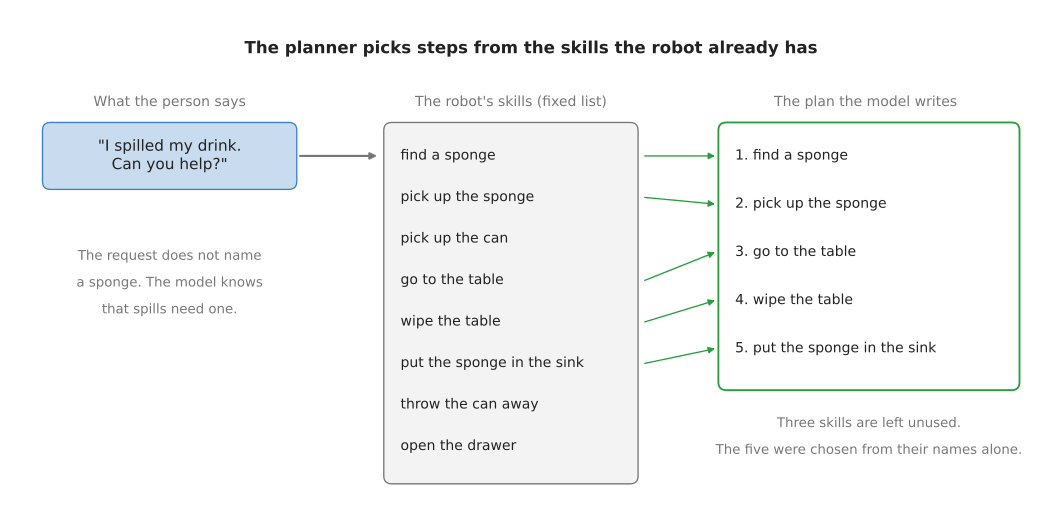
The picture shows one request going to one plan. Here the robot has eight skills, so the model picks five of them and puts them in order. It also adds "find a sponge", although the request never mentions a sponge.
The plan is only text, so a normal program on the robot reads the plan line by line and runs the matching skill for each line. Each skill then uses other models, such as a grasp model to decide where to hold the sponge.
3. How it works inside#
A planner does not need a new kind of network, because it uses an ordinary language model, the same kind that answers questions in a chat window. What makes it a planner is the text the robot gives it, and what the robot does with the answer.
So this section describes one mechanism, and it works the same whether you call the model over the internet or run it on a computer beside the robot. That choice is the subject of section 5, and it changes what the planner costs and when it fails, not how it works.
Step 1: the robot writes a prompt#
The text given to a language model is called the prompt. So the robot's program builds the prompt from pieces of fixed text. A short prompt might look like this:
You control a robot arm in a kitchen.
The robot can do these things:
find a sponge, pick up the sponge, pick up the can, go to the table,
wipe the table, put the sponge in the sink, throw the can away, open the drawer.

Example.
Request: Throw away the can.
Plan: 1. pick up the can  2. throw the can away

Request: I spilled my drink. Can you help?
Plan:
The prompt ends with the word "Plan:" and nothing after it, and it also contains one worked example. A worked example shows the model the exact form the answer should take, and giving a model a few examples inside the prompt is called few-shot prompting. The same idea has been tried with a recording in place of a written example, so that the model is shown one video of the task and then does the task. Prompting with a demonstration covers that method, and the prompt above is the text version it grew out of.
Step 2: the model writes the plan#
Then the language model continues the text, one token at a time, as it always does. Because the prompt ends that way, the most likely continuation is a numbered list in the same form as the example. So the model writes that list out, beginning "find a sponge" and "pick up the sponge", and then stops.
The robot's program then reads the list, checks that every step is a skill on the list, and runs the steps one after another.
Step 3: checking that a step can work#
A language model knows what usually makes sense, but it does not know what this robot can do right now. So it cannot see that the sponge is out of reach, or that the gripper is already full.
So the planner called SayCan solves this with a second score, and section 5.1 is about that system. For each skill, the language model gives a score for "does this step help with the request?" Each skill also has its own small model, which looks at the camera picture and gives a score for "can this skill work right now, from here?" So the planner multiplies the two scores, and runs the skill with the highest result.
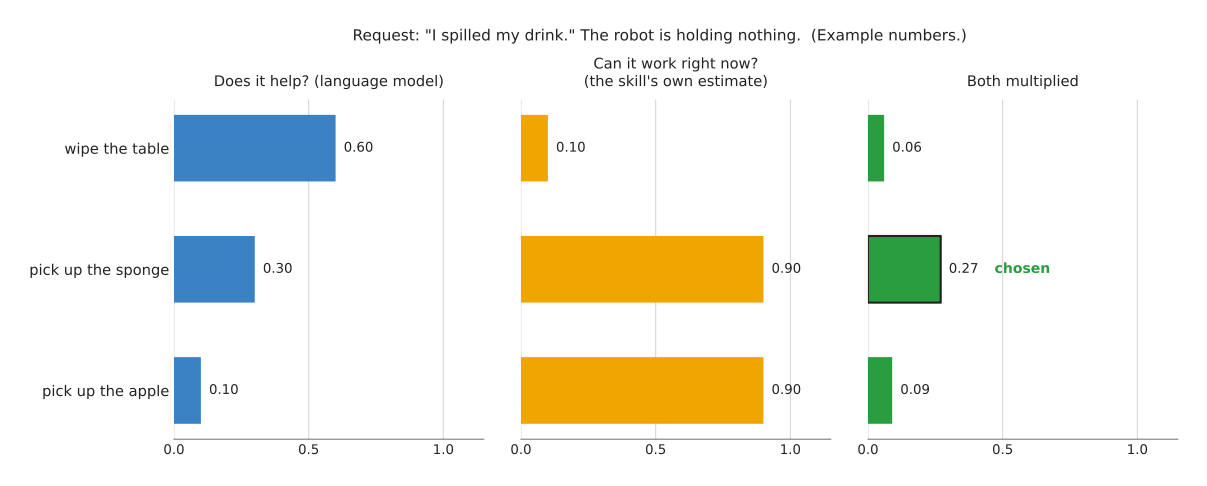
The numbers in the picture are made up to show the method. "Wipe the table" sounds like the most useful step. But the robot is holding nothing, so wiping cannot work yet, and its second score is low. "Pick up the sponge" is less useful, but it can work now, so after multiplying it wins. SayCan then adds the chosen step to the text and asks again for the next step, and it repeats this until the model says the task is done.
Another way: the model writes code#
The plan can also be a short program instead of a list, and this way is called Code as
Policies, after the paper that introduced it, which section
5.2 covers. So the prompt lists the functions the
robot's programmers have written, such as find and pick_and_place, and the model
then writes a few lines of Python that call those functions.
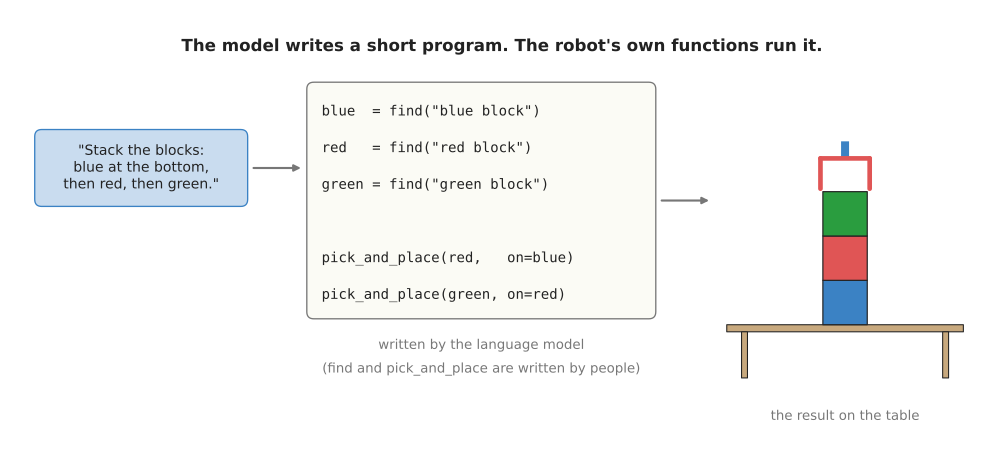
In the picture, the request is to stack three blocks. The model writes three lines
that find each block, and then writes two lines that place red on blue, and green on
red. People wrote find and pick_and_place, so the model only wrote the six lines
that join them together.
Code can do things a list cannot, because it can count, repeat a step for every object, and do arithmetic, such as "put the block 10 cm to the left of the bowl". It also has one big practical benefit, which is that a person can read the program before the robot runs it.
Feeding back what happened#
But a plan written once, at the start, goes wrong when a step fails. If the sponge slips out of the gripper, the list still says "go to the table" next.
So the fix is to tell the model what happened after each step, in words, and let it write the rest of the plan again. The robot adds a line to the prompt, such as "Result: the sponge was dropped." The model then writes "pick up the sponge" again. The words about what happened can come from a person, from a sensor, or from a vision-language model that looks at the camera picture. The Inner Monologue paper studied this way of working. It is not in the shortlist below, because it is a method rather than a model you can call, and section 5.1 has the link to it.
4. How it is trained#
Usually, the language model in a planner is not trained for the robot at all, because it is an ordinary language model, trained by someone else on text from the internet. Instead the robot only changes the prompt, and this is the main reason planners became popular. A laboratory can build one without collecting any robot data for the planning part.
But the parts that do need robot data are the skills underneath. Each skill was taught separately, by programming it or by copying demonstrations. In SayCan, the "can it work right now" scores were also learned from the robot's own attempts at each skill.
Some newer planners are trained a little further on robot material. For example, a model can be trained further on videos of robots, with questions about what step comes next. This makes it better at robot plans, but it is still mostly the same language model underneath.
5. Well-known models of this kind#
This section is the shortlist: the two research systems that invented the method, and the four models you would actually call today. The decision that matters most comes near the end, because a planner is either a model you call over the internet or a model you run on your own machine, and those two options fail in opposite ways.
Each sub-section opens with one short line giving the model's size, the machine it needs and its licence, in the bands that section 7 of the chapter overview defines. So read that line for the band and the table below for the exact figure.
The table has two columns, so read a row from left to right as one sentence about one
model. The left column names the model and says how current it is. The right column
begins with where the model runs, because that is the decision above, and then gives its
size, its licence, what it is best at, and the case for choosing it. The first two rows
are papers to read; the last four are models you can have working this week. The size is
the number of parameters where the maker publishes one, because that number decides
whether a model fits on the computer you already have, and a row says not published
where no figure exists.
| Model | What decides it |
|---|---|
| SayCan, historical | There is nothing to deploy, because this is a method to read rather than a model to call: its size is not published, and the released sample code is Apache-2.0. It is the best entry here at refusing a step the robot cannot do from here. Read it when you need a second score for "can this work right now". |
| Code as Policies, historical | There is nothing to deploy here either, its size is not published, and the released sample code is Apache-2.0. It is the best entry here at plans that count, repeat and measure. Read it when the plan needs a loop or a distance in centimetres. |
| Claude Opus 5.5, most used in 2026 | It runs on Anthropic's computers as a paid service, so the weights are not distributed and the size is not published. It writes the hardest plans, from words alone. Pick it when the planning job is text only, and a network call per plan is acceptable. |
| Gemini Robotics ER 2, most used in 2026 | It runs on Google's computers as a preview service, so the weights are not distributed and the size is not published. It is the best model here at planning from a picture or a video, and at calling your own robot functions. Pick it when the planner must look at the camera and check its own steps. |
| Qwen3.5, most used in 2026 | It runs on your own machine, in sizes of 0.87, 2.3, 4.7 and 9.7 billion parameters and larger, with Apache-2.0 on the weights. It is the best model here at giving a usable plan with no network at all. Pick it when the robot must keep working offline, or when nothing may leave the building. |
| Gemma 4, worth betting on | It also runs on your own machine, down to a phone-class board, at 5.1 and 8.0 billion parameters in its on-device sizes and up to 31 billion, with Apache-2.0 on the weights. It is the best model here at running on the robot's own small computer. Pick it when the planner sits on the robot, and the request arrives as speech. |
5.1 SayCan#
SayCan is historical: you read it to understand where the method came from, and you would not build a planner this way today.
Size not published, and nothing to run, because this is a method rather than a model; Apache-2.0 on the released sample code.
It came from Robotics at Google and Everyday Robots, and its own page dates the first release to 4 April 2022 and an update to 16 August 2022, which swapped in Google's Pathways Language Model, called PaLM. It paired that language model with a set of learned skills on a mobile robot with one arm.
The one idea it is built on is that the language model should not be allowed to write the plan. It is asked to score it instead. The robot's skills are fixed phrases, and for each phrase the model is asked how likely that phrase is as the next line of the plan. A language model can give that number for any piece of text without being asked to produce anything, because scoring the next words is what it does underneath in order to write at all. Then a second model, one for each skill and trained on that robot's own attempts at that skill, gives the chance that the skill will succeed from the current camera picture. The two numbers are multiplied, the winning skill is run, its phrase is added to the text, and the model is asked again.
What that assumes about the robot is a closed world. There must be a fixed list of skills, each one a phrase, and each one with its own trained success model. Nothing in the plan can be a number, a count or a repetition, because the only things the plan can contain are the phrases on the list.
What the assumption buys is that two whole classes of failure cannot happen. The model cannot name a skill the robot has not got, because it never writes a skill name, it only ranks the ones it was given, so the checker that most sub-sections on this page need is unnecessary here. And the model cannot ask for something that is impossible from where the robot is standing, because the second score is exactly a measurement of that. What it costs is the second score itself, which needs a trained model per skill, on that robot, from that robot's own attempts, and that is the part nobody wants to build.
On an arm, the difference shows up when the gripper is already full. A planner that writes a list writes "wipe the table", the runner calls it, and the arm tries to wipe with nothing in its hand. SayCan's second score for wiping is near zero while the hand is empty, so picking up the sponge wins first, even though wiping is the more obviously useful step.
The obvious alternative is the plain method in section 3: prompt a hosted model, read back a numbered list, and refuse any line that is not a skill. That alternative cannot tell whether a step can be carried out from where the robot is standing right now. SayCan is worth reading because it answers exactly that question, and every later planner either copies the answer or does without one.
SayCan's page reports that PaLM-SayCan chooses the correct sequence of skills 84 per cent of the time and carries the sequence out successfully 74 per cent of the time, measured by the team that built it on a robot nobody outside could obtain. The mistake people make when copying it is to write the second score as a hand-written rule, which puts back the hand-written program the planner was meant to remove.
There is no library. Google released a version of the method for a simulated tabletop inside the google-research repository, under that repository's Apache-2.0 licence, as a notebook rather than as a package. The part worth copying is short, and it is the multiplication from step 3:
# Two scores for each candidate step. The first is how likely the language model
# thinks that skill's words are as the next line of the plan. The second comes
# from a small model trained on the robot's own attempts at that skill.
CANDIDATES = {
    #                      does it help?   can it work from here?
    "wipe the table":          (0.60,           0.10),
    "pick up the sponge":      (0.30,           0.90),
    "pick up the apple":       (0.10,           0.90),
}

for skill, (helps, possible) in CANDIDATES.items():
    print(f"{skill:20s} {helps:.2f} x {possible:.2f} = {helps * possible:.3f}")

# SayCan runs the step with the highest product, not the highest first score.
best = max(CANDIDATES, key=lambda name: CANDIDATES[name][0] * CANDIDATES[name][1])
print("next step:", best)
It prints this, using the same numbers as the picture in step 3:
wipe the table       0.60 x 0.10 = 0.060
pick up the sponge   0.30 x 0.90 = 0.270
pick up the apple    0.10 x 0.90 = 0.090
next step: pick up the sponge
The arithmetic is the easy half. You supply both columns of numbers, and the second column is the half that needs robot data. Inner Monologue, from the same group, writes what happened after each step back into the prompt, which is the method in feeding back what happened.
5.2 Code as Policies#
Code as Policies is historical as a system, although the pattern it introduced is not: people still build planners in this shape every week.
Size not published, and nothing to run here either; Apache-2.0 on the released sample code.
It came from Robotics at Google, appeared at the 2023 International Conference on Robotics and Automation, and its paper and page describe the method. The page also publishes every prompt the authors used as plain text files, which is the most useful thing on it.
The one idea it is built on is that the plan should be a program, so the robot's abilities are described as functions rather than as sentences. The prompt lists the robot's own functions, written as comments followed by example code, and the model continues the text with a few more lines of Python that call them.
That changes what the model is choosing from. SayCan, above, hands the model a closed list of phrases and asks it to rank them, so the plan can only ever be a sequence drawn from that list. Code as Policies hands the model a set of function names and lets it write anything those names can express, which is a much larger set of plans than the list contains. The answer then has to be parsed rather than matched, and it is run against a dictionary that maps each permitted name to one of your own functions.
What that assumes about the robot is the interesting part, because it is a stronger
assumption than SayCan's. It assumes the robot's abilities take arguments.
pick_and_place(red, blue) only means something if the robot can be told which object
and which destination, as values rather than as part of a fixed phrase; "pick up the
sponge" has no slot for either. It also assumes somebody has written a safe runner,
because a program can express things nobody wanted as easily as things they did, and the
model has been given a general-purpose language in which to do it.
What the assumption buys is three kinds of plan that a list cannot hold: a count, a repetition over every object on the table, and a number worked out on the spot, such as putting a block ten centimetres to the left of a bowl. There is one more benefit, and it is for the person rather than the robot, because a program can be read before it is run.
On an arm, the difference shows up the moment a request contains a quantity. "Put each block ten centimetres to the left of the bowl" cannot be said at all in SayCan's vocabulary of phrases, and there is no score to give it. In six lines of Python it is a loop and an addition.
The obvious alternative is SayCan's numbered list, and the paragraphs above are the case for code instead.
The cost is that you now run code a model wrote. The failure people hit first is calling
exec on the plan with the ordinary Python built-in functions still in scope, because a
model that invents open("dishwasher") will then really call open. So the plan has to
be parsed and checked against the list of functions the robot has, before it runs.
There is no library here either. The released code sits in the
google-research repository
under Apache-2.0. The part you need in every project is the check, and Python's own
ast module does it in a few lines:
import ast

API = {"find": find, "pick_and_place": pick_and_place}   # your robot's functions

program = """
red = find('red block')
blue = find('blue block')
pick_and_place(red, blue)
"""

tree = ast.parse(program)                 # read the plan without running it
for node in ast.walk(tree):               # ast.walk also looks inside loops
    if isinstance(node, ast.Call):
        name = getattr(node.func, "id", None)
        if name not in API:
            raise ValueError(f"the plan calls what the robot has not got: {name}")

exec(compile(tree, "<plan>", "exec"), {"__builtins__": {}}, dict(API))
That code runs as it stands, and the empty {"__builtins__": {}} is the line that
matters, because it puts open and every other built-in function out of the plan's
reach. You supply the functions in API, the prompt that lists them, and a decision
about what else the plan may contain, since this check allows any Python that only calls
your functions, including a loop that never ends.
VoxPoser, from Stanford and the University of Illinois
Urbana-Champaign in 2023, took the idea further by having the model write code that marks
places in 3D space as good or bad for an ordinary motion planner; its
code is under the MIT licence.
5.3 Claude Opus 5.5#
A hosted general-purpose model is the one most used in 2026, because a developer starting a planner today writes a prompt against a service rather than buying hardware.
Size not published, nothing to run on your side because it is a hosted service, and no licence because the weights are not distributed.
Claude Opus 5.5 is such a model, from Anthropic, reached over the internet through its
Messages application programming interface, usually shortened to API. It was not trained
on robots at all. Its name is also the string you put in the request, claude-opus-5-5,
and Anthropic's model
list names the current
ones.
The idea this model is built on cannot be named, because Anthropic publishes nothing about the inside of it. There is no parameter count, no description of the network and no account of the training data. That is not an oversight you can work around; it is the normal position for every frontier hosted model, and the two hosted entries on this page are both in it.
What is published is the behaviour, and for a planner the published behaviour that matters is this: the model reasons before it answers, and that reasoning cannot be switched off. The only control is how much effort it spends, chosen per request. You pay for the reasoning whether or not it is shown to you. So a plan from this model is not one pass through a network that produces a numbered list; it is an unknown amount of thinking followed by the list, and the time a plan takes varies with the request in a way you cannot predict from the request's length.
Because the model is closed, the mechanism you actually design is outside it, and that is the real content of this sub-section. It has three parts, all of them visible in the code below: a system instruction that fixes the form of the answer, a user message that carries the skill list and the request, and your own checker afterwards that refuses any line naming a skill the robot has not got. Compare that with 5.5, where the weights are on your disk: there you can turn the reasoning off with a flag, pick a smaller size, store the numbers in fewer bits, and read the model's own files to see what it is. Here the three parts above are the whole of your influence over it.
On an arm, the closedness shows up as the difference between tuning and waiting. If the plans are wrong, you can improve the wording, add a worked example, and raise the effort. If they are still wrong, or if the same request repeats a thousand times a day and the bill is the problem, there is nothing inside the model you can change, and the next move is to another model rather than to a better setting.
The obvious alternative is Gemini Robotics ER 2 in 5.4, which was built for robots. Choose the general model when the planning job is text only: a request, a list of skills, and a few words about the scene. The robot-specific abilities, which are pointing at a place in a picture and watching a video of the robot working, do nothing for a planner that is told the scene in words. The general model is also the easiest one to replace, because the request is a list of messages and every hosted service takes that same shape.
Three things cost you. Every plan is a round trip over the network, so the robot waits, and it cannot plan at all while the link is down. Every plan is charged for, and the charge grows with the length of the prompt, which carries the whole skill list every time; the pricing page has the current rates. And the prompt leaves your building. The thing that goes wrong most often is the model name, because these are retired: read it from a configuration file rather than writing it in the middle of your program.
The library is anthropic, installed with pip install anthropic. It reads your key
from the environment variable ANTHROPIC_API_KEY.
import anthropic

client = anthropic.Anthropic()

SKILLS = ["find a sponge", "pick up the sponge", "go to the table",
          "wipe the table", "put the sponge in the sink", "throw the can away"]

response = client.messages.create(
    model="claude-opus-5-5",
    max_tokens=300,
    system="You control a robot arm. Answer with a numbered list of steps. "
           "Copy every step exactly from the list of skills you are given.",
    messages=[{"role": "user",
               "content": f"Skills: {SKILLS}\nRequest: I spilled my drink."}],
)
plan = [block.text for block in response.content if block.type == "text"][0]

for line in plan.splitlines():                      # refuse an invented skill
    step = line.split(".", 1)[-1].strip()
    if step and step not in SKILLS:
        raise ValueError(f"the model invented a skill: {step}")
No output is printed here, because the call needs an account key, and this book does not print output it has not run. The library does the network request, the retries and the key. You supply the skill list, the instructions above it, and the loop at the bottom that refuses a plan naming a skill this robot does not have. You also write the runner, which is the ordinary code that calls the matching skill for each line, and the part that feeds back what happened by adding a line such as "Result: the sponge was dropped" and asking again.
5.4 Gemini Robotics ER 2#
Gemini Robotics ER 2 is also most used in 2026, among developers whose planner has to look at the camera.
Size not published, nothing to run on your side because it is a hosted preview service, and no licence because the weights are not distributed.
It comes from Google DeepMind, which
announced
it on 30 July 2026, and the
frontier document
covers it in detail. "ER" is short for embodied reasoning, which means reasoning about a
real physical scene rather than about text. Google's
documentation gives two names
you can call: gemini-robotics-er-2-preview, which it says is built on Gemini 3.5 Flash,
and gemini-robotics-er-2-streaming-preview for low-delay streaming. Both are marked as
preview.
Its insides are unpublished in the same way as 5.3's, and the sentence above is the whole of what Google says: one endpoint is built on Gemini 3.5 Flash, and nothing about the shape of Gemini 3.5 Flash is published either. So the idea this sub-section can describe is not an idea about the network. It is an idea about where the plan lives.
In 5.3 and in 5.5, the plan is a piece of text that you own. You build the prompt, you get a list back, you parse it, and if you want the model to carry on after a step you rebuild the prompt with a line about what happened. Here the plan is a conversation the service keeps. You create an interaction, and what comes back is not a finished list but a request for one function call. You run it and send a result back carrying that step's identifier, and the next interaction is tied to the last one by its identifier rather than by a prompt you reassembled. So the state of the half-finished plan sits on Google's side between your calls.
What that assumes about the robot is what 5.2 assumed: that every skill is a function with named arguments, because that is the only form the model is offered. The assumption buys two things. There is nothing to parse and no invented skill name to catch, since the model is choosing among definitions you supplied rather than writing words that have to be matched against a list. And judging whether a step worked is a job this model was trained for, where with a general model you build that step yourself out of a second service and a second prompt.
What the arrangement costs, beyond being closed, follows from the state living on the far side. An outage in the middle of a task loses the half-finished plan, which in 5.5 would be a local variable you still had, and there is no way to inspect or edit the plan between steps, because you never hold the whole of it.
On an arm, this is the model to pick when the plan cannot be written in advance. "Put the clean cups on the shelf" cannot be turned into a list before the robot looks, because which cups are clean is only in the picture, and the loop of look, call one function, look again is the shape of the answer rather than a workaround.
The obvious alternative is the general hosted model in 5.3. ER 2 earns the choice when the planner has to look. It points at objects in the picture and returns their positions, and it watches video of the robot working and reports whether a step succeeded: the frontier document records 91.3 per cent accuracy at finding the moment in a video when something happened, with a mean absolute error of 0.96 seconds, and 57.4 per cent at saying how far through a task the robot is. With a general model you build that checking step yourself out of a separate vision-language model, which is a second service and a second prompt.
What it costs is openness and stability. The frontier document states that nothing in this family is downloadable, so there is no offline version to fall back on, and a preview service can change its names and its behaviour under you. It is also a network call after every step rather than once per plan, because the checking is the point, and the loop is yours to write.
The library is google-genai, installed with pip install google-genai.
from google import genai

client = genai.Client()          # reads the key from the environment

pick = {"type": "function", "name": "pick",
        "description": "Pick up the named object.",
        "parameters": {"type": "object",
                       "properties": {"name": {"type": "string"}},
                       "required": ["name"]}}

interaction = client.interactions.create(
    model="gemini-robotics-er-2-preview",
    input=[{"type": "user_input", "content": [
        {"type": "image", "data": img_b64, "mime_type": "image/png"},
        {"type": "text", "text": "Put the clean cups on the shelf."}]}],
    tools=[pick],
    generation_config={"thinking_level": "low"},
)

for step in interaction.steps:               # the model asks for one call at a time
    if step.type == "function_call":
        print(step.name, step.arguments)     # run it, then send the result back
This is not run here either, because it needs a key. To continue after running a step,
create another interaction with previous_interaction_id=interaction.id and an input of
function_result entries carrying step.id, which is the loop Google's task
orchestration guide spells
out in full. You supply the picture as img_b64, one function definition for every skill
your robot really has, and a limit on how many times the loop may go round; Google's own
example stops at fifteen steps.
5.5 Qwen3.5#
Qwen3.5 is most used in 2026 among the models you can download, because its weights are published under the Apache-2.0 licence with no sign-in, and because it is the family whose small sizes a computer on a robot can actually hold.
Size m at 0.87 billion parameters and l above that, a laptop for the small sizes and a big card for the large ones, Apache-2.0 on the weights.
It comes from Alibaba's Qwen team, and the project's own news list dates the first Qwen3.5 release to 16 February 2026 and the small sizes to 2 March 2026. Open weights means the model files themselves are published, so you download them and run them, and no request leaves your machine. Every size reads pictures as well as text.
The one idea it is built on is that most of a transformer's attention does not have to be the expensive kind. The expensive kind is what the chapter overview describes: every token compares itself against every other token in the row, so the work grows with the square of the length. Qwen3.5 keeps that in one block out of every four. The other three use a block its model card calls Gated DeltaNet, a linear-attention block that carries a running summary of what it has read forward instead of comparing each new token against everything behind it, so its work grows with the length rather than with the square of it. The pattern of three cheap blocks and one expensive one repeats up the model.
Two other choices on the card matter for a planner. The model is a sparse mixture of experts, which means a layer holds many small sub-networks and each token is routed to only a few of them, so the work done per token is far smaller than the number of weights on the disk. And its vision was not added afterwards: the card describes early fusion training on multimodal tokens, meaning pictures were in the training mixture from the beginning, rather than being projected into a finished language model later on, as section 3 of the vision-language models page describes.
What the three-to-one pattern buys a planner is exactly the shape of a planner's input. A planner's prompt is long and mostly unchanging: the whole skill list, a description of the scene, one or two worked examples, and then a short request at the end. A long prompt is the case where cheap attention saves the most, and the card claims a context measured in hundreds of thousands of tokens. What the mixture of experts costs is memory, because every expert has to be in memory even though each token uses few of them, so the download is larger than the work per token would suggest.
On an arm, the difference from 5.3 is not the quality of one plan, it is how many plans you can afford. A robot that replans after every step asks for a plan every few seconds all day, and on your own machine that costs nothing after the hardware. The second difference is one line in the code below: here you can switch the reasoning off with a flag when a plan has to be quick, which in 5.3 you cannot do at all.
The obvious alternative is the hosted model in 5.3. Qwen3.5 earns the choice in two situations and no others: the robot has to keep working when the network is down, and the request or the camera picture is not allowed to leave the building. Against Gemma 4, the other open family here, Qwen3.5 gives you more choices at the small end: it has sizes below a billion parameters and below three billion, and Gemma 4 has nothing under its E2B. Note also that the newest open Qwen, Qwen3.8, is published only at 27 billion parameters and above, so the sizes that fit beside an arm are still Qwen3.5's.
The plans are worse than a hosted frontier model's, which makes the checker from 5.3 matter more rather than less, and the hardware is yours. A small single-board computer next to an arm will hold the three smallest sizes, while the larger ones want a desktop machine with a card in it. The thing that goes wrong most often is thinking: these models reason at length before answering unless you tell them not to, which adds seconds nobody planned for.
The library is ollama, installed with pip install ollama, and it talks to the Ollama
program running on the same machine.
from ollama import chat

SKILLS = ["find a sponge", "pick up the sponge", "go to the table",
          "wipe the table", "put the sponge in the sink", "throw the can away"]

response = chat(
    model="qwen3.5:4b",          # fetch it once with: ollama pull qwen3.5:4b
    messages=[
        {"role": "system",
         "content": "You control a robot arm. Answer with a numbered list of steps. "
                    "Copy every step exactly from the list of skills you are given."},
        {"role": "user",
         "content": f"Skills: {SKILLS}\nRequest: I spilled my drink."},
    ],
    think=False,                 # answer at once instead of reasoning first
)
print(response.message.content)
This is not run here, because it needs the model files on disk. Ollama keeps the weights
and loads them, and the ollama package sends the request to it over a connection on
your own machine, so nothing reaches the internet. You supply the same three things as in
5.3, and the checker code there works here unchanged, which is the
practical reason to keep the checker in a function of its own rather than beside the
call.
5.6 Gemma 4#
Gemma 4 is worth betting on, because the models that decide what a robot does are moving onto the robot's own computer, and this is the open family built for that.
Size l for the on-device sizes and xl at the top, a laptop or a phone-class board for the on-device sizes, Apache-2.0 on the weights.
The evidence for the direction is in the frontier document: alongside Gemini Robotics ER 2, Google published Gemini Robotics On-Device 2, a smaller model meant to run on the robot's own computer rather than in a data centre. That one moves the arm rather than plans, and it is not downloadable, so Gemma 4 is the nearest model of that kind that you can actually download.
Google DeepMind announced Gemma 4 on 2 April 2026, and the announcement says the models are released under an Apache 2.0 licence. Its model card lists five sizes, E2B, E4B, 12B, 26B A4B and 31B, says the smaller ones are designed for running locally on laptops and mobile devices, and says every size reads text and images while E2B, E4B and 12B also read video and audio. Function calling is built in, and the context window is 128,000 tokens on the small models and 256,000 on the medium ones.
The one idea the small sizes are built on is that a model can keep most of its memory in lookup tables, where memory is cheap, instead of in layers, where it is expensive. An ordinary model looks a token up once, in one table at the bottom, and the numbers it finds pass up through every layer. Gemma 4's small sizes give each layer a small table of its own, so every layer looks the token up again and reads its own numbers for it. The model card calls these Per-Layer Embeddings. A lookup is cheap, because it is a table read rather than a multiplication, so the tables add a great deal of weight on disk while adding almost nothing to the work done per token. That is what the "E" in E2B and E4B means: the name is the effective size, the work per token, and it is well under the number of parameters the model stores.
The attention is arranged for the same end. Most layers look only at a sliding window of the last few hundred tokens, and occasional layers look at the whole prompt, so the expensive comparison happens in a few places rather than everywhere. Each small size also carries vision and audio encoders of its own, which is why a spoken request can reach it without a separate speech-to-text program.
So Qwen3.5 and Gemma 4 solve the same problem in different places, and the two are worth holding in mind together. Qwen3.5 makes most of its attention blocks the cheap linear kind and routes each token to a few of many experts. Gemma 4 keeps ordinary attention but makes it mostly local, and moves weight out of the layers and into per-layer lookup tables. Both arrive at a model whose work per token is far smaller than its size on disk, and both therefore download larger than they run.
On an arm, the difference from Qwen3.5 comes down to two things, and neither is plan quality. The first is what the computer bolted to the robot actually is: Google designed these sizes for a phone-class board, which is usually what is bolted to a robot. The second is how the request arrives. If somebody speaks to the robot, Gemma 4 can take the sound itself, and a separate speech-to-text step and the mistakes it makes disappear from your program.
The obvious alternative is Qwen3.5 at a similar size, and the paragraphs above are the case for Gemma 4 instead.
Two things cost you. The first is the download: at the smallest useful size the Gemma 4 files are 4.6 GB against Qwen3.5's 2.7 GB, so the cheapest robot computer may take the Qwen and not the Gemma. The second is the licence, not because it restricts you but because people remember the wrong one. Gemma 3 was under Google's own Gemma Terms of Use, and its Hugging Face download still refuses a request that is not signed in, while for Gemma 4 the page the model card points at prints the Apache License 2.0 in full and the repositories answer a request with no sign-in. That could move again, so read the licence page yourself before you ship.
The thing that goes wrong most often at the small sizes is that the answer arrives as prose instead of as the list you asked for.
The library is ollama again, and the fix for prose is to require a shape rather than to
ask for one in words.
from ollama import chat

PLAN_SHAPE = {                   # a JavaScript Object Notation (JSON) schema
    "type": "object",
    "properties": {"steps": {"type": "array", "items": {"type": "string"}}},
    "required": ["steps"],
}

response = chat(
    model="gemma4:e4b",          # fetch it once with: ollama pull gemma4:e4b
    messages=[{
        "role": "user",
        "content": "Choose the steps to run, in order, from: find a sponge, "
                   "pick up the sponge, wipe the table. "
                   "The person said: I spilled my drink.",
        "images": ["table.png"],  # the camera picture, read from disk
    }],
    format=PLAN_SHAPE,           # the answer has to match this shape
    think=False,
)
print(response.message.content)  # a JSON object rather than prose
This one is not run here either. Ollama makes the answer match PLAN_SHAPE, so you read
it with json.loads instead of splitting lines apart, and the images entry is a path on
disk that the library reads and encodes for you. You supply the camera picture, the skill
list, the shape and the checker. The checker is still needed, because a shape only fixes
the form of the answer: a perfectly formed list of steps can still name a skill this
robot does not have.
5.7 How to choose#
Start with a hosted general-purpose model, which today means something in the shape of 5.3. It needs no hardware, it writes the best plans, and it lets you find out whether a planner helps your robot at all before you buy anything.
Four things change that answer, and together they are the whole decision.
The first is delay, and it rarely decides anything. A plan takes from under a second to several seconds either way: the hosted model adds a network round trip, and a small model on a small computer is slower for every token it writes. Neither is anywhere near fast enough to control the arm, and both are fast enough to choose a step.
The second is money. A hosted model charges for every plan, and the charge grows with the prompt, which carries the whole skill list every time, so a robot that replans after every step pays after every step. A model on your own machine costs the hardware once and nothing per plan. What settles it is how many plans a day the robot asks for: a few favour the hosted model, one every few seconds all day favours your own.
The third is privacy. The prompt describes your workplace, and it contains a picture of it when you send one, so with a hosted model that description leaves your building. Many factories decide on this point alone, and if yours is one of them, go to 5.5 or 5.6 and do not spend time comparing plan quality.
The fourth is what happens when the network goes down. A robot whose planner is hosted cannot choose a step at all during an outage, so it needs a safe behaviour for that case, written in ordinary code, while a robot carrying the model keeps choosing. If the robot must work through an outage, this question is settled for you: the model goes on the robot and you accept worse plans.
Two more notes. If the planner has to look at the camera and judge its own steps, and the pictures may leave your building, 5.4 saves you from building that part yourself. And read 5.1 and 5.2 whichever model you pick, because they are not alternatives to the four: any of the four can be used in either shape, writing a numbered list or writing a short program, and the checker in ordinary code goes between the planner and the robot in every case.
6. Where this is going#
Forward-looking writing about robots is where invented facts collect, so every statement below says what kind of claim it rests on. A demonstration is a recording of something working once under conditions the publisher chose. A product announcement says something can be bought or downloaded today, which you can check, so it is worth the most. A research result is a measured number on a stated task. A projection is a statement about a date that has not arrived, and it is worth the least. The frontier chapter's section on the four kinds of claim explains why the difference decides everything. Where a judgement is mine rather than an organisation's published statement, the sentence says so.
The change so far is that the planner stopped being the hard part. In April 2022 SayCan needed a careful arrangement to get a usable plan out of a language model, scoring each candidate step twice, and Code as Policies, whose paper appeared later that same year, needed a page of hand-written prompts to get a short program. Today a hosted model writes either shape on the first attempt. What that did was move the engineering, not remove it. The work is now in the two things on either side of the model: the list of skills you hand it, and the checker in ordinary code that stands between its answer and the robot.
Industry use is the thinnest part of this page, and it is more useful to say so than to fill the space. Nobody has published a production deployment in which a language model chooses a robot arm's next step, with a named site, a number of hours run and a count of how often a person intervened. The repository's frontier chapter was researched from primary sources and records no such deployment either. What exists is an interface you can buy and a pattern that is being absorbed into other models, and both are worth knowing exactly.
The interface is a product announcement and you can check it today. Google documents a task orchestration loop in which Gemini Robotics ER 2 is given the definitions of your robot's own functions, asks for them by name, and is handed the results, and the model itself is available through the Gemini application programming interface and Google AI Studio. On the other side, Qwen3.5 and Gemma 4 publish weights under Apache-2.0, so the planner can run on your own machine with nothing leaving the building, and Anthropic publishes a list of its current models so you can tell which name is still answering. None of that is a deployment. All of it is checkable, which is why it is here and the videos are not.
The pattern being absorbed is the more interesting fact. The strongest robot systems of 2026 do not call a planner, they contain one. Physical Intelligence's π0.7, described in its paper, has a high-level policy that proposes the next sub-task in language and a small world model that turns that language into a picture of what the scene should look like next, all inside one model. Google DeepMind published Gemini Robotics 2 as a reasoning model and an acting model from the same laboratory, built to work together. Neither arrangement is something you can obtain: π0.7 has no released weights, and Google's acting model reaches early-access partners only. So the absorbed version is a demonstration and the separate version on this page is the one you can actually build.
The first thing being worked on right now is tool calling, which is turning the plan from a document into a conversation. Google's orchestration guide spells out the loop in full, and its own example stops after fifteen steps. Gemma 4 has function calling built in, with a context window its model card gives as 128,000 tokens on the small sizes. The consequence for you is that the artefact you maintain stops being a prompt and becomes a set of function definitions, which is a better thing to maintain, because a function has a signature and a test.
The second is moving the planner onto the robot. Google states that Gemma 4's E2B and E4B sizes are designed for running locally on laptops and mobile devices. Qwen3.5 goes at it from the architecture: it keeps the expensive kind of attention in one block out of every four and uses a linear-attention block its model card calls Gated DeltaNet in the other three, so the work grows with the length of what it has read rather than with the square of it. That matters for a planner more than for most models, because a planner's prompt carries the whole skill list every time and then grows with the history of what has already happened.
The third is judging whether a step worked, which is the half of SayCan that never got solved cleanly. Gemini Robotics ER 2 publishes 57.4 per cent accuracy at classifying how far through a task a robot is and 91.3 per cent at finding the moment in a video when something happened. Robometer, shipped in LeRobot, scores progress and success from a video and a written instruction, and AutoEval automates success detection and scene resets so that attempts can be scored without a person watching. This is a planner problem rather than a perception one, because a plan with no feedback is an open-loop guess, and the feedback step is where a planner either recovers or repeats its mistake.
The fourth is recovery, and the most honest statement about it comes from a company rather than from a paper. Google lists, among Gemini Robotics 2's own limits, that the reasoning model has to self-correct when a step fails, which is written as a requirement rather than as an achievement. Alongside that, the frontier chapter notes that several September 2026 robotics submissions add persistent state to a policy so that it can tell apart two moments that look identical but need different actions, and calls that the least glamorous and probably most consequential of the directions it identified, because a system that cannot remember what it already did cannot recover from its own mistake.
What is still unsolved begins with grounding, and it is the clearest case in this chapter of a problem resisting years of work. SayCan's answer in 2022 was to score every candidate step a second time, with a model trained on that robot's own attempts, for whether the skill would succeed from where the robot was standing. Four years later the answer in production is still a skill list somebody wrote by hand and a checker in ordinary code. No model on this page knows what your robot can do unless you tell it, and nothing published has changed that. Section 5.7 tells you to keep the checker whichever model you pick, and that advice is a statement about this unsolved problem rather than a matter of taste.
The second is that nobody publishes the number you would need to choose between planners on evidence. There is no published figure for how often a given model's plan is executable on a stated robot with a stated skill list, so the only way to compare two models is to write the prompt, run it against your own skills and count the plans you could execute. The field is building measuring instruments quickly, and benchmarks appeared in 20.04 per cent of robotics abstracts on arXiv in 2026 against 15.27 per cent in 2025, but the instrument for this particular job is not one I can point you at.
The third is that long plans compound their own errors. The fifteen-step cap in Google's own example is the honest engineering response to that rather than a limitation of the example. A planner that cannot tell whether its third step half-worked will spend steps four to fifteen building on a wrong belief, and since recovery is the open problem two paragraphs above, cutting the plan short is what is left.
Four things follow for the next two to three years, in the order I would bet on them. Each is my expectation rather than anybody's announcement unless the sentence says otherwise, and the reason is the content.
The planner moves onto the robot's own computer for the ordinary case. Three forces push the same way and they are the three in section 5.7: a hosted model charges for every plan and a robot that replans after each step asks for a great many; the prompt describes your workplace, which many factories decide on by itself; and a robot whose planner is hosted cannot choose anything during a network outage. The models to do it with are published now, and NVIDIA announced Jetson Thor computers with hardware stated for the first quarter of 2027, which is a dated product announcement from a company whose recent ones arrived. This is a safer bet for a planner than for a policy, because a plan is wanted every few seconds rather than many times a second.
Writing a program will displace writing a list as the default shape of a plan. The original reason has not gone away: a program can loop, count and name a distance in centimetres, and a numbered list cannot. The newer reason is better. Generated code can be checked by ordinary tools before it runs, so the checker you have to write anyway gets easier, while a sentence can only be checked against a list of allowed phrases. I should be plain that this is my judgement rather than a measured result: I know of no benchmark that compares the two shapes on a real arm, which is exactly the missing measurement described above.
The separate planner will survive for long tasks and disappear for short ones. The absorption is already visible in π0.7 and in Gemini Robotics 2's two-model split, and where a task is a single grasp a second model earns nothing. Where a task runs for minutes, uses skills you wrote yourself, and has to be explained to somebody later, keeping the planner outside the policy is what lets you change one skill without retraining anything. That is my expectation rather than an announcement, and the thing to watch is whether any laboratory releases weights for an absorbed system, because until one does the choice is not really open.
The checker in ordinary code is not going away, and regulation will make it explicit. The European Union's machinery rules, Regulation (EU) 2023/1230, apply on a mandatory basis from 20 January 2027 and the European Commission's own page says they cover machinery with safety functions that use artificial intelligence, while the rules for artificial intelligence embedded in regulated products under the AI Act now have a transition until 2 August 2028. Both dates come from published legal texts, which makes them the most reliable here, and the second has already been moved once by a year. Certification bodies are building the capacity to assess learned systems, and NVIDIA's post on physical AI safety names TÜV SÜD, TÜV Rheinland and the ANSI National Accreditation Board doing that work. A deterministic check with a threshold you wrote down can be shown to an inspector. A sentence a model produced cannot.
One expectation runs the other way. I do not expect a planner that knows what your robot can do without being told, inside this window. It is the same gap SayCan named in 2022, the current answer is still a hand-written skill list, and no published mechanism replaces it. If that changes, the sign will be a model card that states which robot skills the model was trained to know about, and today no model card says anything of the kind.
7. Where to read next#
- Vision-language models adds a camera picture, so the model can see the table instead of being told about it.
- Vision-language-action models then goes one step further and lets the model move the arm itself.
- The learned methods document in the frameworks book compares planners with the other ways of choosing what a robot does.
- The one-arm training overview puts SayCan and Code as Policies in a table of real systems, with what each one learns and what it leaves to ordinary code.
- For the models used today, read foundation models and generalist policies.