This page is about grasp models that can grasp from any direction, because a top-down detector can only send the gripper straight down. The models on this page can send it in from the side, at a tilt, or under an edge instead. That is what a real bin of mixed objects needs, and it is where most grasp research has gone since about 2019.
So the page answers these questions, one section at a time. What does "six degrees of freedom" mean, and what does such a model take in and give back? How does it work inside, and what is it trained on? And which real models do this, which of them should you use, and what does each one assume about your gripper?
It is for a reader who has read the grasp models overview and top-down grasp detection. Because every model on this page starts from a point cloud, it also helps to have read point cloud models first.
Contents#
- What it is
- What goes in and what comes out
- How it works inside
- How it is trained
- Well-known models
- Where this is going
- Where to read next
1. What it is#
Since the introduction promised grasps from any direction, this section says what "any direction" costs in numbers. A six-degree-of-freedom grasp model gives full gripper poses in 3D, coming from any direction at all.
A degree of freedom is one number you can change independently, so to place a gripper anywhere in a room, facing any way, you need six of them. Three numbers say where it is, which is how far along, how far across and how high. Three more say which way it faces, which is how far it is turned about each of three lines. Book 1's joints and degrees of freedom page explains this with pictures, and a set of all six numbers is called a pose.
"Six-degree-of-freedom" is often written 6-DoF, and a 6-DoF grasp is a gripper pose plus an opening width. A top-down grasp fixes two of the six numbers, because the gripper must point straight down, while a 6-DoF grasp leaves all six free.
For example, think of picking a mug off a table with your own hand. You can come from above and pinch the rim, or from the side and wrap your fingers round the body, or in at a tilt and hold the handle. Those are three different poses, and a 6-DoF grasp model can suggest any of them.
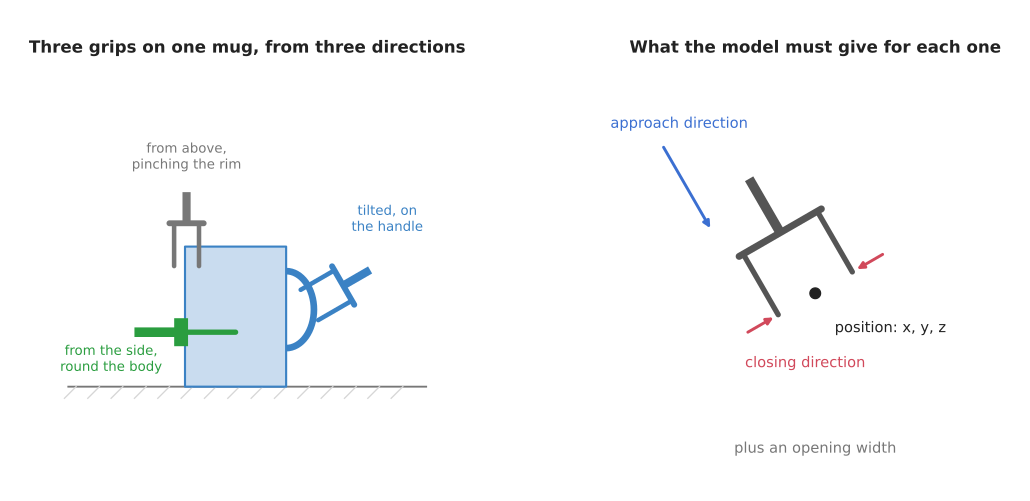
On the left are three grasps on one mug from three directions. The green gripper comes from the side, and its two fingers close from the front and the back of the mug, so only one finger shows. On the right is what the model must give for each grasp, which is a position, an approach direction, a closing direction and an opening width.
2. What goes in and what comes out#
Because all six numbers are free, the model needs a fuller view of the scene than a single picture from above. The input is therefore a point cloud of the scene, which is a long list of 3D points, each one a spot on a surface that the depth camera saw. A depth camera gives a depth picture, and a few lines of code turn each pixel into a 3D point. Book 2's sensors page explains depth cameras in more detail.
The camera sees only the sides of objects that face it, so the point cloud has no points on the back or the bottom of anything. That means the model must guess good grasps from this half view.
The output is a list of grasps, often hundreds of them. Each grasp has:
- a position: where the middle of the fingertips should be, as
x,yandz - an approach direction: the line the gripper travels along as it moves in
- a closing direction: the line along which the two fingers move together
- an opening width: how far apart the fingers should be before they close
- a score: a number between 0 and 1 for how likely the grasp is to hold
The approach direction and the closing direction together fix which way the gripper faces, so together with the position they give all six numbers.
3. How it works inside#
Since the answer is now defined, this section describes how a model produces it. There are three main designs, and they appeared in the order given below.
Sample, then check#
The oldest design does not generate grasps with a network at all. Instead, ordinary code picks thousands of random gripper poses near the point cloud. It then throws away any pose where the gripper would pass through a point, or where the fingers would not close on anything. A small network then looks at the points between the fingers of each pose that is left, and says "good" or "bad". This design is easy to follow, because each rejection has a reason you can read. It is slow, though, since most random poses are bad. GPD works this way, and it is the model of this design you can still run today, so section 5.1 recommends it.
Generate directly#
Instead of sampling at random, the second design trains a network to produce grasps directly. One kind of network, called a variational autoencoder, learns to turn random numbers into grasp poses that look like the good grasps it saw in training. A second network then scores each grasp, and a third step moves each grasp a little to raise its score. 6-DOF GraspNet works this way, and section 5.2 names it as the model Contact-GraspNet replaced. It appears here because it is the clearest example of the design rather than because you should install it. The shortlist in section 5 has the models to use.
Newer models of this design replace the variational autoencoder with a diffusion model, which starts from random numbers and cleans them up step by step into a grasp pose. GraspGen and GraspGenX, in section 5.6, work that way, and they still score the grasps they produce with a second network.
A grasp for every point#
The third design is the one that most current models use. It works like the per-pixel maps on the top-down page, except that it works on points instead of pixels.
- The point cloud goes into a point cloud network, which is a network made to read an unordered list of 3D points. The point cloud models page explains how they work.
- For every point, the network gives a score, an approach direction, a closing direction and a width.
- The clever part is what each point stands for, because each point is treated as the spot where one finger would touch. In other words, the network says "if one finger touches here, the gripper should come in this way, close this way, and open this wide".
- Code keeps the points with the best scores and turns each one into a full grasp pose.
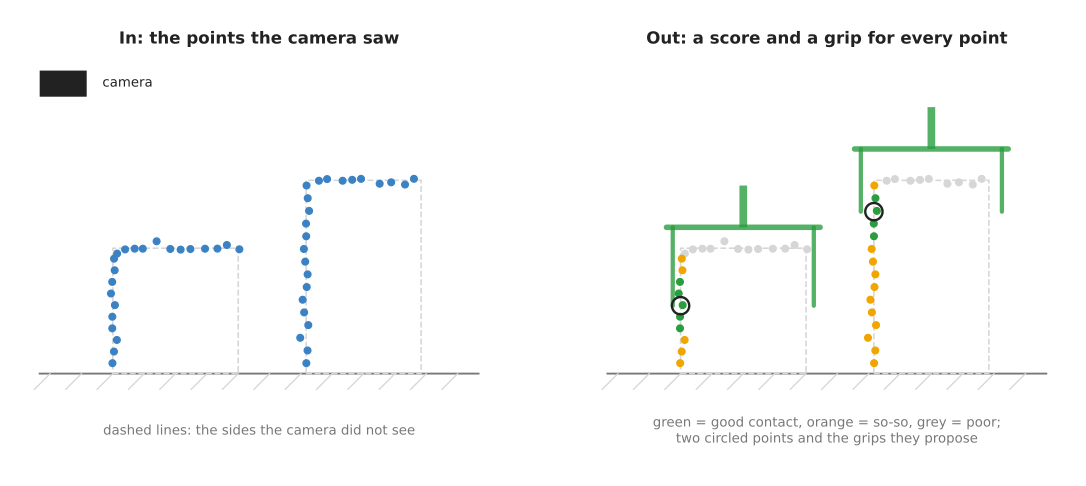
On the left are the points the camera saw on a box and a tall can. On the right, each point is coloured by its score, and the two circled points each propose a grasp in which that point is where one finger touches.
Tying each grasp to a point that the camera actually saw makes the problem much smaller. The network does not have to search all of space, since it only has to answer one question about each point it was given. Contact-GraspNet in section 5.2 is the model that made this design the standard one, and the three models built on GraspNet-1Billion follow it: graspnet-baseline in section 5.3, AnyGrasp in section 5.4 and EconomicGrasp in section 5.5.
Some newer models add one more step before this, because they first ask, for each
point, whether anything near there can be grasped at all. Points on a flat table or
deep in a gap get a low answer and are skipped, which saves time in cluttered
scenes. EconomicGrasp is one of them, which is why it carries a label generation
pass of its own, dataset/generate_graspness.py, that you run before any training
starts.
4. How it is trained#
None of those designs can work until the network has seen good grasps. So these models learn from millions of grasps that were tested by a computer rather than by a real robot, and the recipe is similar across models.
- Collect thousands of 3D models of everyday objects, which are the kind of 3D files you could print on a 3D printer.
- For each object, try a very large number of gripper poses in a physics simulator, or check them with physics formulas. Each pose gets a label, which is 1 if it would hold and 0 if it would slip or not close.
- Place several objects together in a virtual bin to make a cluttered scene, and then throw away any grasp that would now hit a neighbouring object.
- Make a point cloud of the scene from a virtual camera, as a real depth camera would see it.
- Train the network to predict the good grasps from the point cloud.
Two datasets built this way are used more than any others.
- ACRONYM has millions of simulated grasps on thousands of object models, and it was made by NVIDIA and used to train Contact-GraspNet.
- GraspNet-1Billion was made at Shanghai Jiao Tong University, and it has about 97,000 real camera pictures of 190 cluttered scenes built from 88 real objects. The grasps were computed on 3D models of those objects and then placed into each scene, which gives more than a billion labelled grasp poses.
The simulator's pictures are cleaner than a real camera's, because real depth cameras miss thin edges and add noise. Training therefore adds noise and gaps to the simulated point clouds on purpose, so that the model is not surprised by the real thing. The where the data comes from page explains this gap between simulation and the real world.
5. Well-known models#
Sections 1 to 4 explained the kind of model. This section names the ones you can download today, says what each one assumes about your gripper, and shows the shortest real code for each.
Every licence below was read from the project's own licence file, and Book 3's
models that grasp
explains each one in more detail. The table has one row per model, in the order
the sub-sections cover them. The left column names the model and says how current
it is. The right column starts with the gripper the model's weights assume,
because that is what decides whether the model is any use to you, and then gives
what the model is best at, how big it is, the licence of its code and when to pick
it. A size is the download size of the weights and the graphics memory the
project's own instructions ask for, because none of these projects publishes a
parameter count. not stated means the project does not say and the file is not
published where its size can be read.
| Model | What decides it |
|---|---|
| GPD, historical | It is the only model here that asks you for your own gripper's measurements, in metres, instead of assuming somebody else's. It is best at grasps you can explain, and it is the only one that runs on any processor. The weights are 14.5 megabytes and sit inside the repository, no graphics card is needed, and the code is BSD-2-Clause. Pick it when you have no NVIDIA card, or when you must sell the product. |
| Contact-GraspNet, most used in 2026 | Its weights assume the Franka Panda hand, which opens 80 millimetres, written as gripper_width: 0.08 in its own configuration file. It is best at getting a first working 6-DoF model onto a cluttered scene. The weights are 27 megabytes, running it asks for 8 gigabytes of graphics memory and training it asks for 24, and the licence is a PDF file rather than anything a machine can read. Pick it when you want the design the rest of the field assumes. |
| graspnet-baseline, most used in 2026 | Its weights assume the two-finger parallel gripper that GraspNet-1Billion was built with, which opens 100 millimetres, written as GRASP_MAX_WIDTH = 0.1 in its own code. It is best at comparing your work against the standard benchmark. The size of the weights is not stated, and the licence is a Shanghai Jiao Tong University agreement for non-commercial research only. Pick it when you are measuring against GraspNet-1Billion. |
| AnyGrasp, most used in 2026 | Its weights assume a two-finger gripper that opens no more than 100 millimetres, and it quietly reduces max_gripper_width to that. It finds the best grasps of any model here, and it is the only one that works on objects that are moving. The size of the weights is not stated, there is no licence file, and it needs a machine-locked key. Pick it when accuracy matters more than freedom to ship. |
| EconomicGrasp, worth betting on | Its weights assume the same GraspNet-1Billion gripper, which opens 100 millimetres at most, and that is the --grasp_max_width 0.1 setting it is trained with. It is best at training your own model cheaply. The weights are 189 megabytes each, training asks for 5.81 gigabytes of graphics memory, and the licence is MIT. Pick it when you must train on your own data and own the result. |
| GraspGen and GraspGenX, worth betting on | They take the gripper as an input rather than fixing it in the weights. GraspGen publishes one model each for a Franka Panda, a Robotiq 2F-140 and a 30 millimetre suction cup, while GraspGenX covers grippers from a Robotiq 2F-85 to a Barrett hand and lets you add one of your own, so they are the ones to use for a gripper that is not a Franka or a Robotiq. GraspGenX's weights are 1.7 gigabytes and its README reports 20 grasp predictions per second. GraspGen's code licence is non-commercial while GraspGenX's is Apache-2.0, and both sets of weights are under the NVIDIA Open Model License. Pick them when your gripper is unusual, or when you want a clean licence. |
Every row above opens with a gripper for one reason. A grasp pose only means something for the gripper it was predicted for, so a model trained on a gripper that opens 80 millimetres will propose grasps a gripper that opens 38 millimetres cannot make. Each sub-section below says more about the gripper its model assumes.
5.1 GPD, the one you can read and the one you can sell#
GPD, or Grasp Pose Detection, is historical, because it was last changed in January 2022 and has had none of the research since.
Size not stated, the weights in the repository are 14.5 megabytes, a laptop, and BSD-2-Clause for the code and for the weights that sit beside it.
It comes from Andreas ten Pas and Robert Platt at Northeastern University, and it is the sample-then-check design from section 3: C++ code draws candidate gripper poses on the point cloud, geometry throws away the ones that would not close on anything, and a small network scores what is left.
The one idea GPD is built on is that almost nothing about a grasp has to be learned. Where to try a hand, and which way to face it, are worked out from the surface the camera saw, with ordinary geometry. The only thing left for a network is the last yes-or-no: given the points that would end up between the fingers, will this hand hold. Every model below learns a great deal more than that.
That decides what the network reads. GPD takes each surviving candidate, moves the
points that fall between its fingers into the hand's own frame, and draws them as
a small picture. Its README calls that picture the grasp image and ships a
three-channel and a fifteen-channel version of it, and the classifier that reads
it is a LeNet, which is the small convolutional network from the 1990s; the
weights live in the clone under models/lenet/15channels/. So the network never
sees the scene. It sees one hand's worth of points at a time, already turned into
that hand's frame, which is why the camera_position line in the configuration
file matters so much: the geometry has to know which way each surface faces before
it can line a hand up with it. Contact-GraspNet, in the next sub-section, does the
opposite. One network reads the whole cloud once, and every grasp it offers comes
out of that single pass.
What the idea buys is an answer you can read. A candidate was dropped because the fingers would have gone through a point, or because nothing would have been between them, and both reasons are in code you can step through. It also means your hand is a setting rather than a learned fact, and that the whole thing runs on an ordinary processor, because plain geometry and a LeNet on a small picture are cheap. What it costs is that the sampler decides what is possible. The classifier can only judge hands the sampler drew, most of the hands it draws are bad, and so most of the running time goes into making candidates and throwing them away. Nothing in GPD learns where to look.
On an arm, the difference shows up when the only good grasp is a narrow one. Picture two cartons leaning against each other with a slim bottle wedged in the gap between them. A grasp exists, in at a steep tilt down that gap, but GPD will find it only if one of its random hands happens to land there at close to the right angle. The usual fix is to raise the number of samples, which costs time in direct proportion. Contact-GraspNet answers once for each point it was given, including the points on the bottle's shoulder, so it either proposes that grasp or it does not, and it takes the same time either way.
You would pick it rather than Contact-GraspNet for two reasons, and neither is
accuracy. The first is that GPD is BSD-2-Clause, which lets you put it in
something you sell, while almost every model below allows research use only. The
second is that GPD asks you for your gripper's measurements instead of assuming
somebody else's. Its cfg/hand_geometry.cfg file holds finger_width,
hand_outer_diameter, hand_depth and hand_height in metres, and you edit
them. No other model on this page lets you do that.
What it costs you is accuracy, and the gap on cluttered scenes is large rather
than small. It also costs you a day of dependency work, because it is C++ against
Point Cloud Library 1.9, Eigen 3 and OpenCV 3.4, and OpenCV 3.4 is from 2018. The
thing that most often goes wrong is the camera_position line in the
configuration file, because GPD uses it to decide which way each surface faces. If
it is wrong, every surface faces inwards and the grasps are nonsense.
GPD is not a Python library. You build it with CMake and run the program it produces, which is how its own README demonstrates it:
# Run GPD on one saved point cloud file. The first argument is the
# configuration, which points at the gripper file; the second is the cloud.
./detect_grasps ../cfg/eigen_params.cfg ../tutorials/krylon.pcd
The program prints the grasps it found and opens a viewer window. What you supply
is the point cloud as a .pcd or .ply file, your gripper's measurements, and
the camera's position in the cloud's own frame.
PointNetGPD is an MIT-licensed
successor that replaces the small network with a point cloud network.
5.2 Contact-GraspNet, the design everything else copies#
Contact-GraspNet is the most used of these models in 2026, because it is the one every later paper compares itself against and the one most robot code expects to find.
Size not stated, the weights are 27 megabytes, a big card, and a licence that exists only as a PDF file, for the code and the weights alike.
Martin Sundermeyer and others published it from NVIDIA in 2021, in the Contact-GraspNet paper, and its idea is the one section 3 describes: each point the camera saw is treated as a place where one finger could touch, and the network says how the gripper should come in if it touches there.
The one idea is that a grasp's position does not have to be invented. A full grasp is seven numbers: three for where the fingertips go, three for which way the hand faces, and one for how wide it opens. Contact-GraspNet fixes the first three to a point the camera actually saw, which leaves four numbers for the network to produce, and its paper names this as the point of the design: rooting the pose in the observed cloud cuts what has to be learned from seven numbers to four.
Inside, that leaves one network where the sample-then-check design needed a sampler and a classifier. A point cloud network reads the whole scene and gives every sampled point a feature vector, and small heads on top of that vector give the approach direction, the closing direction, the width and a confidence for that point. GPD, above, also judges one candidate at a time, but there the candidates come from geometry and the network only grades them, while here one pass proposes the grasp and scores it together. There is no search, no random start and no repeated pass either, so the same cloud gives the same grasps every time.
What the design buys is the whole answer in one pass, which is fast enough to repeat on each new camera picture rather than planning once and hoping nothing moves, and that is the reason the paper gives for building it. It also gives a dense answer, hundreds of grasps per object, with no sampling budget to tune. What it costs is that the model cannot say anything the cloud does not contain. Every grasp's contact is a point that was seen, so a grip on the hidden back of an object is not scored low, it cannot be expressed at all. Noise in the depth picture moves the grasps, because the position is a measured point. And the width head was trained for one hand, so the openings it returns are that hand's.
On an arm, the difference shows up when the bin is being refilled while the robot works. With GPD you draw and reject thousands of hands again for every new cloud, and that drawing is the slow part, so the arm waits. With Contact-GraspNet one pass per picture gives a fresh dense answer, and the arm can pick from the cloud it is looking at rather than from the one it saw ten seconds ago. The same situation turns against it if your gripper opens 38 millimetres, because then much of that dense answer is useless to you and there is no way to ask for narrower grasps, while GPD would have been given your own measurements before it drew its first candidate.
The obvious alternative is the model it replaced, 6-DOF GraspNet, from the same group two years earlier. That one generated grasps with a variational autoencoder and then pushed each grasp around to raise its score, which meant searching all of space. You pick Contact-GraspNet instead because tying every grasp to a point that was actually seen removes that search, so one pass of the network gives the whole answer.
Two of its costs are decisions rather than arithmetic. The original
NVlabs/contact_graspnet is
TensorFlow and pins CUDA 10.1, so the maintained
PyTorch version is the one
to install. And both repositories carry a file called License.pdf, so there is
no machine-readable licence at all, every dependency scanner reports the project
as unlicensed, and you have to open the PDF and read it before you build anything
on it. The thing that most often goes wrong is handing it a whole scene
with no segmentation, because the grasps then land on the table and the bin
walls.
The PyTorch version installs as a package, and its weights are already inside the repository rather than downloaded separately.
from contact_graspnet_pytorch import config_utils
from contact_graspnet_pytorch.checkpoints import CheckpointIO
from contact_graspnet_pytorch.contact_grasp_estimator import GraspEstimator

ckpt_dir = "checkpoints/contact_graspnet"
estimator = GraspEstimator(config_utils.load_config(ckpt_dir))
CheckpointIO(checkpoint_dir=f"{ckpt_dir}/checkpoints",
             model=estimator.model).load("model.pt")

# depth is in metres, cam_K is the 3 by 3 camera matrix, and segmap gives each
# pixel an object number. z_range drops points nearer than 0.2 m or past 1.8 m.
pc_full, pc_segments, _ = estimator.extract_point_clouds(
    depth, cam_K, segmap=segmap, z_range=[0.2, 1.8])

grasps, scores, contacts, _ = estimator.predict_scene_grasps(
    pc_full, pc_segments=pc_segments,
    local_regions=True,    # look at each object's own region, not the whole scene
    filter_grasps=True)    # drop grasps whose contact is on another object
The library turns your depth picture into point clouds, runs the network and
gives you grasps, a dictionary from object number to an array of four-by-four
pose matrices in the camera's frame. What you supply is the depth picture in
metres, the camera matrix, and the segmentation that says which pixel belongs to
which object. Those poses are in the camera's frame, so moving them into the
robot's frame with your own calibration is still your work.
5.3 graspnet-baseline, the reference for the standard benchmark#
graspnet-baseline is the most used of these models in 2026 for measurement rather than for shipping.
Size not stated, the size of the weights not stated, an NVIDIA card whose memory the project never names, and a Shanghai Jiao Tong University research-only agreement covering the code and the weights.
It comes from Hao-Shu Fang and others at Shanghai Jiao Tong University and is the reference implementation for the GraspNet-1Billion dataset that section 4 described. Almost every published score for a 6-DoF grasp model is a score on that benchmark, produced by code descended from this repository.
The one idea here is that a direction is easier to choose than to guess. Rather
than asking the network for the approach direction as three free numbers, the
model hands it 300 fixed directions spread over a sphere and asks which one is
best. The turn of the hand about that direction is then one of twelve fixed
angles, and how deep to close is one of four fixed depths. Those three lists are
the num_view=300, num_angle=12 and num_depth=4 arguments in the code below.
Picking the best item out of a list is the easiest thing a network does, and that
is the whole bargain on offer.
What that changes inside is that the model works in two stages with a cut in
between, and the repository's own files are named after them: ApproachNet,
CloudCrop, OperationNet and ToleranceNet. The first stage scores all 300
directions at every point and keeps the best one. The second stage then cuts a
cylinder of points out of the cloud around that chosen direction, which is what
the cylinder_radius, hmin and hmax_list arguments describe, turns those
points into the gripper's own frame, and lets a second network pick the angle
and the depth and give a score. A third network, ToleranceNet, predicts how
far the grasp can drift and still work, which the repository calls its
tolerance. Contact-GraspNet has no second look at all: everything it says about
a point comes from the one feature vector it computed for that point, with no
crop and no list.
What the cut buys is that the angle and the depth are decided from the points that will actually lie between the fingers, rather than from a summary of the whole scene, and the tolerance output gives you a reason to prefer a grasp with room around it, which no other model on this page reports. What the lists cost is precision. The answer can only ever be one of twelve turns, so a grip that wanted to sit between two of them comes out slightly rotated and your own code has to make up the difference. The arithmetic is also wasteful, because all 300 directions are scored at every point, including the points on the table and in the gaps, and that waste is exactly what EconomicGrasp in section 5.5 goes after.
On an arm, the lists show up on a flat part lying on a table, where the useful approach comes in at a few degrees off every direction in the list. This model rounds the answer to the nearest one it has, and the fingertip then arrives a little rotated and clips the table, while Contact-GraspNet, which produces the direction outright, has no grid to round to. Against that, when the question is whether a change you made to a model helped, this is the model whose number means something, because almost every published score was produced by code descended from this repository.
You would pick it rather than Contact-GraspNet when you need a number you can compare with the literature. Contact-GraspNet was trained on NVIDIA's simulated ACRONYM grasps and reports no GraspNet-1Billion score, so a measurement against it says nothing about how your change compares with everybody else's. If you are not measuring, pick something else, because this repository is older than the work built on it.
What it costs you is the install, and it is worse than it looks: the
requirements.txt file is ordinary, and then the README tells you to compile a
pointnet2 extension and a CUDA knn operator by hand, which no dependency
scanner will warn you about. Of the two published sets of weights the authors
recommend checkpoint-rs.tar, trained on Intel RealSense pictures, over
checkpoint-kn.tar, trained on Microsoft Kinect pictures, because it transfers
better.
The imports below are files inside the clone rather than installed packages, so
this runs only from inside the repository. graspnetAPI is a real package and
holds the grasp data type.
import torch
from graspnetAPI import GraspGroup
from graspnet import GraspNet, pred_decode              # files in the clone
from collision_detector import ModelFreeCollisionDetector

net = GraspNet(input_feature_dim=0, num_view=300, num_angle=12, num_depth=4,
               cylinder_radius=0.05, hmin=-0.02,
               hmax_list=[0.01, 0.02, 0.03, 0.04], is_training=False)
net.load_state_dict(torch.load("checkpoint-rs.tar")["model_state_dict"])
net.eval().to("cuda")

with torch.no_grad():
    # points has shape (1, 20000, 3): one batch of 20,000 points, in metres
    gg = GraspGroup(pred_decode(net({"point_clouds": points}))[0]
                    .detach().cpu().numpy())

# Put a box the shape of the gripper at each grasp and count the cloud points
# inside it, which catches a gripper that would push through a neighbour.
hits = ModelFreeCollisionDetector(cloud, voxel_size=0.01).detect(
    gg, approach_dist=0.05, collision_thresh=0.01)
gg = gg[~hits].nms().sort_by_score()
pred_decode is the step that turns the network's raw numbers into grasps you
can read, and the answer means nothing without it. What you supply is points,
sampled or padded to exactly 20,000 points with the floor and the bin walls
masked out first, and cloud, every point rather than the sample, for the
collision check. The width on every grasp is the opening of the two-finger
gripper used to build GraspNet-1Billion, so a narrower gripper of your own means
throwing those grasps away yourself.
5.4 AnyGrasp, the strongest and the least free#
AnyGrasp is the most used of these models in 2026 wherever accuracy decides the job.
Size not stated, the size of the weights not stated, an NVIDIA card whose memory the project never names, no licence file at all, and a key tied to one machine.
It comes from the same Shanghai Jiao Tong University group and was built on GraspNet-1Billion, it was still being updated in July 2026, and it is the only model on this page that can follow a grasp on an object that is moving rather than starting again from a new picture.
The one idea is that a grasp should outlast one picture. Every other model here answers a question about a cloud, and when the next cloud arrives it answers again from nothing. AnyGrasp's paper describes matching the grasps found in one picture to the grasps found in the next, so a grasp stays attached to the object it was computed for while that object moves.
Beside that, the paper describes three more things about it, and this is as far as what is published goes. Its labels are dense and computed by formula, as GraspNet-1Billion's were, but they are attached to real camera pictures and to sequences of them rather than to simulated single frames. The object's centre of mass is brought into the training, which the paper says is to make the grasps more stable; a grasp far from the centre of mass has to resist more twist when the arm lifts, and a model that knows nothing about mass cannot see that coming. And each grasp comes out as seven numbers, six for the pose and one for the width.
Past that point the insides are not published, and it is worth being plain about
it. What you install is a compiled library called gsnet together with a set of
weights, so there is no model file to read and nothing to check the paper against.
What you can read is the demo's arguments, and region_steering and
approach_steering are the informative ones, because they act before the
prediction is made rather than on its results.
On an arm, the difference shows up on anything that moves. Re-running graspnet-baseline on each new cloud gives a fresh set of grasps each time, and the best one jumps from picture to picture, so the arm chases a target that keeps sliding sideways and the approach never settles. AnyGrasp's matching keeps the same grasp on the same part of the object, which is what lets the arm steer towards it while it moves. If your objects sit still in a tote, that advantage is worth nothing, and the machine-locked key is then pure cost.
You would pick it rather than graspnet-baseline because it is better at the same task and because it ships as a working detector rather than as training code you have to finish. You would not pick it if anything in your project needs certainty, and that is the whole trade: no licence file at all means default copyright and no permission to use it, and the key you apply for through a form is tied to one machine. The thing that most often goes wrong is that key, because the machine it was issued for changes and the detector then stops starting.
The library is called gsnet, and this is the shape of its own demo program:
import numpy as np
from gsnet import create_detector

# cfgs carries checkpoint_path, gripper_height and max_gripper_width.
# AnyGrasp clamps max_gripper_width to 0.1 m, because that is the widest
# gripper its weights were trained on.
detector = create_detector(cfgs)

gg = detector.get_grasp(points, {              # points: (N, 3) float32, in metres
    "collision_detection": True,
    "dense_grasp": False,
    "region_steering": object_mask,            # only grasp this object
    "approach_steering": [0, 0, 1],            # prefer this approach direction
    "approach_thresh": np.pi / 6,              # allow 30 degrees either side of it
})
gg = gg.nms().sort_by_score()
The detector gives you a GraspGroup from graspnetAPI, already collision
checked against the cloud. The two steering arguments are the part worth knowing,
because they push the model towards the grasps your cell can reach instead of
making you filter its answers afterwards. What you supply is the point cloud in
metres, a mask for the object you want, and the licence key. Note the clamp in the
comment: ask for a gripper wider than 0.1 metres and AnyGrasp quietly reduces it,
because no wider gripper was in its training.
5.5 EconomicGrasp, the one you can train yourself#
EconomicGrasp is worth betting on, because it is the only model in the GraspNet-1Billion family with a real open-source licence and it is the cheapest to train by a wide margin.
Size not stated, the weights are 189 megabytes for each camera, a small card even for training, and MIT for the code and for the weights it publishes as release files.
Xiao-Ming Wu and others at Sun Yat-sen University published it at the European Conference on Computer Vision in 2024, and the repository was last changed in April 2026.
The one idea is that the labels, not the network, are what makes training expensive. GraspNet-1Billion gives a label to every point crossed with every one of the 300 directions, and the paper's finding is that this dense supervision is the bottleneck. Most of those labels are also ambiguous, because a point usually has several directions that are all about as good, and a network told to match all of them at once learns slowly. So EconomicGrasp picks out a small set of labels that are clear and trains on those.
That one decision changes the pipeline in three places, and the repository's file
names show where. The skeleton is graspnet-baseline's, with the same stages:
GraspableNet, ViewNet, a cylinder grouping step and a grasp head. First, a gate
is added. GraspableNet gives every point two scores, one for whether the point is
on an object at all and one the paper calls graspness, which means how likely it is
that a good grasp exists near that point. Only the points above both thresholds go
any further, so the table and the empty gaps never reach the expensive part.
Second, ViewNet settles on one direction for each surviving point, and only that
one direction is supervised, instead of all 300. Third, the two later stages pass
information between their own inputs: the cylinder step shares it among the points
that survived the gate, and the grasp head shares it among the angles and depths of
one grasp, which is what the paper means by its interactive grasp head. The score
also comes out as a choice among a few fixed score levels that are then combined,
rather than as one number guessed outright. The backbone differs as well: a sparse
voxel network built on MinkowskiEngine, where graspnet-baseline samples points
directly, and that choice is the reason the install needs nvcc.
What all of that buys is less to store, less to compute on every training step, and a model that settles quickly, which together are why one rented card is enough. What it costs is the preparation described below, because neither the selected labels nor the graspness labels are in GraspNet-1Billion as published. There is a subtler cost too: the gate is itself learned, so a kind of surface your data never showed it can be gated out before any grasp head ever looks at it.
On an arm, the difference shows up when the objects are yours. Say you have a few thousand captures of your own parts and one card rented by the hour. With graspnet-baseline the training run is itself the obstacle, so in practice you use its published weights and accept that they were learned on somebody else's 88 objects. With EconomicGrasp the run fits a night, the result is yours under MIT, and the model has seen your parts. Pick the other way round only when your number has to be comparable with the published ones.
You would pick it rather than graspnet-baseline for two reasons. It is MIT licensed, so a model you train with it is yours. And its own README reports training overnight on a single card you can rent by the hour, which is the band above, while training the older models in this family is a much larger job. The README also reports 68.21, 61.19 and 25.48 average precision on the seen, similar and novel object splits of GraspNet-1Billion with RealSense pictures, and 62.59, 51.73 and 19.54 with Kinect pictures. Those are the authors' own numbers on their own benchmark, so read them as a claim rather than as an independent measurement.
What it costs you is the install, and the blocker is specific. It imports
MinkowskiEngine, NVIDIA's sparse
convolution library, which was last changed in March 2024 and compiles with
nvcc. It also compiles pointnet2 and a knn operator, and wants CUDA 12. The
thing that most often goes wrong is the preparation before any training starts,
because you must download GraspNet-1Billion and then run two label generation
passes over it.
There is no packaged inference call. You run its own scripts, and this is the test command from its README.
# --test_mode picks the split: seen, similar or novel objects.
# --inference runs the model; without it the script only scores saved results.
python test.py --model economicgrasp --camera kinect \
  --checkpoint_path results/economicgrasp/economicgrasp_epoch10.tar \
  --dataset_root /path/to/graspnet --save_dir results/test_seen \
  --test_mode seen --inference
The repository publishes trained weights for both cameras as release files, so you can test without training first. What you supply is the dataset, the compiled extensions, and your own program if you want to run the model on a live camera, because these scripts read the benchmark's files from disk.
5.6 GraspGen and GraspGenX, the models that ask which gripper you have#
GraspGen and GraspGenX are worth betting on, because they are the first models here to treat the gripper as an input rather than as a fact fixed in the weights, which is the problem every sub-section above ran into.
Size not stated for either, GraspGenX's weights are 1.7 gigabytes, an NVIDIA card whose memory neither project names, and two different code licences: NVIDIA's own for GraspGen and Apache-2.0 for GraspGenX, with the NVIDIA Open Model License on both sets of weights.
GraspGen is NVIDIA's 2025 generator, published in the GraspGen paper: a diffusion model proposes grasps and a second network scores them. A diffusion model starts from random numbers and cleans them up step by step into a good answer, and the diffusion and flow policies page explains the idea. GraspGenX, released on 1 June 2026, is the same group's follow-up.
The one idea is to make grasps the way a picture generator makes pictures. The model starts from a set of poses that are pure noise, floating anywhere around the object, and nudges each of them a little at a time towards something that looks like a grasp it saw in training. Nothing in the object's points says where a pose starts. Contact-GraspNet's answers are tied to points the camera saw, and graspnet-baseline's are tied to a point and a direction out of a list; GraspGen's are tied to nothing.
Inside there are three parts. An encoder reads one segmented object's points, and the project ships two kinds of encoder for that job, PointNet++ and PointTransformerV3. A transformer then takes a noisy pose together with that encoding and predicts the correction to apply to the pose, and the correction is applied over and over. A second network, the discriminator, scores the finished poses, and its training is the part the authors single out: it is trained on the generator's own output, which they call on-generator training, so the scorer learns to recognise the mistakes this particular generator makes rather than a fixed collection of bad grasps. 6-DOF GraspNet, from section 3, also had a generator and a scorer, but its generator produced a pose in one shot from random numbers, where this one reaches the pose in many small steps.
What that buys is poses that are free in space, so the model can offer a grasp that wraps round a side the camera only glimpsed, and a varied set of them rather than one answer per point. What it costs is passes of the network: many of them for one answer, where Contact-GraspNet needs one. It also costs you a segmentation step first, because the model is built around one object, and it costs you repeatability, because the random start means two runs on the same cloud give different grasps and a failure is harder to reproduce.
On an arm, the difference from the models above is the difference between asking and filtering. With Contact-GraspNet or AnyGrasp the widths come back for somebody else's hand, so a dense answer has to be thinned down to the grasps your own hand can make, and a hand that is not a parallel jaw at all gets nothing useful out of them. GraspGenX takes the gripper as part of the question, in the way the next paragraph describes, so the grasps are computed for your hand from the start. The cost of that sits in the paragraph before this one: a cell that has to answer on every camera picture, and to explain afterwards why it failed, is better served by the single repeatable pass of Contact-GraspNet.
You would pick GraspGenX rather than Contact-GraspNet or AnyGrasp because of what
it does about grippers. GraspGen trains one model per gripper and publishes three:
a Franka Panda, a Robotiq 2F-140 and a single suction cup of 30 millimetre radius.
GraspGenX instead trains one model that is given a description of the gripper,
worked out from the volume the gripper sweeps as it closes, and its README reports
training on over 2 billion grasps across 32 generated grippers in 6 kinematic
families and more than 8,000 objects. Its checkpoints name grippers including
franka_panda, robotiq_2f_85, robotiq_2f_140, unitree_g1, inspire_hand,
barrett_hand and ezgripper, and scripts/gripper_config_wizard.py adds one
that is not on the list. No other model on this page offers that.
Two of those costs are decisions rather than arithmetic. GraspGen's licence limits
use to research or evaluation in its section 3.3, and then permits NVIDIA itself to
use the work commercially. And the Apache badge on GraspGenX covers its code only,
so the weights you deploy are under the NVIDIA Open Model License either way.
Besides that, GraspGen needs spconv-cu120, for which no processor-only build
exists. The thing that most often goes wrong is forgetting that both models expect
one object's points rather than a whole scene, so you segment first.
GraspGenX installs as a package, and it fetches its own weights and gripper descriptions from Hugging Face the first time you import it, which is where the 1.7 gigabytes in the line above goes.
from graspgenx import get_checkpoints_version_dir
from graspgenx.grasp_server import GraspGenXSampler
from graspgenx.samplers import run_planner_on_object
from graspgenx.utils.checkpoint_io import load_model_cfg

ckpt = get_checkpoints_version_dir()      # downloaded on first import
cfg = load_model_cfg(f"{ckpt}/gen", f"{ckpt}/dis")   # generator, then scorer
sampler = GraspGenXSampler(cfg, "robotiq_2f_85", assets_dir="assets")

# obj_pc is one object's points as (N, 3), with its own mean subtracted.
grasps, scores, _, _ = run_planner_on_object(
    obj_pc, sampler, num_grasps=200, topk_num_grasps=100)
# grasps is (K, 4, 4); scores is (K,), the scorer's confidence from 0 to 1
The library gives you the download, the gripper description, the diffusion sampler and the scorer. What you supply is the gripper name and one object's point cloud with its mean subtracted, which means you segment the scene yourself. For a gripper that is not on the published list, the configuration wizard asks you for its measurements and its URDF file, which is the format that describes a robot's links and joints.
5.7 How to choose#
Start with GraspGenX. It installs with one command, its code licence is plain Apache-2.0, and it is the only model here that was trained for more than one gripper, so it is the only one whose scores still mean something for a gripper that is not a Franka or a Robotiq.
Four things change that answer.
If you have no NVIDIA graphics card, your only real option here is GPD, and the comparison that matters is then GPD against the written rules in Book 3's choosing a grip rather than GPD against these models.
If you are going to sell the product, your shortlist is GPD under BSD-2-Clause and EconomicGrasp under MIT, and even then you check the weights' licence separately from the code's. Everything else here needs a negotiation, in two cases with a university.
If accuracy on a hard bin decides whether the project works at all, and research terms are acceptable, use AnyGrasp and accept the machine-locked key.
If you are writing a paper, use graspnet-baseline or EconomicGrasp, because a score on GraspNet-1Billion is the only score other people can compare with theirs.
6. Where this is going#
This section is about the direction six-degree-of-freedom grasping is moving in. It is written on 4 October 2026, and it borrows the vocabulary Book 3's frontier chapter uses for the four kinds of claim, because the difference decides how much weight a sentence can carry. A demonstration is a recording of something working once under conditions the publisher chose. A product announcement says a thing can be bought or downloaded, and you can go and check, which makes it the most useful kind. A research result is a measured number under a stated protocol. A projection is about a date that has not arrived, and it is the weakest. Every claim below says which kind it is, and where the judgement is mine the sentence says so.
How it got here#
Every step in this area removed an assumption rather than adding accuracy. The first models asked you for your gripper's measurements and searched for poses that fitted them. The next ones learned to emit poses straight from a point cloud, which made them fast and quietly moved the gripper out of a configuration file and into the weights, where you cannot change it. The current ones are taking the gripper back out and making it an input again. Scores on the standard benchmark rose along the way, but the thing that really changed is what a model is allowed to assume about the hand on the end of your arm.
Where it is used in industry today#
Grasping has more commercial deployment behind it than anything else in this book, and very little of that deployment is six-degree-of-freedom finger grasping. The systems running at scale in warehouses hold things with a suction cup. Amazon says its Cardinal parcel-sorting arm lifts a package "with air suction", and that its newer Vulcan picks with "an arm that carries a camera and a suction cup". Ocado's On-Grid Robotic Pick arm packs grocery orders with a suction cup, and Boston Dynamics' Stretch unloads shipping containers with an array of them. Those are product announcements, and the suction and affordance page covers them properly. They matter here because they are what a business buys when picking has to work this year.
Where fingers do run at scale, they run alongside a cup rather than instead of one. The clearest case is RightHand Robotics, whose RightPick workcell grips with "three compliant fingers and suction", and whose product page claims more than 1.2 million successful picks in production per month and cycle times as fast as three seconds. It has run since 2019 at PALTAC's warehouse in Japan, which the case study says stocks over 20,000 product lines. Other vendors sell the same shape of piece-picking, including Mujin, Osaro, Nimble Robotics and Plus One Robotics, and Dexterity builds two-armed robots that FedEx is scaling up at its Hagerstown hub to load trailers. One commercial event says more about the value of this work than any product page. In August 2024 Amazon hired three of Covariant's founders and licensed its robot foundation models, and Covariant continues under new leadership.
What none of these companies publishes is which model it runs. No vendor names Contact-GraspNet or AnyGrasp, nobody reports a success rate per item class, and I could not find one published comparison of these models on a real bin with a real arm. The honest summary is that the gap between section 5 and a warehouse is systems engineering, item-range curation and gripper choice, not a better network. Read every number above as a company claim, because none has been audited from outside the company.
What is being worked on right now#
The papers below come from an arXiv search of the computer science categories for "grasp" in the abstract, sorted by date and run on 4 October 2026, so you can repeat it and see what has arrived since.
The first thread is taking the gripper out of the weights, which section 5.6 already ships. Gripper-aware Vision Language Action Models, from August 2026, makes the same argument from the other side. A vision-language-action model, usually written VLA, is a policy that takes camera images and a sentence and emits robot actions. The paper's point is that existing VLAs act as though the choice of hand does not change the strategy, which is false: a parallel-jaw gripper and a suction cup reach the same goal differently. Its answer is MiGA, a dataset of 103,000 demonstrations across five gripper types, and a policy with a multi-gripper tokeniser. That is a research result, not a release. FunCo-Grasp does the same for multi-finger hands, by mapping each hand's links onto a shared set of functional parts so that a grasp learned on one hand transfers to a hand shaped differently.
The second thread is grasping being pulled inside a larger policy. Grasp-Anything-6D is the dataset behind it: one million point-cloud scenes and more than 200 million grasp poses tied to language, whose diffusion model steers towards the object you named and away from the rest. The direction also shows in the counts. Book 3 measured that the share of robotics abstracts on arXiv mentioning "vision-language-action" went from 0.52 per cent in 2024 to 10.78 per cent of 2026's submissions up to 23 September, in its table of research momentum. That is a measured trend, and it is the strongest single signal in this section.
The third thread is adapting after installation. Continual Learning for 6-DoF Grasp Synthesis, from 1 October 2026, leaves the trained model alone and adapts through a memory in a learned embedding space, so the outcome of one attempt changes the score of the next. Its stated protocol is over 1,500 real grasp trials, and its claim is that it matches existing 6-DoF baselines before adapting and then improves on object categories that were thin in training. A neighbouring idea is to move the camera rather than improve the prediction, which is active view selection.
The fourth thread is measuring something other than the benchmark number. ManiPhysicsBench, from 2 October 2026, scores whether a policy finishes the task and leaves the object undamaged. Its finding is worth repeating: public VLA checkpoints show a substantial gap between task success and safe success, and their gripper commands cluster near fully open and fully closed, because they were trained on a gripper signal that only had those two values. That is a measured result about every model that treats the gripper as a switch, which includes most of section 5.
What is still unsolved#
Picking unseen items out of a cluttered bin, at a rate and a reliability a business will pay for, is not solved. The useful evidence is not a paper but what the vendors sell. RightHand Robotics offers a Suction Cup Swapper whose stated benefit is making "roughly 1.5x as many orders 100% robot pickable", which is a company telling you that without it a large share of orders were not. Plus One Robotics sells human-in-the-loop remote supervision as a named product feature, so a person elsewhere can take over when a robot is stuck. Ocado states that its arm is "expected to pick more than 70% of an extensive online grocery range" at full capacity, which means it expects to leave the rest to people. Three independent companies describe the same boundary in their own words, and no model in section 5 crosses it.
The input is unsolved as well as the model. Every model on this page starts from a point cloud, and a depth camera returns nothing where a glass jar or a shiny tin was. ClearGrasp named that in 2019, and it is still being worked on: HDCNet completes the missing depth, AISPO uses a shape prior, Trans2Occ estimates occupancy instead of depth, and TransGraspNet targets transparent laboratory glassware. Seven years of work on one failure mode is a signal, and no better scorer fixes it, because the hole in the cloud is upstream of the scorer.
There is also no agreed way to report a real number. GraspNet-1Billion scores poses offline against labels a simulator computed, which is reproducible and is not picks per hour. Nothing in section 5's table is a measured success rate on your bin. The licence problem has not moved either: the strongest model here needs a machine-locked key, and nobody has published an openly licensed model that matches it.
The next two to three years#
Everything in this part is my expectation rather than anybody's announcement, and the reason matters more than the prediction.
I expect gripper-conditioned models to become the default, and weights with a gripper baked into them to become unsellable. The reason is arithmetic rather than science. A grasp pose only means something for the gripper it was predicted for, and four of the six models in section 5 fix a gripper that is probably not yours. No vendor can sell one model into a market where every customer has a different hand. GraspGenX already ships and MiGA already exists, which is the pattern that usually precedes adoption: somebody ships it, then the datasets arrive to make it better.
I expect the standalone grasp detector to survive, but as a component a larger policy calls rather than as the thing you run. The reason is that a grasp detector cannot decide which object to pick and a sentence can, so the two layers have an obvious seam, and the measured VLA trend says where the attention is. The reason I do not expect the detector to disappear is also published: Seg2Grasp argues that end-to-end learning falters on unfamiliar objects and that a modular pipeline is more robust, and every deployment named above is modular. A module inside a policy is a different thing from no module.
I expect adaptation on the installed robot to become something vendors advertise. The reason is that the unsolved problem is a tail of items nobody trained on, and no amount of pre-training removes a tail. A warehouse's item mix also changes week by week, so a frozen model gets worse without anybody touching it. The continual-learning result above is the only published approach aimed at that tail, and it reports real trials rather than simulation.
I expect openly licensed models to be trained rather than waited for, and this is the prediction I hold most firmly. The reason is cost, which has already fallen far enough: EconomicGrasp trains under MIT on 5.81 gigabytes of graphics memory, so a company needing a clean licence no longer has to choose between a machine-locked key and nothing. The blocker here was never the mathematics, and a blocker that is only cost tends to go away.
I do not expect multi-finger dexterous grasping in a warehouse within three years. Two measured things point the same way. Book 3's count shows the share of robotics abstracts mentioning "dexterous" moving only from 3.64 to 4.16 per cent, far slower growth than the VLA line, and its section on dexterous hands finds hands that have been demonstrated and are not sold. Against that, a two-finger gripper with a cup next to it already covers most of a warehouse item range. Nobody is paying for twenty degrees of freedom to pick a bottle of shampoo, and until that changes the research will not reach a loading bay.
7. Where to read next#
- Grasp quality models explains the scoring half of these models on its own.
- Suction and affordance covers suction cups and models that know which part of an object to hold.
- Point cloud models explains the networks these models are built on.
- Learned motion planners covers what moves the arm to the grasp once it is chosen.
- Book 3's models that grasp has the full list of models, licences and hardware needs.