This page explains world models that predict future camera pictures, and it answers four questions about them: what it means for a model to "predict a picture", how a robot arm can use a predicted picture to decide what to do, why predicted pictures often come out blurry, and when this kind of model is worth its large cost.
It is written for a reader who has already read the world models overview and the page on learned dynamics models, so you should know what a model, a state, an action and a rollout are. It also assumes you know that a camera picture is a grid of numbers, one per colour per pixel, which what a model is explains.
Contents#
- What it is
- What goes in and what comes out
- How it works inside
- How it is trained
- Well-known models of this kind · 5.1 Cosmos 3 · 5.2 Cosmos Predict 2.5 · 5.3 LingBot-VA · 5.4 FastWAM · 5.5 Genie · 5.6 Action-conditioned pixel prediction, and Visual Foresight · 5.7 UniPi · 5.8 How to choose
- Where this is going
- Where to read next
1. What it is#
A video prediction model predicts the next camera pictures from the recent pictures and, usually, the actions the arm is about to take.
A learned dynamics model needs a short list of numbers, such as the position of a cube, and somebody must measure those numbers first. A video prediction model skips that step, because it works directly on the pictures from the camera. In other words, its "state" is simply what the camera sees.
Here is an everyday example of the same skill, using a video of falling dominoes. Watch the first half of a video of someone knocking over a row of dominoes, and then pause the video there. You can picture the next few seconds, because the dominoes keep falling, one after another, from left to right. You did not measure any positions, and you only pictured what you would see. So a video prediction model does the same thing, one frame at a time.
A frame is one picture in a video, and a camera on a robot arm usually records between 10 and 30 frames every second.
2. What goes in and what comes out#
Now that the idea is clear, here is what actually passes in and out of such a model. A video prediction model for a robot arm takes two things in and gives one back.
- The recent frames. For example, the last three pictures from a camera above the table.
- The planned actions. For example, "move the gripper right, then right again, then right again". Some models also accept a sentence instead, such as "put the red cube in the bowl".
- The output: the predicted future frames. For example, three pictures that show the gripper moving right and pushing the cube along.
The picture below shows this with tiny pictures of 14 × 14 pixels, so that you can see each pixel. However, real models use pictures with a few hundred pixels on each side.
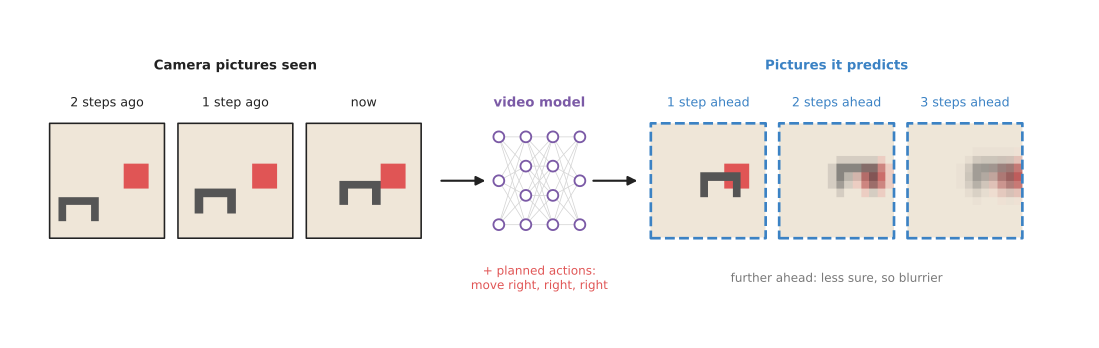
The predicted pictures get blurrier the further ahead they are, because the model is less sure what will happen.
A model that takes the actions as an input is called action-conditioned, because it predicts a different future for each different action. That is what makes it a world model and not only a video generator. A video generator that ignores the action can show you a future. Instead, an action-conditioned model can show you the future that your action would cause.
3. How it works inside#
Drawing the next picture#
The last section said what goes in and what comes out, so this section says what happens in between. A video prediction model has three parts, and they run in the order below.
- An encoder turns each recent frame into a smaller grid of numbers that describes what is in it. Seeing models use the same kind of part; the image classification page shows how a picture becomes numbers.
- A predictor combines those numbers with the action numbers. It works out how things in the scene will move.
- A decoder turns the result back into a full picture, pixel by pixel.
To see further ahead, the model feeds its own predicted frame back in, like the rollout on the learned dynamics models page, and the same problem appears here: errors add up from frame to frame.
The actions do not have to arrive one at a time. You can hand the model a whole sequence of actions at once and ask for the video that sequence would cause, which is the same "what if?" question the previous page asks of a dynamics model. This is the property section 2 calls action-conditioned, and it is what makes such a model a world model rather than a way of making pictures. The models that offer it name the mode forward dynamics, and section 5.1 recommends Cosmos 3 for it, because that is the one model in the shortlist you can download and ask about your own actions. The Cosmos Predict 2.5 model in section 5.2 draws robot video from a picture and a sentence but takes no actions, so it can show you a future and not the future your action would cause.
Some older models do not draw the new frame from nothing. Instead, they predict how each pixel moves, as in "this group of red pixels shifts two pixels to the right", and then they move the pixels of the last frame. So this works well for pushing, where most of the scene stays the same and only a few things move. That is the work in section 5.6, which is in the shortlist as the clearest explanation of this kind of model rather than as something to run.
Most newer models are diffusion models, which build the picture in a different
way. A diffusion model starts from a picture of pure random noise, like the snow on
an old television. It then removes the noise a little at a time, over many passes,
until a clear picture is left. At each pass, it uses the recent frames and the action
to decide what the clean picture should look like. The
diffusion and flow policies
page explains the same method used to produce arm movements. So diffusion models draw
sharp pictures, but the many passes make them slow. Both Cosmos models in the
shortlist are run this way, through Hugging Face's diffusers library, and the
num_inference_steps=30 in the section 5.1 code is the number
of passes it makes for one call. That is where the seconds per call in that
section come from.
Why the future comes out blurry#
The future is often uncertain, even when the action is known. For example, suppose the gripper pushes a cube exactly at its middle. Sometimes the cube slides to the left, and sometimes it slides to the right, and both of those happen in the training videos.
A simple model is trained to make its picture as close as possible to the real one, on average. The safest picture, on average, is a mix of both futures: half a cube on the left and half a cube on the right. So that is what a simple model draws instead of one clear future.
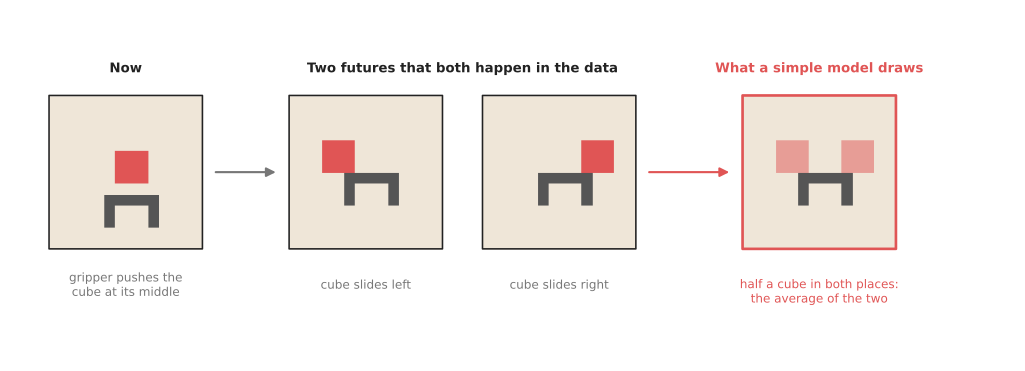
The right-hand picture is the average of the two real futures, and it matches neither of them.
People fix this by letting the model pick one future at a time, and they do that by giving the model an extra input of random numbers. Different random numbers then make it draw different, sharp futures: one with the cube on the left, and one with it on the right. Diffusion models do this naturally, because they start from random noise. So running the model several times shows several possible futures, which is more honest than one blurry picture.
Four ways a robot uses the pictures#
A predicted picture does not move the arm by itself, so something has to use it, and robots use video prediction in the four ways listed below.
- To plan. The robot imagines many action sequences, predicts the pictures for each one, and picks the sequence whose final picture looks most like the goal. This is the planning method from the previous page, with pictures in place of numbers. The work in section 5.6 did exactly this on a real arm, and section 5.8 explains why no model in the shortlist is fast enough to do it in 2026.
- To draw the task, then copy it. The model draws a short video of the task
being done, from a sentence such as "put the red cube in the bowl". A second,
smaller model then works out the arm moves that turn each picture into the
next. That second model is called an inverse dynamics model. It answers
the opposite question to a world model: not "what happens if I do this?" but
"what did I do to make this happen?". The picture below shows these steps.
UniPi, in section 5.7, is where this pattern comes from, and
Cosmos 3 has the reading-off step built in as its
inverse_dynamicsmode. - To make training data. The model draws many videos of a task being done in new rooms or with new objects. The actions are read off with an inverse dynamics model, and the results are used to train a policy. This is what Cosmos Predict 2.5, in section 5.2, is recommended for.
- As a training signal. A policy learns to predict future frames while it learns to act, and the predicting part is thrown away afterwards. The overview says more. FastWAM, in section 5.4, is this way of working, and LingBot-VA, in section 5.3, is the same idea with the predicting part kept, so that you can see the video the policy expected while the robot runs.
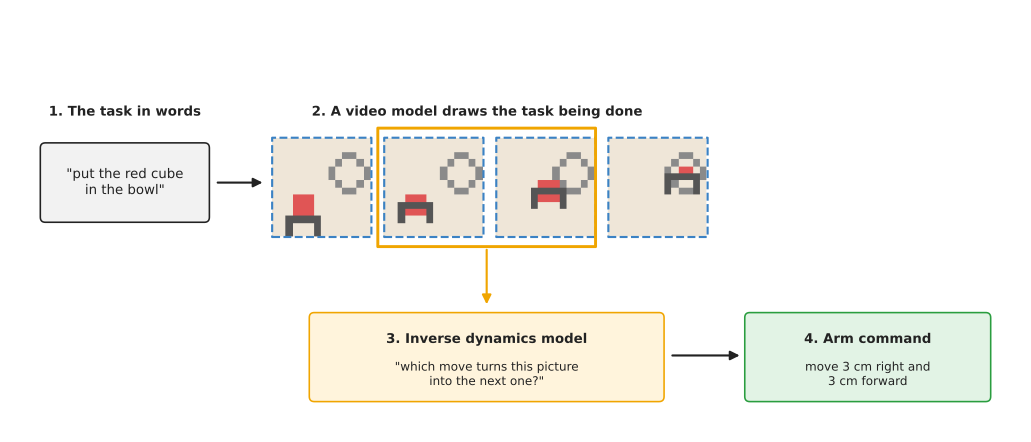
The inverse dynamics model turns each pair of frames, such as the one in the orange box, into one arm command.
Those four are the uses a robot has today. One more exists and is not yet one of them, and it is acting inside the model as if it were a game: somebody makes a move, the model draws what that move leads to, and the moves go on for as long as you like. That is the direction Genie takes, in section 5.5, which is in the shortlist for the direction alone, because no weights are released.
4. How it is trained#
The last section described how the model draws a frame, and this section says where it learns to do that. A video prediction model learns from videos: it sees the first few frames of a clip, predicts the next ones, and is corrected by the real next frames. This needs no labels written by people, because the video itself is the answer, and that is the main attraction of this kind of model.
The videos come from two sources, and most modern models use both.
- Robot videos with actions. The robot records its camera and, at the same time, the actions it took, so these teach the model what each action does. However, they are slow to collect, because a real arm must do every one.
- Ordinary videos without actions. Videos of people cooking, cleaning or building things show how objects move, fall, pour and fold, and there are vastly more of these than robot videos. They teach the model how the world looks and moves, even though they carry no robot actions.
A common recipe is to train first on a large amount of ordinary video, and then to train a little more on robot video with actions, so that the model learns to follow the arm's commands. Book 3's what is changing explains why this matters: robot demonstrations are scarce, and video is not.
Large video models are trained on far more video than any single robot lab could record, on many graphics cards, for weeks. However, small models for one task, such as pushing objects on one table, can learn from a few hours of the robot's own video.
5. Well-known models of this kind#
This is the kind of world model that changed most in 2026, because the large video generation models arrived and some of them now take robot actions as an input. So this section separates the models you can download and run from the ones you can only read about, and then helps you pick one.
Read the table one row at a time. The left column names the model and says how
much it is used in 2026. The right column holds the rest: what the model is best
at, how big it is, its licence, and when to pick it. A size is the number of
trainable numbers, where the makers state one, and not stated means no size is
published. The licence matters more here than anywhere else on this page,
because these are large downloads with conditions attached, so every row gives
it.
| Model | What decides it |
|---|---|
| 5.1 Cosmos 3, most used in 2026 | It is best at predicting the video that a given sequence of actions would cause. The family holds Edge at 4 billion numbers, Nano at 16 billion and Super at 64 billion, all under OpenMDW 1.1. Pick it when you have Linux, an NVIDIA card, and actions in one of its robot shapes. |
| 5.2 Cosmos Predict 2.5, most used in 2026 for making video | It is best at making new robot-scene video from one picture and a sentence. It holds 2 billion numbers, which is where its own name comes from. The code is Apache 2.0 and the weights are under the NVIDIA Open Model License. Pick it when you want synthetic video to train on and you do not need action control. |
| 5.3 LingBot-VA, worth betting on | It is best at predicting video and actions together while the robot runs. It has about 5 billion trainable numbers, plus about 20 GB of frozen parts. LeRobot is Apache 2.0, and the frozen parts come from another repository. Pick it when you want to see what the policy expected to happen. |
| 5.4 FastWAM, worth betting on | It gives you a policy that was trained with video prediction but does not predict at run time. It is initialised from Wan2.2-TI2V-5B, and both LeRobot and Wan2.2-TI2V-5B are Apache 2.0. Pick it when you want the training benefit without the slowness. |
| 5.5 Genie, worth betting on as a direction | It is best at interactive worlds a person can walk around in. Its size is not stated, and no weights are released. Never pick it on a robot, and read it for the direction instead. |
| 5.6 Visual Foresight, historical | This entry is action-conditioned pixel prediction, and it is best at pushing objects on a table, planned with predicted pictures. Its size is not stated, and what exists is research code from the papers. Pick it when you want to understand how all of the above work. |
| 5.7 UniPi, historical | It is best at drawing the task as a video and then reading the actions off it. Its size is not stated, and what exists is research code from a paper. Pick it when you want to understand the pattern Cosmos 3 now provides ready-made. |
5.1 Cosmos 3#
This is most used in 2026 for this kind of work, because it is the only openly downloadable video world model that takes your actual actions as numbers. NVIDIA published the Cosmos 3 family on Hugging Face on 31 May 2026, with Cosmos3-Nano and Cosmos3-Super, and added the smaller Cosmos3-Edge on 20 July 2026. Its model card says that text, pictures, video and action trajectories go in, that text, pictures, video and actions come out, and that the model is ready for commercial and non-commercial use.
Size l for Edge and xl for Nano and Super, a workstation, and OpenMDW 1.1 for both the code and the weights.
The one idea is that an action is an input like any other. The model card lists
what goes in as text, pictures, video and action trajectories, and what comes
out as text, pictures, video and actions. So the question you are asking is
decided by which of those you fill in and which you leave blank, and that is
all the mode names mean. forward_dynamics is given one frame and a table of
actions, and it produces the video. inverse_dynamics is given the frames, and
it produces the table of actions. policy is given neither, and it produces
both.
Inside, the card describes two transformer towers working together, which it calls a mixture of transformers. One tower produces text one token at a time, in the way a language model does. The other produces everything that is not text, including the video and the action numbers, by starting from noise and removing it over many passes, which is the diffusion method that section 3 describes. So an action table is not a command given to the model from outside. It is another kind of content, sitting in the same model as the pixels, which is why the same weights can fill in the actions when you hand them the frames instead.
The action table is the part people trip over, and the card says exactly what it is: one row per frame, holding that robot's own state or control values, such as joint positions, the gripper and the camera pose. The number of values in a row is fixed for each robot the model was trained on, and the card lists them, with a single Franka Panda and a Robotiq gripper at ten values and a dual Franka at twenty. Nothing converts your arm's numbers into one of those layouts for you. If you send ten numbers that mean something other than the ten it learned, you get no error at all. You get a confident video of a different robot.
One call covers one chunk of actions, and the card's own example shows what to do for a longer horizon: take the last generated frame of the chunk and use it as the starting picture for the next call. So the rollout accumulates its own errors in the same way as the numeric rollout on the previous page, except that each step here is a whole generated video. The difference from 5.2 shows up on an arm the moment you want to compare two plans instead of watching one future. You can run this model twice, once per plan, and see which video ends with the mug still on the table. You cannot do that with a model that only takes a sentence, because both plans are described by the same sentence.
The obvious alternative is Cosmos Predict 2.5 in 5.2, which is from the same company and easier to install. Pick Cosmos 3 when you want the thing section 2 calls action-conditioned, because nothing else you can download will answer a question about a robot arm's own actions.
It costs you speed, and it ties you to one operating system. The card lists Linux only, with NVIDIA Ampere, Hopper or Blackwell cards and tested support for BF16 precision alone. Its performance table gives one forward-dynamics call as 3.69 seconds on an H100 SXM 80 GB card and 24.59 seconds on a DGX Spark, while an arm's control loop needs an answer in a few milliseconds.
The library is diffusers from Hugging Face, through
Cosmos3OmniPipeline,
which at the time of writing needs diffusers installed from its git repository
rather than from a release. The code below is the model card's own
forward-dynamics example, shortened to one chunk.
import torch
from diffusers import Cosmos3OmniPipeline, CosmosActionCondition
from diffusers.utils import export_to_video, load_image

pipe = Cosmos3OmniPipeline.from_pretrained(
    "nvidia/Cosmos3-Edge", torch_dtype=torch.bfloat16, enable_safety_checker=True)
pipe.to("cuda")

result = pipe(
    prompt="the gripper pushes the cube to the right",
    action=CosmosActionCondition(
        mode="forward_dynamics",   # future video from one frame plus these actions
        chunk_size=16,             # 16 action steps, so 17 frames with the first one
        domain_name="umi",         # which robot the 10 numbers in each row describe
        resolution_tier=256,
        raw_actions=torch.tensor(my_plan, dtype=torch.float32),   # 16 rows of 10
        image=load_image("table.png"),   # the one real picture it starts from
    ),
    fps=20,
    num_inference_steps=30,
    guidance_scale=1.0,
    generator=torch.Generator(device="cuda").manual_seed(0),
    use_system_prompt=False,
)
export_to_video(result.video, "predicted.mp4", fps=20, macro_block_size=1)
The pipeline gives you the prediction. You supply my_plan, which is the 16
actions you are asking about, in the exact layout of the robot you named, and
the loop that goes further than 16 steps by passing the last generated frame in
as the next call's image. You also supply everything that decides anything,
because this code shows one future for one plan, and comparing two plans means
running it twice at seconds each time.
5.2 Cosmos Predict 2.5#
This is most used in 2026 for making video rather than for choosing actions,
because it is the easiest Cosmos model to get running. Book 3's
simulation and evaluation
document covers it with its sources. cosmos-predict2.5 predicts future video,
and its sibling cosmos-transfer2.5 takes a crude simulated render with depth
and segmentation maps and produces a photorealistic video of the same scene.
That sibling is the one most teams use, because it makes simulated training
pictures look like real ones.
Size l, a workstation, Apache 2.0 for the code and the NVIDIA Open Model License for the weights.
The one idea is that one model should cover every way of starting a video. Its paper names those ways Text2World, Image2World and Video2World, which is to say the prediction can begin from a sentence alone, from a sentence and one picture, or from a sentence and a piece of video you already have. There is no fourth way that begins from a sentence and a table of actions, and that missing way is the whole difference from 5.1.
Inside, the frames are produced by the same kind of gradual denoising as 5.1, and the sentence does not reach the model raw. The paper states that it uses Cosmos-Reason1, which is a vision-language model of the kind the language models chapter describes, to ground the text and give finer control over the world it generates. So the control you have is as fine as words can be. You can ask for the arm to push the red cube to the right and get it. You cannot ask for 3.4 cm, and no sentence you write will distinguish two pushes that differ only in how hard they are.
Its sibling cosmos-transfer2.5 is where the control does get finer, and it is
worth seeing how, because it is not by accepting actions. The paper calls it a
control-net style model, which means a second input runs alongside the
generation and holds it to a shape. That input is a crude render of your own
scene, with the distance to each surface and a label for each object, so the
structure of the video comes from your simulator and the model supplies only
the appearance. You therefore say what should happen by rendering it rather
than by asking for it, which works when you already have a simulator and not
when the question is what your next action would do.
What this buys is the shortest path to a large amount of realistic robot video. What it costs is the thing a world model is for. This model answers "what would a video matching these words look like?", and a planner needs "what would this action do?". The difference decides which one you want on an arm. To train a seeing model that has to work in a kitchen you never recorded, this is the right model and 5.1 is not. To choose between two pushes in the next second, this one cannot help at all, and 5.1 cannot do it quickly enough either.
The obvious alternative is Cosmos 3 in 5.1. Pick Predict 2.5 when the action
does not need to be a number, for example when you are generating video to train
a policy on, because it is smaller, it is in the released diffusers, and its
documented example is a dozen lines.
The cost to understand before you start is that the weights are gated, so you must sign in to Hugging Face and accept the terms before you can download anything. Book 3's frontier document also records the licence split, which is easy to get wrong, because the code licence is the permissive one and the model licence is not.
The library is diffusers. The code below is the example from its own
Cosmos documentation page,
with the prompt changed to a robot scene and the long negative prompt left out.
import torch
from diffusers import Cosmos2_5_PredictBasePipeline
from diffusers.utils import export_to_video, load_image

pipe = Cosmos2_5_PredictBasePipeline.from_pretrained(
    "nvidia/Cosmos-Predict2.5-2B",
    revision="diffusers/base/post-trained",
    dtype=torch.bfloat16,
)
pipe.to("cuda")   # not optional: this model needs a large NVIDIA card

frames = pipe(
    image=load_image("table.jpg"),   # the one real picture the prediction starts from
    video=None,
    prompt="A robot arm pushes the red cube to the right across the table.",
    num_frames=93,
    generator=torch.Generator().manual_seed(1),
).frames[0]

export_to_video(frames, "prediction.mp4", fps=16)
The pretrained model gives you everything about how objects fall, slide, bend and cast shadows, learned from more video than you could record. You supply the sentence, the starting picture, and anything that reads the predicted frames. That last part is a model of its own, because turning predicted pictures into arm commands needs the inverse dynamics model from section 3.
5.3 LingBot-VA#
This is worth betting on, because predicting video and actions in one sequence is the direction this kind of model is going, and it is not yet the default. LingBot-VA arrived in LeRobot version 0.6.0 on 6 July 2026, which Book 3's frontier chapter dates and sources. Its documentation page describes two streams inside one transformer built on the Wan2.2 video stack. One stream predicts future video, the other predicts actions, and they share the same blocks. As each chunk of actions is carried out, the real frames that arrive are fed back in, which the page calls closed-loop world modelling.
Size l for the trainable part, with about 20 GB of frozen parts beside it, a big card, and Apache 2.0 for LeRobot with the frozen parts carrying their own repository's licence.
The one idea is that predicting the video and choosing the action should be the same piece of work rather than two models in a row. The documentation calls it a video-action model, and the two things are produced together in one sequence, taking turns.
What that means inside is two streams of numbers passing through the same blocks. One stream carries the video and the other carries the actions, and the documentation says they share the same thirty transformer blocks and the same text conditioning. The sharing is the point. Whatever lets the model guess the next frames is the same thing it uses to choose the action, so it cannot choose an action without also holding a picture of what the scene would then look like. It does not predict pixels directly either. The video stream predicts the compressed form that a frozen autoencoder uses, and that autoencoder turns the result back into pictures, which is why the frozen parts are so much larger than the trainable ones.
At run time it works a chunk at a time, denoising the video stream and the action stream on separate schedules and keeping what it has already worked out in memory between chunks. The important part is what happens between those chunks. The real frames that arrive while the chunk is being carried out are fed back in, which is what closed-loop world modelling means here, so the model is never left running for long on its own predictions. Compare that with 5.1, where every chunk after the first starts from a picture the model itself drew and nothing arrives to correct it.
What this buys is the one debugging tool on the page. The video the model
imagined is a by-product you can look at, rather than an input to a search, so
--policy.save_predicted_video=true lets you watch what the policy expected
next to what really happened. What it costs is speed, because the frames are
still being generated while the robot is running, and the honest limit is that
the imagined video is not a check on the action: the two streams can agree with
each other and both be wrong. The difference shows on an arm when a task fails
and you cannot tell whether the policy misread the scene or chose badly. This
is the only model here that shows you which.
The obvious alternative is FastWAM in 5.4, which throws the video away before the robot runs. Pick LingBot-VA when you would rather be able to see what the policy expected.
What it costs you besides the speed is a fixed action layout and an awkward fine-tune. The documentation says that evaluation runs one environment at a time, and that the full model does not fit for fine-tuning on the same card that is enough to run it, so adapting it means a LoRA rather than training the whole thing. It also predicts end-effector poses in a fixed 30-channel layout rather than joint angles, so your arm's actions must be mapped into those channels.
The library is LeRobot, and the checkpoints are published in its own format.
pip install -e ".[lingbot_va]"     # from a LeRobot source checkout

# Run the published checkpoint for LIBERO, a benchmark of simulated table tasks,
# and save the video the policy imagined as well as the video of what happened.
lerobot-eval \
  --policy.path=lerobot/lingbot_va_libero_long \
  --policy.device=cuda \
  --policy.save_predicted_video=true \
  --env.type=libero --env.task=libero_10 \
  --eval.n_episodes=50 --eval.batch_size=1
LeRobot gives you the policy, the checkpoint and the evaluation loop. You supply the robot or the simulated task, and the mapping from your arm's action numbers into the 30 channels. If you want to fine-tune it on your own recordings, you also supply a dataset in LeRobot format with camera clips, which the documentation page describes in detail.
5.4 FastWAM#
This is worth betting on, because it is the shape of world model that actually shipped, and Book 3's simulation and evaluation document explains why that matters. FastWAM also arrived in LeRobot 0.6.0. Its documentation page says that it "keeps video modeling during training, but uses direct action prediction at inference time instead of iteratively generating future observations", and that its visual parts are initialised from the Wan2.2-TI2V-5B video model.
Size l, a big card, and Apache 2.0 for both LeRobot and the Wan2.2-TI2V-5B weights it starts from.
The one idea is that the useful part of video prediction may be what it does to the weights while they are being trained, and not the pictures it draws afterwards. If that is true, then a policy should learn to predict video and then stop doing it.
Inside, it is built on the same Wan2.2 video stack as 5.3, and it starts from the released Wan2.2-TI2V-5B weights. So the policy does not begin as random numbers. It begins as a network that was already trained to produce video, which means it already holds something about how objects move before it has seen your robot at all. Training then asks it for two things at once from the camera pictures, the arm's own position numbers and a sentence for the task: the future, and a chunk of actions.
At run time only the second of those is produced. Generating frames is the expensive part, and the whole gain is in not doing it, which is why this is the quickest model on the page to ask for an action. The cost is the exact mirror of 5.3's benefit. Nothing at run time can be inspected, because nothing at run time is drawn, so when the policy does the wrong thing you have its actions and no picture of what it thought it was doing.
The difference shows on an arm wherever the cycle time is part of the job. A pick-and-place loop that has to keep moving cannot stop to generate a video, even a short one, so 5.3 and 5.1 are both out and this is what remains. The honest warning comes from the same frontier document as above: no published head-to-head result shows that a policy trained this way beats the same policy trained without the video prediction, so the training signal is believable rather than established.
The obvious alternative is LingBot-VA in 5.3. Pick FastWAM when the robot has to be quick, and pick 5.3 when you would rather be able to see what the policy expected.
What it costs you besides the training signal being unproven is a dataset in LeRobot format and a long run. The documentation's example expects one camera image of 3 by 224 by 448, or two cameras whose widths add up to 448, and its training command runs for 300,000 steps, which is a large amount of computing.
The library is LeRobot again.
pip install -e ".[fastwam]"        # from a LeRobot source checkout

# Train the policy on your own recordings. The video world model is used here,
# during training, and not when the robot runs.
lerobot-train \
  --dataset.repo_id=your-org/your-dataset \
  --policy.type=fastwam \
  --policy.action_dim=7 --policy.proprio_dim=8 \
  --policy.action_horizon=32 --policy.n_action_steps=10 \
  --policy.image_size='[224,448]' \
  --steps=300000 --batch_size=8 \
  --policy.device=cuda \
  --output_dir=./outputs/fastwam_training --job_name=fastwam_training
LeRobot gives you the policy, the world model and the training loop. You supply the recordings, which need a camera, the arm's own position numbers, the actions and a sentence for each episode, and you supply the numbers in that command that describe your arm, such as the 7 action numbers and the 8 position numbers.
5.5 Genie#
This is worth betting on as a direction rather than as a tool, and the honest summary is that you cannot use it. Genie is Google DeepMind's line of models that produce interactive worlds which respond to a person's input in real time. Book 3's frontier chapter quotes the Genie model page, which offers access through "Project Genie", described there as "an experimental research prototype that lets you create and explore infinitely diverse worlds".
Size not stated and no weights released, so there is no machine to size and no licence to read.
The insides of the current model are not published. There is no paper, no code and no weights, so nothing in this section is a description of how the model you read about on that page works. Two things can honestly be said instead. The first is what the model page claims the model does, which is above. The second is how the one model in this line whose insides were published worked, and that is worth knowing because it explains why a robot could not use this family even if the weights arrived tomorrow.
That published model is Genie: Generative Interactive Environments, from 2024. Its paper describes three parts. A tokeniser turns video into tokens over space and time, in the way a language model turns text into tokens. A dynamics model predicts the next tokens from the tokens so far. And a latent action model works out, from each pair of neighbouring frames, a short code for what changed between them. That third part is the one that matters here. The training videos had no actions recorded alongside them, so the model was left to invent its own small set of codes, and a person acting in the generated world picks one of those codes rather than naming a movement.
So the reason Genie is a direction and not a tool is sharper than the lack of weights. Its actions are not your arm's actions and could not be made into them. 5.1 accepts a row of ten numbers because somebody trained it on recordings of that exact robot, as its list of embodiments shows. Genie's actions mean whatever the model found in the video it watched, and there is no code in that set for closing a gripper by 2 cm. What the line does show is that generating a world which responds to input, in real time, and stays visually consistent while it does, is possible at all. Every row above it in the table exists because that turned out to be true.
There is no alternative to compare it with, because there is nothing to install. The frontier chapter records what is missing for a robot: no weights, no interface a robot could act through, no contact model you can read, no forces, no way to attach a gripper, and no published evaluation on any manipulation benchmark. So its cost is that you cannot plan any work around it, and the frontier chapter names that as the pattern of this field in 2026, where the newest results are announced rather than released.
5.6 Action-conditioned pixel prediction, and Visual Foresight#
This is historical, and it is the work that everything above is built on. Chelsea Finn, Ian Goodfellow and Sergey Levine published Unsupervised Learning for Physical Interaction through Video Prediction in 2016. It trained on a large set of videos of robot arms pushing objects, and instead of drawing new pixels it predicted how the existing pixels move, which is why it worked so well for pushing. Frederik Ebert, Chelsea Finn and others then built Visual Foresight on it in 2018, and that is the system section 3 of this page describes.
Size not stated, nothing to install, and no licence recorded here for the research code.
The one idea is that you do not have to draw the next picture in order to predict it. You can predict where the pixels you already have will move to, and then move them. The 2016 paper's own words are that it models pixel motion explicitly, by predicting a distribution over pixel motion from the previous frames.
So what comes out of that network is not a picture. It is a set of small movements, which are then applied to the last real frame, together with a choice of which movement applies where. The consequence the paper draws from this is the part worth remembering: because the model predicts motion rather than appearance, it is partly indifferent to what the object looks like, so it keeps working on objects that were never in its training videos. The diffusion models in 5.1 and 5.2 have no such property to fall back on, because they draw every pixel of every frame from noise, and what they draw for an unfamiliar object is whatever their training made likely.
Visual Foresight then put that model inside a planner, and the way it scored a plan is the part nobody has repeated. A person marks one pixel on the object in the camera picture and marks where that pixel should end up. The planner makes up many action sequences, predicts for each one where the marked pixel travels, and keeps the sequence that lands it nearest the mark. Nothing compares whole pictures, because a whole picture is mostly background and comparing whole pictures mostly measures the background. The paper offers a goal picture and a goal classifier as alternatives, and it needs no reward from outside at all, because the camera already holds the answer.
That is why this entry is still here, and section 5.8 is the rest of the reason. This is the only work on the page that planned real pushes by comparing predicted pictures, and it managed it because its model was small enough to run many times and its score was one pixel rather than a whole frame. Everything above it predicts better and plans worse. So if you ever want to plan with pictures on your own arm, this is the design to copy: a small model, run many times, scored on one marked pixel.
Read these rather than skip them. Everything newer either generates video from a sentence, as 5.2 does, or uses prediction as a training signal, as 5.4 does, and neither of those answers the question this work asked.
What they cost you is that there is nothing to install. They are research programs attached to individual papers, written for versions of TensorFlow that are now many years old. Reproducing them means rewriting them, and 5.1 is the first model you can download that will answer the question they asked.
5.7 UniPi#
This is historical in the same way, and it is the origin of the second pattern in section 3. Yilun Du and others published it in 2023 as Learning Universal Policies via Text-Guided Video Generation. It draws a video of the task from a sentence, and then recovers the arm moves from that video with an inverse dynamics model. SuSIE, by Kevin Black and others in the same year, cut the video down to a single next picture, which a policy then drives the arm towards.
Size not stated, nothing to install, and no licence recorded here for the research code.
The one idea is that a plan can be a video. The paper treats deciding what to do as a video generation problem: given a sentence describing the goal, the planner produces the frames that show the task being done, and the arm's actual commands are worked out from those frames afterwards.
The reason for splitting the work in two is that the two halves can be trained on different things. The first half is a text-conditioned video generator, and it can learn from video from anywhere, including video with no robot and no actions recorded. The second half is the inverse dynamics model, which looks at two neighbouring frames and says what command would turn the first into the second, and only that half needs recordings of your own robot's commands. The paper's argument is that the half needing robot data is the small and easy one.
The consequence is the claim in the paper's title. Because the plan is a picture, it never mentions joints or grippers, so the paper can describe environments with different states and different commands in one shared space of images. Compare that with 5.1, where the action table has to be in one of the layouts the model was trained on and nothing translates between them. UniPi pushes the robot-specific part to the very last step, where it is cheapest to redo.
What it costs is two models and two ways to fail. A video plan can look convincing and be physically impossible, and the inverse dynamics model will then read commands off a pair of frames that no real arm could have produced, without anything in either model noticing. SuSIE's answer to that cost is to generate only the next picture rather than a whole video, so the arm is never asked to follow a long imagined sequence.
The reason to know UniPi is that Cosmos 3 now provides both halves of it as modes of one model, so the pattern is no longer something you assemble from two research programs. What it costs you is again that there is nothing to install: the value is the idea, not the code.
5.8 How to choose#
If you want video prediction for a robot arm today, and you have Linux and an
NVIDIA card, start with Cosmos3-Edge in forward_dynamics mode, as 5.1
describes, because it is the only downloadable model that answers a question
about your own actions.
Four things change that choice.
If you want pictures rather than answers about actions, for example to train a
seeing model or a policy on, use Cosmos Predict 2.5, or cosmos-transfer2.5 if
what you have is simulated renders that look wrong.
If what you actually want is a policy that moves the arm, use FastWAM, as in 5.4, or LingBot-VA, as in 5.3, when you would rather be able to see what the policy expected to happen.
If you have no NVIDIA card, nothing on this page runs. Measure the state and use a learned dynamics model instead, or read latent world models, which predict a short code rather than pixels and are small enough to be practical.
If you need to plan, which means comparing many imagined futures before every move, nothing here is fast enough. The timings in 5.1 are seconds for one call.
6. Where this is going#
This section is about where this kind of model is heading rather than what it does today, so it follows the rule that Book 3's what is coming sets out: say what kind of claim each statement rests on. A demonstration is a recording of something working once, under conditions the publisher chose. A product announcement says a thing can be bought or downloaded, so you can go and check, which makes it the most useful kind. A research result is a measured number on a stated task. A projection is about a date that has not arrived, and it is the weakest. Where a judgement below is mine, the sentence says so.
The history has three steps and one shape. In 2016 a network predicted where the pixels already in the frame would move to, which is section 5.6. Then video generation moved to diffusion, which draws every pixel from noise, and the pictures became good enough that people believed them. Only recently has anybody been able to ask such a model what a particular action would do, because that needs training video with the actions written down beside it. The shape of the change is that appearance came first and control came second, and control is still the part that is thin.
Start with what you can actually download, because that is the checkable half. NVIDIA's Cosmos 3 is there under OpenMDW 1.1 and takes an action table, as 5.1 describes, and Cosmos Predict 2.5 is there behind a sign-in. LeRobot's LingBot-VA and FastWAM are installable under Apache 2.0. AgiBot published Genie Envisioner, which is a video model, an action decoder and an action-conditioned neural simulator in one repository, with its weights on Hugging Face. Read its licence first, because only some directories are Apache 2.0 and the rest is CC BY-NC-SA 4.0, which forbids commercial use. Decart and Etched published Oasis on 31 October 2024, a real-time interactive video model, with code and the weights of a 500-million-number version on Hugging Face. And 1X released over 100 hours of vector-quantised video under Apache 2.0, with baseline models and a public challenge, in a post of 17 September 2024. Those are product announcements, each checkable in a minute.
Now the half that cannot be downloaded, which is where most of the attention is. Google DeepMind announced Genie 3 on 5 August 2025: worlds you navigate in real time at 24 frames per second and 720p, "largely consistent for several minutes", released as "a limited research preview, providing early access to a small cohort of academics and creators". That is a demonstration plus restricted access, not a product, and the same post lists "limited ability for agents to perform direct actions" among its own limitations. Wayve's GAIA-2 of 26 March 2025 generates driving scenes across countries, weather and road types, and nothing on the page offers it to anyone outside Wayve. There is a technical report and no model.
The useful question is what the companies that have one actually use it for, and the answer is consistent. 1X says it is "learning a simulator directly from raw sensor data and using it to evaluate our policies across millions of scenarios", which is a company statement about testing rather than control. Wayve uses GAIA-2 to make training and safety-critical scenarios. NVIDIA's GR00T-Dreams under Apache 2.0, and Cosmos-H-Dreams of 27 July 2026, generate synthetic robot trajectories, as Book 3's simulation and evaluation records. In every named case the job is making data or scoring policies. Nobody has published a deployment in which a video world model chooses a robot's next move.
The first thing being worked on now is making the action input general. Cosmos 3 accepts a row of numbers only in the fixed layout of a robot it was trained on. Genie Envisioner's simulator and LingBot-VA's paired streams are two further designs, each with its own layout. One model that accepts any arm's actions would remove the largest single obstacle to using any of this, and no published model does it.
The second is speed, and the numbers decide it. A forward-dynamics call to Cosmos 3 takes 3.69 seconds on an H100 card by NVIDIA's own table, as 5.1 records, and planning means tens of such calls before every move. Oasis is the useful counter-example: 20 frames per second, in real time, from 500 million numbers at standard definition, with the weights published. So real-time generation is a question of model size and of how many denoising passes you take, not a question of whether it is possible. The engineering front is distillation, which trains a small fast model to copy a large slow one, and few-step sampling.
The third is using the model as a test harness instead of as a planner. This is where the published activity is: 1X's statement above, Genie Envisioner's simulator for closed-loop policy development, and EWMBench, the benchmark that arrived with it, which scores visual fidelity, physical consistency and whether the motion matches the instruction. Book 3's measured count shows benchmark papers growing from 15.27 per cent of robotics abstracts in 2025 to 20.04 per cent in 2026, faster than most of the methods. Evaluating a policy on real hardware is the most expensive step in this field, which is why the world model is being pointed at it first.
The fourth is predicting something smaller than a picture. Meta's V-JEPA 2 was deployed, in the paper's own words, "on Franka arms in two different labs" for picking and placing with image goals, "without collecting any data from the robots in these environments", from under 62 hours of unlabelled robot video, and the code is published. Dreamer 4 reports the first agent to obtain diamonds in Minecraft from offline data alone, with a world model that runs interactively on one graphics card. Both are research results, both predict a compressed code rather than pixels, and latent world models is the page that covers them.
Now what is still unsolved, starting with the one that matters most to a robot. A model that predicts convincing pictures has not thereby predicted correct physics, and this is measured rather than argued. Physics-IQ, published in January 2025 by Saman Motamed and four co-authors, tested six video generation models, including Sora, Runway and Stable Video Diffusion, against filmed scenarios covering collisions, fluids, gravity, optics and magnetism. The authors' conclusion is that "physical understanding is severely limited, and unrelated to visual realism", and the paper's own one-line summary is that "visual realism does not imply physical understanding". The benchmark is downloadable: 198 scenarios filmed from three camera angles in two takes at 3840 by 2160 and 30 frames per second, with the code under Apache 2.0 and the material under CC BY 4.0, so you can run it rather than take my word.
That result is the whole problem for a robot, and the reason is in the training. The loss function rewards a frame that looks like the recorded frame, and nothing in it separates a cube that slid 3 cm from one that slid 6 cm when both look plausible. A robot needs the second number. Worse, the one planner on this page that worked, Visual Foresight in 5.6, scored a plan by where a single marked pixel travelled, which is exactly the quantity a plausible-looking video gets wrong. So the better these models get at the thing they are trained for, the less safe it is to infer that they are getting better at the thing a robot needs.
The remaining unsolved problems are smaller but they bite sooner. There is no accepted measurement for a world model on manipulation: EWMBench is new and comes from the authors of one of the models it scores, and Book 3 records that no published head-to-head result shows a policy trained with video prediction beating the same policy trained without it. The practical costs have not moved either. Everything downloadable here needs Linux and a large NVIDIA card, some weights are gated and some are non-commercial, and a rollout past the first chunk starts from a picture the model drew, so it drifts like the numeric rollout on the previous page.
The rest of this section is my expectation, with the reason given each time, and none of it is anybody's announcement.
I expect the downloadable action-conditioned video model to become a normal part of the data pipeline and to stay out of the control loop. The reasons are the two facts above: every named industrial use today is data generation or evaluation, and the fastest published time for one action-conditioned call is seconds while a control loop needs milliseconds. The shape that shipped in LeRobot points the same way, because both of its world-model policies either throw the video away before the robot runs or predict a compressed form of it.
I expect small real-time models to arrive and to be used for short checks rather than for plans. The reason is that Oasis has already shown 20 frames per second from 500 million numbers, and that the few-step distillation which made image generation fast is the same technique. A one-second look at what the next push would do is affordable in a pick-and-place cycle; a ten-second rollout is not. What would change my mind is the opposite result: a published attempt at a small fast action-conditioned model whose predictions are too inaccurate to use.
I expect physics measurement to become a normal thing to report when one of these models is released. The reason is that the instruments now exist and cost nothing, with Physics-IQ downloadable and EWMBench published, and that Book 3's count shows the field building measuring instruments faster than methods. When a cheap measurement exists, reviewers start asking for it. The caveat is worth keeping: a good score on filmed laboratory scenarios still says nothing about your own table, your own friction and your own gripper.
I expect evaluation rather than planning to be where video world models first matter to a developer, because evaluation tolerates a model that is wrong about physics in a way planning does not. A failure your world model invents is still worth checking on the real arm, so a wrong prediction costs you one wasted test. An action your world model recommends is simply the wrong action, and it costs you the task. That asymmetry, plus the cost of real-robot evaluation, is why I think 1X's use is the one that spreads.
Finally, I expect pixel prediction to keep losing to latent prediction inside policies, for the reason V-JEPA 2 demonstrates on a real Franka: most pixels in a robot's camera are background, and drawing them is work the robot does not need.
Against all of this, one number would settle more than the whole section. Nobody has published a whole-task success rate for a real arm whose actions were chosen by a downloadable video world model. Until somebody does, every claim in this area rests on how good the video looked.
7. Where to read next#
- The next page covers learned simulators, which follow cloth, liquids and other soft materials piece by piece.
- Latent world models keep the idea of learning from pictures but predict a short code, which is much faster.
- Vision-language-action models are the large robot policies that some video world models are trained together with.
- Tracking and motion explains optical flow, which is the "how does each pixel move" idea used by early video prediction models.
- For the current state of the field, read Book 3's simulation and evaluation.