The seven chapters before this one each describe a family of models: what they take in, what they give back and how they are trained. This chapter is about what happens after that, because having a model is not the same as having a working robot. You have a model that works in a notebook, which here means a program on a computer that is right on a set of test pictures, and the question this chapter answers is how you get from there to a model that works on a real robot arm, every day.
This page is the chapter overview, so it says what the chapter is for, lists its four pages in their two groups, and then says how the chapter connects to the frontier pages in Book 3.
It is for a reader who has read the first chapter of this book, what models are, and at least one of the family chapters. You should know what training, a test set and fine-tuning mean, and if you do not, then learning signals and where the data comes from explain them.
Contents#
- What this chapter is for
- The five pages
- In what order to read them
- How this chapter connects to Book 3
- Where to read next
- Using it in Python
1. What this chapter is for#
A model that works in a notebook has passed exactly one test, because it gave the right answers on pictures that were deliberately kept back from training. That is a good start, however it is only a start, since a robot arm asks much more of a model than a set of held-back pictures ever does.
On an arm the model sees your objects, in your light, from your camera, and it may never have seen any of those during training. It must also answer within a fixed time, many times a second, while the arm is still moving. When it is wrong the arm does something in the real world, so a wrong grasp can break a mug or hit a person, which is a cost that a wrong answer in a notebook never carries. Finally it must keep working long after the first good demonstration, on the hundredth try and on a different day.
So the gap between "it works in a notebook" and "it works on the arm" is really four separate questions. Does the model know your objects? Is it fast enough, and does it fit into the robot's loop? Does it really work, and how does it fail? And does it know when it is unsure? Each page of this chapter answers one of them.
2. The five pages#
Because the gap is four separate questions, this chapter has one page for each of them, and a fifth page that gives a second way of answering the first question. The picture shows the four questions in the order a project usually meets them, and a model has to pass all four before the arm can rely on it. The fifth page hangs below the first step rather than standing in the row, because it is another way to do that step rather than another thing a model has to pass.
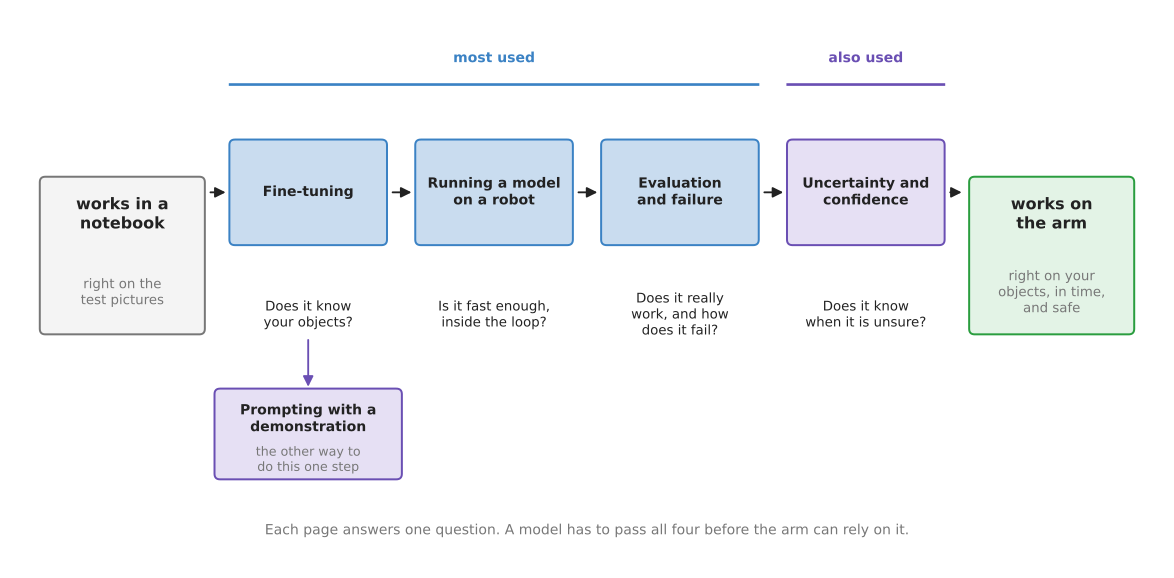
Like every chapter in this book, this one splits its pages into two groups. The most used group holds the steps that nearly every project with a model on an arm goes through, whereas the also used group holds a step that many projects need but not all of them.
The table below lists the five pages. Read each row across: the page, its group, and the question it answers.
| Page | Group | The question it answers |
|---|---|---|
| Fine-tuning | most used | How do I teach a downloaded model my own objects and my own robot, with a small amount of my own data? |
| Running a model on a robot | most used | How fast must the model be, what computer does it run on, and how does it fit into the loop that drives the arm? |
| Evaluation and failure | most used | How do I measure whether the model really works on the arm, and how do I find and sort the ways it fails? |
| Uncertainty and confidence | also used | How can the robot tell when the model is unsure, and what should it do then? |
| Prompting with a demonstration | also used | Can I teach a task by showing one recording of it, instead of collecting data and training? |
The three most-used pages follow one model through a whole project, so they are best read as one story. Fine-tuning adapts the model to your objects, then running it on the robot puts it inside the loop that drives the arm, and evaluation finally checks whether the result is good enough while showing you where it breaks. The first also-used page then adds one more safeguard, because it lets the robot stop, look again or ask a person when the model is not sure, instead of acting on a guess.
The second also-used page stands apart from that story. It describes a newer way of doing the first step, in which a task is taught by showing the model one recording of it rather than by collecting examples and training on them. It is in the also-used group because, in 2026, no model that works this way can be downloaded, so it is worth understanding and cannot yet be used.
3. In what order to read them#
Since the three most-used pages follow one model through a project, you should read them in order, and each one also uses the words that the page before it introduced. Fine-tuning comes first because adapting a downloaded model is usually the first thing a project does to it, and evaluation comes last because you can only measure a model once it is already running on the arm.
Read the prompting page straight after fine-tuning, because it is the alternative to it and the comparison is what makes either one clear. Read it even though you cannot run it today, since knowing that the choice exists changes how you judge the cost of collecting data.
Read the uncertainty page when your robot must decide by itself whether to act on an answer, which is the case for most robots that work near people or handle objects that break. It builds on section 5 of running a model on a robot, which shows that a model can be sure and wrong at the same time.
If you use only written techniques and no learned models, then you do not need this chapter at all. Book 5 covers those techniques instead, and its safety monitoring page is the written check that sits around any model as well.
4. How this chapter connects to Book 3#
This chapter explains ideas rather than current results, so it has a partner elsewhere in the docs. Book 3's frontier chapter records what actually happened to robot arm manipulation in 2026: which models exist, which data they were trained on and how they were measured. This chapter explains the ideas you need in order to read those pages, whereas those pages tell you what is true today.
Each page here has a partner there:
- Fine-tuning explains how to adapt a model. The foundation models document lists the large models you might adapt, and which of them you can download. The data and demonstration document describes how the demonstrations for fine-tuning are recorded.
- Prompting with a demonstration explains the alternative to adapting a model at all. The section on Skild records the one model that works this way, when it appeared and what was claimed for it.
- Running a model on a robot explains why speed and computer matter. The hardware document lists the computers people actually put next to an arm, and working without an NVIDIA graphics card says what runs on a laptop.
- Evaluation and failure explains how to measure a model. The simulation and evaluation document lists the benchmarks people report, and explains why two published numbers are often not comparable.
- Uncertainty and confidence has no single partner page. The frontier overview's section on how to read a claim applies the same caution to published results that this page applies to one model's answer.
5. Where to read next#
- Fine-tuning is the first page of this chapter.
- Prompting with a demonstration is the alternative to it, and is best read straight afterwards.
- The map of models shows where this chapter sits in the whole book.
- The frontier: what changed in 2026 in Book 3 is where to go for the models, data and results that are current today.
6. Using it in Python#
The four questions above are each answered by their own page, so this section shows the few lines they all sit around: loading a trained policy, asking it once, and timing how long the answer took. After reading it you will be able to see where each of the four pages joins in.
import time

import torch
from lerobot.policies.act.modeling_act import ACTPolicy

# A trained policy from the Hugging Face Hub, downloaded on first use.
policy = ACTPolicy.from_pretrained('lerobot/act_aloha_sim_transfer_cube_human')
policy.eval()

# You build this dictionary yourself, from your own cameras and joint sensors. Each
# value is a PyTorch tensor with a batch dimension in front, even for one picture.
observation = {'observation.state': joint_angles,
               'observation.images.top': camera_picture}

start = time.perf_counter()
with torch.inference_mode():
    action = policy.select_action(observation)
print(f'one answer took {(time.perf_counter() - start) * 1000:.0f} ms')
LeRobot gives you the policy class and the weights. from_pretrained downloads the
trained numbers and the settings they were trained with, and select_action hands back
one movement per call, even for a policy that predicts a whole chunk of movements at a
time, because it keeps the rest of the chunk and gives them out one by one. LeRobot
changes quickly, so check the import path in its own README against the version you
install.
What you have to write yourself is everything around those three lines. You build the observation dictionary from your own cameras and joints, in the shape the policy was trained on, and you write the safety checks, the trial log and what the arm does when the model is wrong. None of that comes with the model.
What you have to decide is what each of this chapter's five pages is about.
Fine-tuning decides whether this downloaded policy
needs teaching your objects first, and prompting with a
demonstration decides whether you
could skip that teaching by showing it a recording instead.
Running a model on a robot decides
whether the milliseconds that this snippet prints are small enough for your loop, and
on which computer.
Evaluation and failure decides how many
real trials it takes before you believe the policy works.
Uncertainty and confidence decides
when the arm should not act on action at all.